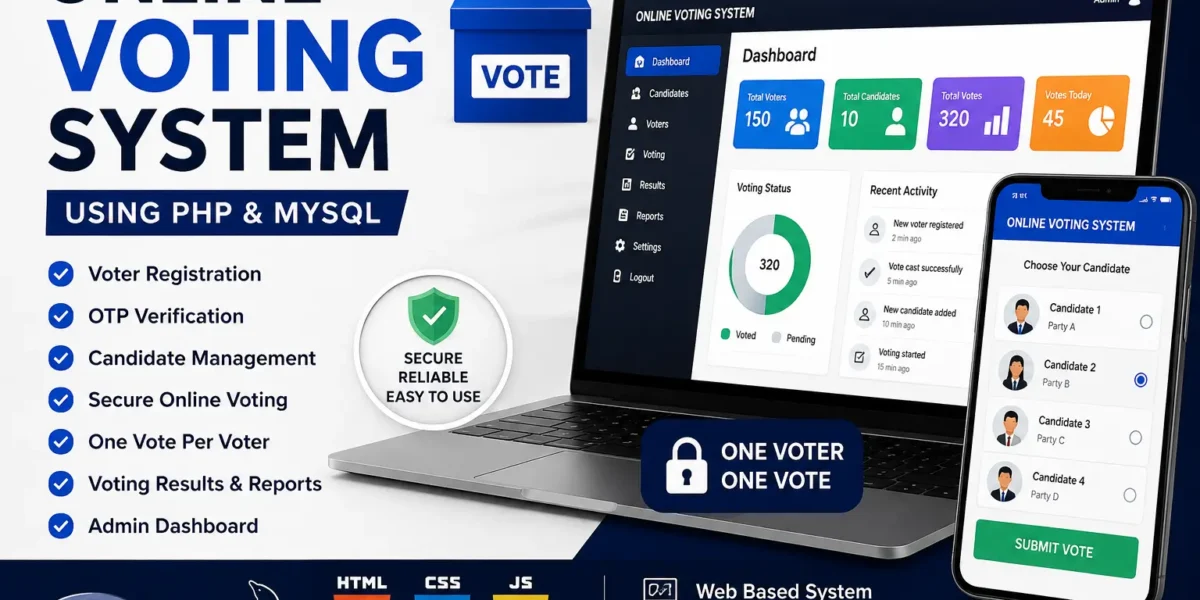
Online Voting System
The Web-Based Online Voting System is a simple and practical web application developed to provide a secure and efficient digital voting process through an online platform. The main purpose of this project is to replace the traditional paper-based voting process with a faster, more accessible, and organized digital voting system.
The system allows registered voters to verify their identity through OTP authentication before accessing the voting page. An admin panel is also included to manage voters, candidates, and monitor voting results. The complete project is developed using HTML, CSS, JavaScript, PHP, and MySQL and can be run locally using XAMPP.
This project is useful for students who want to learn about web application development, database management, user authentication, OTP verification, and backend logic.
Table of Contents
Project Overview
| Attribute | Description |
|---|---|
| Project Name | Web-Based Online Voting System |
| Language/s Used | HTML, CSS, JavaScript, PHP |
| Database | MySQL |
| Type | Web Application |
| Developer | UPDATEGADH |
About the Project
The Web-Based Online Voting System is designed to simplify the process of conducting elections within organizations, colleges, or communities. The system allows only verified users to participate in voting and prevents a voter from submitting multiple votes.
The application follows a simple voting workflow:
- The admin adds candidates and manages the overall election process.
- Voters register by providing their required details.
- Registered voters verify their identity through OTP authentication.
- After successful verification, voters can log in and access the voting page.
- Voters select their preferred candidate and submit their vote.
- The system automatically calculates and displays the voting results.
The interface is designed to be simple and easy to navigate, while OTP verification provides an additional layer for verifying voters before they participate in the election.
Available Features
1. Admin Panel
The admin panel allows the administrator to manage the voting process.
- Admin can securely log in to manage the election.
- Admin can add candidates.
- Admin can delete candidates.
- Admin can view voter information.
- Admin can manage registered users.
- Admin can view real-time voting statistics and results.
2. Voter Registration
New voters can register themselves through the registration page.
- Voters can enter their name, contact number, email, and other required details.
- After registration, the voter needs to verify their identity using an OTP.
- The OTP is sent to the registered mobile number.
3. OTP Verification
OTP verification is used as a security layer during voter registration.
- An OTP is sent to the registered mobile number.
- The voter must enter the correct OTP.
- Successful OTP verification allows the voter to access the voting page.
4. Voting Process
The voting interface provides a simple way for registered and verified voters to cast their votes.
- Voters can view the available candidates.
- Voters can select their preferred candidate.
- A voter can submit the vote through the voting interface.
- Each voter can vote only once.
- Duplicate voting is prevented through database validation.
5. Results Tabulation
The system automatically handles the calculation of voting results.
- Results are automatically calculated after voting.
- Admin can view the live vote count.
- Overall voting results are displayed through the results section.
Technologies Used
The project is developed using the following technologies:
- Frontend: HTML, CSS, JavaScript
- Backend: PHP
- Database: MySQL
- Server Environment: XAMPP
- Security: Mobile OTP Verification through API
System Requirements
Before running the project, make sure the following requirements are available:
- XAMPP installed on the system for Apache and MySQL.
- VS Code as the main code editor.
- An active internet connection for OTP API functionality.
- A properly configured
htdocsfolder for storing the project files.
Installation Guide – VS Code Setup
Follow the steps below to set up and run the Web-Based Online Voting System using VS Code and XAMPP.
Step 1: Install XAMPP
Download and install XAMPP on your computer.
After installation, open the XAMPP Control Panel and start:
Apache
MySQL
Step 2: Extract the Project
Extract the project folder named:
Web-Based-Online-Voting-System
Copy the extracted folder into the XAMPP htdocs directory.
Example:
C:\xampp\htdocs\Web-Based-Online-Voting-System
Step 3: Open Project in VS Code
Open VS Code and select:
File → Open Folder
Then select:
Web-Based-Online-Voting-System
Step 4: Import Database
Open phpMyAdmin in your browser.
Create a new database named:
voting
After creating the database:
- Open the Import option.
- Select the database file located at:
database/voting.sql
- Import the SQL file into the
votingdatabase.
Step 5: Configure Database Connection
Open the following file:
voting/includes/config.php
Make sure the database connection is configured with the correct database name:
<?php
$servername = "localhost";
$username = "root";
$password = "";
$database = "voting";

$conn = mysqli_connect($servername, $username, $password, $database);

if(!$conn){
    die("Connection failed: " . mysqli_connect_error());
}
?>
Step 6: Run the Project
Make sure Apache and MySQL are running from the XAMPP Control Panel.
Then open the project through your browser using the localhost address for the project folder.
You should now see the home page of the Web-Based Online Voting System.
Usage Guide
The project contains two main roles:
- Admin
- Voter
For Voters
Voters can follow these steps to participate in the election:
- Visit the registration page.
- Enter the required details.
- Receive the OTP on the registered mobile number.
- Enter and verify the OTP.
- Access the voting portal after successful verification.
- Select the preferred candidate.
- Click on Submit Vote.
- After voting, the account is marked as voted and the voter cannot vote again.
For Admin
The admin is responsible for managing the voting process.
- Admin logs in using valid credentials.
- Admin can add candidates.
- Admin can delete candidates.
- Admin can view registered voters.
- Admin can monitor the ongoing voting process.
- After voting ends, admin can view the final results generated by the system.
This division of roles provides a structured voting workflow between administrators and voters.
How to Download
Get This Project
The complete package is available so you can run, study, and submit it with confidence. It includes:
- Full Source Code
- Project Report
- Synopsis
- PPT Presentation
For any queries or a quick response, reach out on WhatsApp: +91 79834 34684
Why This Project Is Useful for Students
The Web-Based Online Voting System is a useful project for students who want to understand how frontend and backend technologies work together in a database-driven web application.
The project covers several important concepts:
- Database Connectivity: Understanding how PHP connects with MySQL for storing and retrieving information.
- User Authentication: Working with OTP-based verification for registered voters.
- Real-Time Updates: Understanding automatic vote counting and result generation.
- Web Security: Implementing database validation to prevent duplicate voting.
- Practical Implementation: Understanding how an online voting system can be used within schools, colleges, organizations, or communities.
This project provides practical experience with PHP, MySQL, frontend technologies, authentication, database handling, and web-based voting functionality.
License
This project is developed for educational and learning purposes under the guidance of UPDATEGADH. Students can use, study, modify, and extend the project according to their academic and learning requirements.
Final Thoughts
The Web-Based Online Voting System Using PHP & MySQL is a practical project that demonstrates how a traditional voting process can be implemented through a web-based application.
The project includes voter registration, OTP verification, candidate management, online voting, duplicate vote prevention, and automatic result calculation. It also provides separate functionality for administrators and voters, making the overall voting workflow organized and easy to understand.
For students, this project is a good opportunity to gain hands-on experience with PHP, MySQL, HTML, CSS, JavaScript, database connectivity, authentication, and web application development.
Keywords
Online Voting System, Web-Based Voting System, Online Voting System Using PHP, Online Voting System Using PHP and MySQL, PHP Voting System, MySQL Voting Project, Voting Management System, Online Election System, PHP MySQL Project, Online Voting Project, Web Application Project, Final Year PHP Project, College Project, Student Project, PHP Project with Source Code, MySQL Project, Voting System Source Code online voting system using php and mysql
online voting system project with source code
online voting system project in php github
online voting system project with source code in python
online voting system project with source code pdf
college voting system project in php
how to make online voting system project
online-voting-system github