
Apartment Rental Management System in PHP and MySQL
A simple project on Apartment Rental Management System that aims to make searching and managing accommodations easy and organized. This project is developed using PHP and MySQL, creating a dynamic and interactive web platform where property owners and tenants can manage rental activities digitally.
The system provides a centralized solution for property listings, tenant requests, property availability, and administrative management. It reduces the need for manual record-keeping and traditional advertising methods by allowing rental information to be managed through a web-based platform.
The main purpose of this project is to simplify the apartment rental process by connecting property owners with potential tenants in an efficient and organized way. Property owners can manage their property information and availability, while tenants can search for apartments, view property details, and contact property owners through the system.
Built with PHP as the backend scripting language and MySQL as the database, the project demonstrates database integration, role-based access, dynamic page rendering, property management, and rental request handling.
Complete Advance AI Topics: Click Here
Real Time Projects:- DecodeIT
Project Overview
| Project Name | Apartment Rental System |
|---|---|
| Language/s Used | PHP, HTML, CSS, JavaScript |
| Database | MySQL |
| Type | Web Application |
| Developer | UPDATEGADH |
Introduction
The Apartment Rental System is designed to simplify the process of finding suitable accommodation for tenants and provide property owners with tools to manage their rental listings.
From a student’s perspective, this project provides practical experience with important web development concepts such as frontend design, backend programming, database connectivity, user authentication, role-based access, property management, and dynamic search.
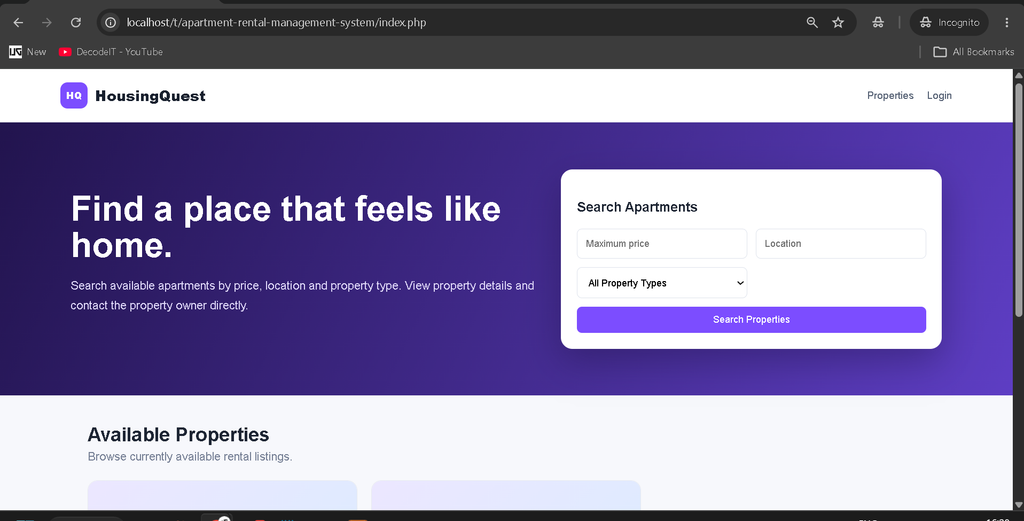
The system provides a user-friendly homepage where prospective tenants can browse available apartments and search properties based on price, location, and property type.
At the same time, property owners can access their own management dashboard to add properties, update property information, manage availability, view tenant requests, and maintain their profile.
Available Features
1. User Registration and Login
The system provides separate access for property owners and prospective tenants.
Property owners can register their accounts by providing the required information. The system validates the email address and checks whether the email is already registered.
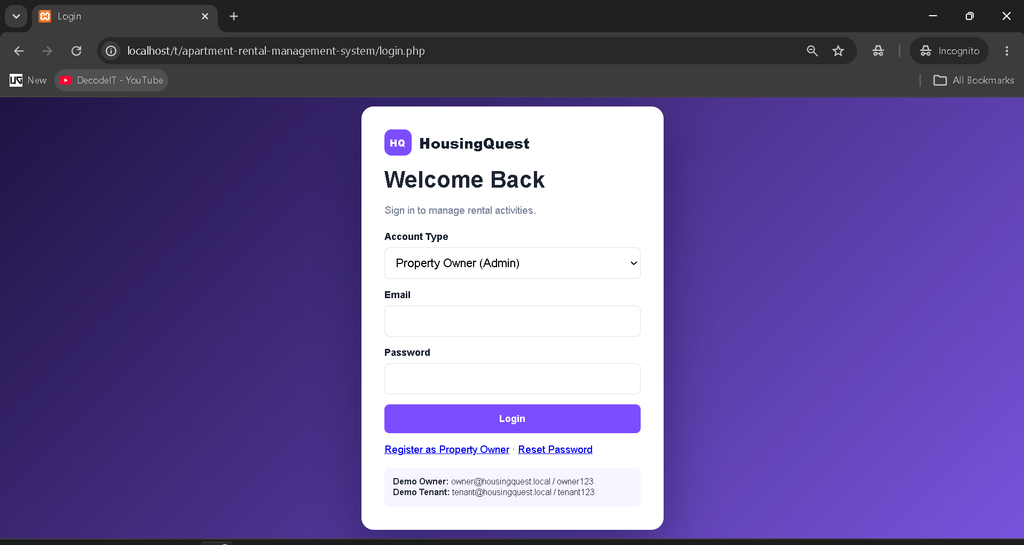
Users can log in using their registered credentials, while the role-based system directs property owners and tenants to their respective areas.
2. Password Reset
A password reset section is included for property owner accounts.
The owner can provide the registered email address and set a new password through the password reset functionality.
3. Property Management
The Property Management module is available to the property owner.
Property owners can:
- Add new property listings.
- Add detailed property information.
- Add property images.
- Edit property information.
- Delete property listings.
- View all their properties.
- Update property availability.
- Mark properties as available or taken.
Property information includes the property title, property type, location, price, bedrooms, bathrooms, facilities, description, images, and availability status.
4. Property Search
The property search functionality allows prospective tenants to search available apartments according to their requirements.
Properties can be searched using:
- Price range
- Location
- Property type
Only available properties are displayed in the search results. This helps tenants focus on properties that can currently be requested.
5. Property Details Page
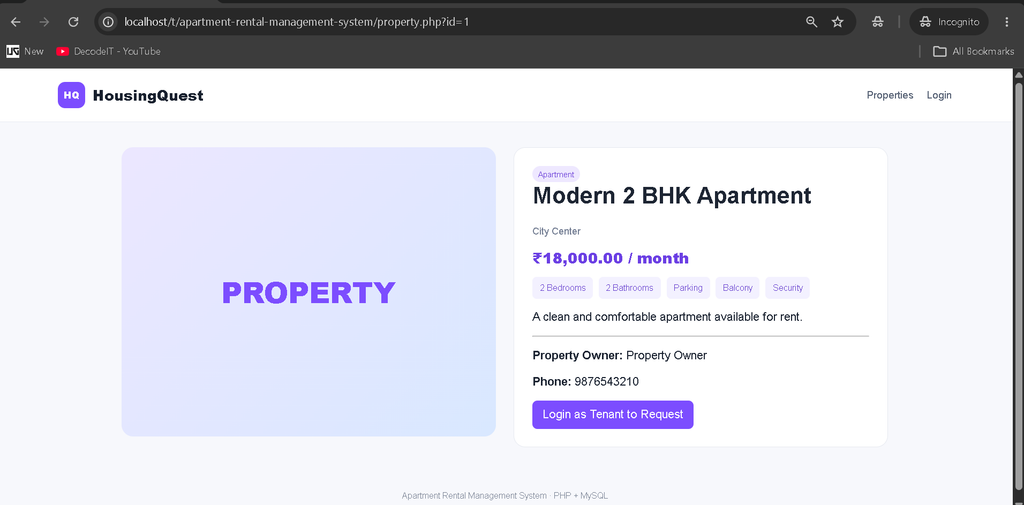
Each property has a dedicated details page where tenants can view important information about the apartment.
The property details section displays:
- Property title
- Property type
- Location
- Rental price
- Number of bedrooms
- Number of bathrooms
- Facilities
- Property description
- Property owner information
- Availability
The system also prevents users from viewing rental details of properties that have already been marked as taken.
6. Contact Property Owner
Prospective tenants can contact the property owner directly from the property details page.
The tenant can enter a message or inquiry and submit the request. The request is stored in the database and becomes available to the property owner through the owner dashboard.
7. Admin Dashboard
The property owner has access to a dedicated dashboard for managing rental activities.
The dashboard provides information about:
- Total property listings
- Available properties
- Tenant requests
- Total income
- Monthly income information
The dashboard provides a centralized view of property and tenant activity.
8. Tenant Requests
The owner can view requests submitted by prospective tenants.
The request section displays:
- Property name
- Tenant name
- Tenant email
- Tenant phone number
- Tenant message
- Request status
The owner can update request status to help manage tenant inquiries.
9. Profile Management
Property owners can update their profile information through the Profile Management section.
The profile includes:
- Name
- Phone number
- Profile picture
This allows property owners to maintain their account information whenever required.
10. Theme Changer
The system includes a dynamic theme changer that allows the user interface to switch between light and dark modes.
The theme button changes its icon according to the selected interface mode.
11. Property Information Editor
The property management section provides a dedicated property details area where the owner can enter formatted property information and descriptions while adding or editing a property.
12. Security Features
The project includes several security-related checks for the rental system.
- Only authenticated users can access protected management pages.
- Property owners can manage their own property listings.
- Tenants cannot access owner management pages.
- Taken properties cannot be requested through the property details section.
- Uploaded profile and property images are checked for supported file extensions.
- Database operations use PHP PDO prepared statements.
Download Complete Project
Screenshot
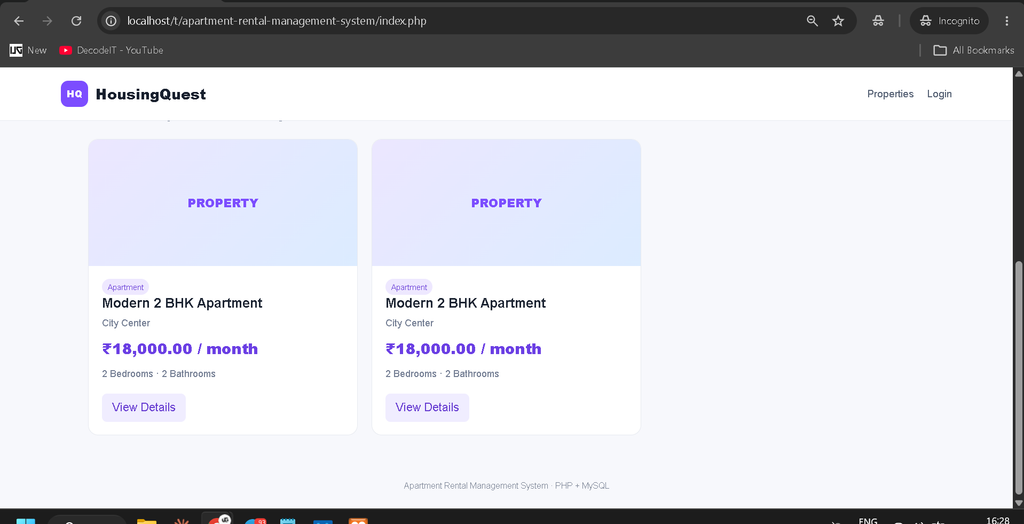
Installation Guide Using VS Code
Follow these steps to run the Apartment Rental Management System on your local computer using VS Code.
Step 1: Install Required Tools
Make sure the following software is installed:
- XAMPP including Apache and MySQL
- Visual Studio Code
- PHP 8 or later
- Web Browser
Step 2: Move the Project Folder
Extract the project ZIP file and place the project folder inside the XAMPP htdocs directory.
C:\xampp\htdocs\apartment-rental-management-systemStep 3: Start Apache and MySQL
Open the XAMPP Control Panel and start:
Apache
MySQL
Both services should be running before starting the application.
Step 4: Create the Database
Open phpMyAdmin in your browser:
http://localhost/phpmyadminImport the SQL file included in the project:
database/db.sqlThe database is named:
housingquestStep 5: Configure Database Connection
Open the following file in VS Code:
config.phpThe default database configuration is:
$host = "localhost";
$db = "housingquest";
$user = "root";
$pass = "";
If your local MySQL username or password is different, update these values.
Step 6: Open the Project in VS Code
Launch Visual Studio Code and select:
File → Open FolderSelect:
C:\xampp\htdocs\apartment-rental-management-systemOpen the integrated terminal and check the PHP installation:
php -vStep 7: Run the Project
Open your browser and visit:
http://localhost/apartment-rental-management-system/The apartment rental homepage will appear.
Default Login Credentials
| Role | Password | |
|---|---|---|
| Property Owner | owner@housingquest.local | owner123 |
| Prospective Tenant | tenant@housingquest.local | tenant123 |
Usage Guide
1. Property Owner Admin
The Property Owner has access to the management side of the system.
The owner can:
- Register an account.
- Log in as a property owner.
- Add new property details.
- Add property images.
- Edit property listings.
- Delete property listings.
- Change property availability.
- View tenant requests.
- View tenant contact details.
- Update request status.
- View rental information.
- Monitor monthly income information.
- Update profile information.
- Change profile picture.
- Change the interface theme.
- Reset the owner password.
The owner dashboard provides centralized control over property listings and tenant requests.
2. Prospective Tenant User
The prospective tenant can browse available properties from the public homepage.
Tenants can:
- Log in as a prospective tenant.
- Search apartments.
- Filter properties by price.
- Filter properties by location.
- Filter properties by property type.
- View property details.
- Check property facilities.
- Check rental price.
- Check property availability.
- Contact the property owner.
- Submit rental requests.
- View their submitted requests.
This provides tenants with a simple way to find available accommodation and communicate their interest in a property.
Student Perspective and Real-Life Application
For students, this project provides practical exposure to important full-stack web development concepts.
- Backend programming using PHP.
- Database creation and queries using MySQL.
- Frontend development using HTML, CSS, and JavaScript.
- User authentication and role-based access.
- CRUD operations for property management.
- Database integration.
- Image upload handling.
- Dynamic property searching.
- Rental request management.
- Profile management.
From a real-life perspective, the Apartment Rental Management System demonstrates how property rental activities can be moved from traditional manual processes to an online platform.
Property owners can use the system to manage and showcase available apartments, while tenants can search properties according to their requirements and contact owners directly.
The project demonstrates how PHP and MySQL can be combined to create a practical rental management platform with separate functionality for property owners and prospective tenants.
Conclusion
The Apartment Rental Management System in PHP and MySQL is a practical web application designed to simplify property rental activities.
The project provides separate functionality for Property Owners and Prospective Tenants. Owners can manage property listings, availability, tenant requests, profiles, and rental information, while tenants can search available properties, view details, and send requests to property owners.
Keywords
apartment rental management system using php mysql, apartment rental management system using php and mysql pdf, apartment rental management system php mysql, house rental management system php mysql project, php mysql house rental management system project, house rental management system in php mysql, apartment visitor management system project in php mysql, rental management system php, house rental management system in php, house rental management system php, real estate management system in php mysql, apartment management system project in php, house rental management system project in php Rental Management System

[…] Apartment Rental Management System in PHP and MySQL :- Click Here […]
[…] Apartment Rental Management System in PHP and MySQL :- Click Here […]