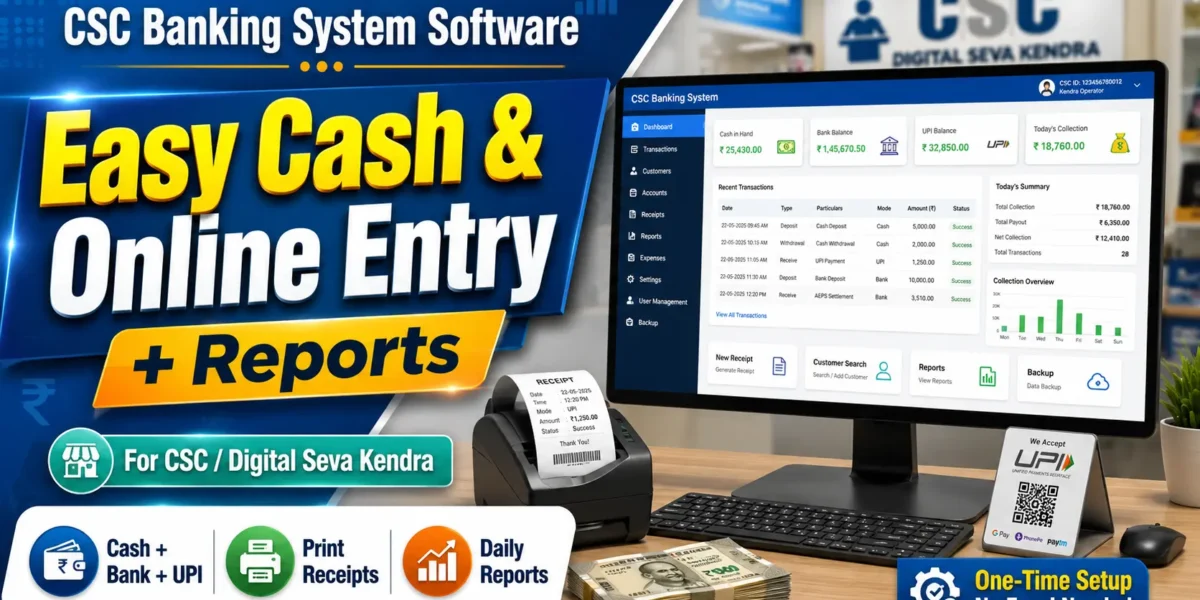
If you run a CSC Center or Digital Seva Kendra, you already know the real headache is not doing the work; it is keeping the books straight at the end of the day. The CSC Banking Management System is a ready-to-use software built exactly for that, so you can record every cash, bank, and UPI transaction, print receipts, and pull clean daily reports without touching a single Excel sheet. In this post, I will walk you through what the software does, how it fits into your daily counter work, and how you can get it for your own center.
This is a complete PHP and MySQL web application that runs on your own computer. There is no monthly subscription, no internet dependency for the core work, and no complicated setup. You install it once, open it in your browser, and start managing your day like a proper bank branch.
| Detail | Information |
|---|---|
| Software Name | CSC Banking Management System |
| Built For | CSC Centers & Digital Seva Kendras |
| Language | PHP |
| Database | MySQL |
| Type | Local Web Application (Browser-Based) |
| Runs On | Windows PC / Laptop via XAMPP or WAMP |
| Internet | Not required for core transactions |
| Licensing | One-time purchase, single center use |
| Best For | Daily banking, cash & balance management |
| Developer | Updategadh |
Why CSC Centers Need a Proper Banking Software
A busy Digital Seva Kendra handles dozens of small money movements every day. Cash comes in, cash goes out, UPI payments land in your bank, customers withdraw against Aadhaar, and every one of them expects a receipt. When all of this is tracked on paper or in a random notebook, mistakes creep in fast. By evening, you cannot tell how much physical cash you should have in the drawer, how much sits in the bank, or whether a customer’s balance was noted correctly. That confusion costs you money and trust.
The CSC Banking Management System removes that guesswork completely. It keeps a live figure for your cash, bank, and UPI balances at all times, records each transaction with a proper receipt, and tracks physical note denominations so your drawer always matches your records. At the end of the day, you open one report and see exactly where every rupee went. It brings the discipline of a real bank counter to your own center, without the cost or complexity.
Key Features of the CSC Banking Management System
Balance & Cash Management
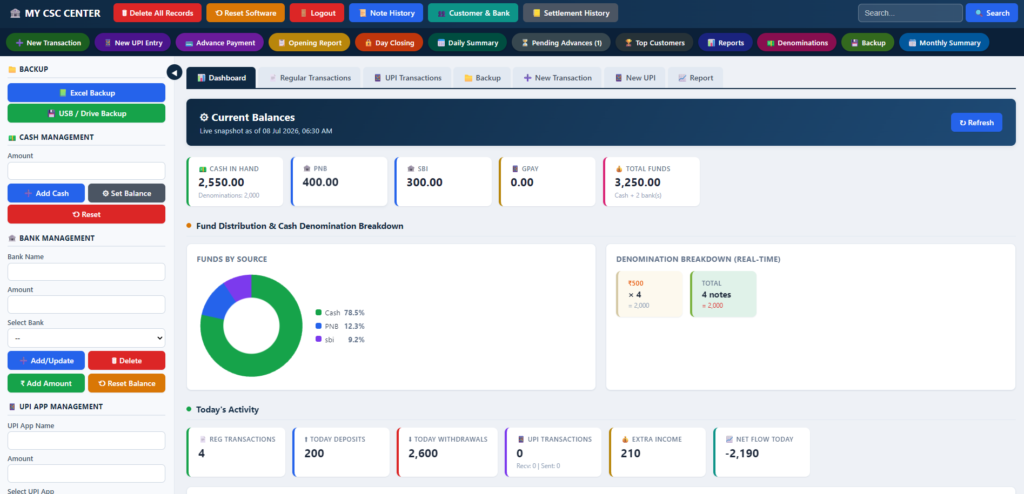
- Live Cash, Bank & UPI Balance: Every entry updates your three main balances instantly, so you always know your current position.
- Denomination Tracking: Record notes by denomination so your physical cash drawer can be tallied against the software in seconds.
- Cash & Bank Reset: Reset or correct balances safely with password protection when you start a fresh cycle.
Transactions & Receipts
- Regular & UPI Transactions: Handle both counter cash work and UPI-based entries from a single screen.
- Advances: Record advance payments and adjust them cleanly against later transactions.
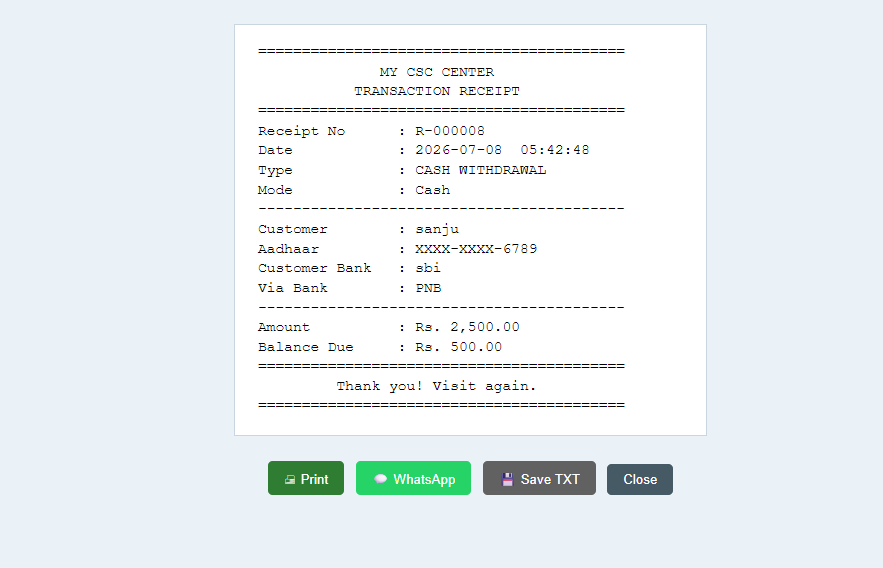
- Printable Receipts: Generate a receipt for every transaction and print it directly, or send it to the customer.
- WhatsApp Receipts: Share the receipt straight to the customer’s WhatsApp with a single click, no separate WhatsApp account needed.
Customer & Bank Records
- Aadhaar-Based Autofill: Enter a customer’s Aadhaar number and the software fills in their saved name, mobile, bank, account number, IFSC, and address automatically.
- Customer Directory: Search and manage all saved customer bank records by name, date, Aadhaar, or bank.
- Top Customers: See your most valuable customers ranked by transaction count, amount, and extra income.
Reports & Safety
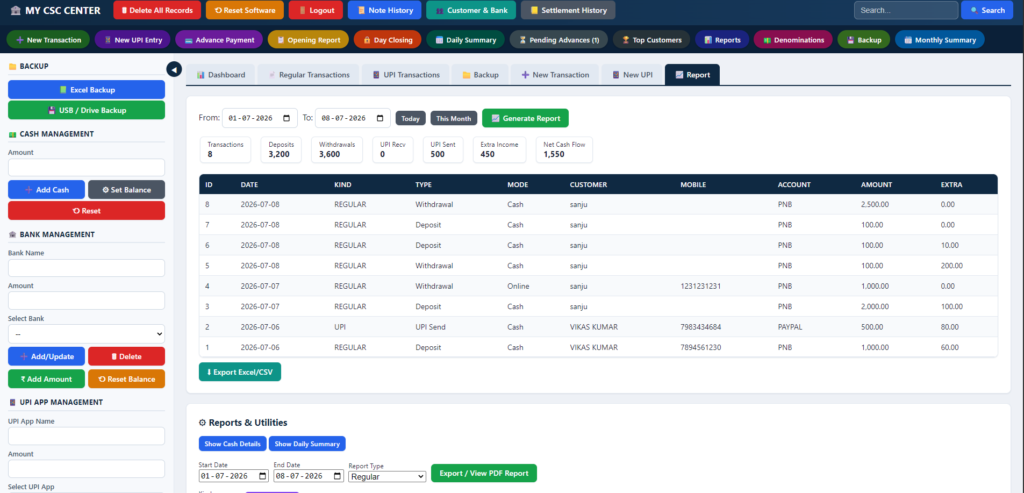
- Daily Reports: View clean HTML reports you can print or save as PDF, plus CSV export for your own records.
- Backup & Restore: Take a full backup of your data and restore it whenever you need, so a system crash never wipes your records.
- Password Protection: Sensitive actions like resets and deletions always ask for your password before running.
Technology & System Requirements
| Layer | Technology | Purpose |
|---|---|---|
| Frontend | HTML, CSS, JavaScript | Clean counter-style interface with shortcut bar |
| Backend | PHP | All business logic, balances, transactions, reports |
| Database | MySQL | Stores transactions, customers, and balances |
| Server | Apache (XAMPP / WAMP) | Runs the app locally on your own PC |
You only need a basic Windows computer or laptop with XAMPP or WAMP installed. The software is lightweight and runs comfortably even on modest hardware that most CSC Centers already own.
How It Works in Your Daily Counter Work
- Log in to the software at the start of your day and confirm your opening cash, bank, and UPI balances.
- When a customer arrives, enter their Aadhaar number and let the software autofill their saved details, or add a new record.
- Record the transaction as cash, bank, or UPI, along with the denominations received or paid out.
- Print the receipt or send it to the customer on WhatsApp instantly.
- The software updates all balances automatically after every entry.
- At closing time, open the daily report to match your physical cash with the software and export it if needed.
How to Set Up the CSC Banking Management System
Step 1 — Install XAMPP or WAMP
Install XAMPP on your Windows PC. This gives you Apache and MySQL, which the software needs to run.
Step 2 — Copy the Software Folder
Place the application folder inside your web root, for example:
C:\xampp\htdocs\csc_bankingStep 3 — Create the Database
Open phpMyAdmin or the MySQL command line and import the included database file:
"C:\xampp\mysql\bin\mysql.exe" -u root -p < schema.sqlStep 4 — Configure the Connection
Open config/db.php and set your MySQL username and password if they are different from the defaults.
Step 5 — Start & Open the App
Start Apache and MySQL from the XAMPP control panel, then open the software in your browser:
http://localhost/csc_banking/Log in with the default admin details and change the password immediately from the Settings option. Add your bank and UPI app once, and you are ready to start recording transactions.
Watch the Software in Action
Screenshots
How to Download
Get This Project
The complete package is available so you can run, study, and submit it with confidence. It includes:
- Full Source Code
- Project Report
- Synopsis
- PPT Presentation
For any queries or a quick response, reach out on WhatsApp: +91 79834 34684
Why Your CSC Center Should Use This Software
- Save Time Daily: No more late-night tallying. Your day closes with one clean report instead of a pile of paper.
- Stop Cash Mismatches: Denomination tracking means your drawer always matches your records, so shortages get caught early.
- Look Professional: Printed and WhatsApp receipts give your customers confidence and make your center look like a real bank branch.
- Own Your Data: Everything runs on your own PC. Your customer and transaction records stay with you, not on someone else’s server.
- One-Time Cost: Buy it once and use it, with no monthly fees eating into your commission income.
- Grow With Insight: The top customers report shows you who brings the most business, so you know where to focus.
How to Get the CSC Banking Management System
You can get the complete software with full source code, database file, and setup instructions, ready to install on your own PC. It is a one-time purchase built specifically for CSC Centers and Digital Seva Kendras.
For pricing, a live demo, or any questions before you buy, message us directly on WhatsApp: +91 7983434684
Upcoming Features & Enhancements
- Multi-counter support so more than one operator can work at the same time
- Automatic transaction number reading from screenshots using OCR
- Monthly and yearly summary reports for accounting and GST
- SMS receipt sharing alongside WhatsApp
- Cloud backup option for extra safety
- Commission and extra income analytics dashboard
- Mobile-friendly view for quick balance checks
See More Software & Demos on YouTube
Want to see this software and many more tools in action before you buy? Watch full demos and tutorials on our channel.
Subscribe to DecodeIT2 on YouTube
Frequently Asked Questions
Do I need the internet to use this software?
No. The core banking work, transactions, receipts, and reports all run locally on your own PC. You only need the internet to send a WhatsApp receipt.
Is this software only for banking transactions?
It is built mainly for daily cash, bank, and UPI transaction management at a CSC Center, along with customer records, receipts, and reports. It covers the full daily counter workflow of a Digital Seva Kendra.
Can I use it on a normal computer?
Yes. Any basic Windows PC or laptop with XAMPP or WAMP installed can run the CSC Banking Management System comfortably.
Will my customer data stay safe?
All data is stored on your own machine, and sensitive actions require your password. You can also take regular backups so your records are never lost.
Is this a one-time purchase or a subscription?
It is a one-time purchase for your center, with no monthly fees. For pricing details, contact us on WhatsApp.