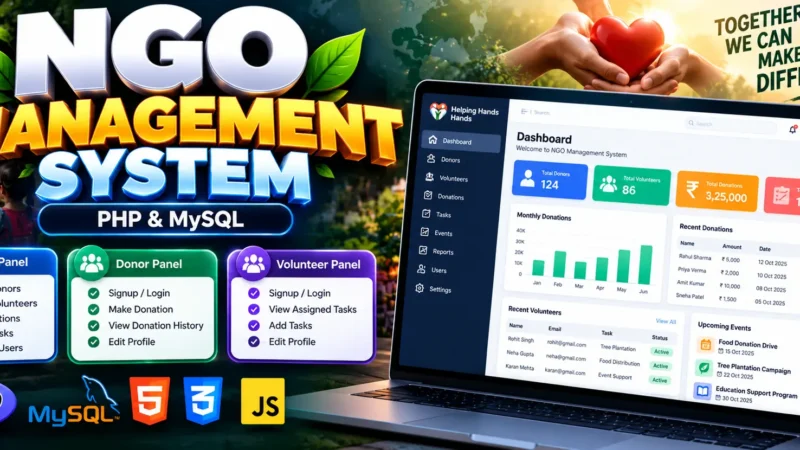
Student Attendance Management System in PHP and MySQL
A simple project on Attendance System designed to make tracking student attendance easier, faster, and more accurate. This project automates the manual attendance process often performed on paper, ensuring that data is stored securely in a digital format. It provides a structured interface for administrators to manage student details, courses, mark attendance, and generate attendance reports with just a few clicks.
Complete Advance AI Topics: Click Here
Real Time Projects:- DecodeIT
Project Overview
| Parameter | Details |
|---|---|
| Project Name | Attendance System |
| Language/s Used | PHP, HTML, CSS, JavaScript |
| Database | MySQL |
| Type | Web Application |
| Developer | UPDATEGADH |
Introduction
The Attendance System project is a web-based solution built to simplify and digitalize the attendance-taking process for educational institutions. In many colleges and schools, attendance tracking is often a repetitive task performed manually. This process can take considerable time and may result in errors while maintaining records.
This project automates the attendance process by storing attendance information securely in a MySQL database and providing detailed attendance reports.
Developed using PHP for the backend and MySQL for database management, the system features a clean and minimal front-end interface created with HTML, CSS, and JavaScript. It demonstrates how web technologies can be used to create an efficient attendance management tool.
From a student’s point of view, this project is an excellent learning opportunity because it introduces essential concepts of full-stack development, database interaction, CRUD operations, session management, and report generation.
Available Features
The following features are included in the project:
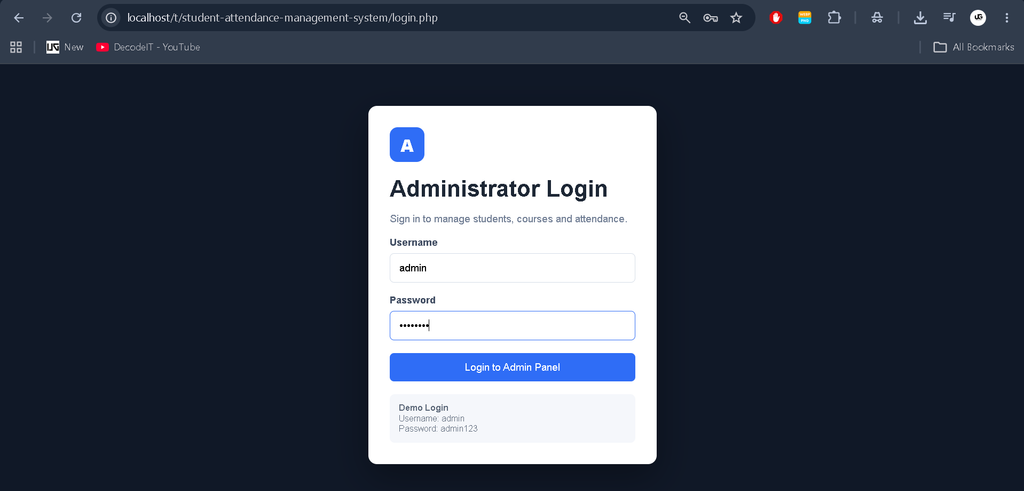
1. Admin Login Panel
The system provides a dedicated Admin Login Panel. Only the administrator can access the management dashboard and perform attendance-related operations.
The administrator logs in using valid credentials through the login page. After successful authentication, the administrator is redirected to the dashboard.
2. Student Management
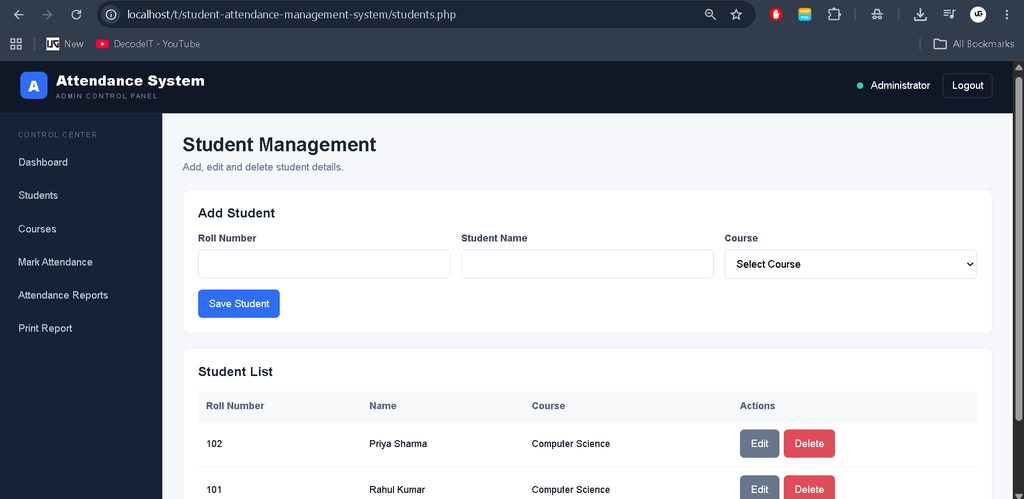
The Student Management module allows the administrator to manage student information.
Admin can:
- Add student details.
- Edit student details.
- Delete student details.
- Manage student roll numbers.
- Manage student names.
- Assign students to available courses.
- View the complete student list.
This module provides the basic student information required for attendance management.
3. Course Management
The Course Management module allows the administrator to create and manage different subjects or courses offered by the institution.
Admin can:
- Add courses.
- Edit courses.
- Delete courses.
- View available courses.
- Check the number of students assigned to a course.
Courses are connected with student records so that attendance can be marked according to the selected course.
4. Attendance Marking System
The Attendance Marking System is the main feature of the project.
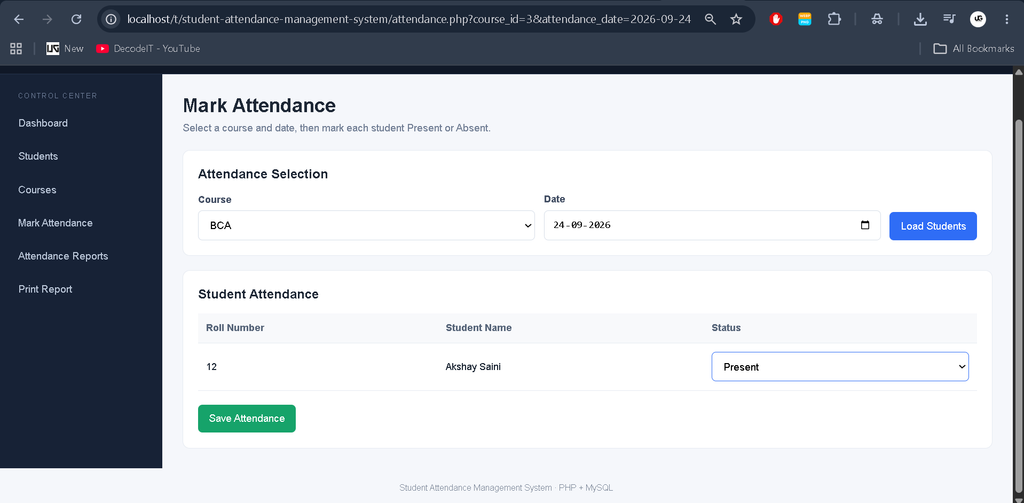
The administrator can select a course and attendance date. After selecting the required course and date, the system displays the students assigned to that course.
The administrator can then mark each student as:
- Present
- Absent
The attendance records are stored in the MySQL database. If attendance for the same student, course, and date already exists, the system updates the existing record instead of creating a duplicate entry.
5. Attendance Reports
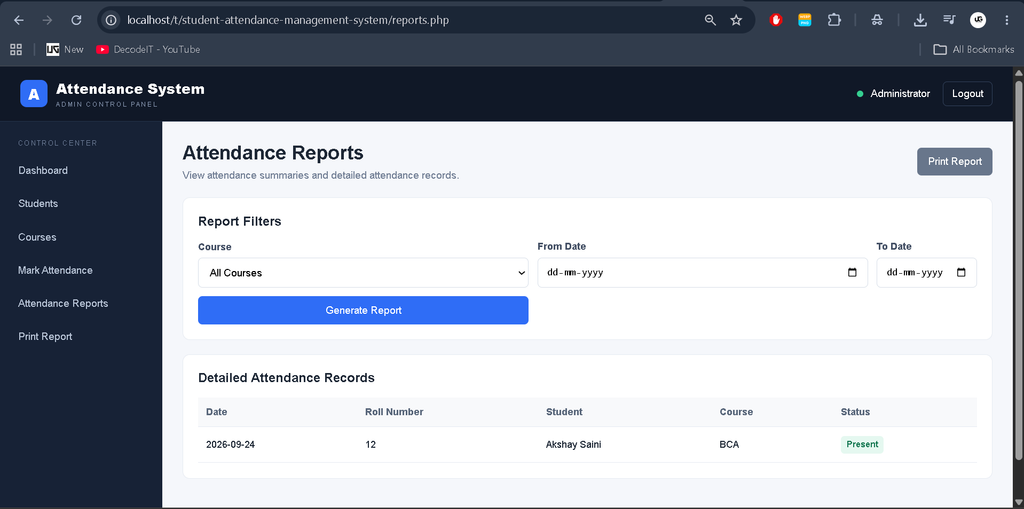
The system provides a dedicated Attendance Reports section where the administrator can view attendance records.
Reports can be filtered using:
- Course
- From date
- To date
The report displays the attendance date, student roll number, student name, course, and attendance status.
6. Print Report Option
The project includes a printable attendance report option.
After generating an attendance report, the administrator can open the print report page and print the displayed attendance records for record-keeping or submission.
7. Logout Functionality
The system includes a logout option for the administrator. When the administrator finishes using the system, the session can be terminated through the Logout option.
This helps prevent unauthorized access to the administrative panel after the user has finished working with the system.
8. Database Connectivity
The project uses MySQL to store and manage student, course, and attendance information.
PHP PDO is used for database communication. The database contains separate tables for administrators, courses, students, and attendance records.
How to Download
The complete package is available so you can run, study, and submit it with confidence. It includes:
- Full Source Code
Screenshot
Installation Guide Using VS Code
Follow these steps to set up the Student Attendance Management System in Visual Studio Code.
Step 1: Prerequisites
Before installation, make sure the following software is installed:
- XAMPP for Apache and MySQL.
- Visual Studio Code.
- Web Browser such as Chrome or Firefox.
Step 2: Extract the Project
Download and extract the ZIP file named:
Student-Attendance-Management-System.zipMove the extracted project folder into the htdocs directory of your XAMPP installation.
Example path:
C:\xampp\htdocs\Student-Attendance-Management-SystemStep 3: Configure the Database
Open XAMPP and start Apache and MySQL.
Then open phpMyAdmin:
http://localhost/phpmyadminImport the SQL file included in the project:
database/attendance_system.sqlThe SQL file creates the attendance_system database and the required tables.
Step 4: Check Database Configuration
Open the following file in VS Code:
config.phpThe default configuration is:
$host = "localhost";
$dbname = "attendance_system";
$username = "root";
$password = "";
If your local MySQL configuration is different, update the database username or password accordingly.
Step 5: Open the Project in VS Code
Launch Visual Studio Code and select:
File → Open FolderBrowse to:
C:\xampp\htdocs\Student-Attendance-Management-SystemClick Select Folder to load the project.
Step 6: Run the Project
Make sure Apache and MySQL are running from the XAMPP Control Panel.
Open your browser and enter:
http://localhost/Student-Attendance-Management-System/login.phpThe Administrator Login page will appear.
Default Admin Login
| Role | Username | Password |
|---|---|---|
| Admin | admin | admin123 |
Usage Guide
The system is built around the Admin role, which handles all key operations. There are no separate student or teacher management panels for performing attendance operations.
1. Admin Role
The administrator has control over the complete attendance management process.
- Login: The admin logs in using valid credentials through
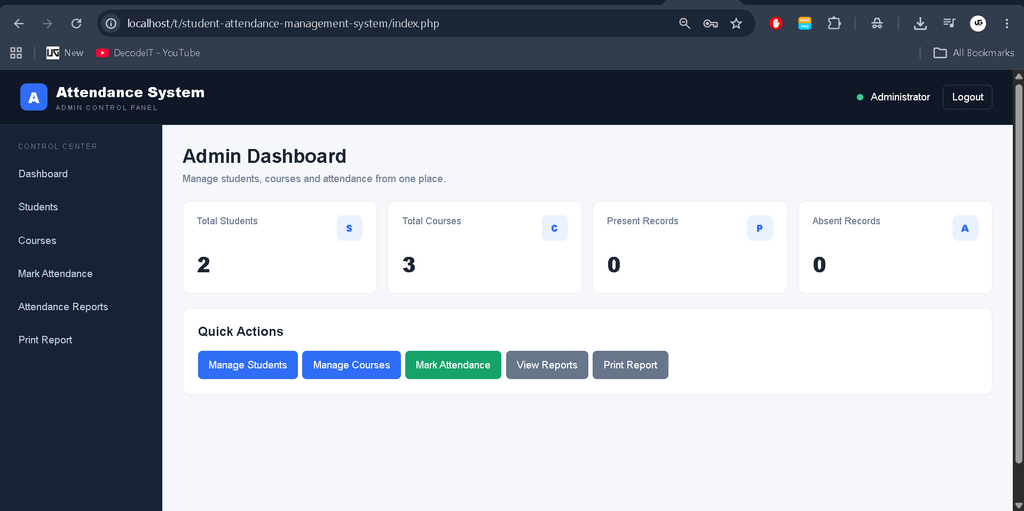
login.php. - Dashboard: After logging in, the admin is directed to a dashboard displaying student, course, present-record, and absent-record information.
- Add Student: Admin can enter student details such as name, roll number, and course.
- Edit Student: Admin can update existing student information.
- Delete Student: Admin can remove student records from the system.
- Manage Courses: Admin can add, edit, and remove courses that students are enrolled in.
- Mark Attendance: Admin selects a course and date, then marks each student as Present or Absent.
- View Reports: The system provides attendance reports for selected courses and date ranges.
- Print Reports: Admin can open the printable report page and print attendance records.
- Logout: Admin can securely terminate the session after completing the work.
This system focuses mainly on administrative control, ensuring that attendance records are managed from one centralized panel.
Technical Perspective For Students
From a student developer’s perspective, this project provides practical experience with full-stack web development using PHP and MySQL.
Database Interaction
Students can understand how PHP communicates with MySQL through the database connection file and how records are inserted, updated, selected, and deleted.
CRUD Operations
The Student Management and Course Management modules demonstrate CRUD operations. Administrators can add, edit, view, and delete student and course information.
Session Management
The project demonstrates how PHP sessions can be used to authenticate the administrator and restrict access to the administrative pages.
Frontend-Backend Integration
The project demonstrates how HTML forms interact with PHP scripts to process student, course, and attendance data.
Report Generation
The Attendance Reports module demonstrates how database records can be filtered and displayed in a structured format. The Print Report section provides a printable version of the attendance records.
Real-Life Application
The Attendance System is not only a student learning project. The same concept can be applied to environments where attendance needs to be recorded and maintained digitally.
- Educational Institutions: Automates attendance tracking for educational environments.
- Training Centers: Simplifies tracking of trainee participation in sessions.
- Corporate Environments: The basic attendance concept can be adapted to record employee attendance and working hours.
The project provides a foundation for larger management systems where attendance records are an important part of the overall application.
This makes it useful for final-year computer science and IT students who want to understand practical implementation of PHP, MySQL, CRUD operations, authentication, and attendance reporting.
Conclusion
The Student Attendance Management System is a simple web-based application developed using PHP and MySQL to make student attendance management easier and more organized.
Keywords
student attendance management system project source code, Student Attendance Management Systemstudent attendance management system project report pdf, student attendance management system project ppt, student attendance management system project website, student attendance management system project proposal, student attendance management system project documentation, student attendance management system mini project, student attendance management system project in html css and javascript, complete student attendance management project with source code, complete student attendance management project pdf, complete student attendance management project reportStudent Attendance Management SystemStudent Attendance Management SystemStudent Attendance Management System