Traffic Fine Management System Using PHP and MySQL
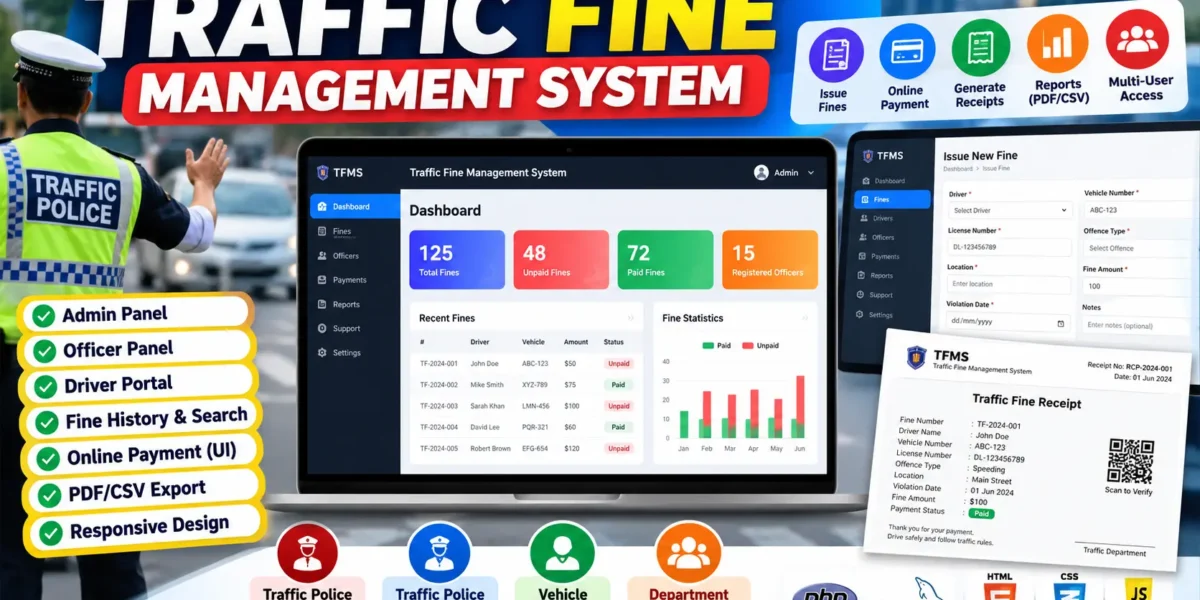
The Traffic Fine Management System in PHP with MySQL is a web application designed to organize recording traffic violations, issuing fines, maintaining driver and officer records, and tracking payment status. The project converts a paper-based fine workflow into a structured digital system that can be used by traffic department staff and vehicle drivers through role-based access.
Built with PHP, MySQL, HTML, CSS, JavaScript, and Bootstrap-style responsive design principles, the application is suitable for an intermediate-level college project. It provides separate workspaces for administrators, traffic officers, department staff, and drivers while keeping fine information in a centralized database.
Table of Contents
Complete Advance AI Topics: Click Here
Real Time Projects on YouTube:- DecodeIT
Project Overview
| Project Name | Traffic Fine Management System |
|---|---|
| Language/s Used | PHP, HTML, CSS, JavaScript, Bootstrap |
| PHP Version | 5.6.3 / 7.4.12 |
| Database | MySQL |
| Type | Web Application |
| Developer | UPDATEGADH |
Key Features
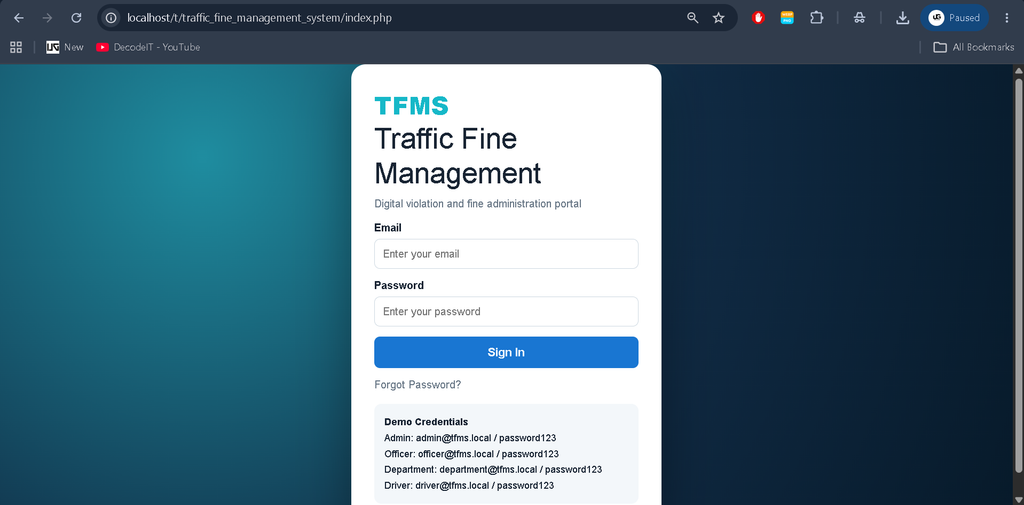
- Role-based login: Separate access is provided for the administrator, traffic officer, and driver.
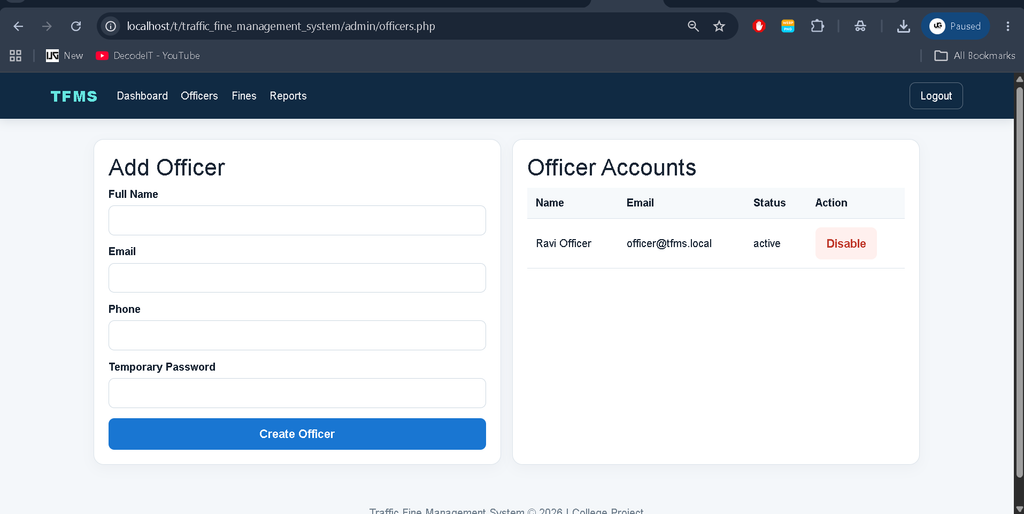
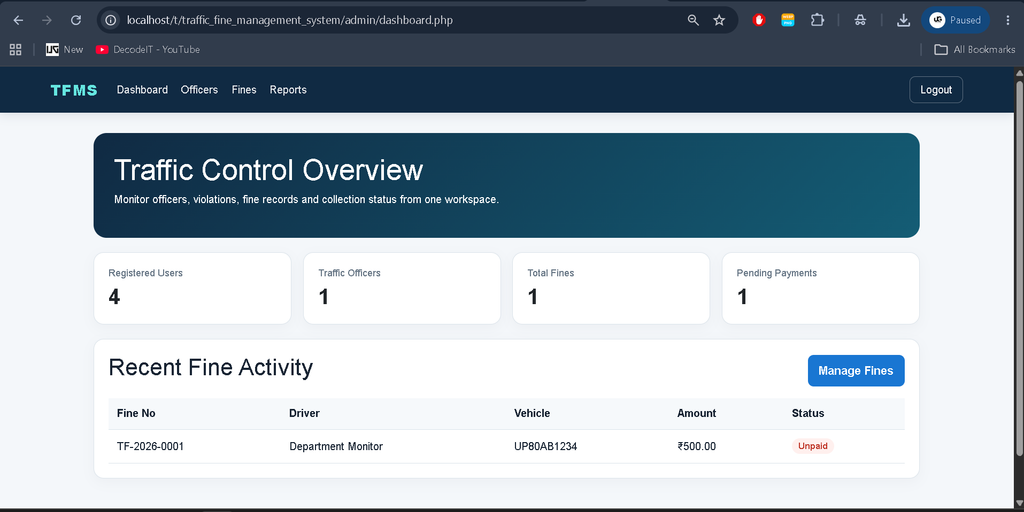
- Admin dashboard: Administrators can view system totals, monitor fine activity, manage officers, and review reports.
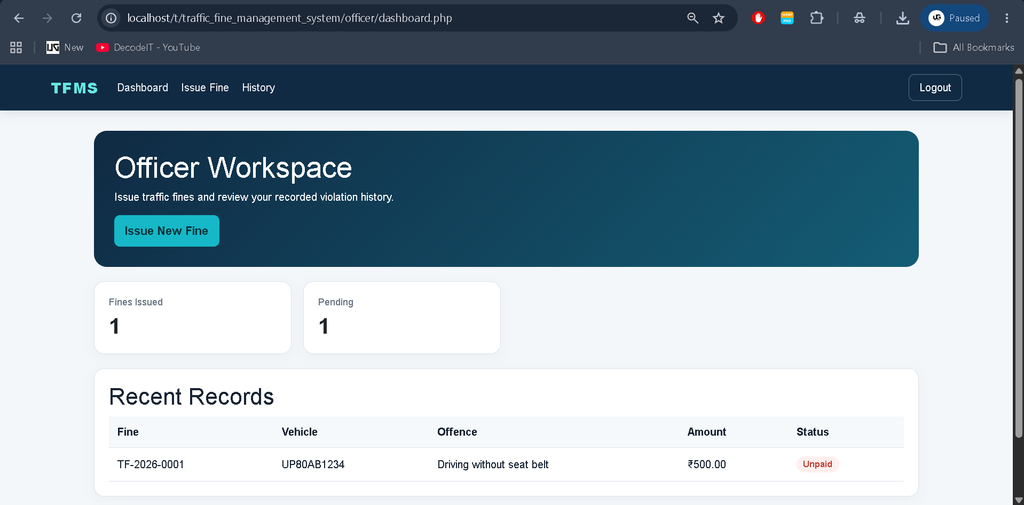
- Traffic fine issuance: Officers can select a driver and record the vehicle, license, offence, location, amount, due date, and notes.
- Fine search: Records can be searched using a fine number, vehicle plate, or license number.
- Fine history: Officers and drivers can review relevant historical records from their own workspaces.
- Online payment interface: Drivers can use the integrated project payment screen to record a demo payment and update a fine as paid.
- Receipt generation: Fine details are presented in a print-ready receipt format.
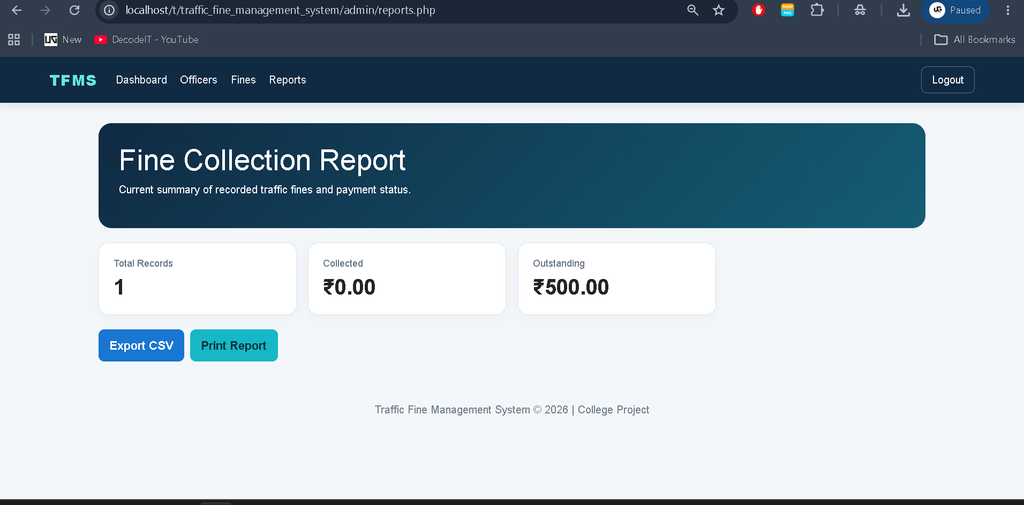
- Report export: Administrators can export fine records to CSV and open a print-ready report for PDF printing.
- Forgot password: Users can verify their registered email and phone number and set a new password through the recovery page.
- Support page: Drivers can submit questions or requests and review their submitted support records.
User Roles
Traffic Police Admin
The administrator has the broadest system access. The admin dashboard displays registered users, officers, fine records, and pending payment information. Administrators can add officer accounts, disable officer access, search fine records, open receipts, and review collection reports.
Traffic Police Officer
The officer workspace focuses on day-to-day fine issuance. An officer can select a registered driver, verify license and vehicle information, enter the traffic offence and location, set the fine amount and due date, and save the violation. Officers can also search their issued fine history and print receipts.
Vehicle Driver
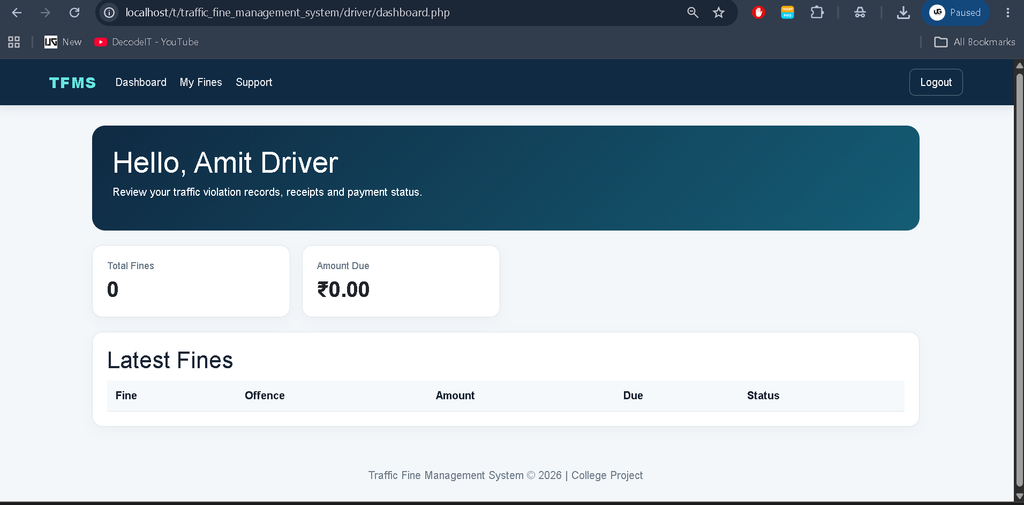
The driver portal provides access to the driver’s own fine records. A driver can see offence details, location, amount, due date, and current payment status. Unpaid fines can be processed through the project’s integrated demo payment flow, after which the record is marked as paid. Drivers can also submit support queries.
Department of Motor Traffic
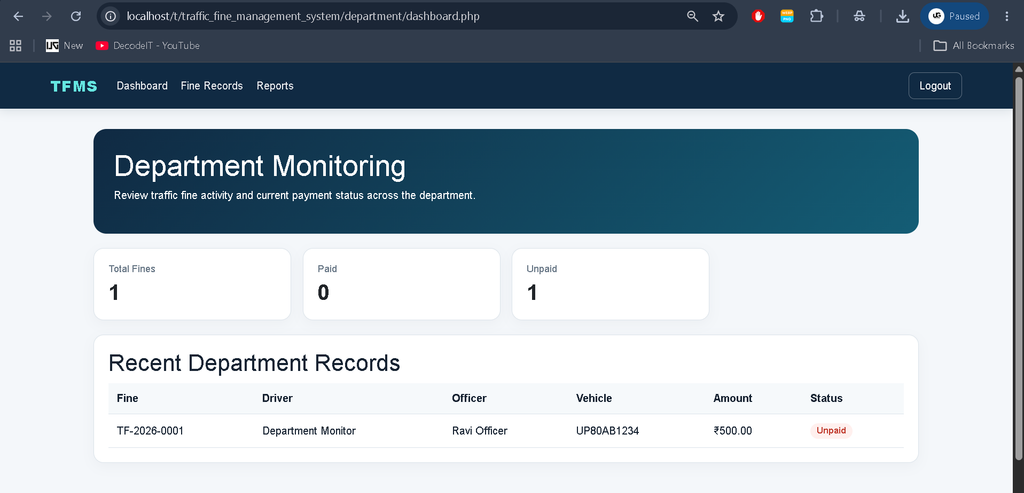
The department monitoring role provides a read-focused view of overall fine activity. Department users can review total, paid, and unpaid fine counts and inspect recent records across officers and drivers. This role is intended for monitoring rather than changing operational records.
Project Modules
- Authentication Module: Handles login, sessions, role checks, and logout.
- Admin Module: Provides dashboard statistics, officer management, fine management, and reports.
- Officer Module: Provides fine creation, validation, history, search, and receipt access.
- Driver Module: Provides dashboard information, fine review, payment recording, and support requests.
- Department Module: Provides read-focused monitoring of overall fine activity and payment status.
- Fine and Payment Module: Stores violation details, payment references, amounts, methods, and status changes.
- Report Module: Produces CSV output and a print-friendly report for administrative use.
How to Download
The complete package is available so you can run, study, and submit it with confidence. It includes:
- Full Source Code
- Project Report
- Synopsis
- PPT Presentation
Screenshot
Technologies Used
PHP handles authentication, sessions, form processing, database queries, role checks, fine creation, payment records, and report operations. MySQL stores users, fines, payments, and support requests in related tables. HTML and CSS define the page structure and visual presentation, while JavaScript provides small client-side interactions such as confirmation prompts and automatic driver detail filling. The interface follows responsive Bootstrap-style principles so screens remain practical on smaller displays.
Project Structure
The source package is organized into folders for configuration, shared interface files, administrator pages, officer pages, driver pages, reports, database scripts, and frontend assets. The config folder contains database and authentication logic, while role-specific folders keep dashboards and workflows separated. The sql directory contains the database script, and report files handle receipts and exports. This organization keeps the application easier to understand and maintain.
How the System Works
The workflow starts when a registered user signs in with the appropriate account. After authentication, the application checks the user’s role and opens the matching dashboard. An officer can create a fine by selecting a driver and entering the violation information. The system generates a unique fine number and stores the record in MySQL.
The administrator can later search the centralized records and review the current status of fines. From the driver side, the same fine becomes visible in the driver’s account. If it remains unpaid, the driver can use the project payment action. The application creates a payment reference, records the demo payment, and changes the fine status to paid. A receipt can then be opened and printed.
Installation and Setup
Install XAMPP or a similar local PHP and MySQL environment, then place the project folder inside the web server directory. Start Apache and MySQL. Open phpMyAdmin and import the sql/stfms.sql database file. The script creates the required database, tables, demo users, and a sample fine record.
Open config/config.php if the local MySQL username, password, host, or database settings are different from the project defaults. Finally, open the project through the local server in a browser. Demo accounts are included in the project README for administrator, officer, and driver testing.
Usage
Administrators should begin by checking the dashboard and officer accounts. Officers can use the “Issue Fine” page to create new violation records. Drivers can sign in to review their fines and use the payment action for an unpaid record. The receipt page is designed for printing, while the report page provides administrative export options.
Frequently Asked Questions
What technology is used in this project?
The application uses PHP for backend processing, MySQL for data storage, and HTML, CSS, JavaScript, and Bootstrap-oriented responsive styling for the interface.
Who can issue a traffic fine?
A logged-in traffic police officer can issue fines through the officer workspace. The administrator can manage and review fine records.
Can drivers pay fines online?
The project includes a UI-integrated demo payment flow. It records the payment in the database and changes the fine status to paid; it is not connected to a real payment provider.
Is a forgot-password option available?
Yes. The recovery page verifies the registered email and phone number before allowing the user to set a new password.
Can fine receipts be printed?
Yes. A print-ready receipt displays the fine number, driver, license, vehicle, offence, location, amount, officer, and status.
Can administrators export fine records?
Yes. The report module provides CSV export and a print-ready report that can be saved as PDF through the browser’s print dialog.
Future Scope
- Connect the existing payment interface with an appropriate real payment gateway.
- Add a complete password-reset workflow using verified account recovery.
- Extend report filtering with date and status selections.
- Add additional administrative controls for resolving support requests.
- Improve deployment configuration for a hosted traffic department environment.
Conclusion
The Traffic Fine Management System provides a structured digital workflow for traffic violation and fine administration. Its role-based dashboards keep administrative, officer, and driver activities separated while allowing all fine information to remain connected through MySQL. Fine creation, search, history, payment status, receipts, reports, and support requests make the project more complete than a basic CRUD demonstration.
For college students, the project also provides a practical example of authentication, authorization, relational database design, CRUD operations, validation, status management, reporting, and responsive web interface development using PHP and MySQL. The overall design remains understandable while delivering the level of functionality expected from a properly developed intermediate college project.
Keywords:
Traffic Fine Management System in PHP
Traffic Fine Management System Using PHP and MySQL
Traffic Fine Management System Project
Traffic Fine Management System Project in PHP
Traffic Fine Management System with MySQL
Traffic Violation Management System
Traffic Fine Management System Source Code
Traffic Fine Management System Project Report
Traffic Fine Management System DBMS Project
Traffic Fine Management System Web Application
Traffic Fine Management System PHP MySQL
Traffic Offence Management System
Traffic Fine Management Project
Traffic Management System in PHP
RTO Management System in PHP
Vehicle Fine Management System
Online Traffic Fine Management System
Traffic Fine Payment System
Traffic Fine Management System Project for Students
PHP MySQL College Project