Backward Elimination in Machine Learning
In the world of Machine Learning, building a model is not just about feeding data into an algorithm and getting results. A significant part of model building involves feature selection, where we identify the most relevant variables that impact the model’s performance.
One such efficient and widely-used technique is Backward Elimination. This method helps in refining models by removing less significant features, making them simpler, faster, and more accurate.
In this blog by *, we’ll explore what Backward Elimination is, why it’s important, how to implement it step-by-step, and how it optimizes a Multiple Linear Regression (MLR) model.
Complete Advance AI Topics: Click Here
SQL Tutorial: Click Here
Why Feature Selection Matters?
Machine Learning models perform better when they use only the most influential features. Including irrelevant or weak predictors can:
- Add noise to the model
- Increase computational complexity
- Lead to overfitting
- Make the model hard to interpret
Thus, feature elimination techniques like Backward Elimination become essential tools for data scientists and engineers.
Backward Elimination: The Concept
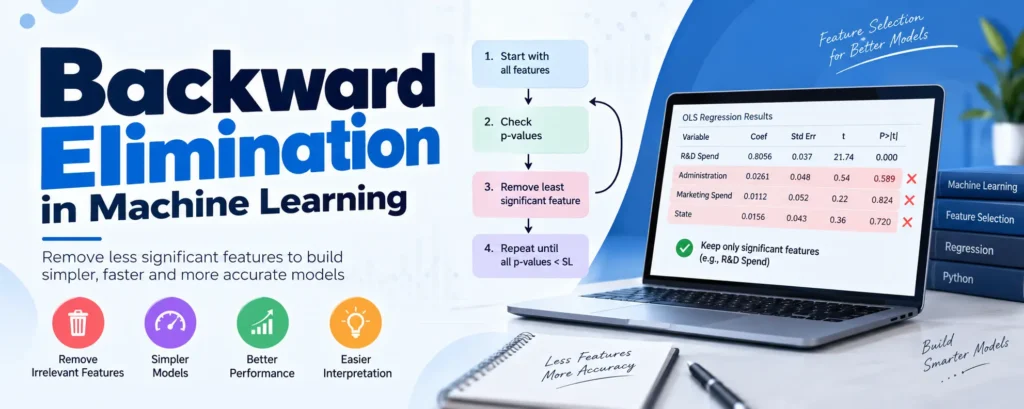
Backward elimination is a feature selection strategy that uses statistical tests to remove the least significant variables from a model. It starts with all features and eliminates the ones that don’t have a meaningful impact on the output.
Other Feature Selection Methods:
- All-in
- Forward Selection
- Backward Elimination
- Bidirectional Elimination
- Score Comparison
Among these, Backward Elimination is often preferred because it is fast, reliable, and data-driven.
Steps to Apply Backward Elimination
Let’s walk through the step-by-step procedure to implement backward elimination.
Step 1: Choose a significance level (SL)
Typically, SL = 0.05. This means any feature with a p-value > 0.05 is considered statistically insignificant.
Step 2: Fit the model with all independent variables.
Step 3: Check the p-values of each variable.
- If the highest p-value > SL, remove that variable.
- Otherwise, stop! The model is optimized.
Step 4: Repeat steps 2 and 3 until all variables in the model have p-values less than SL.
Let’s Understand with an Example
Imagine you are working with a dataset of 50 companies. You want to predict Profit based on:
- R&D Spend
- Administration Spend
- Marketing Spend
- State (Dummy Variables)
We’ll first build a Multiple Linear Regression (MLR) model with all features and then apply Backward Elimination to optimize it.
Step 1: Build the Full MLR Model
import numpy as np
import matplotlib.pyplot as plt
import pandas as pd

# Load dataset
dataset = pd.read_csv('50_CompList.csv')
X = dataset.iloc[:, :-1].values
y = dataset.iloc[:, 4].values

# Encode Categorical Data (State)
from sklearn.preprocessing import LabelEncoder, OneHotEncoder
labelencoder = LabelEncoder()
X[:, 3] = labelencoder.fit_transform(X[:, 3])

from sklearn.compose import ColumnTransformer
ct = ColumnTransformer([("State", OneHotEncoder(), [3])], remainder='passthrough')
X = ct.fit_transform(X)

# Avoid dummy variable trap
X = X[:, 1:]

# Split dataset
from sklearn.model_selection import train_test_split
X_train, X_test, y_train, y_test = train_test_split(X, y, test_size=0.2, random_state=0)

# Train model
from sklearn.linear_model import LinearRegression
regressor = LinearRegression()
regressor.fit(X_train, y_train)

# Predict and score
y_pred = regressor.predict(X_test)
print("Train Score:", regressor.score(X_train, y_train))
print("Test Score:", regressor.score(X_test, y_test))
Output:
Train Score: 0.95018
Test Score: 0.93470
Step 2: Apply Backward Elimination
Add a constant column:
import statsmodels.api as sm
X = np.append(arr = np.ones((50,1)).astype(int), values = X, axis = 1)
Start Elimination:
X_opt = X[:, [0,1,2,3,4,5]]
regressor_OLS = sm.OLS(endog = y, exog = X_opt).fit()
print(regressor_OLS.summary())
Iteratively Remove Variables with High p-value:
# Remove variable with p > 0.05 and repeat
X_opt = X[:, [0,2,3,4,5]]
regressor_OLS = sm.OLS(endog = y, exog = X_opt).fit()

X_opt = X[:, [0,3,4,5]]
regressor_OLS = sm.OLS(endog = y, exog = X_opt).fit()

X_opt = X[:, [0,3,5]]
regressor_OLS = sm.OLS(endog = y, exog = X_opt).fit()

X_opt = X[:, [0,3]]
regressor_OLS = sm.OLS(endog = y, exog = X_opt).fit()
After running these, you’ll find that R&D Spend is the only statistically significant variable left.
Final Optimized Model
Let’s now use only R&D Spend for our final model:
# Load optimized dataset
dataset = pd.read_csv('50_CompList1.csv')
X_BE = dataset.iloc[:, :-1].values
y_BE = dataset.iloc[:, 1].values

# Split dataset
from sklearn.model_selection import train_test_split
X_BE_train, X_BE_test, y_BE_train, y_BE_test = train_test_split(
    X_BE, y_BE, test_size=0.2, random_state=0
)

# Train optimized model
from sklearn.linear_model import LinearRegression
regressor = LinearRegression()
regressor.fit(np.array(X_BE_train).reshape(-1,1), y_BE_train)

# Predict and score
y_pred = regressor.predict(X_BE_test)
print("Train Score:", regressor.score(X_BE_train, y_BE_train))
print("Test Score:", regressor.score(X_BE_test, y_BE_test))
Output:
Train Score: 0.94495
Test Score: 0.94645
Result: Our simplified model using only R&D Spend is almost as accurate as the original complex model using four features. The difference in score is minimal, and the model is now cleaner and more efficient.
Download New Real Time Projects :- Click here
Conclusion
Backward Elimination helps in building optimized, high-performing models by removing less useful features. It’s especially useful in regression models where interpretability and performance go hand-in-hand.
By applying this technique, we realized that R&D Spend alone could predict the profit of a company quite accurately, making the model simpler without compromising its predictive power.
backward elimination in machine learning with example
backward elimination python
backward elimination in machine learning python