K-Nearest Neighbor Algorithm (KNN)
In Machine Learning, some algorithms are simple to understand yet powerful enough to be widely used in real-world applications. The K-Nearest Neighbor (KNN) algorithm is one such technique.
KNN is a supervised learning algorithm that can be used for both classification and regression problems. It is especially popular for classification because of its simple approach based on similarity and distance.
Complete Advance AI Topics: Click Here
SQL Tutorial: Click Here
What is the KNN Algorithm?
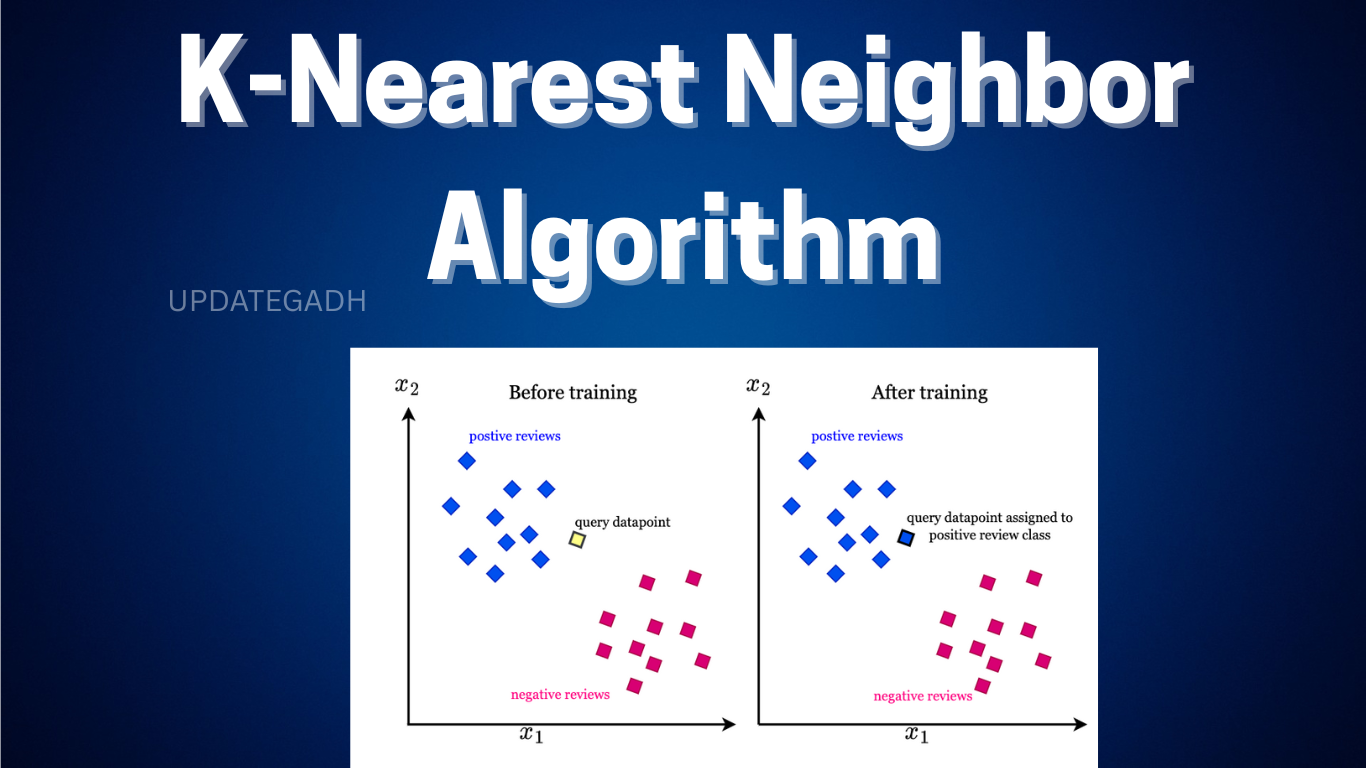
The basic idea behind K-Nearest Neighbor is simple: similar data points tend to be located close to each other.
Unlike many machine learning algorithms, KNN does not build an explicit model during the training phase. Instead, it stores the training data and uses it when a new prediction is requested. Because of this behavior, KNN is known as a lazy learner.
How Does KNN Work?
When a new data point needs to be classified, KNN follows these basic steps:
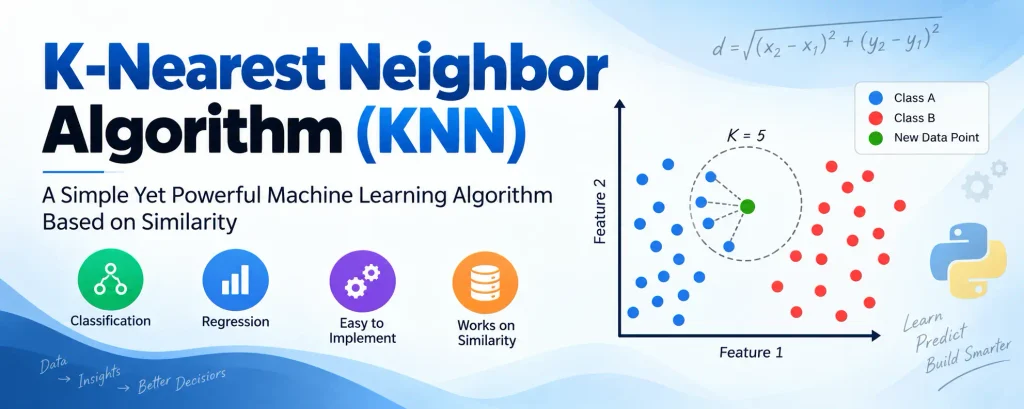
- Find the K closest data points from the training dataset using a distance metric.
- Check the classes of those neighboring data points.
- Count how many neighbors belong to each class.
- Assign the new data point to the class with the highest number of neighbors.
For example, suppose we want to determine whether an image represents a cat or a dog. If the new image is more similar to the nearby cat examples in the dataset, KNN will classify it as a cat.
Why Do We Need KNN?
Imagine that we have two categories, A and B, and a new data point x1 that needs to be assigned to one of them. If there is no predefined rule, determining the correct category can be difficult.
KNN solves this problem by looking at the similarity between data points. Instead of creating a complicated decision rule, it checks which existing observations are closest to the new observation and uses them to make the prediction.
How Does the KNN Algorithm Work Step-by-Step?
- Select the value of K, which represents the number of neighbors to consider.
- Calculate the distance between the new data point and the training data.
- Sort the distances and identify the K nearest neighbors.
- Count the classes represented by those neighbors.
- Assign the new data point to the class with the highest count.
- Use the same process to make predictions for additional data points.
Euclidean Distance Formula
One of the most commonly used distance measures in KNN is Euclidean distance.
d = √((x₂ − x₁)² + (y₂ − y₁)²)
This formula calculates the straight-line distance between two points.
Choosing the Value of K
Selecting an appropriate value of K is important because it directly affects the predictions made by the algorithm.
- K = 1 or 2: The model can become highly sensitive to noise and outliers.
- Larger K: The decision boundary becomes smoother, but very large values may make different classes less distinguishable.
- Rule of thumb: You can start with K = 5 and experiment with different values to find what works best for your dataset.
Advantages of KNN
- It is simple and intuitive to understand.
- It does not require an extensive training process.
- It works well with multi-class classification problems.
- Using a larger K value can make the algorithm less sensitive to individual noisy observations.
Disadvantages of KNN
- It can be computationally expensive because distances may need to be calculated against many training samples.
- It is sensitive to irrelevant features.
- The algorithm is sensitive to the scale of the data, so feature scaling is often important.
- The optimal value of K needs to be selected carefully.
Real-Life Example: SUV Purchase Prediction
Problem Statement
Suppose a car manufacturer wants to target advertisements toward users who are more likely to purchase a new SUV.
The company has information such as the users’ age and estimated salary, along with whether they previously purchased an SUV. We can use this data to predict whether a new user is likely to make a purchase.
Let’s solve this problem using KNN in Python.
Python Implementation of KNN
Step 1: Data Preprocessing
import numpy as np
import matplotlib.pyplot as plt
import pandas as pd

# Importing the dataset
data_set = pd.read_csv('user_data.csv')

x = data_set.iloc[:, [2, 3]].values  # Age and Estimated Salary
y = data_set.iloc[:, 4].values      # Purchased (0 or 1)

# Splitting dataset
from sklearn.model_selection import train_test_split

x_train, x_test, y_train, y_test = train_test_split(
    x, y, test_size=0.25, random_state=0
)

# Feature Scaling
from sklearn.preprocessing import StandardScaler

sc = StandardScaler()
x_train = sc.fit_transform(x_train)
x_test = sc.transform(x_test)
Step 2: Fitting the K-NN Model
from sklearn.neighbors import KNeighborsClassifier

classifier = KNeighborsClassifier(
    n_neighbors=5,
    metric='minkowski',
    p=2
)

classifier.fit(x_train, y_train)
Step 3: Predicting the Test Set
y_pred = classifier.predict(x_test)Step 4: Confusion Matrix
from sklearn.metrics import confusion_matrix

cm = confusion_matrix(y_test, y_pred)
print(cm)
For example, suppose the output is:
[[64  4]
 [ 3 29]]
This confusion matrix represents 93 correct predictions and 7 incorrect predictions.
Step 5: Visualizing the Results (Training Set)
from matplotlib.colors import ListedColormap

x_set, y_set = x_train, y_train

x1, x2 = np.meshgrid(
    np.arange(
        start=x_set[:, 0].min() - 1,
        stop=x_set[:, 0].max() + 1,
        step=0.01
    ),
    np.arange(
        start=x_set[:, 1].min() - 1,
        stop=x_set[:, 1].max() + 1,
        step=0.01
    )
)

plt.contourf(
    x1,
    x2,
    classifier.predict(
        np.array([x1.ravel(), x2.ravel()]).T
    ).reshape(x1.shape),
    alpha=0.75,
    cmap=ListedColormap(('red', 'green'))
)

plt.xlim(x1.min(), x1.max())
plt.ylim(x2.min(), x2.max())

for i, j in enumerate(np.unique(y_set)):
    plt.scatter(
        x_set[y_set == j, 0],
        x_set[y_set == j, 1],
        c=ListedColormap(('red', 'green'))(i),
        label=j
    )

plt.title('K-NN (Training Set)')
plt.xlabel('Age')
plt.ylabel('Estimated Salary')
plt.legend()
plt.show()
The visualization produces a non-linear decision boundary that separates buyers and non-buyers based on age and estimated salary.
Download New Real Time Projects :- Click here
Final Thoughts
The K-Nearest Neighbor algorithm is a great example of how a simple approach can be effective in Machine Learning. It is a non-parametric, lazy learning algorithm that does not require building an explicit model before making predictions. Instead, it relies on the concept of proximity and similarity.
KNN can be used for different classification tasks, such as identifying spam emails, predicting customer behavior, and recognizing handwritten digits.
For beginners learning Machine Learning, KNN is an excellent algorithm to study because it is easy to understand, simple to implement, and effective when properly tuned.
Stay tuned for more beginner-friendly Machine Learning guides!
Keywords: k-nearest neighbor algorithm in machine learning, KNN algorithm, KNN algorithm solved example, k-nearest neighbor algorithm example, KNN algorithm formula, KNN algorithm Python, what is K in KNN, KNN full form, KNN algorithm in machine learning Python code, K-nearest neighbor KNN algorithm in machine learning, K-nearest neighbor KNN algorithm example, K-nearest neighbor KNN algorithm Python, KNN algorithm in data mining, KNN vs K-means, K-nearest neighbor K-Nearest Neighbor Algorithm K-Nearest Neighbor Algorithm