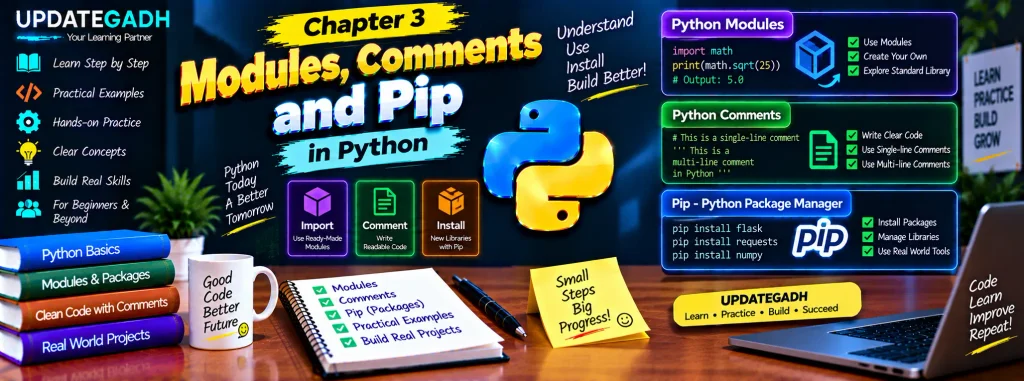
Modules, Comments, and Pip in Python
Welcome to Chapter 3 of our Python learning series. In this chapter, we will explore three important concepts that help you write cleaner, more organized, and more practical Python programs: modules, comments, and Pip. We will also create a simple Python program, learn how to use an existing module, create our own module, install an external package, and practice Python calculations.
These concepts are useful for beginners because they introduce the idea of reusing code instead of writing everything from scratch. Comments also make programs easier to understand, while Pip gives Python developers access to thousands of additional packages.
Creating Your First Python Program
Before learning modules and packages, it is useful to understand how a basic Python program is created and executed. Create a file named hello.py in your preferred text editor or IDE and add the following code:
# This is your first Python program
print("Hello, World!")  # This line prints a message to the screen
Save the file and open a terminal in the directory where the file is stored. Run the program using:
python hello.pyThe program displays Hello, World! on the screen. This simple example shows the basic process of writing Python code, saving it as a .py file, and executing it through the Python interpreter.
Understanding Python Modules
Modules are an important part of Python programming. A module is a Python file containing reusable code such as functions, variables, or classes. Instead of placing all functionality into one large program, related code can be organized into separate modules and imported whenever it is needed.
Python’s standard library already contains many useful modules. Some commonly used examples include math for mathematical operations, datetime for date and time operations, and os for interacting with the operating system.
Using the math Module
The math module provides functions that can be used for mathematical calculations. It can be imported with the import statement.
import math

# Calculate the square root
sqrt_value = math.sqrt(25)
print(f"The square root of 25 is {sqrt_value}")

# Calculate the sine of an angle
angle = math.radians(90)
sine_value = math.sin(angle)
print(f"The sine of 90 degrees is {sine_value}")
Here, math.sqrt() calculates the square root of a number. The math.radians() function converts degrees into radians, which can then be used with math.sin().
Creating Your Own Python Module
Python also allows you to create your own modules. Any Python file containing reusable code can be used as a module. This is helpful when you want to separate related functions from the main program.
Create a file called mymodule.py and add:
# mymodule.py

def greet(name):
    return f"Hello, {name}!"

def add_numbers(a, b):
    return a + b
Now create another file called main.py in the same directory and import the module:
# main.py

import mymodule

greeting = mymodule.greet("Alice")
print(greeting)

result = mymodule.add_numbers(10, 5)
print(f"The result of addition is {result}")
The import mymodule statement makes the functions from the module available to the main program. The functions can then be called using the module name followed by a dot and the function name.
Creating modules like this helps keep programs organized and allows the same functions to be reused in different Python files.
Introduction to Pip: Python’s Package Manager
Pip is a package management tool used with Python. It allows developers to install additional Python packages and libraries that are not part of the standard library.
For example, Flask is a popular Python web framework that can be installed using Pip. Open your terminal and run:
pip install flaskAfter installation, Flask can be imported into a Python program.
Simple Flask Example
from flask import Flask

app = Flask(__name__)

@app.route("/")
def home():
    return "Welcome to Flask!"

if __name__ == "__main__":
    app.run(debug=True)
This example creates a small Flask application. The route for / returns the message Welcome to Flask! when the application is accessed through a web browser.
Pip is therefore useful when a project requires functionality that is not available through Python’s built-in modules.
Using Python as a Calculator
Python can also be used to perform calculations. You can enter mathematical expressions directly into the Python interpreter or write them inside a Python program.
Basic Arithmetic Operations
addition = 10 + 5
subtraction = 10 - 5
multiplication = 10 * 5
division = 10 / 5
exponentiation = 10 ** 2

print(f"Addition: {addition}")
print(f"Subtraction: {subtraction}")
print(f"Multiplication: {multiplication}")
print(f"Division: {division}")
print(f"Exponentiation: {exponentiation}")
This program demonstrates addition, subtraction, multiplication, division, and exponentiation. Python’s ability to evaluate expressions makes it useful for both simple calculations and larger programs.
Comments in Python
Comments are written explanations inside source code. They help programmers understand what different parts of a program are doing. Comments are especially useful when returning to an older project or sharing code with other developers.
Single-Line Comments
A single-line comment begins with the # symbol. Python ignores everything written after the symbol on that line.
# This is a single-line comment

x = 10  # Assigning the value 10 to variable x
Comments can be placed above a statement to explain it or at the end of a statement when a short explanation is needed.
Multiline Comments
Longer explanations can be written using multiple comment lines.
# This is an example of a
# multiline explanation.
# Each line begins with a hash symbol.
Triple-quoted strings using """ or ''' are also commonly seen for longer blocks of text:
"""
This is an example of a
multiline text block.
It can span multiple lines.
"""
In Python, triple-quoted strings are technically string literals rather than a dedicated multiline comment syntax, but they are commonly used for documentation strings and explanatory text.
Practical Exercise: Combining the Concepts
Now let’s combine modules, functions, comments, and user input in a small Circle Area Calculator.
# calculator.py

import math

def calculate_circle_area(radius):
    """Calculates the area of a circle given its radius."""
    return math.pi * radius ** 2

def main():
    # Print a welcome message
    print("Welcome to the Circle Area Calculator!")

    # Get the radius from the user
    radius = float(input("Enter the radius of the circle: "))

    # Calculate the area
    area = calculate_circle_area(radius)

    # Display the result
    print(f"The area of the circle is: {area}")

if __name__ == "__main__":
    main()
This program uses the math module to access math.pi, defines a reusable function for calculating the area, accepts a value from the user, and displays the result. Comments explain the important sections, making the program easier to follow.
Chapter 3 Practice Set
1. Display Text Using print()
Write a Python program that displays the following two lines:
Python is fun!
Let's learn Python together!
2. Calculate the Sum of the First 10 Positive Integers
Use the Python REPL to calculate the sum of the first ten positive integers. You can solve the problem using a loop or Python’s sum() function.
3. Install and Use the requests Module
Install the requests package using Pip and create a program that uses it to fetch data from a public API. The original exercise suggests retrieving and displaying weather information for a specific city using the OpenWeatherMap API.
4. List Files and Directories
Write a Python program that uses the os module to display all files and directories in the current working directory. Research the appropriate function provided by the os module.
5. Add Detailed Comments
Take the program from the previous exercise and add detailed comments. Explain the purpose of each important section so that another person can understand the code more easily.
Complete Advance AI Topics: Click Here
SQL Tutorial: Click Here
YT:- DecodeIT
Why Modules, Comments, and Pip Matter
Modules, comments, and Pip each serve a different purpose in Python development. Modules help organize and reuse code, comments make code easier to understand, and Pip provides access to external packages that extend Python’s capabilities.
Together, these concepts help beginners move beyond very small programs and start understanding how larger Python projects are structured. Learning them early also makes it easier to work with libraries and frameworks in future chapters.
Conclusion
In this chapter, we learned how to create and execute a basic Python program and explored the role of modules in organizing reusable code. We used the built-in math module, created a custom module, and learned how Pip can install external packages such as Flask.
We also explored Python comments, performed basic calculations, and built a practical Circle Area Calculator that combines several concepts. Finally, the practice exercises provide opportunities to apply modules, Pip, comments, and basic Python programming skills.
FAQs – Modules, Comments, and Pip in Python
1. What is a module in Python?
A module is a Python file containing reusable code such as functions, variables, or classes that can be imported into another Python program.
2. Why are Python modules useful?
Modules help organize code into separate files and make reusable functionality available to different programs.
3. What is Pip in Python?
Pip is a package management tool used to install and manage additional Python packages.
4. How do you install a Python package with Pip?
Use the command pip install package_name in the terminal. For example, Flask can be installed with pip install flask.
5. How do you create a Python module?
Create a Python file with a .py extension and place reusable functions, variables, or classes inside it. The file can then be imported into another Python program.
6. How are comments written in Python?
Single-line comments begin with the # symbol. Multiple comment lines can be written by placing # at the beginning of each line.
7. Can Python be used as a calculator?
Yes. Python can directly evaluate arithmetic expressions such as addition, subtraction, multiplication, division, and exponentiation.
8. Why should programmers use comments?
Comments explain the purpose of code and make programs easier to read, understand, maintain, and share.
Keywords: Modules Comments and Pip in Python, Python modules, Python comments, Pip in Python, Python package manager, create Python module, Python math module, install Python packages, Python practice exercises