Web Scraping Using Python
Web scraping is a technique used to automatically collect information from websites and organize it into a structured format. Instead of manually copying large amounts of information, a Python program can retrieve webpage content and extract the required data for further use.
Web scraping is commonly used in data-driven projects such as market research, price monitoring, news tracking, and data collection. Python makes this process accessible because it provides several useful libraries for sending requests, parsing webpages, automating browsers, and processing collected data.
What is Web Scraping?
Web scraping is the automated process of gathering information from webpages. The extracted information can be stored locally in formats such as CSV, JSON, or a database for later analysis.
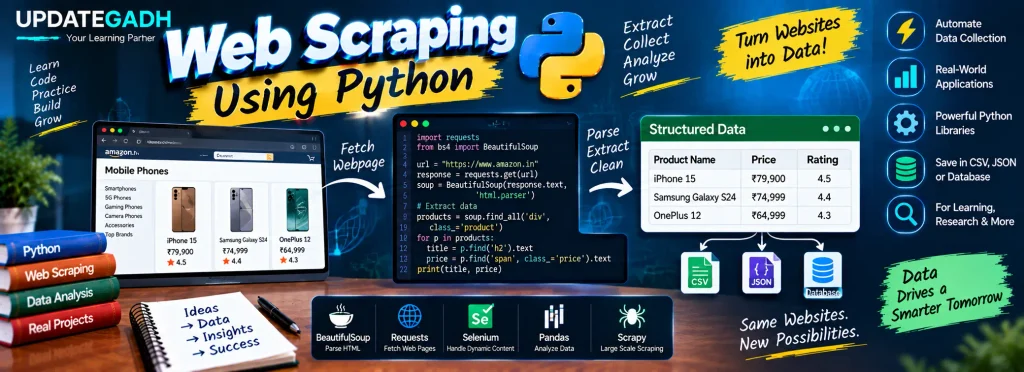
For example, suppose you want to build a phone comparison website. You may need information such as mobile models, prices, and ratings from different e-commerce websites. Collecting this information manually can take considerable time. Web scraping can automate the collection process and organize the required information efficiently.
Why Use Web Scraping?
Web scraping can be useful for several types of data collection and analysis tasks, including:
- Dynamic Price Monitoring: Collect product prices from e-commerce websites for monitoring and comparison.
- Market Research: Gather information about market trends, competitors, and consumer behavior.
- Email Gathering: Collect publicly available email information for appropriate marketing activities.
- News Monitoring: Track news content and developments relevant to a business or research project.
- Social Media Analysis: Analyze publicly available trends, hashtags, or sentiment-related information.
- Research and Development: Collect statistical, environmental, or other publicly available information for research.
Is Web Scraping Legal?
The legality and permitted use of web scraping can depend on the website, the type of information being collected, applicable laws, and the site’s terms and policies.
Scraping publicly accessible information does not automatically mean that every use is permitted. You should review the website’s terms of service and robots.txt guidance where applicable. Avoid collecting nonpublic information or attempting to bypass authentication, security controls, or other access restrictions.
Why Use Python for Web Scraping?
Python is widely used for web scraping because it combines a straightforward syntax with libraries designed for different scraping requirements.
- Simplicity: Python syntax is relatively easy to understand and write.
- Libraries: Libraries such as BeautifulSoup, Selenium, Scrapy, and Requests support different web scraping tasks.
- Versatility: Python can handle basic webpage extraction as well as data processing and analysis.
- Open-Source Community: Python has a large ecosystem of documentation, libraries, and community resources.
The Basics of Web Scraping
A basic web scraping workflow generally involves two important components:
- Web Crawler or Spider: An automated program that visits webpages and locates relevant content.
- Web Scraper: A program or component that extracts the required information from the webpages.
How Does Web Scraping Work?
A typical Python web scraping process can be divided into four main steps.
1. Find the URL to Scrape
First, identify the website and the specific information that you want to collect.
2. Inspect the Page
Use your browser’s developer tools by selecting Inspect. Examine the HTML structure to determine which elements contain the required information.
3. Write the Python Code
Use an appropriate Python library to request the webpage and extract the required content from its HTML structure.
4. Store the Data
After extraction, the collected information can be stored in formats such as CSV or JSON, or inserted into a database for further processing.
Python Libraries for Web Scraping
| Library | Purpose | Installation |
|---|---|---|
| BeautifulSoup | Parses HTML and XML documents. | pip install bs4 |
| Selenium | Automates browser interactions and is useful for dynamic content. | pip install selenium |
| Pandas | Helps manipulate and analyze collected data. | pip install pandas |
| Requests | Sends HTTP requests and retrieves webpage content. | pip install requests |
Example: Web Scraping Using BeautifulSoup
The following example retrieves a Wikipedia webpage and extracts its section headings using BeautifulSoup.
from bs4 import BeautifulSoup
import requests

# Step 1: Make a request to the website
url = "https://en.wikipedia.org/wiki/Machine_learning"
response = requests.get(url)

# Step 2: Parse the webpage content
soup = BeautifulSoup(response.text, 'html.parser')

# Step 3: Extract headings
headings = soup.select('.mw-headline')

for heading in headings:
    print(heading.text)
Output: The program prints the section headings available on the Machine Learning Wikipedia page.
Advanced Example: Scraping and Storing Data
Web scraping can also be combined with file handling. The following example extracts article titles and links and saves them into a CSV file.
import csv
from bs4 import BeautifulSoup
import requests

# Step 1: Fetch the webpage
url = "https://example.com/articles"
response = requests.get(url)

soup = BeautifulSoup(response.text, 'html.parser')

# Step 2: Extract article titles and links
articles = soup.find_all('h2', class_='article-title')

# Step 3: Store the data in a CSV file
with open('articles.csv', 'w', newline='', encoding='utf-8') as file:
    writer = csv.writer(file)
    writer.writerow(["Title", "Link"])

    for article in articles:
        title = article.text.strip()
        link = article.a['href']
        writer.writerow([title, link])
This approach collects the selected article information and writes the title and link of each article into articles.csv.
Complete Advance AI Topics: Click Here
SQL Tutorial: Click Here
YT:- DecodeIT
Frequently Asked Questions
1. What is web scraping using Python?
Web scraping using Python is the process of automatically retrieving webpage information and extracting required data with Python libraries.
2. Which Python library is commonly used for HTML parsing?
BeautifulSoup is commonly used to parse HTML and XML documents and extract information from their structure.
3. Can Python scrape dynamic websites?
Python can work with dynamic webpages using tools such as Selenium, which can automate browser interactions.
4. What is BeautifulSoup used for?
BeautifulSoup is used to parse webpage HTML or XML and locate specific elements or information within the document.
5. Can scraped data be saved in CSV format?
Yes. Python’s csv module can be used to write extracted information into a CSV file.
6. Is web scraping always legal?
No single rule applies to every website and situation. You should consider applicable laws, website terms, access restrictions, and the nature of the data being collected.
Conclusion
Web scraping using Python provides a practical way to collect and organize information from webpages. With libraries such as BeautifulSoup, Requests, Selenium, and Pandas, Python can support different stages of the scraping and data-processing workflow.
By understanding how to identify webpage elements, retrieve content, extract information, and store the results, you can build useful data collection projects while respecting website policies and applicable legal requirements.
Keywords: Web Scraping Using Python, web scraping using Python BeautifulSoup, web scraping using Python projects, web scraping using Python libraries, web scraping using Python example, web scraping using Python Selenium, Python web scraping tutorial, Python web scraper, BeautifulSoup web scraping, Python web scraping example