Python Arrays
Arrays are an important data structure used across programming languages such as C, C++, Java, JavaScript, and Python. They offer a simple way to keep multiple values together in one container, making it easier to access, modify, search, and manage related data efficiently.
In Python, arrays can be created using the built-in array module. Unlike a regular Python list, an array created with this module stores elements of the same type. This makes arrays useful when working with collections of numeric or similarly typed values.
What is an Array?
An array is a collection that stores multiple elements under one variable name. Each element can be accessed using an index. Instead of creating separate variables for related values, an array allows them to be managed together.
For example, without an array, you could write:
car1 = "Lamborghini"
car2 = "Bugatti"
car3 = "Koenigsegg"
Using a collection, these values can be grouped together:
cars = ["Lamborghini", "Bugatti", "Koenigsegg"]This approach makes it easier to loop through values and perform operations on multiple elements.
Key Concepts of Arrays
- Element: Each individual value stored in an array is called an element.
- Index: The position of an element in an array. Python indexing starts from
0. - Dynamic Memory Allocation: Python’s array structure can grow or shrink as elements are added or removed.
Download New Real Time Projects: Click here
Array Representation
Arrays provide several useful characteristics for storing and accessing data:
- Indexing: Array elements are accessed using their index, beginning with
0. - Length: The length represents the current number of elements stored in the array.
- Direct Access: Individual elements can be accessed directly by specifying their index.
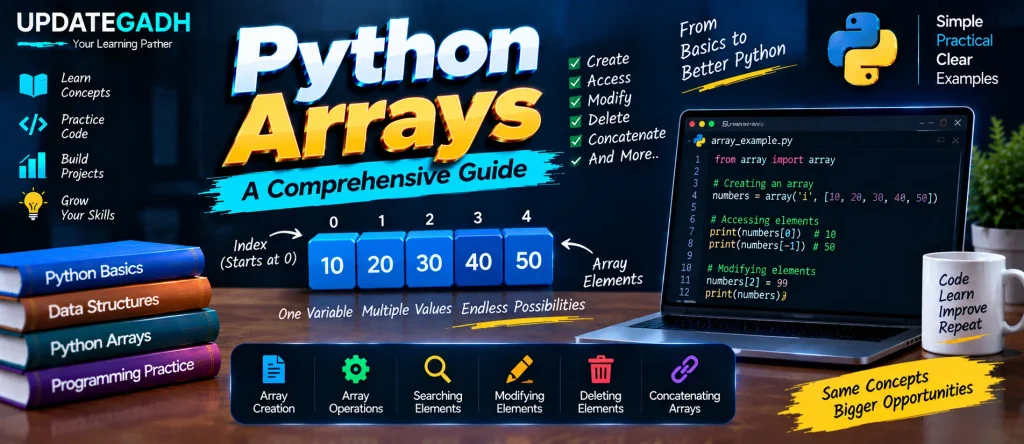
For example, if an array contains [10, 20, 30], the first element is available at index 0, while the last element is available at index 2.
Common Array Operations
Several basic operations can be performed on arrays:
- Traversal: Accessing or displaying elements one by one.
- Insertion: Adding an element to an array.
- Deletion: Removing an element from an array.
- Search: Finding a required element or value.
- Update: Changing the value of an existing element.
Creating an Array in Python
Python provides the array module for creating typed arrays. The general syntax is:
from array import *
arrayName = array(typecode, [initializers])
The type code specifies the type of values that the array can contain.
Accessing Array Elements
Array elements can be accessed using their index. Python also supports negative indexing, which makes it possible to access elements from the end of the array.
import array as arr

a = arr.array('i', [2, 4, 5, 6])

print("First element:", a[0])
print("Last element:", a[-1])
Output:
First element: 2
Last element: 6
Here, a[0] accesses the first element, while a[-1] accesses the final element.
Modifying Array Elements
Arrays are mutable, so existing elements can be changed after the array has been created. Individual positions or multiple elements can be updated.
import array as arr

numbers = arr.array('i', [1, 2, 3, 5, 7, 10])

numbers[0] = 0
numbers[5] = 8
numbers[2:5] = arr.array('i', [4, 6, 8])

print(numbers)
Output:
array('i', [0, 2, 4, 6, 8, 8])The example changes individual elements and also replaces a group of elements using slicing.
Deleting Array Elements
The del statement can be use remove an element from an array by specifying it is index.
import array as arr

numbers = arr.array('i', [1, 2, 3, 4])

del numbers[2]

print(numbers)
Output:
array('i', [1, 2, 4])In this example, the element at index 2 is removed from the array.
Finding the Length of an Array
The len() function returns the number of elements currently stored in an array.
length = len(numbers)
print("Length of the array:", length)
This is useful when you need to determine how many elements are available before performing an operation or iteration.
Concatenating Arrays
Complete Advance AI Topics: Click Here
SQL Tutorial: Click Here
YT:- DecodeIT
The + operator can be use a combine two arrays. The arrays should contain compatible element type.
import array as arr

a = arr.array('d', [1.1, 2.1, 3.1])
b = arr.array('d', [3.7, 8.6])

c = a + b

print("Concatenated Array:", c)
Output:
Concatenated Array: array('d', [1.1, 2.1, 3.1, 3.7, 8.6])The two arrays are combined into a new array containing the elements of both.
Why Use Arrays in Python?
- Efficiency: Arrays provide compact way store value the same type.
- Flexibility: Elements can be added, removed, accessed, and modified as required.
- Convenience: Indexing and common operations make it easier to work with collections of values.
- Simple Data Management: Related values can be maintained under a single variable instead of using multiple variables.
Python Arrays vs Lists
Python arrays and lists can both store multiple values, but they are designed differently. The array module provides typed arrays, while Python lists can contain values of different types. For collections where a common data type is required, the array module can provide a suitable structure.
Conclusion
Python arrays provide a useful way to store and manage collections of values with a common data type. Using the array module, you can create arrays, access elements through indexes, modify values, delete elements, find their length, and concatenate compatible arrays.
Understanding these basic array operations is helpful for learning Python data structures and working with collections of numeric or similarly typed data.
FAQs – Python Arrays
1. What is an array in Python?
An array is a collection used to store multiple values under a single variable. Python provides the array module for creating typed arrays.
2. How do you create an array in Python?
You can create an array using the array module:
import array as arr
numbers = arr.array('i', [1, 2, 3, 4])
3. What is an index in a Python array?
An index represents the position of an element in an array. Python array indexing starts from 0.
4. How can you access an array element in Python?
Use the element’s index:
numbers[0]This accesses the first element of the array.
5. Can Python arrays be modified?
Yes. Python arrays are mutable, so existing elements can be changed using their indexes.
6. How do you delete an element from a Python array?
The del statement can remove an element by its index:
del numbers[2]7. How do you find the length of an array in Python?
Use the len() function:
len(numbers)It returns the number of elements currently stored in the array.
8. How can two Python arrays be concatenated?
Compatible arrays can be combined using the + operator:
c = a + bThis creates a new array containing the elements from both arrays.
Keywords: Python Arrays, Python Array, array in Python example, Python array module, Python array methods, types of array in Python, Python array vs list, NumPy array in Python, Python 2D array, Python Arrays tutorial