Python Syntax, Variables and Data Types
Welcome to Day 2 of our 45-day Python course. In the previous chapter, we focused on installing Python and preparing the development environment. Now it is time to understand some of the core concepts that form the foundation of Python programming: syntax, variables, and data types.
Python is popular because its syntax is clean and easy to read. However, beginners still need to understand important rules such as indentation, statements, variable naming, data types, input and output, type conversion, and basic operations. In this chapter, we will explore these concepts with simple examples and practice exercises.
What Is Python Syntax?
Python syntax refers to the rules used to write Python programs correctly. Just as natural languages have grammar rules, programming languages have syntax rules that tell the interpreter how code should be structured.
Python is designed to keep its syntax readable. One of its most important features is indentation, which is used to define blocks of code.
1. Indentation
Python uses indentation to identify the statements that belong to a particular block. Consistent indentation is therefore essential when writing Python code.
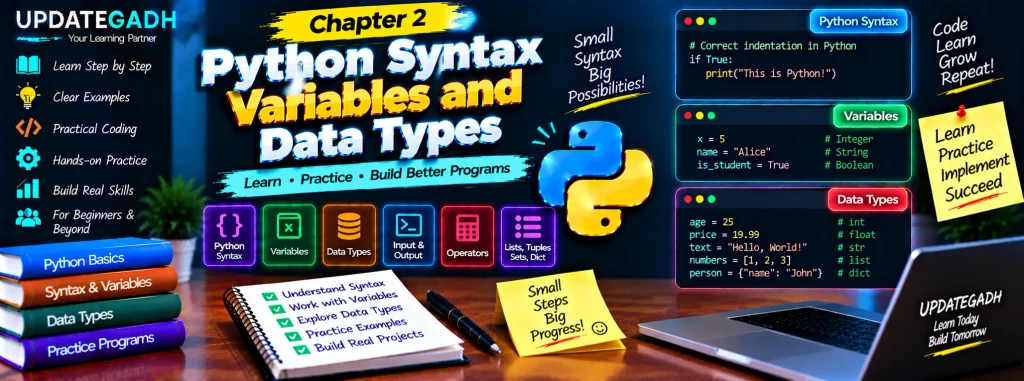
if True:
    print("This is correctly indented")
The print() statement is indented because it belongs to the if block. Incorrect indentation can result in an error.
2. Comments
Comments are used to explain code. Python ignores comments while executing the program. A single-line comment begins with the # symbol.
# This is a single-line commentLonger explanatory text can also be written using triple quotes:
"""
This is a multi-line text block.
It can span several lines.
"""
Comments are useful for making code easier to understand, especially when working on larger programs.
3. Statements
Statement is instruction that Python can execute. Most Python programs contain several statements arranged in a logical order. Expressions can also be continued across multiple lines when appropriate.
total = (1 + 2 + 3 +
         4 + 5 + 6)

print(total)
Using parentheses is a convenient way to continue an expression over multiple lines while keeping the code readable.
Variables in Python
Variables are use to store values that program can access and manipulate. Unlike some programming languages, Python does not require you to declare a variable’s data type before assigning a value. Python determines the type from the value assigned.
Variable Assignment
x = 5
name = "Alice"
is_student = True
Here, x stores an integer, name stores a string, and is_student stores a Boolean value.
Rules for Naming Variables
Python variable names must follow specific rules:
- A statement is a instruction that Python can executeariable name must start with a letter or an underscore.
- After the first character, it can contain letters, numbers, and underscores.
- Variable names are case-sensitive.
- Spaces are not allowed in variable names.
- Reserved Python keywords such as
class,if, andelseshould not be used as variable names.
For example, age and Age are treated as different variable names because Python is case-sensitive.
Multiple Assignments
Python allow several variables to be assigned values in single statement.
a, b, c = 1, 2, 3

x = y = z = 0
In the first example, three different values are assigned to three variables. In the second example, all three variables receive the value 0.
Data Types in Python
Data type determines what kind of value variable contains. Python supports several built-in data types for representing numbers, text, Boolean values, and collections of data.
1. Numeric Types
Python provides three common numeric types: integers, floating-point numbers, and complex numbers.
Integer
An integer is a whole number without a decimal point.
age = 25
count = 10
temperature = -5
Float
A float represents a number containing a decimal point.
price = 19.99
height = 5.7
pi = 3.14159
Complex
Complex number contains a real part and an imaginary part. Python uses j to represent the imaginary component.
complex_num = 1 + 2j2. String
String is sequence of characters used to represent text. Strings can be enclosed in single or double quotation marks.
message = "Hello, World!"
greeting = 'Hello'
Python also supports multiline strings using triple quotes.
multi_line = """This is a
multi-line string"""
3. Boolean
Boolean values represent one of two possible states: True or False. They are commonly used in conditions and logical operations.
is_active = True
has_license = False
4. List
A list is an ordered and mutable collection. It can contain values of different data types.
fruits = ["apple", "banana", "cherry"]Lists can be modified after creation.
fruits[1] = "blueberry"
fruits.append("date")
fruits.remove("cherry")

print(fruits)
Individual elements can be accessed using their index, and slicing can be used to obtain a portion of a list.
first_fruit = fruits[0]
subset = fruits[1:3]
5. Tuple
A tuple is an ordered collection that is immutable. Once created, its elements cannot be changed.
point = (4, 5)

x = point[0]
y = point[1]
Tuples are useful for grouping related values that should remain unchanged.
6. Set
A set is a collection of unique values. It does not maintain items according to a fixed index-based order.
unique_numbers = {1, 2, 3, 4}Sets are useful when duplicate values are not required.
7. Dictionary
A dictionary stores information as key-value pairs. Each key can be used to access its corresponding value.
student = {
    "name": "John",
    "age": 21,
    "courses": ["Math", "Science"]
}
Dictionaries are useful when information needs to be organized using descriptive keys.
Printing Output in Python
The print() function is used to display information on the console.
print("Hello, World!")You can also print variables and expressions:
name = "Alice"
print(name)
Taking Input from the User
The input() function allows a Python program to receive information from the user.
name = input("Enter your name: ")
print("Hello, " + name + "!")
The entered value is stored in the name variable and then used in the greeting.
Basic Arithmetic Operations
Python supports common mathematical operations using arithmetic operators.
a = 10
b = 3

sum = a + b
difference = a - b
product = a * b
quotient = a / b
remainder = a % b
power = a ** b

print(sum)
print(difference)
print(product)
print(quotient)
print(remainder)
print(power)
The + operator performs addition, - performs subtraction, * performs multiplication, / performs division, % returns the remainder, and ** performs exponentiation.
Data Type Conversion
Python provides built-in functions that allow values to be converted from one data type to another when appropriate. Common conversion functions include int(), float(), and str().
num_str = "123"
num_int = int(num_str)

height = 5.7
height_str = str(height)

print(num_int)
print(height_str)
Type conversion is particularly useful when working with user input because values received through input() are strings by default.
String Operations
Python provides several operations and methods for working with strings. Strings can be joined together, converted to different cases, and measured using built-in functions.
greeting = "Hello"
name = "Alice"

message = greeting + ", " + name + "!"

upper_case = message.upper()
lower_case = message.lower()
title_case = message.title()
length = len(message)

print(message)
print(upper_case)
print(lower_case)
print(title_case)
print(length)
Here, the + operator combines strings, while upper(), lower(), and title() change their letter formatting. The len() function returns the number of characters.
Working with Lists
Lists can store multiple values and provide several operations for accessing and modifying their contents.
fruits = ["apple", "banana", "cherry"]

first_fruit = fruits[0]

fruits[1] = "blueberry"
fruits.append("date")
fruits.remove("cherry")

subset = fruits[1:3]

print(fruits)
print(first_fruit)
print(subset)
This example demonstrates accessing an element, modifying an existing element, adding a new value, removing an item, and slicing the list.
Working with Tuples
Tuples are useful for storing a fixed group of related values.
coordinates = (10.0, 20.0)

x = coordinates[0]
y = coordinates[1]

print(x)
print(y)
Python also allows multiple assignment using tuple-style syntax:
a, b = 1, 2

print(a)
print(b)
Working with Dictionaries
Dictionaries organize information using keys and values. Values can be accessed, modified, added, or removed through their keys.
person = {
    "name": "Alice",
    "age": 30,
    "is_student": True
}

person_name = person["name"]

person["age"] = 31
person["height"] = 5.7

del person["is_student"]

for key, value in person.items():
    print(key, value)
The items() method allows you to iterate through both the keys and values stored in the dictionary.
Practice Exercises: Python Syntax, Variables and Data Types
Complete Advance AI Topics: Click Here
SQL Tutorial: Click Here
YT:- DecodeIT
1. Print Your Name
Write a Python program that asks the user for their name and then prints a greeting using the entered name.
2. Simple Calculator
Create a program that accepts two numbers from the user and displays their sum, difference, product, and quotient.
Conclusion
In this chapter, we explored the fundamental syntax rules used when writing Python programs. We learned how indentation defines code blocks, how comments explain code, and how statements form the basic instructions of a Python program.
We also learned how variables store values and how Python automatically determines their data types. Numeric values, strings, Boolean values, lists, tuples, sets, and dictionaries provide different ways to represent and manage information.
Finally, we practiced input and output, arithmetic operations, type conversion, string operations, lists, tuples, and dictionaries. These concepts provide an important foundation for the upcoming chapters of the Python course.
FAQs – Python Syntax, Variables and Data Types
1. What is Python syntax?
Python syntax is the set of rules that determines how Python code should be written and structured so that the interpreter can execute it.
2. Why is indentation important in Python?
Python uses indentation to define blocks of code. Consistent indentation is therefore required for correctly structured programs.
3. What is a variable in Python?
A variable is a name used to store or refer to a value that can be accessed and manipulated by a program.
4. Does Python require variable type declarations?
No. Python automatically determines the type based on the value assigned to the variable.
5. What are common Python data types?
Common data types include integers, floats, complex numbers, strings, Booleans, lists, tuples, sets, and dictionaries.
6. What is the difference between a list and a tuple?
A list is mutable, meaning its contents can be modified. A tuple is immutable after it has been created.
7. What does input() do in Python?
The input() function accepts information entered by the user and returns it as a string.
8. What is type conversion?
Type conversion means changing a value from one data type to another, such as converting a string into an integer using int().
Keywords: Python Syntax Variables and Data Types, Python syntax, Python variables, Python data types, Python syntax for beginners, Python variable assignment, Python list, Python tuple, Python dictionary, Python type conversion