Welcome to Chapter 5 of our 45-day Python course. In this chapter, we will learn the fundamentals of Input/Output (I/O) operations in Python. I/O is an essential part of programming because applications need ways to receive information and communicate results. Python provides simple built-in functions such as input() and print() that make basic interaction straightforward for beginners.
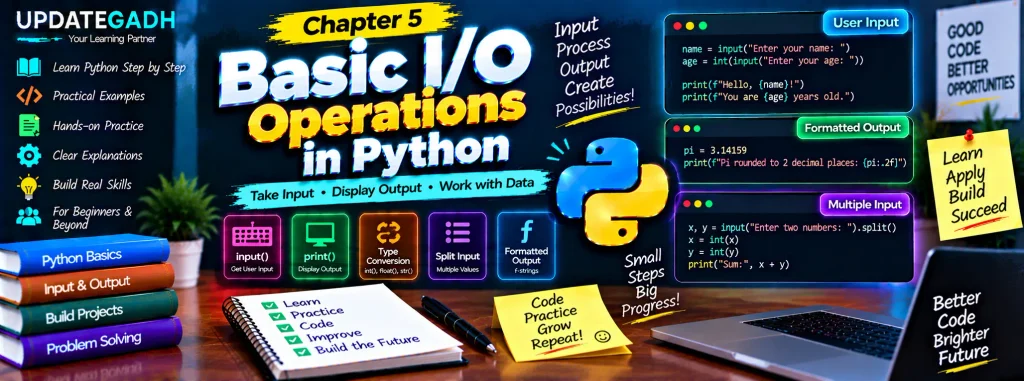
What Are I/O Operations?
I/O operations describe the movement of information into and out of a program. Input means receiving data that the program can process, while output means presenting information produced by the program.
Input Operations
Input operations collect information from a user or another source and make it available to the program. In beginner Python programs, keyboard input is commonly handled with input().
Output Operations
Output operations send information from the program to a destination such as the screen. The print() function is the most common way to display output in a basic Python program.
Taking Input in Python
Python uses the input() function to read a line entered by the user. The function displays an optional prompt, waits for the user to type something, and returns the entered value as a string.
Basic Input Example
name = input("Enter your name: ")
print("Hello, " + name + "!")
Here, input() displays a prompt and stores the user’s response in name. The print() function then combines the greeting with the value stored in the variable.
Understanding the Default Input Type
One important point for beginners is that input() returns a string, even when the user enters a number. If a program needs a numeric value, the input should be converted into the required type.
age = input("Enter your age: ")
age = int(age)
print("You are " + str(age) + " years old.")
The first statement reads the value as text. int(age) converts it into an integer. Before combining the integer with text using +, str(age) converts it back to a string.
Input with Different Data Types
Python provides conversion functions that can be used with input(). For example, int() is used for integers and float() is used for decimal numbers.
age = int(input("Enter your age: "))
height = float(input("Enter your height: "))
This approach performs the conversion immediately after the user enters the value. The program can then use age in integer calculations and height in floating-point calculations.
Reading Multiple Values
Python also allows a program to accept multiple values from one line. The split() method can separate the entered text into individual parts.
x, y = input("Enter two numbers separated by a space: ").split()
x = int(x)
y = int(y)
print("Sum:", x + y)
If the user enters two values separated by a space, split() divides the input into separate strings. Those values are assigned to x and y and then converted to integers for addition.
Displaying Output in Python
The print() function is used to display information on the screen. It can show text, numbers, variables, expressions, and formatted messages.
Basic Output Example
print("Welcome to Python programming!")This statement sends the text inside the quotation marks to the output screen.
Printing Variables
Variables can be displayed in several ways. A simple approach is to pass multiple values to print().
name = "UPDATEGADH"
age = 30
print("Name:", name)
The comma separates the values, and print() automatically places a space between them.
Using f-Strings
F-strings provide a convenient way to place variables and expressions directly inside a string.
name = "UPDATEGADH"
age = 30
print(f"Name: {name}, Age: {age}")
The f before the quotation mark tells Python that the string is formatted. Expressions written inside curly braces are evaluated and inserted into the resulting output.
Formatting Numeric Output
Output can also be formatted when displaying decimal values. For example, the following statement displays pi with two digits after the decimal point.
pi = 3.14159
print(f"Pi rounded to 2 decimal places: {pi:.2f}")
The .2f format specification tells Python to display the floating-point value with two decimal places.
Combining Input and Output
Many beginner programs combine input and output. A program can ask the user for values, perform an operation, and then display the result.
Example: Simple Calculator
num1 = float(input("Enter the first number: "))
num2 = float(input("Enter the second number: "))

print(f"The sum is: {num1 + num2}")
print(f"The difference is: {num1 - num2}")
print(f"The product is: {num1 * num2}")
print(f"The quotient is: {num1 / num2}")
This calculator accepts two numbers as floating-point values. It then performs addition, subtraction, multiplication, and division before displaying each result. Converting the input with float() allows the program to work with both whole-number and decimal values.
Why Basic I/O Matters in Python
Basic I/O is important because it forms the foundation of interactive programming. Once you understand input and output, you can create programs that collect information, process it, and communicate useful results.
These concepts are also useful when learning larger Python topics. User input is commonly used in practice programs, while output helps developers inspect results and understand what their programs are doing. A strong understanding of input types, conversion, and output formatting can make later Python lessons easier to follow.
Common Mistakes to Avoid
Beginners often encounter a few simple mistakes while working with I/O operations.
First, remember that input() returns a string. Trying to perform numeric calculations directly on unconverted input can produce errors or unexpected behavior.
Second, use the appropriate conversion function. Use int() for integer values and float() for decimal values.
Third, make sure the number of values matches the variables when using split(). For example, assigning two input values to x and y requires two values in the entered input.
Finally, be careful when performing division. If the second number is zero, Python cannot perform ordinary division and will raise an error.
Practice Exercises: Basic I/O Operations
1. User Greeting Program
Create a program that asks the user for their name, age, and favorite color. Display a personalized message using all three values.
2. Basic Arithmetic Calculator
Extend the calculator example so that the user can choose an operation such as addition, subtraction, multiplication, or division before entering the numbers.
3. Temperature Converter
Write a program that accepts a temperature in Fahrenheit and converts it to Celsius. Display the converted temperature clearly.
4. Student Information Program
Ask the user for a student’s name, course, and marks. Display all the entered information in a formatted message.
5. Rectangle Calculator
Ask the user for the length and width of a rectangle, then calculate and display its area and perimeter.
Complete Advance AI Topics: Click Here
SQL Tutorial: Click Here
YT:- DecodeIT
Conclusion
Basic Input/Output operations are among the first Python concepts every beginner should understand. The input() function allows programs to receive information, while print() makes it possible to display messages and results. Converting input values with int() and float(), reading multiple values with split(), and formatting results with f-strings make these operations more useful.
By practicing small interactive programs, you can build confidence with variables, data types, expressions, and user interaction. These skills will become useful throughout the rest of your Python learning journey.
FAQs – Basic I/O Operations in Python
1. What is I/O in Python?
I/O stands for Input/Output. Input allows a program to receive data, while output allows it to display or send information.
2. What does input() do in Python?
The input() function reads a line entered by the user and returns the entered value as a string.
3. Why does input() return a string?
Python treats keyboard input as text by default. If another data type is required, the value must be converted using functions such as int() or float().
4. How can I take an integer as input?
Use int() together with input(), such as int(input("Enter a number: ")). This converts the entered text into an integer.
5. How can I take a decimal number as input?
Use float() with input(), for example float(input("Enter a value: ")). The result is stored as a floating-point number.
6. What is the purpose of split() with input()?
split() separates an input string into multiple parts, allowing a program to read several values from one line.
7. What is an f-string?
An f-string is a formatted string that lets you place variables and expressions inside curly braces within a string.
8. Why is print() used in Python?
print() displays text, variables, expressions, and formatted results on the output screen.
Keywords: Basic I/O Operations in Python, Python input function, Basic I/O operation,Python output function, input() in Python, print() in Python, Python user input, Python f-string, Python split function,I/O operation,I/O operation,Basic I/O operation