Variables and Data Types in Python
Variables or data types are among the most important concepts for anyone beginning to learn Python. A Python program needs a way to store information, work with different kinds of values, perform calculations, compare data, and make decisions. Variables provide a convenient way to store values, while data types tell Python what kind of information those values represent.
In this chapter, we will learn how variables work in Python, understand common data types, explore the rules for naming variables, and study important operators such as arithmetic, assignment, comparison, and logical operators. We will also create a practical program that combines these concepts and finish with exercises for practice.
Introduction to Variables
Variable in Python is name used to refer to a value stored in memory. Instead of working directly with a value every time, we can assign that value to a variable and use the variable whenever required. This makes programs easier to understand, modify, and maintain.
Python does not require you to specify the type of a variable when creating it. The type is automatically determined from the value assigned to the variable.
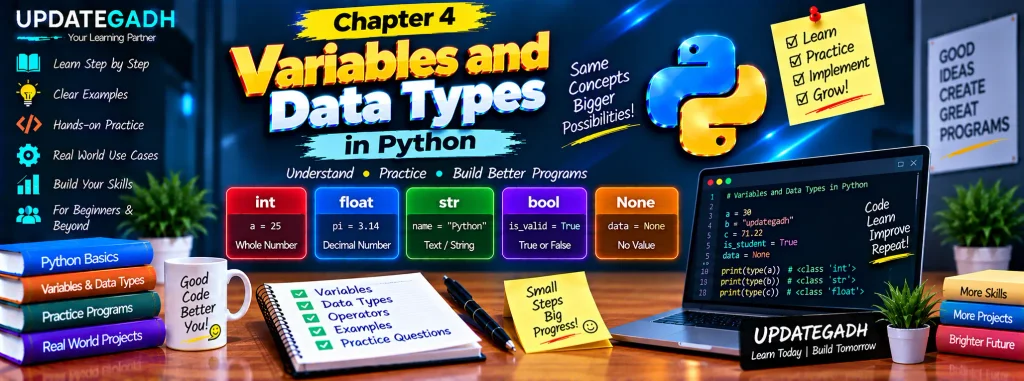
a = 30
b = "updategadh"
c = 71.22

print(a)
print(b)
print(c)
In this example, a stores the integer value 30, b stores the string "updategadh", and c stores the floating-point value 71.22.
Variables can also be reassigned during program execution. For example, a variable initially storing one value can later refer to another value.
age = 20
print(age)

age = 25
print(age)
This flexibility is one of the useful features of Python’s dynamic typing system.
Understanding Data Types in Python
A data type describes the kind of value stored in a variable. Python automatically identifies the data type according to the value assigned to the variable. Understanding data types helps you know what operations can be performed on a particular value.
1. Integer (int)
An integer represents a whole number without a decimal part. Integers can be positive, negative, or zero.
age = 71
temperature = -20
count = 0
2. Floating-Point Number (float)
A floating-point number represents a value containing a decimal point. Floats are useful for measurements, prices, percentages, and other values where decimal precision is required.
height = 88.44
value = -0.005
3. String (str)
A string is a sequence of characters used to represent text. Strings are written inside single quotes or double quotes.
name = "updategadh"
message = "Python is fun!"
4. Boolean (bool)
The Boolean data type represents one of two values: True or False. Boolean values are commonly used when working with conditions and decision-making statements.
is_student = True
is_logged_in = False
5. None
None represents the absence of a value. It can be used when a variable does not currently contain meaningful data.
data = NonePython automatically determines the type of the assigned value. For example:
a = 71
b = 88.44
name = "updategadh"

print(type(a))
print(type(b))
print(type(name))
The type() function can be used whenever you want to check the data type of a value.
Rules for Naming Variables
Variable names, also called identifiers, must follow certain rules in Python. Following these rules prevents syntax errors and makes code easier to understand.
- A variable name can contain letters, digits, and underscores.
- A variable name must begin with a letter or an underscore.
- A variable name cannot begin with a digit.
- Spaces are not allowed inside variable names.
Valid Variable Names
rishabhone8seven_seven
Invalid Variable Names
7up— starts with a digit.my variable— contains a space.
It is also good practice to choose descriptive variable names. Names such as student_name, total_marks, and phone_number make code easier to understand than unclear names.
Operators in Python
Operators are symbols or keywords used to perform operations on values and variables. Python provides several categories of operators. In this chapter, we will focus on arithmetic, assignment, comparison, and logical operators.
1. Arithmetic Operators
Arithmetic operators are used for mathematical calculations. Common operators include addition, subtraction, multiplication, and division.
+— Addition-— Subtraction*— Multiplication/— Division
a = 10
b = 5

addition = a + b
subtraction = a - b
multiplication = a * b
division = a / b

print(addition)
print(subtraction)
print(multiplication)
print(division)
Arithmetic operators can be used with variables containing compatible numeric values to perform calculations.
2. Assignment Operators
Assignment operators are used to store values in variables. The basic assignment operator is =. Python also provides compound assignment operators that make it convenient to update an existing value.
=— Assigns a value to a variable.+=— Adds a value and assigns the result.-=— Subtracts a value and assigns the result.
a = 10

a += 5
print(a)

a -= 3
print(a)
After a += 5, the value becomes 15. After a -= 3, the value becomes 12.
3. Comparison Operators
Comparison operators are used to compare two values. The result of a comparison is a Boolean value, either True or False.
==— Checks whether two values are equal.!=— Checks whether two values are different.>— Checks whether the left value is greater.<— Checks whether the left value is smaller.>=— Checks whether the left value is greater than or equal to the right value.<=— Checks whether the left value is less than or equal to the right value.
a = 10
b = 5

is_equal = (a == b)

print(is_equal)
Because 10 and 5 are not equal, the result stored in is_equal is False.
4. Logical Operators
Logical operators are used to combine or reverse conditions. The three common logical operators are and, or, and not.
and— ReturnsTruewhen both conditions are true.or— ReturnsTruewhen at least one condition is true.not— Reverses the Boolean result.
a = 10
b = 5
c = 20

result = (a > b) and (c > a)

print(result)
Both comparisons are true, so the final result is True.
Practical Exercise: Combining Variables, Data Types, and Operators
Now let’s combine the concepts covered in this chapter into one simple Python program. The program creates variables using different data types, performs an arithmetic calculation, combines strings, and displays Boolean information.
# variables.py

# Define variables of different types
age = 25
height = 5.9
name = "Alice"
is_student = True

# Perform operations
years_left = 65 - age
welcome_message = "Hello, " + name + "!"

# Display the results
print(welcome_message)
print(f"You have {years_left} years left until retirement.")
print(f"Is {name} a student? {is_student}")
In this example, age and years_left are integers, height is a floating-point value, name is a string, and is_student is a Boolean value. The program also demonstrates arithmetic subtraction, string concatenation, and formatted output using an f-string.
Chapter 4 Practice Set: Variables and Data Types
Practice is important when learning Python. Try solving the following exercises without looking at the solution first.
1. Create Variables of Different Types
Write a Python program that creates an integer, float, string, and Boolean variable. Use the print() function to display the value of each variable.
2. Perform Arithmetic Operations
Create a Python program that uses two numbers and performs addition, subtraction, multiplication, and division. Display the result of every operation.
3. Use Logical Operators
Define three variables and use the and, or, and not operators to evaluate multiple conditions. Print the results so you can observe how logical operators work.
4. Demonstrate Assignment Operators
Start with an integer variable and modify its value using assignment operators such as +=, -=, *=, and /=. Display the value after each operation.
5. Calculate the Area of a Rectangle
Write a Python program that calculates the area of a rectangle using variables for length and width. Add comments explaining the purpose of each variable, the formula used, and the resulting value.
Complete Advance AI Topics: Click Here
SQL Tutorial: Click Here
YT:- DecodeIT
Conclusion
In this chapter, we explored the fundamentals of variables and data types in Python. We learned how variables store information and how Python automatically identifies the type of a value. We also covered integers, floating-point numbers, strings, Booleans, and None.
Along with variables and data types, we studied the rules for creating valid variable names and explored arithmetic, assignment, comparison, and logical operators. The practical program and exercises provide a simple way to apply these concepts in real Python code.
Variables, data types, and operators form the foundation of Python programming. Once these basics are clear, learning more advanced topics such as conditional statements, loops, functions, and data structures becomes much easier.
FAQs – Variables and Data Types in Python
1. What is a variable in Python?
A variable is a name used to refer to a value. It allows a program to store, access, and manipulate information during execution.
2. Does Python require variable type declarations?
No. Python automatically determines the data type from the value assigned to a variable.
3. What are common data types in Python?
Common types include int, float, str, bool, and None.
4. What are the rules for naming a Python variable?
A variable can contain letters, digits, and underscores, but it cannot start with a digit or contain spaces.
5. What is the difference between = and ==?
= assigns a value to a variable, while == compares two values and produces a Boolean result.
6. What are logical operators in Python?
The main logical operators are and, or, and not. They are used to combine or reverse conditions.
7. How can I check the data type of a variable?
You can use the built-in type() function, such as type(variable), to check the type of a value.
8. Why are variables important in Python?
Variables allow programs to store and reuse information, making it possible to perform calculations, manipulate data, and build more useful applications.
Keywords: Variables and Data Types in Python, Python variables, Python data types, Python variable naming rules, Python operators, arithmetic operators in Python, assignment operators in Python, comparison operators in Python, logical operators in Python