Python JSON
JSON (JavaScript Object Notation) is a lightweight and widely used data format for exchanging information between applications. Its simple and readable structure makes it useful for transferring and storing data. Although JSON was originally based on JavaScript, it can be used with many programming languages, including Python, Java, and Perl.
Python provides a built-in json module that makes it easy to work with JSON data. Using this module, you can convert Python objects into JSON, save JSON data to files, read JSON files, and convert JSON strings back into Python objects.
What Is JSON?
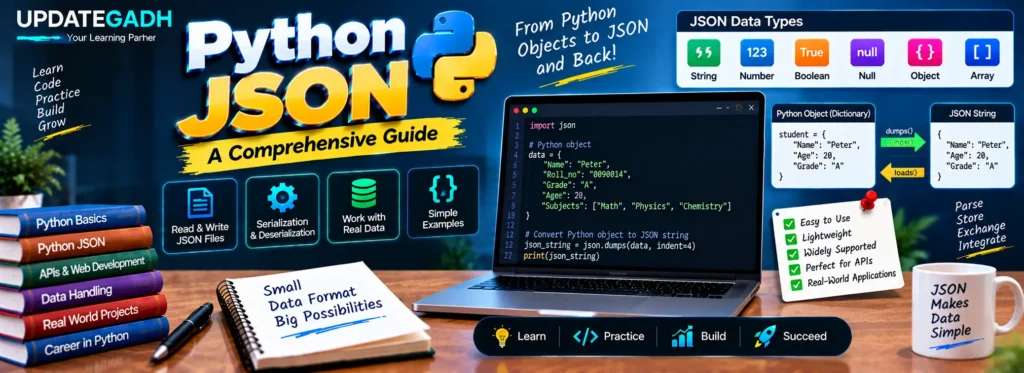
JSON mainly supports six data types:
- String
- Number
- Boolean
- Null
- Object
- Array
JSON is built around two basic structures:
- Name/value pairs: These are similar to dictionaries, objects, records, or hash tables.
- Ordered lists of values: These are similar to arrays, lists, or sequences.
In Python, JSON objects are commonly represented using dictionaries, while JSON arrays are commonly represented using lists.
Example of JSON Data
{
  "book": [
    {
      "id": 1,
      "language": "English",
      "edition": "Second",
      "author": "Derrick Mwiti"
    },
    {
      "id": 2,
      "language": "French",
      "edition": "Third",
      "author": "Vladimir"
    }
  ]
}
Working with JSON in Python
Python includes the json module for working with JSON data. The module provides functions for both serialization and deserialization.
Serialization converts Python objects into JSON-compatible data, while deserialization converts JSON data back into Python objects.
Encoding JSON: Serialization
Serialization is the process of converting Python objects into JSON representation. It is useful when data needs to be stored in a file or transmitted between applications.
The two commonly used serialization functions are:
dump(): Writes serialized JSON data into a file.dumps(): Converts Python data into a JSON-formatted string.
Example: Using dump()
The dump() function writes Python data to a JSON file. It accepts the object that needs to be serialized and the file object where the JSON data should be written.
import json

student = {
    "Name": "Peter",
    "Roll_no": "0090014",
    "Grade": "A",
    "Age": 20,
    "Subjects": [
        "Computer Graphics",
        "Discrete Mathematics",
        "Data Structures"
    ]
}

with open("data.json", "w") as write_file:
    json.dump(student, write_file)
Output in data.json:
{
    "Name": "Peter",
    "Roll_no": "0090014",
    "Grade": "A",
    "Age": 20,
    "Subjects": [
        "Computer Graphics",
        "Discrete Mathematics",
        "Data Structures"
    ]
}
Example: Using dumps()
The dumps() function converts a Python object into a JSON string. Unlike dump(), it does not directly write the result to a file.
import json

student = {
    "Name": "Peter",
    "Roll_no": "0090014",
    "Grade": "A",
    "Age": 20
}

json_string = json.dumps(student)

print(json_string)
Output:
{"Name": "Peter", "Roll_no": "0090014", "Grade": "A", "Age": 20}Decoding JSON: Deserialization
Deserialization is the process of converting JSON data back into Python objects. The Python json module provides two commonly used functions for this purpose:
load(): Reads JSON data from a file and converts it into a Python object.loads(): Converts a JSON string into a Python object.
Example: Using load()
The load() function reads JSON content from a file and converts it into Python data.
import json

with open("data.json", "r") as read_file:
    student_data = json.load(read_file)

print(student_data)
Output:
{'Name': 'Peter', 'Roll_no': '0090014', 'Grade': 'A', 'Age': 20,
 'Subjects': ['Computer Graphics', 'Discrete Mathematics', 'Data Structures']}
Example: Using loads()
The loads() function takes a JSON-formatted string and converts it into a Python object.
import json

json_string = '{"Name": "Peter", "Roll_no": "0090014", "Grade": "A", "Age": 20}'

student_data = json.loads(json_string)

print(student_data)
Output:
{'Name': 'Peter', 'Roll_no': '0090014', 'Grade': 'A', 'Age': 20}Pretty Printing JSON
JSON data can sometimes become difficult to read when it is displayed on a single line. Python allows you to format JSON output using parameters such as indent and sort_keys with the dumps() function.
Complete Advance AI Topics: Click Here
SQL Tutorial: Click Here
YT:- DecodeIT
import json

person = {
    "Name": "Andrew",
    "City": "New York",
    "Age": 23,
    "Subjects": [
        "Math",
        "Physics",
        "Chemistry"
    ]
}

formatted_json = json.dumps(
    person,
    indent=4,
    sort_keys=True
)

print(formatted_json)
Output:
{
    "Age": 23,
    "City": "New York",
    "Name": "Andrew",
    "Subjects": [
        "Math",
        "Physics",
        "Chemistry"
    ]
}
Summary of Key JSON Functions
| Function | Description |
|---|---|
dump() | Serializes a Python object and writes it to a JSON file. |
dumps() | Serializes a Python object into a JSON string. |
load() | Reads JSON data from a file and converts it into a Python object. |
loads() | Converts a JSON string into a Python object. |
Frequently Asked Questions (FAQ)
- What is JSON in Python?
JSON (JavaScript Object Notation) is a lightweight format used to store and exchange structured data. Python provides the built-injsonmodule for working with JSON. - How do I read a JSON file in Python?
You can use thejson.load()function to read JSON data from a file and convert it into a Python object. - What is the difference between json.load() and json.loads()?
json.load()reads JSON data from a file, whilejson.loads()converts a JSON-formatted string into a Python object. - What is the difference between json.dump() and json.dumps()?
json.dump()writes Python data directly to a JSON file, whereasjson.dumps()converts Python data into a JSON string. - How can I convert JSON into a Python dictionary?
You can usejson.loads()when the JSON is stored as a string, orjson.load()when the JSON data is stored in a file. - How can I convert a Python dictionary into JSON?
Usejson.dumps()to convert a Python dictionary into a JSON string, orjson.dump()to save it directly to a JSON file. - How do I pretty print JSON in Python?
You can use theindentparameter withjson.dumps(). Thesort_keys=Trueparameter can also be used to display dictionary keys in sorted order. - Do I need to install the JSON module separately?
No. Thejsonmodule is included with Python, so it can be imported directly without installing an additional package.
Conclusion
Python makes working with JSON straightforward through its built-in json module. The dump() and dumps() functions are useful for serialization, while load() and loads() are used for deserialization.
Understanding these four functions is important when working with JSON files, exchanging data between applications, and handling structured information in Python programs. Pretty printing with indent and sort_keys can also make JSON output easier to read and debug.
Keywords: Python JSON, python json from file, python json load, python json dumps, python read json, python json library, python json to string, python json to dict, python json pretty print, Python JSON tutorial, Python JSON example, Python JSON file, JSON serialization in Python, JSON deserialization in Python