Python Course Roadmap
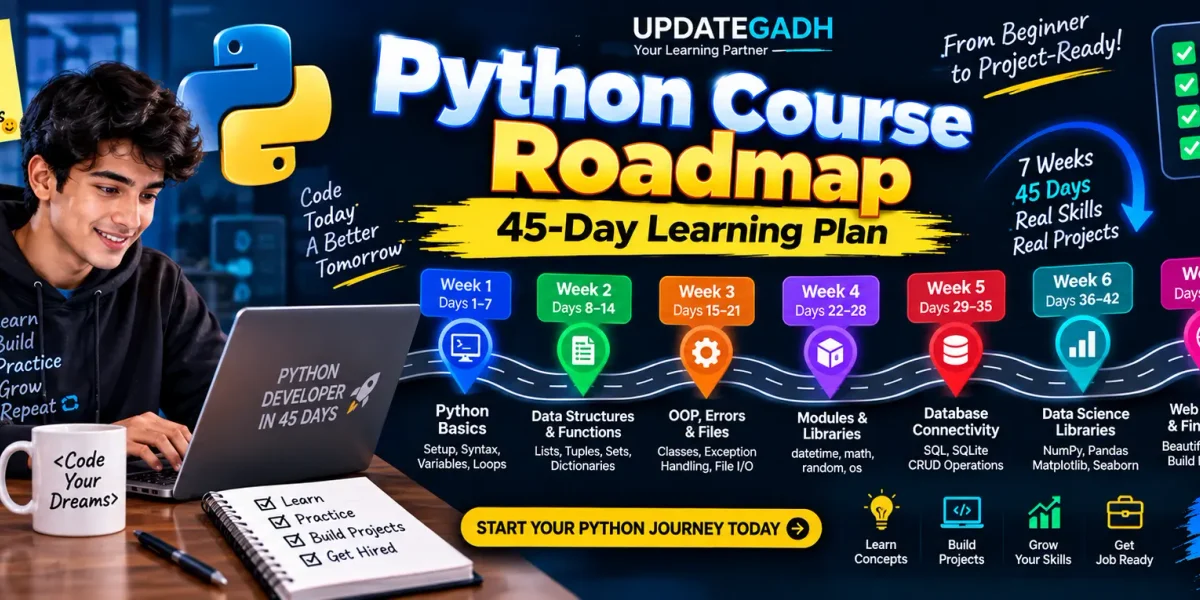
Learning Python becomes much easier when you have a clear path to follow. Instead of jumping randomly between programming topics, a structured roadmap lets you build knowledge step by step. This 45-day Python course roadmap starts with the fundamentals and gradually moves toward data structures, functions, object-oriented programming, databases, data science libraries, web scraping, APIs, and a final practical project.
The plan is designed for beginners who want to develop their Python skills through consistent daily learning and practice. By following the topics in sequence and writing code regularly, you can build a strong foundation for future Python projects.
Table of Contents
Week 1: Build Your Python Fundamentals
The first week focuses on the basic concepts required to understand Python programs. These topics form the foundation for everything you will learn later, so spend enough time practicing each concept instead of only reading the theory.
Day 1–3: Python Setup and Basic Programming
- Install Python and prepare the development environment.
- Understand Python syntax and indentation.
- Learn variables and how values are stored.
- Study common Python data types.
- Work with basic input and output.
During these days, write small programs using variables, strings, numbers, and user input. The goal is to become comfortable creating and executing simple Python files.
Day 4–6: Conditions and Loops
- Understand
if,elif, andelse. - Practice
forloops. - Practice
whileloops. - Learn how list comprehensions work.
- Solve small problems involving conditions and repetition.
Day 7: Practice Day
Use the seventh day to review the first six days. Try solving beginner-level problems using conditions, loops, and basic data types. Avoid learning too many new topics on this day and concentrate on improving your programming logic.
Week 2: Data Structures and Functions
After understanding basic Python syntax, the next step is learning how to organize data and reuse code. Python’s built-in data structures and functions are used in almost every practical program.
Day 8–10: Python Data Structures
Study the four major built-in collection types:
- Lists: Store multiple values in an ordered and changeable collection.
- Tuples: Store ordered values that are generally treated as immutable.
- Sets: Work with collections of unique values.
- Dictionaries: Store information using key-value pairs.
Practice common operations such as adding, removing, updating, searching, and iterating through data. Also learn how nested lists and dictionaries can represent more complex information.
Day 11–12: Functions
Learn how functions help divide a large program into smaller reusable blocks. Cover function definitions, parameters, arguments, return values, default arguments, and lambda functions.
After understanding normal functions, explore commonly used functional programming tools such as map(), filter(), and reduce().
Day 13–14: Function Practice
Use functions to solve practical problems. Create separate functions for calculations, data processing, validation, and other small tasks. This practice will help you understand how reusable code can make larger programs easier to manage.
Week 3: OOP, Error Handling, and Files
The third week introduces concepts that become important when building larger Python applications. You will learn object-oriented programming, exception handling, and file operations.
Day 15–17: Object-Oriented Programming
Start with classes and objects and then move toward inheritance and polymorphism. Learn how attributes and methods are organized inside classes and how objects can represent real-world entities in a program.
Practice by creating simple classes such as Student, Employee, Product, or BankAccount.
Day 18–19: Handling Errors
Programs can encounter unexpected situations, such as invalid input or missing files. Learn how Python handles these situations with:
tryexceptfinally- Custom exceptions
Write small programs that safely handle incorrect input and other expected errors.
Day 20–21: Working with Files
Learn how to open, read, write, and update text files. After that, practice working with CSV files so that you can store structured information outside your Python program.
Week 4: Modules and Python Libraries
Once the core programming concepts are familiar, learn how Python code can be divided into modules and packages. This makes projects easier to organize and maintain.
Day 22–23: Modules and Packages
Learn how to import existing modules, use functions from different files, and create your own modules. Then understand the basic idea of Python packages and how related modules can be organized together.
Day 24–26: Useful Standard Libraries
Spend these days working with commonly used Python modules:
- datetime: Work with dates and times.
- math: Perform mathematical calculations.
- random: Generate random values and select random elements.
- os: Interact with files, directories, and parts of the operating system.
Rather than only reading about these modules, create short programs that demonstrate their practical use.
Day 27–28: Small Projects
Combine the concepts learned during the first four weeks. Build small applications that use functions, data structures, files, modules, and error handling. These projects will help connect individual topics into complete programs.
Week 5: Python and Database Connectivity
Applications often need to save information permanently. During the fifth week, you will learn database fundamentals and connect Python programs with SQLite.
Day 29–31: SQL and SQLite
Begin with basic SQL concepts and understand how databases store structured information. Learn how to create tables and perform basic CRUD operations:
- Create: Add new records.
- Read: Retrieve stored information.
- Update: Modify existing records.
- Delete: Remove records.
Set up a simple SQLite database and practice writing basic SQL queries.
Day 32–34: Using sqlite3 with Python
Learn how Python communicates with an SQLite database through the sqlite3 module. Practice creating database connections, executing queries, inserting records, retrieving results, and closing connections correctly.
Day 35: Database Project Practice
Create a small application that stores information in SQLite. For example, you can build a simple student, employee, inventory, or contact management application.
Week 6: Data Science with Python
The sixth week introduces popular libraries used for numerical computing, data manipulation, and visualization. These tools are especially useful for data analysis and data science projects.
Day 36–37: NumPy
Start with NumPy arrays and learn how they differ from ordinary Python lists. Practice array creation, indexing, mathematical operations, and basic statistical calculations.
Day 38–39: Pandas
Learn how Pandas can be used to work with structured datasets. Focus on DataFrames, selecting data, modifying columns, filtering records, and performing basic analysis.
Day 40–41: Visualization
Use Matplotlib and Seaborn to convert data into useful visual representations. Practice creating common charts and understanding how visualizations can make patterns in a dataset easier to identify.
Day 42: Complete Data Analysis Practice
Choose a dataset and perform a small analysis project. Load the data with Pandas, examine the information, perform basic processing, and create visualizations using Matplotlib or Seaborn.
Week 7: Web Scraping, APIs, and the Final Project
The final three days combine several skills into a practical workflow. You will learn how Python can collect information from external sources and process the results.
Day 43: Web Scraping with BeautifulSoup
Learn the fundamentals of extracting information from web pages using BeautifulSoup. Practice locating relevant HTML elements and collecting useful information from a webpage.
Day 44: Working with APIs
Learn how Python communicates with web APIs using the Requests library. Understand basic HTTP requests, JSON responses, and the general idea of REST APIs.
Day 45: Build the Final Project
The final project brings several roadmap topics together. Create a workflow that:
- Fetches information from an API.
- Processes the returned data with Python.
- Stores relevant information in a database.
- Loads the stored data using Pandas.
- Analyzes the dataset.
- Creates visualizations with Matplotlib.
This final exercise gives you an opportunity to combine Python programming, API communication, databases, data processing, and visualization in one project.
How to Follow This 45-Day Roadmap
Try to divide each study session into three parts: learning, coding, and practice. Reading a concept once is not enough to build programming ability. Type the examples yourself, change their values, experiment with different inputs, and solve small problems without looking at the solution.
Keep your projects organized in separate folders and save the programs you create during the course. By the end of the 45 days, these exercises can become the foundation of a Python portfolio.
Complete Advance AI Topics: Click Here
SQL Tutorial: Click Here
YT:- DecodeIT
What You Will Cover in 45 Days
| Week | Main Focus |
|---|---|
| Week 1 | Python basics, syntax, variables, I/O, conditions, loops |
| Week 2 | Data structures and functions |
| Week 3 | OOP, error handling, and files |
| Week 4 | Modules, packages, and standard libraries |
| Week 5 | SQL, SQLite, and Python database connectivity |
| Week 6 | NumPy, Pandas, Matplotlib, and Seaborn |
| Week 7 | Web scraping, APIs, and final project |
Conclusion
This 45-day Python roadmap provides a gradual learning path that begins with programming fundamentals and moves toward practical development and data-related tasks. Instead of treating Python as a collection of unrelated topics, the schedule allows each stage to build on the skills learned earlier.
Use the roadmap as a daily learning guide, but give special attention to practice. Write programs, experiment with the concepts, build small applications, and keep improving your projects. By the final day, you will have worked across Python fundamentals, data structures, functions, OOP, files, modules, databases, data science libraries, web scraping, and APIs.
FAQs
1. Is this Python roadmap suitable for beginners?
Yes. The roadmap starts with installation, syntax, variables, data types, and basic input/output before moving to more advanced subjects.
2. How long does this Python course roadmap take?
The planned learning schedule covers 45 days, with different Python topics assigned to each day.
3. Should I practice Python every day?
Regular practice is useful because programming concepts become easier to understand when you repeatedly write and test code.
4. Does the roadmap include databases?
Yes. Week 5 introduces SQL, SQLite, CRUD operations, and Python’s sqlite3 module.
5. Are NumPy and Pandas included?
Yes. NumPy is covered on Days 36–37, while Pandas is included on Days 38–39.
6. Does the roadmap cover web scraping?
Yes. Day 43 introduces web scraping with BeautifulSoup.
7. Will I learn APIs in this roadmap?
Yes. Day 44 focuses on APIs, Requests, JSON, and REST concepts.
8. What is the final project about?
The final project combines API data collection, database storage, Pandas-based analysis, and Matplotlib visualization.
Keywords: Python Course Roadmap, python developer roadmap, python roadmap for beginners, python roadmap 2026, how to become a python developer, python roadmap for web development, python course, python full stack developer roadmap, learn Python