Securing Data with AES-256 Encryption in Python: A Complete Guide
In today’s digital age, protecting sensitive information is more critical than ever. Whether it’s personal data, confidential business information, or private messages, encryption ensures that only authorized individuals can access the data. One of the most secure and widely used encryption methods is AES-256 (Advanced Encryption Standard). In this blog post, we’ll walk you through how to implement AES-256 encryption and decryption in Python, including saving encrypted data to a file for future use.
What is AES-256 Encryption?
AES (Advanced Encryption Standard) is a symmetric encryption algorithm, meaning the same key is used for both encryption and decryption. AES-256:
- Uses a 256-bit encryption key, providing robust security.
- Ensures data integrity with modes like GCM (Galois/Counter Mode).
- Is highly efficient and widely adopted across industries.
Step-by-Step Implementation
Let’s break down the Python implementation into key steps.
1. Setting Up the Environment
Before diving into the code, ensure you have the necessary libraries installed. Use the following commands to install the required dependencies:
pip install pycryptodome
pip install pycryptodomex
2. Encryption Function
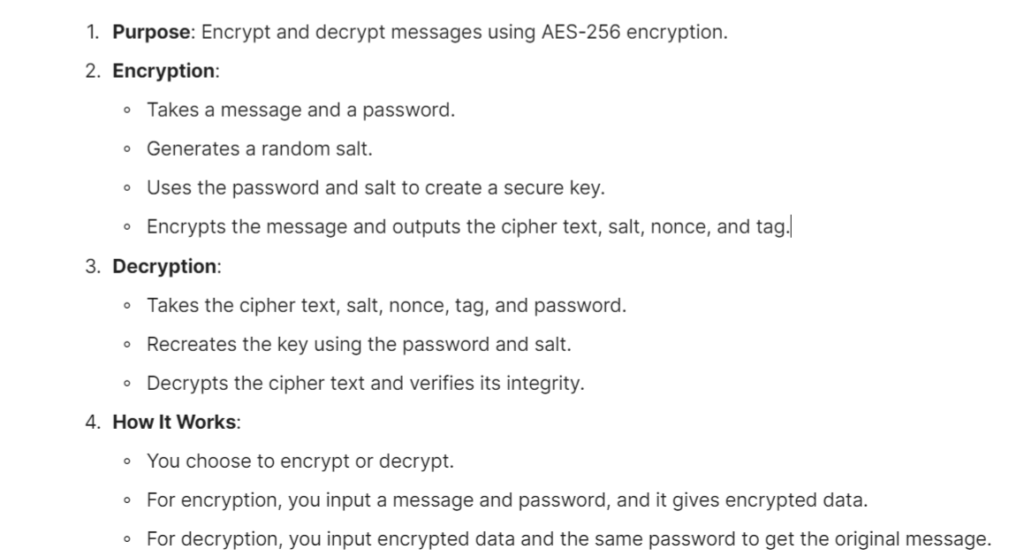
The encrypt function takes a plain text and a password, generates a random salt, and derives a secure key using the password and salt with the scrypt algorithm. It then encrypts the data using AES-256 in GCM mode. Here’s the key part of the encryption process:
def encrypt(plain_text, password):
    if not password:
        raise ValueError("Password cannot be empty.")
    salt = get_random_bytes(AES.block_size)
    private_key = hashlib.scrypt(
        password.encode(), salt=salt, n=2**14, r=8, p=1, dklen=32
    )
    cipher_config = AES.new(private_key, AES.MODE_GCM)
    cipher_text, tag = cipher_config.encrypt_and_digest(bytes(plain_text, "utf-8"))
    return {
        "cipher_text": b64encode(cipher_text).decode("utf-8"),
        "salt": b64encode(salt).decode("utf-8"),
        "nonce": b64encode(cipher_config.nonce).decode("utf-8"),
        "tag": b64encode(tag).decode("utf-8"),
    }
3. Decryption Function
The decrypt function reverses the encryption process. It uses the password and saved salt to recreate the encryption key, decrypts the cipher text, and verifies its integrity using the tag.
def decrypt(enc_dict, password):
    if not password:
        raise ValueError("Password cannot be empty.")
    salt = b64decode(enc_dict["salt"])
    cipher_text = b64decode(enc_dict["cipher_text"])
    nonce = b64decode(enc_dict["nonce"])
    tag = b64decode(enc_dict["tag"])
    private_key = hashlib.scrypt(
        password.encode(), salt=salt, n=2**14, r=8, p=1, dklen=32
    )
    cipher = AES.new(private_key, AES.MODE_GCM, nonce=nonce)
    decrypted = cipher.decrypt_and_verify(cipher_text, tag)
    return decrypted.decode("utf-8")
4. Save and Load Encrypted Data
To make the program more user-friendly, encrypted data can be saved to a JSON file and loaded later for decryption. Here are the helper functions:
- Save Data:
def save_to_file(data, filename="encrypted_data.json"):
    with open(filename, "w") as file:
        json.dump(data, file)
    print(f"nEncrypted data saved to {filename}")
- Load Data:
def load_from_file(filename="encrypted_data.json"):
    if not os.path.exists(filename):
        raise FileNotFoundError(f"No file found at {filename}")
    with open(filename, "r") as file:
        return json.load(file)
5. Main Program
The program allows the user to:
- Encrypt a message and save it to a file.
- Decrypt a message using the saved file and password.
def main():
    print("ttAES 256 Encryption and Decryption Algorithm")
    x = input("""
               Enter
               1 to encrypt
               2 to decrypt
               :
              """)
    if x == "1":
        password = input("Enter the Password: ")
        secret_mssg = input("nEnter the Secret Message: ")
        encrypted = encrypt(secret_mssg, password)
        print("nnEncrypted Data:")
        for k, v in encrypted.items():
            print(f"{k}: {v}")
        save_to_file(encrypted)
    elif x == "2":
        filename = input("Enter the filename to load encrypted data (default: encrypted_data.json): ") or "encrypted_data.json"
        encrypted = load_from_file(filename)
        password = input("Enter the password: ")
        decrypted = decrypt(encrypted, password)
        print("nnDecrypted Message:")
        print(decrypted)
Running the Code
- Save the code to a file, e.g.,
AES256.py. - Run the script in the terminal:bashCopy code
python3 AES256.py - Follow the prompts to encrypt or decrypt a message.
Output Example
Encryption:
Enter 1 to encrypt and 2 to decrypt: 1
Enter the Password: mysecurepassword
Enter the Secret Message: Hello, World!
Encrypted Data:
cipher_text: a1b2c3...
salt: x4y5z6...
nonce: 123abc...
tag: pqr456...
Encrypted data saved to encrypted_data.json
Decryption:
Enter 1 to encrypt and 2 to decrypt: 2
Enter the filename to load encrypted data (default: encrypted_data.json):
Enter the password: mysecurepassword
Decrypted Message:
Hello, World!
Why Use AES-256?
- High Security: AES-256 is resistant to brute-force attacks due to its large key size.
- Integrity Check: GCM mode ensures the encrypted data hasn’t been tampered with.
- Ease of Use: Simple implementations in Python make it accessible for developers of all skill levels.
Complete Code 1 Python
# # Imports
# import hashlib
# from base64 import b64encode, b64decode
# import os
# from Cryptodome.Cipher import AES
# from Cryptodome.Random import get_random_bytes
# import platform
# # Clear the console screen
# if platform.system() == "Windows":
#     os.system("cls")
# else:
#     os.system("clear")
# # Start of Encryption Function
# def encrypt(plain_text, password):
#     if not password:
#         raise ValueError("Password cannot be empty.")
#     salt = get_random_bytes(AES.block_size)
#     private_key = hashlib.scrypt(
#         password.encode(), salt=salt, n=2**14, r=8, p=1, dklen=32
#     )
#     cipher_config = AES.new(private_key, AES.MODE_GCM)
#     cipher_text, tag = cipher_config.encrypt_and_digest(bytes(plain_text, "utf-8"))
#     return {
#         "cipher_text": b64encode(cipher_text).decode("utf-8"),
#         "salt": b64encode(salt).decode("utf-8"),
#         "nonce": b64encode(cipher_config.nonce).decode("utf-8"),
#         "tag": b64encode(tag).decode("utf-8"),
#     }
# # Start of Decryption Function
# def decrypt(enc_dict, password):
#     if not password:
#         raise ValueError("Password cannot be empty.")
#     try:
#         salt = b64decode(enc_dict["salt"])
#         cipher_text = b64decode(enc_dict["cipher_text"])
#         nonce = b64decode(enc_dict["nonce"])
#         tag = b64decode(enc_dict["tag"])
#         private_key = hashlib.scrypt(
#             password.encode(), salt=salt, n=2**14, r=8, p=1, dklen=32
#         )
#         cipher = AES.new(private_key, AES.MODE_GCM, nonce=nonce)
#         decrypted = cipher.decrypt_and_verify(cipher_text, tag)
#         return decrypted.decode("utf-8")
#     except (ValueError, KeyError) as e:
#         raise ValueError("Invalid encrypted message format.") from e
# def main():
#     print("ttAES 256 Encryption and Decryption Algorithm")
#     print("tt-------------------------------------------n")
#     x = input("""
#                Enter
#                1 to encrypt
#                2 to decrypt
#                :
#               """)
#     if x == "1":
#         password = input("Enter the Password: ")
#         secret_mssg = input("nEnter the Secret Message: ")
#         # First, let us encrypt the secret message
#         encrypted = encrypt(secret_mssg, password)
#         print("nnEncrypted:")
#         print("---------------n")
#         for k, v in encrypted.items():
#             print(f"{k}: {v}")
#     elif x == "2":
#         try:
#             encrypted = {}
#             encrypted["cipher_text"] = input("Enter the cipher text: ")
#             encrypted["salt"] = input("Enter the salt: ")
#             encrypted["nonce"] = input("Enter the nonce: ")
#             encrypted["tag"] = input("Enter the tag: ")
#             password = input("Enter the password: ")
#             decrypted = decrypt(encrypted, password)
#             print("nnDecrypted:")
#             print("-----------------n")
#             print(decrypted)
#         except ValueError as e:
#             print(f"Error: {e}")
# if __name__ == "__main__":
#     main()
# Imports
import hashlib
from base64 import b64encode, b64decode
import os
from Cryptodome.Cipher import AES
from Cryptodome.Random import get_random_bytes
import platform
import json
# Clear the console screen
if platform.system() == "Windows":
    os.system("cls")
else:
    os.system("clear")
# Start of Encryption Function
def encrypt(plain_text, password):
    if not password:
        raise ValueError("Password cannot be empty.")
    salt = get_random_bytes(AES.block_size)
    private_key = hashlib.scrypt(
        password.encode(), salt=salt, n=2**14, r=8, p=1, dklen=32
    )
    cipher_config = AES.new(private_key, AES.MODE_GCM)
    cipher_text, tag = cipher_config.encrypt_and_digest(bytes(plain_text, "utf-8"))
    return {
        "cipher_text": b64encode(cipher_text).decode("utf-8"),
        "salt": b64encode(salt).decode("utf-8"),
        "nonce": b64encode(cipher_config.nonce).decode("utf-8"),
        "tag": b64encode(tag).decode("utf-8"),
    }
# Start of Decryption Function
def decrypt(enc_dict, password):
    if not password:
        raise ValueError("Password cannot be empty.")
    try:
        salt = b64decode(enc_dict["salt"])
        cipher_text = b64decode(enc_dict["cipher_text"])
        nonce = b64decode(enc_dict["nonce"])
        tag = b64decode(enc_dict["tag"])
        private_key = hashlib.scrypt(
            password.encode(), salt=salt, n=2**14, r=8, p=1, dklen=32
        )
        cipher = AES.new(private_key, AES.MODE_GCM, nonce=nonce)
        decrypted = cipher.decrypt_and_verify(cipher_text, tag)
        return decrypted.decode("utf-8")
    except (ValueError, KeyError) as e:
        raise ValueError("Invalid encrypted message format.") from e
def save_to_file(data, filename="encrypted_data.json"):
    with open(filename, "w") as file:
        json.dump(data, file)
    print(f"nEncrypted data saved to {filename}")
def load_from_file(filename="encrypted_data.json"):
    if not os.path.exists(filename):
        raise FileNotFoundError(f"No file found at {filename}")
    with open(filename, "r") as file:
        return json.load(file)
def main():
    print("ttAES 256 Encryption and Decryption Algorithm")
    print("tt-------------------------------------------n")
    x = input("""
               Enter
               1 to encrypt
               2 to decrypt
               :
              """)
    if x == "1":
        password = input("Enter the Password: ")
        secret_mssg = input("nEnter the Secret Message: ")
        # Encrypt the secret message
        encrypted = encrypt(secret_mssg, password)
        print("nnEncrypted:")
        print("---------------n")
        for k, v in encrypted.items():
            print(f"{k}: {v}")
        # Save encrypted data to a file
        save_to_file(encrypted)
    elif x == "2":
        try:
            # Load encrypted data from file
            filename = input("Enter the filename to load encrypted data (default: encrypted_data.json): ") or "encrypted_data.json"
            encrypted = load_from_file(filename)
            password = input("Enter the password: ")
            decrypted = decrypt(encrypted, password)
            print("nnDecrypted:")
            print("-----------------n")
            print(decrypted)
        except (ValueError, FileNotFoundError) as e:
            print(f"Error: {e}")
if __name__ == "__main__":
    main()