Pandas vs SQL for Data Analysis
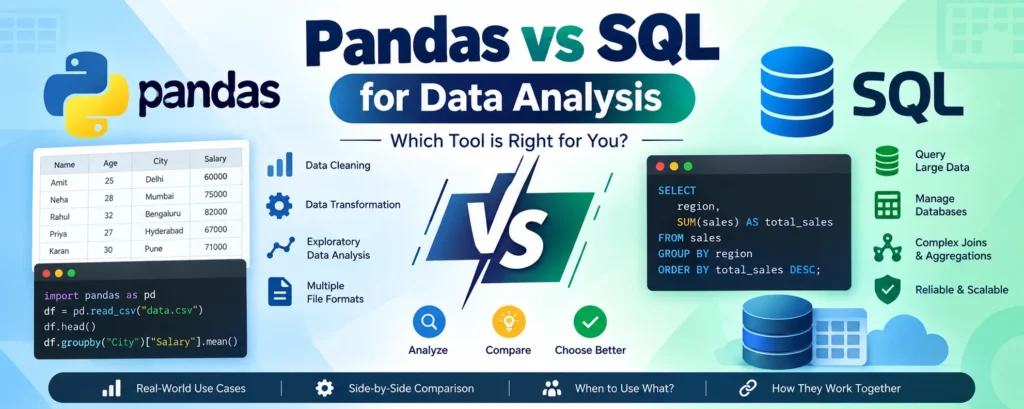
When it comes to data analysis, Pandas and SQL are two of the most widely used tools. Both are powerful, but they solve different problems. SQL is primarily used to retrieve, filter, join, and aggregate data directly inside databases, while Pandas provides a flexible Python-based environment for cleaning, transforming, analyzing, and visualizing data.
For many modern data professionals, the choice is not really Pandas vs SQL. Instead, the most effective approach is often to use both together. SQL can efficiently retrieve the required data from a large database, while Pandas can handle detailed analysis and transformation in Python.
In this tutorial, we will explore Pandas and SQL, compare their capabilities, understand when to use each tool, and see how they can be combined in a practical data analysis workflow.
Complete Advance AI Topics: Click Here
SQL Tutorial: Click Here
What is Pandas?
Pandas is an open-source Python library designed for data manipulation and analysis. It provides convenient data structures and functions for working with structured datasets.
The two most important Pandas data structures are Series and DataFrame. A DataFrame is particularly useful because it represents data in rows and columns, making it similar to a spreadsheet or a database table.
Key Features of Pandas
- Data Structures
Series– A one-dimensional labeled data structure.DataFrame– A two-dimensional labeled data structure consisting of rows and columns.
- Data Cleaning
- Handling missing values
- Removing duplicate records
- Converting data types
- Renaming columns
- Data Transformation
- Filtering records
- Grouping and aggregation
- Merging datasets
- Sorting and reshaping data
Time-Series AnalysisPandas provides useful functionality for working with dates, timestamps, time intervals, and other time-series data.
Input and Output SupportPandas can read and write data in formats such as CSV, Excel, JSON, and SQL databases.
Python Ecosystem IntegrationPandas works well with popular Python libraries such as NumPy, Matplotlib, Seaborn, and Scikit-learn.
Why Use Pandas?
- Provides simple and expressive Python syntax.
- Excellent for data cleaning and transformation.
- Useful for exploratory data analysis (EDA).
- Works well with Jupyter Notebook and Python applications.
- Integrates easily with data science and machine learning libraries.
- Supports many common data formats.
Common Pandas Use Cases
- Data cleaning and preprocessing
- Exploratory Data Analysis (EDA)
- Data transformation and reshaping
- Data aggregation
- Feature engineering
- Time-series analysis
- Preparing datasets for machine learning
Example of Pandas Data Analysis
import pandas as pd

data = pd.read_csv("sales.csv")

# Display the first five records
print(data.head())

# Filter sales greater than 1000
high_sales = data[data["sales"] > 1000]

# Calculate total sales by region
result = data.groupby("region")["sales"].sum()

print(result)
This example demonstrates how Pandas can load a dataset, filter records, and perform grouping and aggregation using Python.
What is SQL?
SQL (Structured Query Language) is the standard language used to communicate with relational database systems. It allows users and applications to retrieve, insert, update, and manage structured data stored in databases.
SQL is widely used with database systems such as MySQL, PostgreSQL, Microsoft SQL Server, Oracle Database, and many other relational database platforms.
Key Features of SQL
Data RetrievalThe
SELECTstatement is used to retrieve information from database tables.
Data ManipulationSQL provides commands such as
INSERT,UPDATE, andDELETEfor modifying records.
Data DefinitionCommands such as
CREATE,ALTER, andDROPare used to define and modify database structures.
Data ControlCommands such as
GRANTandREVOKEcan be used to manage database permissions.
Transaction ManagementSQL databases provide transaction commands such as
COMMITandROLLBACKto help maintain data consistency.
Complex QueriesSQL supports joins, subqueries, common table expressions, window functions, grouping, aggregation, and other advanced querying techniques.
Why Use SQL?
- Efficiently queries large datasets stored in databases.
- Supports complex joins and aggregations.
- Works well with structured relational data.
- Database engines can optimize query execution.
- Supports concurrent access in multi-user database environments.
- Widely supported across database platforms and business applications.
Common SQL Use Cases
- Generating reports
- Creating dashboards and business intelligence queries
- Extracting data from relational databases
- Data warehousing
- Data integration and transformation
- Managing transactional data
- Building backend applications
Example of SQL Data Analysis
SELECT
    region,
    SUM(sales) AS total_sales
FROM sales
GROUP BY region
ORDER BY total_sales DESC;
This query groups sales records by region and calculates the total sales for each region.
Pandas vs SQL: Side-by-Side Comparison
1. Ease of Use
| Feature | Pandas | SQL |
|---|---|---|
| Syntax | Python-based and expressive | Declarative query language |
| Learning Curve | Easy for Python users | Easy to moderate for database beginners |
| Interactivity | Excellent for notebooks and interactive analysis | Excellent for running database queries |
2. Performance and Scalability
| Feature | Pandas | SQL |
|---|---|---|
| Primary Processing | Generally operates in memory | Processed by the database engine |
| Scalability | Limited by available system resources for many workflows | Designed to work with large database workloads |
| Optimization | Uses vectorized operations and optimized libraries | Uses database query planners, indexes, and execution engines |
3. Flexibility
| Feature | Pandas | SQL |
|---|---|---|
| Transformations | Highly flexible with Python functions | Powerful relational transformations and queries |
| Data Formats | CSV, Excel, JSON, SQL, Parquet, and more | Primarily structured database tables and queryable data sources |
| Programming Integration | Excellent Python integration | Excellent database and BI integration |
4. Data Environment
| Feature | Pandas | SQL |
|---|---|---|
| Typical Environment | Python scripts, Jupyter Notebook, data science workflows | Relational databases, data warehouses, BI systems |
| Best For | Exploratory and programmatic analysis | Data retrieval, aggregation, and database operations |
| Integration | Python, ML, visualization, and scientific libraries | Applications, BI tools, ETL pipelines, and data warehouses |
Pandas vs SQL: Which One Should You Use?
The right choice depends on where your data is stored and what you need to accomplish.
Use Pandas When:
- You are performing Exploratory Data Analysis (EDA).
- You need to clean and transform data using Python.
- Your dataset can be processed efficiently within your available resources.
- You are working with files such as CSV, Excel, JSON, or Parquet.
- You need custom Python functions or machine learning workflows.
- You want to visualize or experiment with data interactively.
Use SQL When:
- Your data is stored in a relational database or data warehouse.
- You need to query large datasets without unnecessarily moving all the data into Python.
- You are performing complex joins and aggregations.
- You need database-level filtering and aggregation.
- Multiple users or applications need access to shared data.
- You need database transactions and persistent storage.
Why Use Pandas and SQL Together?
In real-world data analysis projects, Pandas and SQL are often used together rather than treated as competing technologies.
A common workflow is to use SQL for data extraction and Pandas for analysis and transformation.
Typical Pandas + SQL Workflow
Extract Data with SQLUse SQL to filter and aggregate the required information directly in the database.
Load Data into PandasImport the SQL result into a Pandas DataFrame.
Clean and TransformUse Pandas to perform additional data cleaning, feature engineering, and transformations.
Analyze and VisualizeUse Python libraries to perform statistical analysis and create charts or reports.
Build Machine Learning WorkflowsThe processed Pandas DataFrame can be passed to machine learning libraries such as Scikit-learn.
Example: Combining SQL and Pandas
Suppose a company has millions of sales records stored in a database. Instead of loading the entire table into Python, we can first use SQL to calculate the required information.
SELECT
    region,
    SUM(sales) AS total_sales
FROM sales
GROUP BY region;
The result can then be loaded into Pandas:
import pandas as pd
from sqlalchemy import create_engine

engine = create_engine("database_connection_string")

query = """
SELECT
    region,
    SUM(sales) AS total_sales
FROM sales
GROUP BY region
"""

df = pd.read_sql(query, engine)

print(df)
After loading the smaller result into Pandas, you can perform additional calculations or create visualizations without transferring the entire database table into memory.
Pandas vs SQL: Quick Summary
| Requirement | Recommended Tool |
|---|---|
| Querying a relational database | SQL |
| Working with CSV or Excel files | Pandas |
| Large-scale database filtering | SQL |
| Interactive data exploration | Pandas |
| Complex database joins | SQL |
| Custom Python transformations | Pandas |
| Machine learning preprocessing | Pandas |
| Persistent relational data management | SQL |
| End-to-end data workflows | Pandas + SQL |
YT:- DecodeIT
Final Thoughts
Pandas and SQL are both essential tools for modern data professionals. SQL is particularly valuable for working directly with relational databases, filtering large datasets, joining tables, and performing database-level aggregations. Pandas is highly useful for interactive analysis, data cleaning, transformation, visualization, and machine learning preparation.
Rather than choosing one tool exclusively, learning how to use SQL and Pandas together can make your data analysis workflow more efficient. SQL can reduce the amount of data that needs to be transferred from a database, while Pandas can provide the flexibility of Python for deeper analysis.
If you are building a career in data analytics, data science, or machine learning, learning both Pandas and SQL is a valuable skill combination.
Keywords
Pandas vs SQL for Data Analysis, Pandas vs SQL, Pandas, SQL, Python Pandas, Data Analysis, Data Analytics, SQL Data Analysis, Pandas Data Analysis, Python Data Analysis, Data Cleaning, Exploratory Data Analysis, EDA, SQL Queries, Data Science, Machine Learning, Data Transformation, DataFrame, Relational Database, Python SQL