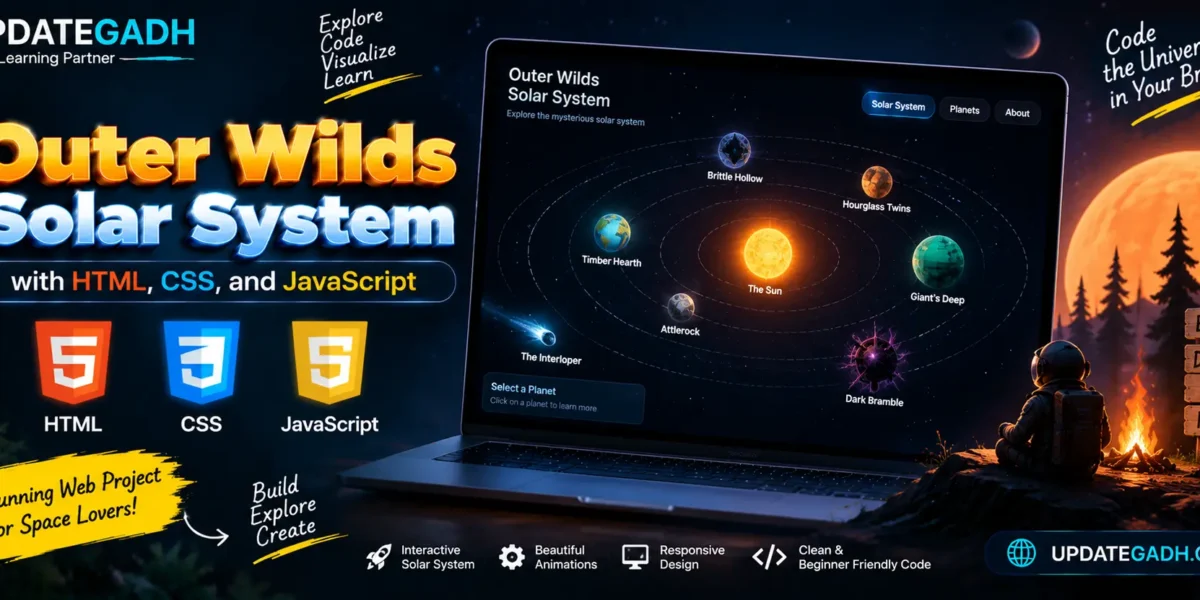
Creating the Outer Wilds Solar System with HTML, CSS, and JavaScript
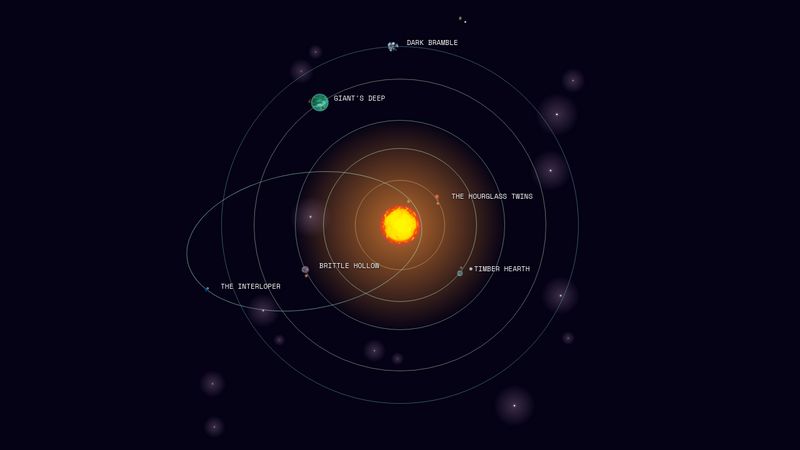
The Outer Wilds Solar System is a dynamic and mesmerizing environment, and recreating it in a simple interactive webpage can be a fun challenge. By using HTML, CSS, and JavaScript, you can simulate the orbiting planets and provide a basic visual representation of this system. In this guide, we’ll walk through how to create an animated solar system inspired by Outer Wilds.
Step 1: Structure with HTML
First, well set up the basic structure of the solar system using HTML. We’ll create a div for the sun and multiple divs for the planets, each wrapped in an orbiting container.
<!-- All planet imagery taken from: https://imgur.com/a/outer-wilds-planets-TXsDF2o -->
<!-- Orbit timing calculated by taking timestamps from: https://www.reddit.com/r/outerwilds/comments/xfwido/outer_wilds_system_full_cycle_timelapse/ -->
<ow-system>
  <ow-starfield stars="100" use="star">
    <svg xmlns="http://www.w3.org/2000/svg" xmlns:xlink="http://www.w3.org/1999/xlink" width="0" height="0" viewBox="0 0 230.767 230.767">
      <defs>
        <radialGradient id="starglow" cx="115.383" cy="115.383" r="115.383" fx="115.383" fy="115.383" gradientUnits="userSpaceOnUse">
          <stop offset="0" stop-color="#fcf" stop-opacity=".5"/>
          <stop offset=".1" stop-color="#fcf" stop-opacity=".2"/>
          <stop offset="1" stop-color="#fcf" stop-opacity="0"/>
        </radialGradient>

        <symbol id="star">
          <circle cx="115.383" cy="115.383" r="115.383" fill="url(#starglow)"/>
          <path fill="#fff" d="M117.964 114.923c-1.865-3.354-2.86-3.882-4.495-2.383s-1.09 2.247-1.226 3.337.272 2.997 1.907 3.133 2.315-.954 2.928-.954c1.976 0 1.624-1.805.886-3.132Z"/>
        </g>
      </defs>
    </svg>
  </ow-starfield>

  <ow-orbit id="sun">
    <ow-wanderer image="https://i.imgur.com/CHfm7Rb.png"></ow-wanderer>
  </ow-orbit>

  <ow-orbit id="sun-station" path="false">
    <ow-name shy>Sun Station</ow-name>
    <ow-wanderer image="https://i.imgur.com/KcqPZnw.png"></ow-wanderer>
  </ow-orbit>

  <ow-orbit id="interloper">
    <ow-name>The Interloper</ow-name>
    <ow-wanderer image="https://i.imgur.com/3EF5IMK.png"></ow-wanderer>
  </ow-orbit>

  <ow-orbit id="hourglass-twins" quantum>
    <ow-name>The Hourglass Twins</ow-name>
    <ow-wanderer image="https://i.imgur.com/YTAcqBw.png">
      <ow-orbit id="twins">
        <ow-wanderer id="ash-twin" image="https://i.imgur.com/SUYEIpK.png"></ow-wanderer>
        <ow-wanderer id="ember-twin" image="https://i.imgur.com/iPE6eao.png"></ow-wanderer>
      </ow-orbit>
    </ow-wanderer>
  </ow-orbit>

  <ow-orbit id="timber-hearth" quantum>
    <ow-name>Timber Hearth</ow-name>
    <ow-wanderer image="https://i.imgur.com/s93MtRV.png">
      <ow-orbit id="attlerock">
        <ow-name shy>Attlerock</ow-name>
        <ow-wanderer image="https://i.imgur.com/rxdFlJ8.png"></ow-wanderer>
      </ow-orbit>

      <ow-orbit id="quantum-moon">
        <ow-name shy>Quantum Moon</ow-name>
        <ow-wanderer image="https://i.imgur.com/NvXkTjY.png"></ow-wanderer>
      </ow-orbit>
    </ow-wanderer>
  </ow-orbit>

  <ow-orbit id="brittle-hollow" quantum>
    <ow-name>Brittle Hollow</ow-name>
    <ow-wanderer image="https://i.imgur.com/e6oWjiF.png">
      <ow-orbit id="hollows-lantern">
        <ow-name shy>Hollow's Lantern</ow-name>
        <ow-wanderer image="https://i.imgur.com/sb8xB97.png"></ow-wanderer>
      </ow-orbit>
    </ow-wanderer>
  </ow-orbit>

  <ow-orbit id="giants-deep" quantum>
    <ow-name>Giant's Deep</ow-name>
    <ow-wanderer image="https://i.imgur.com/OMosCVo.png">
      <ow-orbit id="orbital-probe-cannon">
        <ow-name shy>Orbital Probe Cannon</ow-name>
        <ow-wanderer image="https://i.imgur.com/v5oGWQN.png"></ow-wanderer>
      </ow-orbit>
    </ow-wanderer>
  </ow-orbit>

  <ow-orbit id="dark-bramble" quantum>
    <ow-name>Dark Bramble</ow-name>
    <ow-wanderer image="https://i.imgur.com/C0CtSuY.png"></ow-wanderer>
  </ow-orbit>

  <ow-orbit id="white-hole-station" path="false">
    <ow-name shy>White Hole Station</ow-name>
    <ow-wanderer image="https://i.imgur.com/9CC2K51.png"></ow-wanderer>
  </ow-orbit>
</ow-system>
Here, each planet is placed within a surrounding orbit. These div containers will later be styled and animated to simulate movement around the sun.
Step 2: Styling with CSS
Next, well bring the solar system to life with some CSS. This includes creating a glowing sun, sizing the planets, and animating their orbits.
@layer reset, token, pen;

@layer pen {
  html { overflow: auto; scrollbar-width: none; }
  body {
    display: flex;
    flex-direction: column;
    font-family: Space Mono, monospace;
  }

  ow-system {
    --cycle: 1320s; // 22-minute cycle if you want this to be game-accurate
    --cycle: 120s; // Two minutes to make it less boring?
    --unit: calc(var(--scale, 1) * 95vmin);
    --sun-glow: #ba702f;
    --orbit-border-width: 1px;

    position: relative;
    isolation: isolate;

    flex: 1;
    display: grid;
    grid-template-columns: 1fr;
    grid-template-rows: 1fr;
    justify-content: center;
    align-items: center;
    block-size: calc(1 * var(--unit));
    inline-size: calc(1 * var(--unit));
    aspect-ratio: 1;
    margin: auto;

    background: radial-gradient(circle at center, var(--sun-glow), transparent 35%) no-repeat center / var(--unit) var(--unit);

    transition: --scale 5ms linear;
    animation: --sun-glow var(--cycle) linear infinite;

    &::before { // Dev only
      // content: '';

      position: absolute;
      inset: 0;
      z-index: -1;

      background: url(https://res.cloudinary.com/chriskirknielsen/image/upload/c_crop,ar_1:1/v1729476626/image_uw02rg.png) no-repeat 50% 51% / contain;

      transform: translateY(0.375%);

      opacity: 0.5;
    }
  }

  ow-starfield {
    position: absolute;
    inset: 0;
    z-index: -2;
    pointer-events: none;

    opacity: 0.75;
  }

  ow-star {
    position: absolute;
    inset-block-start: var(--star-y, 50%);
    inset-inline-start: var(--star-x, 50%);

    display: flex;

    translate: -50% -50%;
    animation: --star calc(var(--cycle) * 0.25) ease-in-out calc(var(--cycle) * var(--delay)) 1 both;
  }

  #sun {
    --orbit-radius: 0.00000000000000001;
    --body-radius: 0.05;
    --orbital-speed: 0;
    --w-color: #f6ab48;

    animation: --orbit calc(var(--cycle) * 0.1) linear infinite;

    // The sun goes supernova at the end of the cycle
    ow-wanderer { animation: --supernova var(--cycle) linear infinite; }
  }

  #sun-station {
    --orbit-radius: 0.06;
    --body-radius: 0.0075;
    --orbital-speed: 0.9;
    --w-color: gold;
  }

  #hourglass-twins {
    --orbit-radius: 0.105;
    --body-radius: 0.0000001;
    --orbital-speed: 0.091667;
    --w-color: orangered;
    --initial-delay: -8.5s;

    & > ow-wanderer {
      display: flex;
      justify-content: center;
      align-items: center;

      &:defined[image] {
        --gap: calc(0.0075 * var(--unit));

        // Sand column from the twins, only if the image is available
        &::before {
          content: '';
          position: absolute;
          // inset: 50% 0 0 50%;
          inset: 50%;

          flex-shrink: 0;
          block-size: var(--gap);
          inline-size: var(--gap);
          margin: auto;

          background: inherit;

          scale: 2; // 'tis a bit tiny
          // translate: -50% -50%; // Centering within
        }
      }
    }
  }

  #twins {
    --orbit-radius: 0.0075;
    --body-radius: 0.0000001;
    --orbital-speed: 0;
  }

  #ash-twin, #ember-twin {
    --orbit-radius: 0.0075;
    --body-radius: 0.005;
    --orbital-speed: 0;
  }
  #ember-twin { --w-offset: 50%; }

  #timber-hearth {
    --orbit-radius: 0.18;
    --body-radius: 0.0075;
    --orbital-speed: 0.191667;
    --w-color: greenyellow;
  }

  #attlerock {
    --orbit-radius: 0.0125;
    --body-radius: 0.005;
    --orbital-speed: 0;
    --w-color: slategray;
  }

  #brittle-hollow {
    --orbit-radius: 0.245;
    --body-radius: 0.01;
    --orbital-speed: 0.3;
    --w-color: darkturquoise;
  }

  #hollows-lantern {
    --orbit-radius: 0.015;
    --body-radius: 0.005;
    --orbital-speed: 0;
    --w-color: darkorange;
  }

  #giants-deep {
    --orbit-radius: 0.3425;
    --body-radius: 0.0225;
    --orbital-speed: 0.5;
    --w-color: darkseagreen;
  }

  #orbital-probe-cannon {
    --orbit-radius: 0.025;
    --body-radius: 0.005;
    --orbital-speed: 0;
    --w-color: gold;
    --w-angle: 90deg;
  }

  #dark-bramble {
    --orbit-radius: 0.4175;
    --body-radius: 0.01625;
    --orbital-speed: 0.6667;
    --w-color: darkslateblue;
  }

  #interloper {
    --orbit-radius: 0.278;
    --body-radius: 0.0075;
    --orbit-ratio: 0.575;
    --orbital-speed: 0.441667;
    --tilt-axis: -8.9deg;
    --w-color: cyan;
    --orbit-dir: -1;

    // The Interloper has a different orbit
    transform-origin: 93.5% 47.6%;
    transform: translate(-41%, 0) rotate(var(--tilt-axis));

    ow-wanderer {
      --revolution-animation: none;

      offset-rotate: auto -90deg;
    }

    ow-wanderer, ow-name {
      animation-timing-function: cubic-bezier(.25,.6,.75,.4);
    }
  }

  #quantum-moon {
    --orbit-radius: 0.0275;
    --body-radius: 0.0075;
    --orbital-speed: 0.5;
    --w-color: slategray;
    --w-offset: 50%;
  }

  #white-hole-station {
    --orbit-radius: 0.5;
    --body-radius: 0.01625;
    --orbital-speed: 0.85;
    --w-color: gold;
  }

  ow-orbit {
    position: relative;
    z-index: -1;
    pointer-events: none;

    grid-area: 1 / 1 / -1 / -1;
    place-self: center;
    display: flex;
    block-size: calc(var(--orbit-radius) * 2 * var(--unit) * var(--orbit-ratio, 1));
    inline-size: calc(var(--orbit-radius) * 2 * var(--unit));

    border: var(--orbit-border-width) solid #8888;
    border-color: color-mix(in oklch, transparent, color-mix(in oklch, var(--fg), var(--w-color)));
    border-radius: 50%;
  }

  ow-wanderer {
    --revolution-animation: --orbit calc(var(--cycle) * var(--orbital-speed) * 0.5) linear infinite;

    position: absolute;
    z-index: 2;
    pointer-events: auto;

    inset-block-start: 0;
    inset-inline-start: 50%;
    display: block;
    block-size: calc(var(--body-radius) * 2 * var(--unit));
    inline-size: calc(var(--body-radius) * 2 * var(--unit));
    aspect-ratio: 1;

    border-radius: 50%;
    background: var(--w-color, deeppink);

    offset-anchor: 50% 50%;
    offset-rotate: auto calc(-90deg + var(--w-angle, 0deg));
    offset-distance: var(--w-offset, 0%);
    animation: var(--orbit-animation), var(--revolution-animation);
    transform-origin: 50% 50%;

    &:defined[image] {
      background: var(--w-image) no-repeat 50% / contain;
    }
  }

  ow-wanderer,
  ow-name {
    --orbit-animation: --w-orbit calc(var(--cycle) * var(--orbital-speed)) linear var(--initial-delay, -17s) infinite;

    offset-path: ellipse(
      calc(var(--orbit-radius) * var(--unit))
      calc(var(--orbit-radius) * var(--unit) * var(--orbit-ratio, 1))
      at 50% 50%
    );
  }

  ow-name {
    position: absolute;
    z-index: 3;
    inset-block-end: 100%;
    inset-inline-start: 50%;
    pointer-events: auto;

    min-block-size: 1em;
    inline-size: calc(0.25 * var(--unit));
    max-inline-size: 50vw;
    margin-block: auto;
    font-size: clamp(8px, 1vmin + 0.25rem, 24px);
    text-transform: uppercase;
    color: var(--fg);
    text-shadow: 0 1px 2px var(--bg);

    offset-anchor: -2em 100%;
    offset-rotate: calc(var(--tilt-axis, 0deg) * -1);
    animation: var(--orbit-animation);

    &[shy] { visibility: hidden; }
  }

  // Nested orbits, or hidden orbits
  ow-orbit[path='false'],
  ow-wanderer > ow-orbit {
    border-color: transparent;
  }

  ow-system > ow-orbit:has(:hover),
  ow-system > ow-orbit:has(:hover) ow-orbit{
    border-color: cyan;
  }

  ow-wanderer > ow-orbit {
    position: absolute;
    inset: 50% 0 0 50%;

    place-self: unset; // Fixes stuff in Chrome, makes no sense

    transform: translate(-50%, -50%);
  }

  ow-system.paused, ow-system.paused * { animation-play-state: paused !important; }
}

@layer token {
  :root {
    --fg: #fcfefc;
    --bg: #050215;
  }
}

@property --w-color {
  syntax: '<color>';
  inherits: true;
  initial-value: deeppink;
}
@property --sun-glow {
  syntax: '<color>';
  inherits: true;
  initial-value: deeppink;
}
@property --scale {
  syntax: '<number>';
  inherits: true;
  initial-value: 1;
}

@keyframes --orbit {
  to { transform: rotate(-360deg); }
}

@keyframes --w-orbit {
  from { offset-distance: calc(var(--orbit-dir, 1) * (100% - var(--w-offset, 0%))); }
  to { offset-distance: calc(var(--orbit-dir, 1) * (0% - var(--w-offset, 0%))); }
}

@keyframes --sun-glow {
  99% { --sun-glow: red; }
  99.5% { --sun-glow: cyan; }
  100% { --sun-glow: white; }
}

@keyframes --supernova {
  0% { transform: scale(1); }
  99% { transform: scale(1.15); filter: hue-rotate(-20deg); --w-color: #f6ab48; }
  99.5% { transform: scale(0.25); filter: hue-rotate(160deg); --w-color: cyan; }
  100% { transform: scale(12); filter: hue-rotate(160deg) brightness(2); --w-color: white; }
}

@keyframes --star {
  0% { scale: 0.25; }
  50% { scale: 0.75; filter: brightness(1); }
  99.5% { scale: 1; filter: brightness(2); }
  100% { scale: 4; opacity: 0; }
}

@layer reset {
  *,
  *::before,
  *::after {
    box-sizing: border-box;
  }

  html {
    height: 100%;
  }

  body {
    min-height: 100%;
    margin: 0;

    line-height: 1.2;
    color: var(--fg, #fff);
    background-color: var(--bg, #000);
    font-family: var(--font, sans-serif);
  }

  [hidden]:not(#\#) { display: none !important; }
}
In this CSS:
- The
.solar-systemcontainer is centrally aligned on the screen. - The
.sunis placed in the center with a glowing effect usingbox-shadow. - Each
planetis given a distinct size and color to represent different celestial bodies. @keyframes orbitanimates the orbits around the sun, with varying durations to simulate different speeds for each planet.
Complete Advance AI Topics: Click Here
Real Time Projects:- DecodeIT
Step 3: Adding Interactivity with JavaScript
To make the solar system more interactive, we can add some JavaScript to handle hover events or display information about each planet when clicked. For example, hovering over a planet might reveal its name.
class Wanderer extends HTMLElement {
  constructor() {
    super();
  }

  static observedAttributes = ['image'];

  attributeChangedCallback (name, oldValue, newValue) {
    if (name === 'image') {
      // Pre-load the image before replacing the solid colour with the image
      const img = new Image();
      img.onload = () => { this.style.setProperty('--w-image', `url(${newValue})`); }
      img.src = newValue;
    }
  }
}
customElements.define('ow-wanderer', Wanderer);

class Starfield extends HTMLElement {
  constructor() {
    super();
    this.svgNS = 'http://www.w3.org/2000/svg';
  }

  static observedAttributes = ['stars'];

  attributeChangedCallback (name, oldValue, newValue) {
    if (name === 'stars') {
      Array.from(this.querySelectorAll('ow-star')).forEach(s => s.parentElement.removeChild(s));

      const starCount = parseInt(newValue, 10);
      const svgElId = this.getAttribute('use');
      const originalViewBox = document.getElementById(svgElId).closest('svg').getAttribute('viewBox').trim().split(' ');
      const originalSize = parseFloat(originalViewBox[3]);

      if (!isNaN(starCount) && starCount > 0 && svgElId) {
        for (let s = 0; s < starCount; s++) {
          const star = document.createElement('ow-star');
          const svg = document.createElementNS(this.svgNS, 'svg');
          const use = document.createElementNS(this.svgNS, 'use');
          const size = Math.round(0.25 + Math.random() * 0.75 * originalSize);
          const delay = Math.random() * 0.5;
          const posX = Math.random() * 100;
          const posY = Math.random() * 100;

          use.setAttributeNS(this.svgNS, 'xlink:href', `#${svgElId}`);
          use.setAttribute('width', originalSize);
          use.setAttribute('height', originalSize);

          svg.setAttribute('xmlns', 'http://www.w3.org/2000/svg');
          svg.setAttribute('xmlns:xlink', 'http://www.w3.org/1999/xlink');
          svg.setAttribute('width', size);
          svg.setAttribute('height', size);
          svg.setAttribute('viewBox', originalViewBox.join(' '));
          svg.setAttribute('class', 'starclone');

          star.style.setProperty('--delay', delay);
          star.style.setProperty('--star-x', posX + '%');
          star.style.setProperty('--star-y', posY + '%');

          svg.appendChild(use);
          star.appendChild(svg)
          this.appendChild(star);
        }

        this.innerHTML += ' '; // Hacky BS to force the SVG to render, sorry
      }
    }
  }
}
customElements.define('ow-starfield', Starfield);

document.addEventListener('DOMContentLoaded', function() {
  // Make the quantum moon jump around randomly
  const quantumMoon = document.getElementById('quantum-moon');
  const quantumOrbits = Array.from(document.querySelectorAll('[quantum]'));
  setInterval(() => {
    const currOrbit = quantumMoon.closest('[quantum]');
    const availableOrbits = quantumOrbits.filter(o => o !== currOrbit);
    const newOrbit = availableOrbits[Math.floor(Math.random() * availableOrbits.length)];
    const newWanderer = newOrbit.querySelector(':scope > ow-wanderer');
    newWanderer.appendChild(quantumMoon);
  }, 5000);

  const doc = document.documentElement;
  const solarSystem = document.querySelector('ow-system');

  solarSystem.onclick = () => solarSystem.classList.toggle('paused');

  // Very shifty scaling, doesn't work well
  let scale = 1;
  let debouncer = null;
  function debounce (e) {
    if (!e.shiftKey) { return; } // No shift key, no scaling
    clearTimeout(debouncer);
    debouncer = setTimeout(() => {
        e.preventDefault();
        if (e.wheelDeltaY < 0) { scale -= 0.25; }
        if (e.wheelDeltaY > 0) { scale += 0.25; }
        scale = Math.max(0.5, Math.min(4, scale)); // Min: 0.5 / Max: 4
        solarSystem.style.setProperty('--scale', String(scale));
    }, 5);
  }
  window.addEventListener('wheel', debounce);
  // window.addEventListener('scroll', debounce);

  let x;
  let y;
  let isMouseDown = false;
  doc.style.cursor = 'grab';
  window.addEventListener('mousedown', (e) => {
    isMouseDown = true;
    doc.style.cursor = 'grabbing';
    x = e.clientX;
    y = e.clientY;
  });
  window.addEventListener('mousemove', (e) => {
    if (!isMouseDown) { return; }
    doc.style.cursor = 'grabbing';
    const deltaX = x - e.clientX;
    const deltaY = y - e.clientY;
    doc.scrollLeft = Math.max(0, doc.scrollLeft + deltaX);
    doc.scrollTop = Math.max(0, doc.scrollTop + deltaY);
    x = e.clientX;
    y = e.clientY;
  });
  window.addEventListener('mouseup', (e) => {
    isMouseDown = false;
    doc.style.cursor = 'grab';
    x = null;
    y = null;
  })
});
This simple script adds an interactive feature where hovering over any of the planets enlarges them, providing a focus effect.
Keywords
- outer wilds solar system with html css and javascript github
- solar system html code
- outer worlds solar system
- can you leave the solar system in outer wilds
- outer wilds planets
- Outer Wilds Solar System with HTML, CSS, and JavaScript
- Outer Wilds Solar System with HTML, CSS, and JavaScript
- creating the solar system
- outer wilds solar system map
- Outer Wilds Solar System with HTML, CSS, and JavaScript
- outer wilds solar system name
- outer wilds solar system map
- outer wilds solar system tattoo
- outer wilds planets
- outer wilds planets symbols
- outer wilds planet order
- outer wilds dark bramble
- outer wilds rumor map
- brittle hollow
- outer wilds tattoo
- outer wilds solar system reddit
- outer wilds solar system guide