
Introduction
Managing bills efficiently is crucial for financial stability, whether for personal use or business operations. A Bill Management System (BMS) simplifies this by automating invoice tracking, payment processing, and financial reporting. This blog post explores the key features and benefits of BMS, demonstrating how it enhances financial control, reduces errors, and saves time, making financial management more streamlined and effective.
Bill Management System in Python
Complete Advance AI Topics: Click Here
Real Time Projects:- DecodeIT
Core Features
- Add New Bills: Enter bill details such as bill type, amount, due date, and status (paid/unpaid).
- Update Existing Bills: Modify the details of existing bills.
- Delete Bills: Remove bills that are no longer needed.
- View All Bills: Show the status of each bill in a list.
- Search for a Bill: Quickly find a bill by its type or date.
Technologies Used
- Python: The main programming language for building the system.
- SQLite:Bill data is managed and stored in a lightweight database.
- Tkinter (Optional): A Python library for creating a simple graphical user interface (GUI) if you prefer not to use the command line.
Setting Up
Make sure Python is installed on your machine before we start. You can download it from python.org. We will also be using SQLite, which comes bundled with Python.
Step-by-Step Guide
1. Creating the Project Structure
Start by creating a new directory for your project and inside it, create a Python script file named bill_management.py.
mkdir bill_management_system
cd bill_management_system
touch bill_management.py
2. Setting Up the Database
We will use SQLite to store our bill data. In your bill_management.py, import the sqlite3 library and set up the connection to the database.
import sqlite3

# Connect to the SQLite database (or create it if it doesn't exist)
conn = sqlite3.connect('bills.db')

# Create a cursor object to execute SQL commands
cursor = conn.cursor()

# Create a table for storing bill information
cursor.execute('''CREATE TABLE IF NOT EXISTS bills (
                    id INTEGER PRIMARY KEY,
                    bill_type TEXT,
                    amount REAL,
                    due_date TEXT,
                    status TEXT
                )''')

# Commit the changes and close the connection
conn.commit()
This code snippet creates a bills table in an SQLite database. The table has columns for id, bill_type, amount, due_date, and status.
3. Adding New Bills
Next, let’s create a function to add new bills to the database:
def add_bill(bill_type, amount, due_date, status):
    conn = sqlite3.connect('bills.db')
    cursor = conn.cursor()

    cursor.execute("INSERT INTO bills (bill_type, amount, due_date, status) VALUES (?, ?, ?, ?)",
                   (bill_type, amount, due_date, status))

    conn.commit()
    conn.close()
    print("Bill added successfully!")
You can call this function in your script to add a bill:
add_bill('Electricity', 120.50, '2024-10-01', 'Unpaid')4. Viewing All Bills
To view all the bills stored in the database, well create a function that fetches and displays them:
def view_bills():
    conn = sqlite3.connect('bills.db')
    cursor = conn.cursor()

    cursor.execute("SELECT * FROM bills")
    bills = cursor.fetchall()

    for bill in bills:
        print(f"ID: {bill[0]}, Type: {bill[1]}, Amount: {bill[2]}, Due Date: {bill[3]}, Status: {bill[4]}")

    conn.close()
Calling view_bills() will print out a list of all bills in the database.
5. Updating Bill Information
We can also create a function to update an existing bill’s information:
def update_bill(bill_id, bill_type=None, amount=None, due_date=None, status=None):
    conn = sqlite3.connect('bills.db')
    cursor = conn.cursor()

    if bill_type:
        cursor.execute("UPDATE bills SET bill_type = ? WHERE id = ?", (bill_type, bill_id))
    if amount:
        cursor.execute("UPDATE bills SET amount = ? WHERE id = ?", (amount, bill_id))
    if due_date:
        cursor.execute("UPDATE bills SET due_date = ? WHERE id = ?", (due_date, bill_id))
    if status:
        cursor.execute("UPDATE bills SET status = ? WHERE id = ?", (status, bill_id))

    conn.commit()
    conn.close()
    print("Bill updated successfully!")
Use this function to update specific fields of a bill:
update_bill(1, amount=130.75, status='Paid')6. Deleting a Bill
To delete a bill, implement the following function:
def delete_bill(bill_id):
    conn = sqlite3.connect('bills.db')
    cursor = conn.cursor()

    cursor.execute("DELETE FROM bills WHERE id = ?", (bill_id,))

    conn.commit()
    conn.close()
    print("Bill deleted successfully!")
You can remove a bill by passing its ID to this function:
delete_bill(1)7. Searching for a Bill
Lastly, lets add a function to search for a specific bill by its type or due date:
def search_bills(search_term):
    conn = sqlite3.connect('bills.db')
    cursor = conn.cursor()

    cursor.execute("SELECT * FROM bills WHERE bill_type LIKE ? OR due_date LIKE ?",
                   ('%' + search_term + '%', '%' + search_term + '%'))
    bills = cursor.fetchall()

    for bill in bills:
        print(f"ID: {bill[0]}, Type: {bill[1]}, Amount: {bill[2]}, Due Date: {bill[3]}, Status: {bill[4]}")

    conn.close()
Search for bills by calling search_bills() with your search term:
search_bills('Electricity')Complete Source Code
Heres the complete source code combining all the functionalities:
import sqlite3

# Function to set up the database
def setup_database():
    conn = sqlite3.connect('bills.db')
    cursor = conn.cursor()
    cursor.execute('''CREATE TABLE IF NOT EXISTS bills (
                        id INTEGER PRIMARY KEY,
                        bill_type TEXT,
                        amount REAL,
                        due_date TEXT,
                        status TEXT
                    )''')
    conn.commit()
    conn.close()

# Function to add a new bill
def add_bill():
    bill_type = input("Enter the bill type: ")
    amount = float(input("Enter the amount: "))
    due_date = input("Enter the due date (YYYY-MM-DD): ")
    status = input("Enter the status (e.g., Unpaid, Paid): ")

    conn = sqlite3.connect('bills.db')
    cursor = conn.cursor()
    cursor.execute("INSERT INTO bills (bill_type, amount, due_date, status) VALUES (?, ?, ?, ?)",
                   (bill_type, amount, due_date, status))
    conn.commit()
    conn.close()
    print("Bill added successfully!")

# Function to view all bills
def view_bills():
    conn = sqlite3.connect('bills.db')
    cursor = conn.cursor()
    cursor.execute("SELECT * FROM bills")
    bills = cursor.fetchall()
    if bills:
        for bill in bills:
            print(f"ID: {bill[0]}, Type: {bill[1]}, Amount: {bill[2]}, Due Date: {bill[3]}, Status: {bill[4]}")
    else:
        print("No bills found.")
    conn.close()

# Function to update a bill
def update_bill():
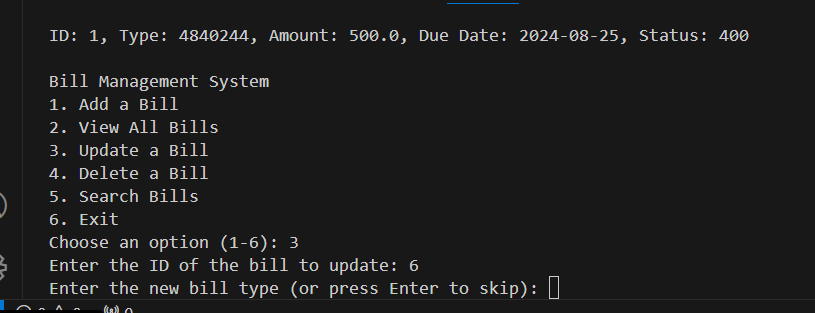
    bill_id = int(input("Enter the ID of the bill to update: "))
    bill_type = input("Enter the new bill type (or press Enter to skip): ")
    amount = input("Enter the new amount (or press Enter to skip): ")
    due_date = input("Enter the new due date (or press Enter to skip): ")
    status = input("Enter the new status (or press Enter to skip): ")

    conn = sqlite3.connect('bills.db')
    cursor = conn.cursor()
    if bill_type:
        cursor.execute("UPDATE bills SET bill_type = ? WHERE id = ?", (bill_type, bill_id))
    if amount:
        cursor.execute("UPDATE bills SET amount = ? WHERE id = ?", (float(amount), bill_id))
    if due_date:
        cursor.execute("UPDATE bills SET due_date = ? WHERE id = ?", (due_date, bill_id))
    if status:
        cursor.execute("UPDATE bills SET status = ? WHERE id = ?", (status, bill_id))
    conn.commit()
    conn.close()
    print("Bill updated successfully!")

# Function to delete a bill
def delete_bill():
    bill_id = int(input("Enter the ID of the bill to delete: "))

    conn = sqlite3.connect('bills.db')
    cursor = conn.cursor()
    cursor.execute("DELETE FROM bills WHERE id = ?", (bill_id,))
    conn.commit()
    conn.close()
    print("Bill deleted successfully!")

# Function to search for a bill
def search_bills():
    search_term = input("Enter a search term (bill type or due date): ")

    conn = sqlite3.connect('bills.db')
    cursor = conn.cursor()
    cursor.execute("SELECT * FROM bills WHERE bill_type LIKE ? OR due_date LIKE ?",
                   ('%' + search_term + '%', '%' + search_term + '%'))
    bills = cursor.fetchall()
    if bills:
        for bill in bills:
            print(f"ID: {bill[0]}, Type: {bill[1]}, Amount: {bill[2]}, Due Date: {bill[3]}, Status: {bill[4]}")
    else:
        print("No matching bills found.")
    conn.close()

# Setting up the database
setup_database()

# Main menu
def main_menu():
    while True:
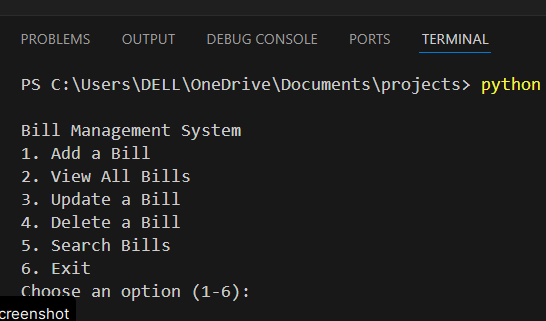
        print("\nBill Management System")
        print("1. Add a Bill")
        print("2. View All Bills")
        print("3. Update a Bill")
        print("4. Delete a Bill")
        print("5. Search Bills")
        print("6. Exit")

        choice = input("Choose an option (1-6): ")
        if choice == '1':
            add_bill()
        elif choice == '2':
            view_bills()
        elif choice == '3':
            update_bill()
        elif choice == '4':
            delete_bill()
        elif choice == '5':
            search_bills()
        elif choice == '6':
            print("Thank you for using the Bill Management System. Goodbye!")
            break
        else:
            print("Invalid choice, please try again.")

main_menu()
Keywords
- bill management system in python
- bill management system project in python
- simple Bill Management System in Python Free Source Code
- billing system python project
- billing management system project in python
- python source code for billing system
- python Bill Management System in Python Free Source Code
- Bill Management System in Python Free Source Code
- Bill Management System in Python Free Source Code
- Bill Management System in Python Free Source Code
- Bill Management System in Python Free Source Code
- Bill Management System in Python Free Source Code