Basic Calculator in Python
If youre new to Python and looking for a fun and simple project to practice your programming skills, building a basic calculator is a perfect choice! Its a great way to learn core programming concepts like functions, loops, and user input. Plus, youll end up with a useful tool that can handle simple arithmetic operations like addition, subtraction, multiplication, and division.
Complete Advance AI Topics: Click Here
Real Time Projects:- DecodeIT
Features
The Python calculator well build will support the following operations:
- Addition: Adding two numbers.
- Subtraction: Subtracting one number from another.
- Multiplication: Multiplying two numbers.
- Division:Dividing an integer by another (with zero division mistake handled).
Steps to Build
Heres an overview of what well do:
- Construct a user input mechanism to gather operators and numbers.
- For every arithmetic operation, create a function.
- Implement a menu system to guide the user through the operations.
- Add error handling to make sure the calculator works smoothly.
Lets dive into the code!
Step 1: Define Functions for Each Operation
The first thing well do is define separate functions for each of the basic arithmetic operations (addition, subtraction, multiplication, and division). This will make the code more modular and easier to understand.
Heres the code to define the basic operations:
# Function for addition
def add(x, y):
    return x + y

# Function for subtraction
def subtract(x, y):
    return x - y

# Function for multiplication
def multiply(x, y):
    return x * y

# Function for division
def divide(x, y):
    if y == 0:
        return "Error! Division by zero is not allowed."
    else:
        return x / y
Explanation:
- We define four separate functions, each taking two parameters (
xandy), which represent the two numbers that the user will input. - For the division function, weve added basic error handling to avoid division by zero.
Step 2: Create the User Input System
Next, well create a system that allows the user to input the numbers and choose the operation they want to perform. Pythons input() function will be used to collect user data.
Heres the code for gathering user input and choosing an operation:
def calculator():
    print("Welcome to the Basic Python Calculator!")

    # Display the available operations
    print("Select operation:")
    print("1. Addition")
    print("2. Subtraction")
    print("3. Multiplication")
    print("4. Division")

    # Take input from the user
    choice = input("Enter choice (1/2/3/4): ")

    if choice in ['1', '2', '3', '4']:
        # Input the numbers
        try:
            num1 = float(input("Enter first number: "))
            num2 = float(input("Enter second number: "))
        except ValueError:
            print("Invalid input! Please enter numeric values.")
            return

        # Perform the chosen operation
        if choice == '1':
            print(f"{num1} + {num2} = {add(num1, num2)}")
        elif choice == '2':
            print(f"{num1} - {num2} = {subtract(num1, num2)}")
        elif choice == '3':
            print(f"{num1} * {num2} = {multiply(num1, num2)}")
        elif choice == '4':
            print(f"{num1} / {num2} = {divide(num1, num2)}")
    else:
        print("Invalid choice! Please select a valid operation.")

# Call the calculator function to run the program
calculator()
Explanation:
- The program first displays a menu of available operations (
Addition,Subtraction,Multiplication, andDivision). - It then asks the user to select an operation by entering
1,2,3, or4. - The program checks whether the users input is valid and then prompts the user to input two numbers.
- Based on the users selection, the corresponding function is called, and the result is displayed.
Step 3: Add Error Handling and Final Touches
Weve already added error handling for invalid numeric inputs and division by zero, but its important to ensure the user experience is smooth. Heres a breakdown of what we added:
- Handling non-numeric input: If the user enters something that isnt a number, the program will print an error message and exit gracefully.
- Handling invalid choices: If the user selects an option outside of the given choices (
1,2,3,4), the program will inform them and stop. - Handling division by zero: We added an extra check to avoid dividing by zero, which is a common error in calculators.
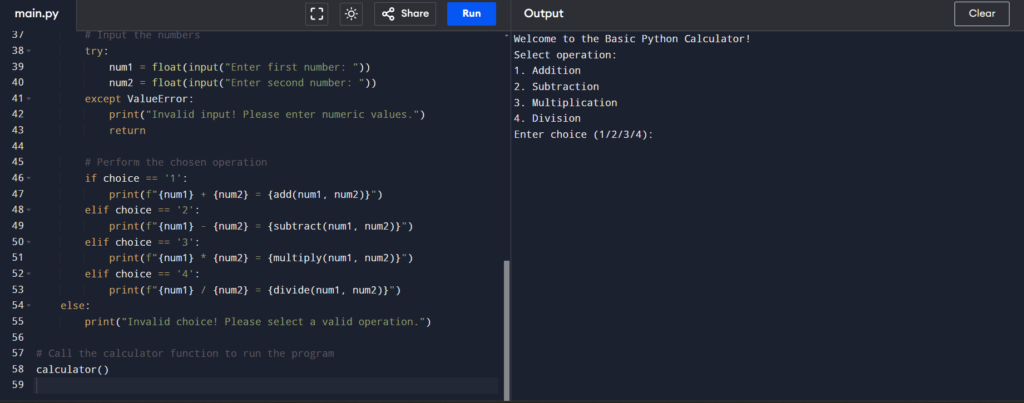

Full Source Code for the Basic Calculator
Heres the full code for the Basic Python Calculator:
# Basic Calculator in Python

# Function for addition
def add(x, y):
    return x + y

# Function for subtraction
def subtract(x, y):
    return x - y

# Function for multiplication
def multiply(x, y):
    return x * y

# Function for division with error handling for division by zero
def divide(x, y):
    if y == 0:
        return "Error! Division by zero is not allowed."
    else:
        return x / y

# Main calculator function
def calculator():
    print("Welcome to the Basic Python Calculator!")

    # Display the available operations
    print("Select operation:")
    print("1. Addition")
    print("2. Subtraction")
    print("3. Multiplication")
    print("4. Division")

    # Take input from the user
    choice = input("Enter choice (1/2/3/4): ")

    if choice in ['1', '2', '3', '4']:
        # Input the numbers
        try:
            num1 = float(input("Enter first number: "))
            num2 = float(input("Enter second number: "))
        except ValueError:
            print("Invalid input! Please enter numeric values.")
            return

        # Perform the chosen operation
        if choice == '1':
            print(f"{num1} + {num2} = {add(num1, num2)}")
        elif choice == '2':
            print(f"{num1} - {num2} = {subtract(num1, num2)}")
        elif choice == '3':
            print(f"{num1} * {num2} = {multiply(num1, num2)}")
        elif choice == '4':
            print(f"{num1} / {num2} = {divide(num1, num2)}")
    else:
        print("Invalid choice! Please select a valid operation.")

# Call the calculator function to run the program
calculator()
How to Run the Calculator Program
- Copy the above code and paste it into a Python file (e.g.,
calculator.py). - Open your terminal or command prompt.
- Go to the directory containing your Python file.
- Run the script by typing
python calculator.py.
You can now perform basic arithmetic operations directly from your terminal!
FAQs – Basic Calculator in Python with Source Code
1. What is a Basic Calculator in Python?
A Basic Calculator in Python is a simple application that performs common mathematical operations such as addition, subtraction, multiplication, and division.
2. Which programming language is used to create the calculator?
The project is developed using Python and is suitable for beginners who want to practice basic programming concepts.
3. What operations can the calculator perform?
The calculator can perform addition, subtraction, multiplication, and division. Additional operations can also be added to the source code.
4. Is the Basic Calculator suitable for beginners?
Yes. It is a beginner-friendly project for learning variables, user input, operators, conditional statements, functions, and basic program logic.
5. Can the calculator be converted into a GUI application?
Yes. The basic calculator can be extended with a graphical user interface using Python libraries such as Tkinter, allowing users to perform calculations through buttons and an interactive display.