
Registration System in Python
A registration system is essential for securely managing user data across various platforms, from websites to event management. This project guides you through building a registration system in Python, complete with features like email validation, password encryption, and data storage. By creating this system, you’ll gain hands-on experience with user input handling, file operations, and security measures, making it a valuable project for both beginners and intermediate Python developers.
Complete Advance AI Topics: Click Here
Real Time Projects:- DecodeIT
Build a Registration System in Python
A registration system helps in managing users by allowing them to sign up and store their details securely. It involves handling various components such as:
- User Input: Collecting data like name, email, and password from users.
- Data Validation: Ensuring that the data entered is in the correct format (e.g., email validation, password checks).
- Data Storage: Storing the user data in a file or database.
This project is ideal for beginners as it touches on key programming concepts, including input handling, file I/O operations, and error checking.
Step 1: Setting Up the Basic Structure
Lets start by setting up a simple console-based registration system in Python. Our system will prompt users to enter details like name, email, and password, and store them in a file for later retrieval.
Heres a basic structure for our registration system:
#---Import Librarires
from tkinter import *
from tkinter import ttk
from tkinter import messagebox

#----Functions/Actions

def validation():
    if name.get()!="" and email.get()!="" and password.get()!="" and gender.get()!="" and age.get()!="":
        email_check=email_validation()
        password_check=password_validataion()
        duplicate_check=duplicates()
        if email_check:
            if duplicate_check:
                messagebox.showinfo("information","User Email Already Exist")
            elif password_check:
                insertion_data()
                messagebox.showinfo("information","Data Inserted Sucessfully")
                shifting_form()
            else:
                messagebox.showerror("Error","Password should be (max 7 characters ,upper and lower case letter , number and symbol)")
        else:
            messagebox.showerror("Error","Email Fromat Is Not invalid")
    else:
        messagebox.showerror("Error","Fill All The Required Feilds")
Step 2: Explanation of the Code
- Email Validation:
- The
validate_email()function uses a regular expression to check if the email entered by the user follows a valid format. - If the email is not valid, the program prompts the user to try again.
- User Registration:
- The
register_user()function collects user input for the name, email, password, and password confirmation. - If the passwords dont match or the email is invalid, appropriate error messages are displayed, and the registration is aborted.
- Data Storage:
- If the input passes all validation checks, the users data is stored in a file (
users.txt). Each line in the file contains a user’s name, email, and password, separated by commas. - Using a file allows you to maintain a persistent storage of registered users that can be used for further processing.
Step 5: Running the Application
To run the registration system:
- Save the code in a Python file (e.g.,
signup.py.). - Run the file from the terminal or command prompt:
python registration_system.pyComplete Code
Screenshot
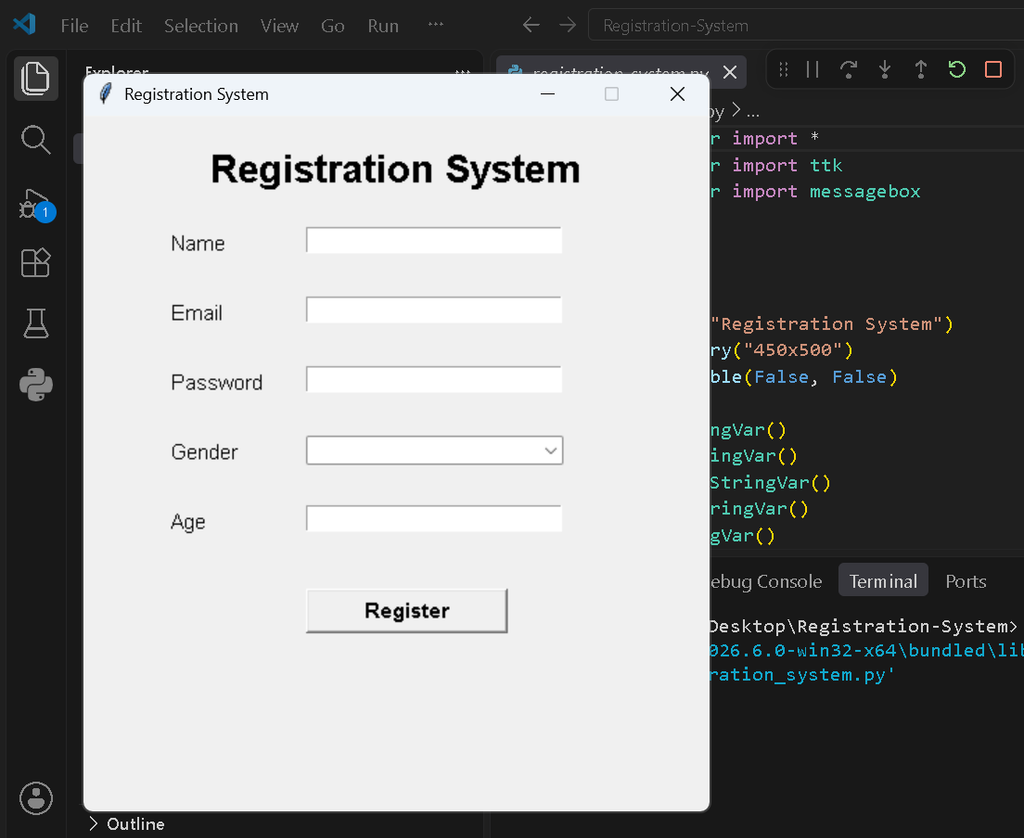
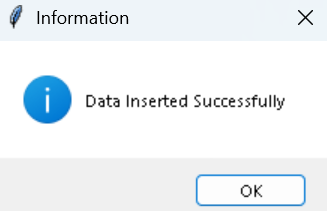
Frequently Asked Questions (FAQ)
1. What is the Registration System in Python?
It is a simple Tkinter-based project that allows users to enter their name, email, password, gender, and age and save the information in a text file.
2. Which technology is used in this project?
The project uses Python, Tkinter, ttk, messagebox, regular expressions, and file handling.
3. Where is user data stored?
User registration data is stored in a simple users.txt file.
4. Does this project require MySQL or another database?
No. The project does not use MySQL, SQLite, MongoDB, or any other database.
5. How is the email validated?
The system uses a regular expression to check whether the entered email follows a valid email format.
6. What are the password requirements?
The password must contain an uppercase letter, lowercase letter, number, and symbol, with a maximum length of 7 characters.
7. What happens if the email already exists?
The system checks users.txt before registration and displays “User Email Already Exist” if the email is already registered.
8. What happens if a required field is empty?
The system displays “Fill All The Required Fields” and does not save the registration.
9. How do I run the project?
Open the project folder in a terminal and run:
python registration_system.py10. Do I need to install external Python packages?
No. The project uses Python’s built-in libraries and does not require external packages.