Online Food Ordering System in Python
In today’s fast-paced world, online food ordering systems have become essential for convenience and efficiency. This blog post demonstrates how to build a simple Online Food Ordering System using Python, without any graphical user interface. Instead, it operates via a command-line interface, focusing on core functionalities like viewing the menu, adding items to a cart, and calculating the total cost. This project offers a hands-on way to explore Python, database management, and basic user interaction.
Complete Advance AI Topics: Click Here
Real Time Projects:- DecodeIT
Tools
- Python: The language in which the application was written in programming.
- SQLite: A lightweight, serverless database to store food items and their prices.
- Command Line Interface: A text-based interface that allows users to interact with the system.
Features
- View Menu: Display a list of available food items and their prices.
- Add to Cart: Select food items and add them to a shopping cart.
- Order Calculation: Determine the total cost of the cart’s contents.
- Checkout: Place the order and show a summary with the total price.
Python Code for the Online Food Ordering System
Heres the complete source code for a command-line-based Online Food Ordering System:
import sqlite3

# Connect to SQLite database
conn = sqlite3.connect('food_ordering.db')
cursor = conn.cursor()

# Create food_items table if not exists
cursor.execute('''
CREATE TABLE IF NOT EXISTS food_items (
    item_id INTEGER PRIMARY KEY AUTOINCREMENT,
    item_name TEXT NOT NULL,
    item_price REAL NOT NULL
)
''')

# Insert sample food items if the table is empty
cursor.execute("SELECT COUNT(*) FROM food_items")
if cursor.fetchone()[0] == 0:
    cursor.execute("INSERT INTO food_items (item_name, item_price) VALUES ('Pizza', 10.99)")
    cursor.execute("INSERT INTO food_items (item_name, item_price) VALUES ('Burger', 5.99)")
    cursor.execute("INSERT INTO food_items (item_name, item_price) VALUES ('Pasta', 7.99)")
    conn.commit()

# Cart to store selected items
cart = []

# Function to display the menu
def show_menu():
    cursor.execute("SELECT item_id, item_name, item_price FROM food_items")
    items = cursor.fetchall()

    print("\n--- Menu ---")
    for item in items:
        print(f"{item[0]}. {item[1]} - ${item[2]:.2f}")

# Function to add an item to the cart
def add_to_cart(item_id, quantity):
    cursor.execute("SELECT item_name, item_price FROM food_items WHERE item_id = ?", (item_id,))
    item = cursor.fetchone()

    if item:
        cart.append((item[0], item[1], quantity))
        print(f"\nAdded {quantity} x {item[0]} to the cart.")
    else:
        print("Item not found!")

# Function to display the cart
def show_cart():
    if not cart:
        print("\nYour cart is empty!")
        return

    print("\n--- Your Cart ---")
    total = 0
    for item in cart:
        total += item[1] * item[2]
        print(f"{item[2]} x {item[0]} - ${item[1]:.2f} each")

    print(f"\nTotal: ${total:.2f}")

# Function to place an order
def place_order():
    if not cart:
        print("\nYour cart is empty! Please add items to your cart before placing an order.")
        return

    total = sum([item[1] * item[2] for item in cart])
    print("\n--- Order Summary ---")
    for item in cart:
        print(f"{item[2]} x {item[0]} - ${item[1]:.2f} each")

    print(f"\nTotal: ${total:.2f}")
    print("Thank you for your order!")

    cart.clear()  # Clear the cart after placing the order

# Main function to run the system
def main():
    while True:
        print("\n--- Food Ordering System ---")
        print("1. View Menu")
        print("2. Add Item to Cart")
        print("3. View Cart")
        print("4. Place Order")
        print("5. Exit")

        choice = input("\nChoose an option: ")

        if choice == '1':
            show_menu()
        elif choice == '2':
            item_id = int(input("Enter the item ID to add to your cart: "))
            quantity = int(input("Enter the quantity: "))
            add_to_cart(item_id, quantity)
        elif choice == '3':
            show_cart()
        elif choice == '4':
            place_order()
        elif choice == '5':
            print("Exiting system. Goodbye!")
            break
        else:
            print("Invalid option. Please try again.")

if __name__ == "__main__":
    main()

# Close the database connection after the program ends
conn.close()

How the Code Works
1. Database Setup:
- The system uses SQLite to store food items. When the program runs for the first time, it creates a table (
food_items) and inserts a few sample items like pizza, burger, and pasta. - The database is queried whenever a user views the menu or adds items to the cart.
2. Menu Display:
- The
show_menu()function fetches all items from the database and displays them to the user in the terminal. The items include an ID, name, and price.
3. Adding to Cart:
- Users can add food items to their cart by selecting an item ID and specifying a quantity. The
add_to_cart()function ensures that the item is valid and adds it to the cart.
4. Viewing Cart:
- The
show_cart()function displays the contents of the cart along with the total price. Users can view their selected items before placing the order.
5. Placing the Order:
- Once the user is ready, they can place the order. The
place_order()function calculates the total price of the cart, displays the order summary, and clears the cart.
6. Main Loop:
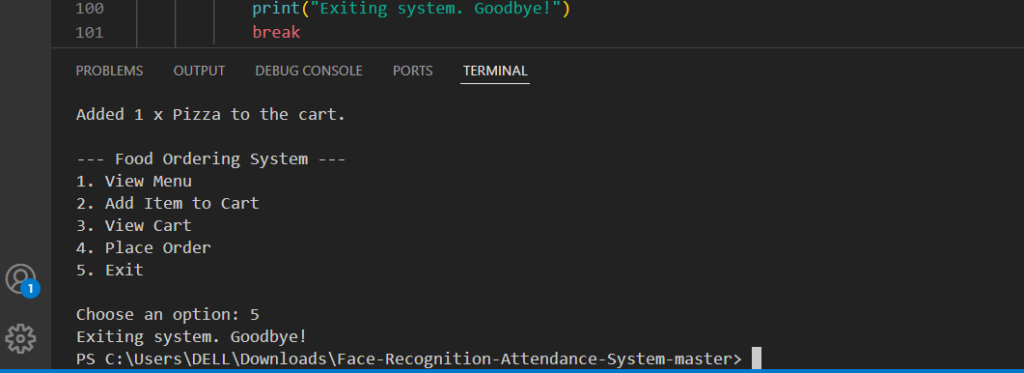
- The system runs in a loop where users can choose to view the menu, add items to the cart, view the cart, place an order, or exit the program.
Running the System
To run this system, you need to have Python installed on your machine. If you’re using Python 3, follow these steps:
- Save the code in a file, for example,
food_ordering_system.py. - Open a terminal and navigate to the directory where the file is located.
- Run the script using:
python3 food_ordering_system.pyThe program will start running, and you can interact with it through the command line.
Key Takeaways
- SQLite Integration: The system interacts with an SQLite database to store and retrieve food items, demonstrating basic database management in Python.
- Command-Line Interface: While theres no graphical user interface, the system is fully functional and allows users to interact with the menu and cart through text input.
- Modular Functions: The system is structured using modular functions, making it easier to maintain and extend.
Frequently Asked Questions (FAQ)
1. What is an Online Food Ordering System in Python?
An Online Food Ordering System in Python is an application that allows customers to browse food items, add items to a cart, place orders, and manage their order information online.
2. Which programming language is used in this project?
The project is developed using Python. Depending on the project design, frameworks such as Django or Flask can be used to build the web application.
3. What is the main purpose of this system?
The main purpose is to simplify the food ordering process by allowing customers to view menus, select food items, place orders, and track their order information digitally.
4. What features are included in an Online Food Ordering System?
Common features include food menu management, user registration, login, food search, shopping cart, order placement, order management, payment handling, and an admin panel.
5. Can users add multiple food items to their cart?
Yes. Users can select multiple food items, adjust quantities, and review the total amount before placing an order.
6. Can restaurant administrators manage food items?
Yes. An admin panel can allow authorized users to add, update, remove, and manage food items, prices, categories, and availability.
7. Can the system store customer orders?
Yes. Orders can be stored in a database along with customer details, selected food items, quantities, prices, order status, and timestamps.
8. Can online payments be integrated?
Yes. A production system can integrate a suitable payment gateway. Payment processing should be implemented securely and according to the provider’s requirements.
9. Is this project suitable for Python students?
Yes. It is a practical project for learning Python, web development, database operations, CRUD functionality, authentication, and order-management workflows.
10. Can the project be expanded with additional features?
Yes. Features such as restaurant ratings, delivery tracking, coupons, notifications, order history, multiple restaurants, and advanced sales reports can be added as the project grows.