Tic-Tac-Toe Game in Python with Source Code
Tic-Tac-Toe is a simple and popular two-player game that is also an excellent beginner project for learning Python programming. In this project, we will create a basic Tic-Tac-Toe Game in Python with Source Code using Python and Tkinter.
The game provides a simple graphical 3×3 board where two players can play against each other on the same computer. One player uses X and the other player uses O. Players take turns by clicking the empty buttons on the board.
This project is intentionally kept simple and beginner-friendly. It does not use artificial intelligence, a computer player, database connectivity, login functionality, scorekeeping, APIs, web frameworks, external libraries, themes, or unnecessary modules. The complete project is contained in a single Python file.
Project Overview
| Project Detail | Information |
|---|---|
| Project Name | Tic-Tac-Toe Game in Python with Source Code |
| Project Type | Simple Desktop Game |
| Programming Language | Python |
| GUI Library | Tkinter |
| Message Library | messagebox |
| Players | Two Players |
| Game Board | 3×3 Grid |
| Project File | tic_tac_toe.py |
| Developer | UPDATEGADH |
Main Objective
The main objective of this project is to create a basic two-player Tic-Tac-Toe game with a graphical interface. The game starts with Player X. After Player X selects an empty cell, the program automatically changes the turn to Player O.
Every time a player clicks an empty button, their mark is placed on the board. After each move, the program checks whether the current player has created a winning combination. If there is no winner, it checks whether all nine cells are filled. When the board is completely filled without a winner, the game displays a draw message.
Once X or O wins, or the game ends in a draw, the application prevents additional moves. The players can then use the Restart Game button to clear the board and start another game.
Complete Advance AI Topics: Click Here
Real Time Projects:- DecodeIT
Required Features
The project includes only the features required for the basic Tic-Tac-Toe game:
- 3×3 Tic-Tac-Toe board
- Two-player gameplay
- Player X
- Player O
- Button click handling
- Winner detection
- Draw detection
- Game-over message
- Restart game functionality
- Simple Tkinter graphical interface
Technologies Used
This project requires only Python and Tkinter. Tkinter is used to create the desktop graphical interface, while the Tkinter messagebox module is used to display the winner and draw messages.
No external Python packages are required for this project. A standard Python installation that includes Tkinter is sufficient to run the application.
Project Structure
The project has a very simple structure with only one Python file:
Tic-Tac-Toe/
│
└── tic_tac_toe.py
The tic_tac_toe.py file contains the complete graphical interface, button handling, player turns, winner detection, draw detection, and restart functionality.
Complete tic_tac_toe.py Source Code
Copy the following code into a file named tic_tac_toe.py:
import tkinter as tk
from tkinter import messagebox


# Main window
root = tk.Tk()
root.title("Tic-Tac-Toe Game")


# Game variables
current_player = "X"
game_over = False


# Create the game board
buttons = []


def check_winner():
    """Check all possible winning combinations."""

    winning_combinations = [
        (0, 1, 2),  # Row 1
        (3, 4, 5),  # Row 2
        (6, 7, 8),  # Row 3
        (0, 3, 6),  # Column 1
        (1, 4, 7),  # Column 2
        (2, 5, 8),  # Column 3
        (0, 4, 8),  # Diagonal
        (2, 4, 6)   # Diagonal
    ]

    for a, b, c in winning_combinations:
        if (
            buttons[a]["text"] != ""
            and buttons[a]["text"] == buttons[b]["text"]
            and buttons[a]["text"] == buttons[c]["text"]
        ):
            return True

    return False


def on_button_click(index):
    """Handle a player clicking a board button."""

    global current_player, game_over

    # Do not allow moves after the game ends
    if game_over:
        return

    # Do not allow an already-filled button to change
    if buttons[index]["text"] != "":
        return

    # Place the current player's mark
    buttons[index]["text"] = current_player

    # Check for a winner
    if check_winner():
        messagebox.showinfo(
            "Game Over",
            f"Player {current_player} wins!"
        )
        game_over = True
        return

    # Check for a draw
    if all(button["text"] != "" for button in buttons):
        messagebox.showinfo(
            "Game Over",
            "The game is a draw!"
        )
        game_over = True
        return

    # Switch player
    if current_player == "X":
        current_player = "O"
    else:
        current_player = "X"

    player_label.config(
        text=f"Current Player: {current_player}"
    )


def restart_game():
    """Reset the board and start a new game."""

    global current_player, game_over

    current_player = "X"
    game_over = False

    for button in buttons:
        button["text"] = ""

    player_label.config(
        text=f"Current Player: {current_player}"
    )


# Game title
title_label = tk.Label(
    root,
    text="Tic-Tac-Toe",
    font=("Arial", 20)
)
title_label.pack(pady=10)


# Current player information
player_label = tk.Label(
    root,
    text="Current Player: X",
    font=("Arial", 12)
)
player_label.pack(pady=5)


# Board frame
board_frame = tk.Frame(root)
board_frame.pack()


# Create 3x3 buttons
for i in range(9):
    button = tk.Button(
        board_frame,
        text="",
        width=5,
        height=2,
        font=("Arial", 20),
        command=lambda index=i: on_button_click(index)
    )

    button.grid(
        row=i // 3,
        column=i % 3
    )

    buttons.append(button)


# Restart button
restart_button = tk.Button(
    root,
    text="Restart Game",
    font=("Arial", 12),
    command=restart_game
)
restart_button.pack(pady=15)


# Start the application
root.mainloop()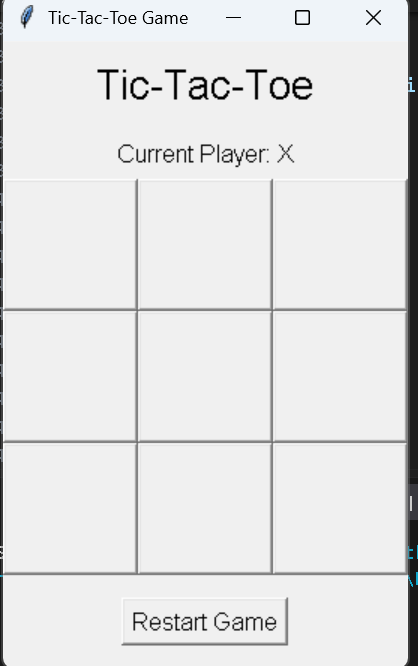
How the Game Works
When the Python program starts, it creates the main Tkinter window. The window contains a title, current player information, a 3×3 game board, and a Restart Game button.
The nine board positions are created using Tkinter buttons. Initially, every button has an empty text value. When a player clicks a button, the program checks whether the button is empty and whether the game is still active.
If the button is available, the current player’s mark is placed inside it. The first player starts with X. After a valid X move, the program changes the current player to O. After O makes a move, the turn changes back to X.
Winner Detection
The check_winner() function is responsible for detecting a winning player. A Tic-Tac-Toe board has eight possible winning combinations.
There are three possible winning rows, three possible winning columns, and two possible diagonals. The function checks each combination and compares the text of the three buttons.
For example, a player wins when the board contains three identical marks in a row:
X X X
O O
O
A player can also win vertically:
X
X
X
The two diagonal combinations are also checked. If three identical non-empty marks are found, check_winner() returns True.
Button Click Handling
The on_button_click() function controls what happens when a player selects a board cell. The function first checks whether the game has already finished. If the game is over, the function returns without making another move.
It also checks whether the selected button already contains X or O. If it does, the button cannot be changed. This prevents players from replacing an existing move.
After a valid move is placed, the program checks for a winner. If the current player has won, messagebox.showinfo() displays the game-over message and the game is stopped.
Draw Detection
If there is no winner, the program checks whether all nine buttons have been filled. When every cell contains either X or O and no winning combination exists, the game ends in a draw.
The program uses messagebox.showinfo() to display:
The game is a draw!After displaying the message, the game_over variable is changed so that no additional moves can be made until the game is restarted.
Restart Game Functionality
The restart_game() function allows the players to start a new game without closing the application. It clears the text from all nine buttons, changes the current player back to X, and allows moves again.
The restart button is placed below the 3×3 board and calls the restart_game() function whenever it is clicked.
How to Run the Project
First, create a folder named Tic-Tac-Toe. Inside that folder, create a file named tic_tac_toe.py and paste the complete source code into it.
Open Command Prompt or Terminal inside the project folder and run the following command:
python tic_tac_toe.pyThe Tkinter game window will open. Player X can make the first move by clicking any empty square.
How to Play
- Start the program using the Python command.
- Player X starts the game.
- Click any empty square on the 3×3 board.
- Player O takes the next turn.
- Continue taking turns between X and O.
- Make three identical marks in a row, column, or diagonal to win.
- If all nine cells are filled without a winner, the game ends in a draw.
- After the game ends, click Restart Game to begin again.
Conclusion
The Tic-Tac-Toe Game in Python with Source Code is a simple desktop project for beginners who want to understand Python GUI programming with Tkinter. The project demonstrates important basic concepts such as button click handling, variables, functions, conditional statements, loops, player switching, winner detection, draw detection, and restarting a game.
The complete application is kept inside one Python file and does not require external libraries. Players can interact with the 3×3 graphical board, take turns using X and O, receive a message when the game ends, and restart the board for a new game.
Keywords:
Tic-Tac-Toe Game in Python Tic-Tac-Toe Game in Python – Google Search tic tac toe game in python tic tac toe game in python code tic tac toe game in python project report pdf tic tac toe game in python pdf tic tac toe game in python GitHub Tic-Tac-Toe Game in Python with Source Code