Menu
Object Detection Project in python
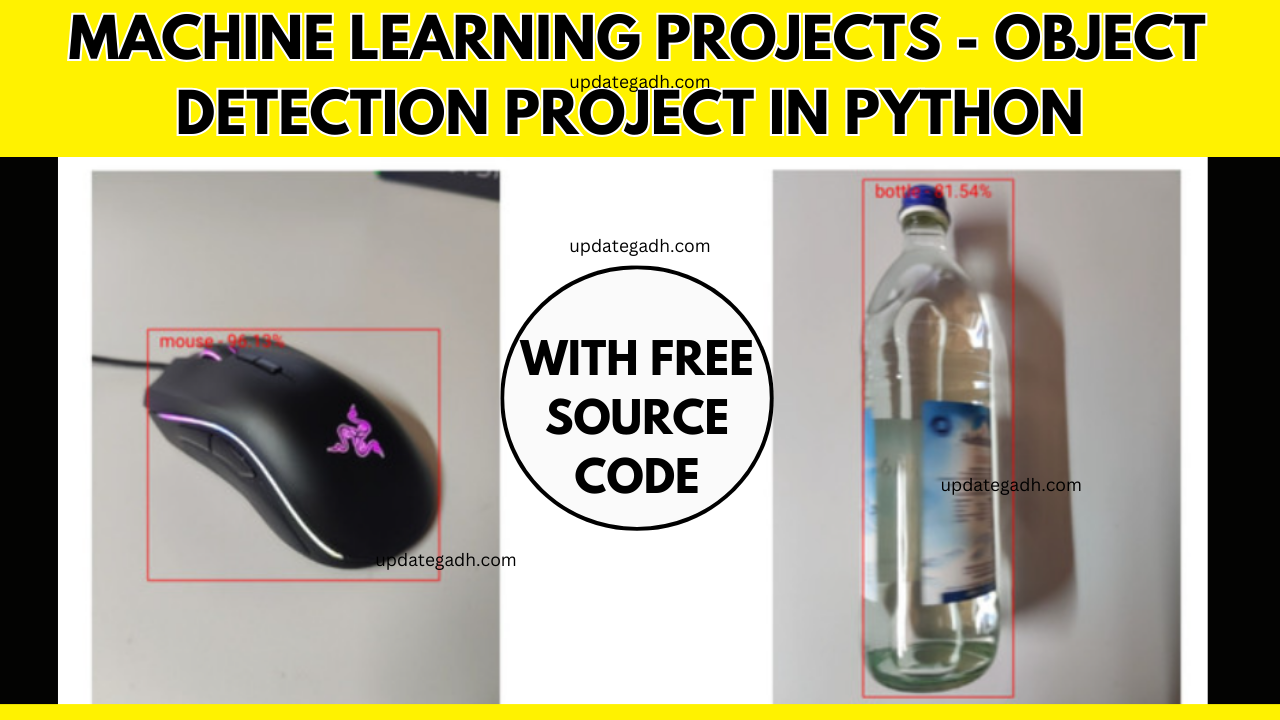
Object Detection Project in python is a subset of the wider topic of Computer Vision. This technology is capable of recognizing and tracking objects in photos and movies. Face recognition, vehicle recognition, pedestrian counting, self-driving vehicles, security systems, and many more applications use object recognition, also known as object detection.
The two main goals of object recognition are as follows:
Identification of all items in a photograph
Filtration of the thing vying for attention
Project Demo live , just try it out here:
Object Detection Project in python
Objective
The objective of bject Detection Project in python is to develop a robust and efficient object detection system using Python, leveraging state-of-the-art computer vision techniques and deep learning frameworks. The system should be capable of accurately identifying and localizing objects within images or video streams. Key goals include implementing a pre-trained deep learning model for object detection, fine-tuning the model on a specific dataset relevant to the application domain,
If you are not convinced yet just try it out here:
Feature
-
- Toggle switch to turn AI on or off
-
- Range slider to control frame rate
Multiple browser support
| Browser | supported |
|---|---|
| Firefox | |
| Chrome | |
| Edge | |
| Internet Explorer |
| Mobile Browser | supported |
|---|---|
| Firefox | |
| Chrome |
Software And Tools Required
- : Vs Code
- : Python
- : JavaScript
Credits (Use these libraries)
Output
Home Page:
Download Project:
Download Free Project :-
Free Object Detection Project in python :-Click below
Download Source Code Project:
Virus note: All files are scanned once-a-day by updategadh.com for viruses, but new viruses come out every day, so no prevention program can catch 100% of them
FOR YOUR OWN SAFETY, PLEASE:
1. Re-scan downloaded files using your personal virus checker before using it.
2. NEVER, EVER run compiled files (.exe’s, .ocx’s, .dll’s etc.)–only run source code.
Note: Only for Educational Purpose
Copy below Source code :-
Object Detection Project in python
index.html
<!DOCTYPE html>
<html lang="en">
<head>
  <title>AI object detection</title>
  <meta charset="utf-8">
  <meta name="viewport" content="width=device-width, initial-scale=1.0">
  <link rel="stylesheet" href="https://cdnjs.cloudflare.com/ajax/libs/materialize/1.0.0/css/materialize.min.css">
  <link rel="stylesheet" href="style.css">
  <script src="https://unpkg.com/ml5@latest/dist/ml5.min.js"></script>
</head>
<body>
  <h2 id="loadingText">Loading...</h2>
  <!-- video with size of 0px because of chrome -->
  <video playsinline autoplay muted controls="true" id="video"></video>
  <br><br>
  <canvas id="c1"></canvas>
  <br><br>
  <table>
    <tr>
      <td>AI:</td>
      <td>
        <div>
          <label>
            Off
            <input type="checkbox" id="ai" disabled>
            <span></span>
            On
          </label>
        </div>
      </td>
    </tr>
    <tr>
      <td>FPS:</td>
      <td>
        <p>
          <input type="range" id="fps" min="1" max="60" value="50">
        </p>
      </td>
    </tr>
  </table>
  <script>
    var modelIsLoaded = false;
    // Create a ObjectDetector method
    const objectDetector = ml5.objectDetector('cocossd', {}, modelLoaded);
    // When the model is loaded
    function modelLoaded() {
      console.log("Model Loaded!");
      modelIsLoaded = true;
    }
  </script>
  <script src="video.js"></script>
  <script src="https://cdnjs.cloudflare.com/ajax/libs/materialize/1.0.0/js/materialize.min.js"></script>
</body>
</html>
body {
text-align: center;
}
video {
width: 0px;
height: 0px;
}
table {
width: auto;
margin: auto;
}
tr, td {
border: 0px;
text-align: center;
}
document.getElementById("ai").addEventListener("change", toggleAi)
document.getElementById("fps").addEventListener("input", changeFps)
const video = document.getElementById("video");
const c1 = document.getElementById('c1');
const ctx1 = c1.getContext('2d');
var cameraAvailable = false;
var aiEnabled = false;
var fps = 16;
/* Setting up the constraint */
var facingMode = "environment"; // Can be 'user' or 'environment' to access back or front camera (NEAT!)
var constraints = {
    audio: false,
    video: {
        facingMode: facingMode
    }
};
/* Stream it to video element */
camera();
function camera() {
    if (!cameraAvailable) {
        console.log("camera")
        navigator.mediaDevices.getUserMedia(constraints).then(function (stream) {
            cameraAvailable = true;
            video.srcObject = stream;
        }).catch(function (err) {
            cameraAvailable = false;
            if (modelIsLoaded) {
                if (err.name === "NotAllowedError") {
                    document.getElementById("loadingText").innerText = "Waiting for camera permission";
                }
            }
            setTimeout(camera, 1000);
        });
    }
}
window.onload = function () {
    timerCallback();
}
function timerCallback() {
    if (isReady()) {
        setResolution();
        ctx1.drawImage(video, 0, 0, c1.width, c1.height);
        if (aiEnabled) {
            ai();
        }
    }
    setTimeout(timerCallback, fps);
}
function isReady() {
    if (modelIsLoaded && cameraAvailable) {
        document.getElementById("loadingText").style.display = "none";
        document.getElementById("ai").disabled = false;
        return true;
    } else {
        return false;
    }
}
function setResolution() {
    if (window.screen.width < video.videoWidth) {
        c1.width = window.screen.width * 0.9;
        let factor = c1.width / video.videoWidth;
        c1.height = video.videoHeight * factor;
    } else if (window.screen.height < video.videoHeight) {
        c1.height = window.screen.height * 0.50;
        let factor = c1.height / video.videoHeight;
        c1.width = video.videoWidth * factor;
    }
    else {
        c1.width = video.videoWidth;
        c1.height = video.videoHeight;
    }
};
function toggleAi() {
    aiEnabled = document.getElementById("ai").checked;
}
function changeFps() {
    fps = 1000 / document.getElementById("fps").value;
}
function ai() {
    // Detect objects in the image element
    objectDetector.detect(c1, (err, results) => {
        console.log(results); // Will output bounding boxes of detected objects
        for (let index = 0; index < results.length; index++) {
            const element = results[index];
            ctx1.font = "15px Arial";
            ctx1.fillStyle = "red";
            ctx1.fillText(element.label + " - " + (element.confidence * 100).toFixed(2) + "%", element.x + 10, element.y + 15);
            ctx1.beginPath();
            ctx1.strokeStyle = "red";
            ctx1.rect(element.x, element.y, element.width, element.height);
            ctx1.stroke();
            console.log(element.label);
        }
    });
}
Download Free Project :-