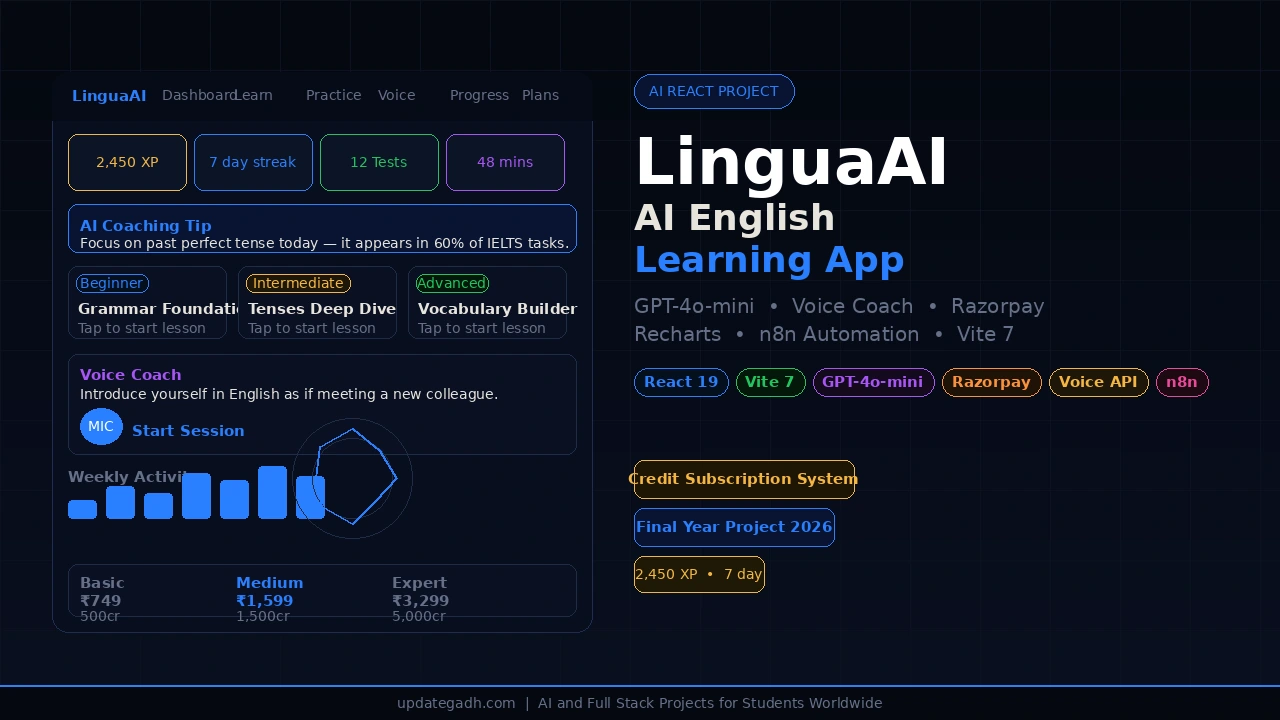
Looking for an AI-Powered English Learning App using React, Vite, OpenAI and Razorpay with full source code? LinguaAI is a complete final year project for BCA, MCA, and B.Tech CS/IT students that combines real GPT-4o-mini lessons, an interactive practice test engine, browser-based voice coaching, progress analytics, and a working Razorpay subscription system inside a single polished React SPA. It is one of those rare student projects that uses production-grade tools, which means your viva examiner takes notice and your resume instantly stands out.
Project Overview
| Project Name | LinguaAI – AI-Powered English Learning App |
| Framework | React 19 + Vite 7 |
| AI Engine | OpenAI GPT-4o-mini |
| Voice | Web Speech API (SpeechRecognition + SpeechSynthesis) |
| Payments | Razorpay Checkout SDK |
| Charts | Recharts 3 |
| Persistence | localStorage (no backend required) |
| Project Type | Single Page Web Application (SPA) |
| Difficulty | Advanced |
| Best For | BCA, MCA, B.Tech CS/IT Final Year Students |
| Developer | Updategadh |
About the Project
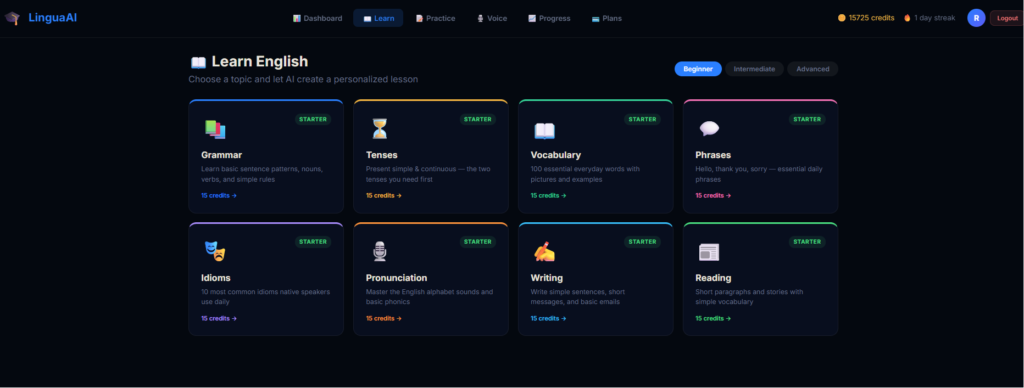
LinguaAI is an AI-powered English learning web application built with React 19 and Vite 7 that turns the browser into a complete language classroom. Instead of static, hard-coded lessons, the app calls the OpenAI GPT-4o-mini API in real time to generate dynamic lessons on any topic at Beginner, Intermediate, or Advanced level, complete with an in-lesson Q&A chat for follow-up questions.
The project also includes a randomised MCQ practice test engine with AI-generated explanations, a voice coach that listens to your spoken English through the microphone and reads correction feedback aloud, a full progress dashboard with four real-time charts, and a credit-based subscription system powered by the Razorpay Checkout SDK. Everything runs entirely in the browser using localStorage, so there is no backend server to configure – making it extremely easy to demo from any laptop during your viva or project presentation.
Key Features
- AI-Powered Lessons: Generate dynamic English lessons on any topic at Beginner, Intermediate, or Advanced level using GPT-4o-mini, with in-lesson Q&A chat for follow-up questions.
- Practice Tests: Randomised 8-question MCQ tests covering grammar, tenses, vocabulary, phrases, and communication with instant scoring and AI-generated explanations for every answer.
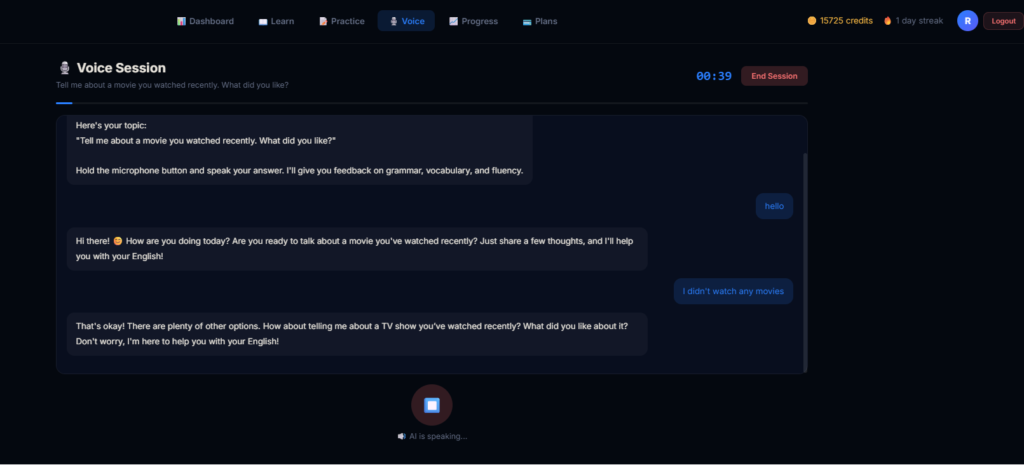
- Voice Coach: Browser-based speech recognition captures your spoken English in real time, sends it to the AI for pronunciation and grammar correction, and reads the feedback aloud via text-to-speech.
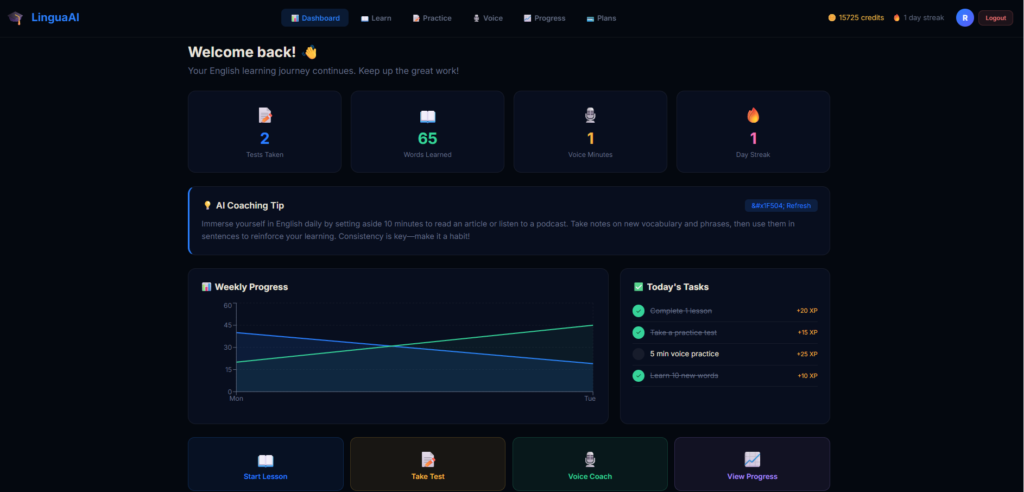
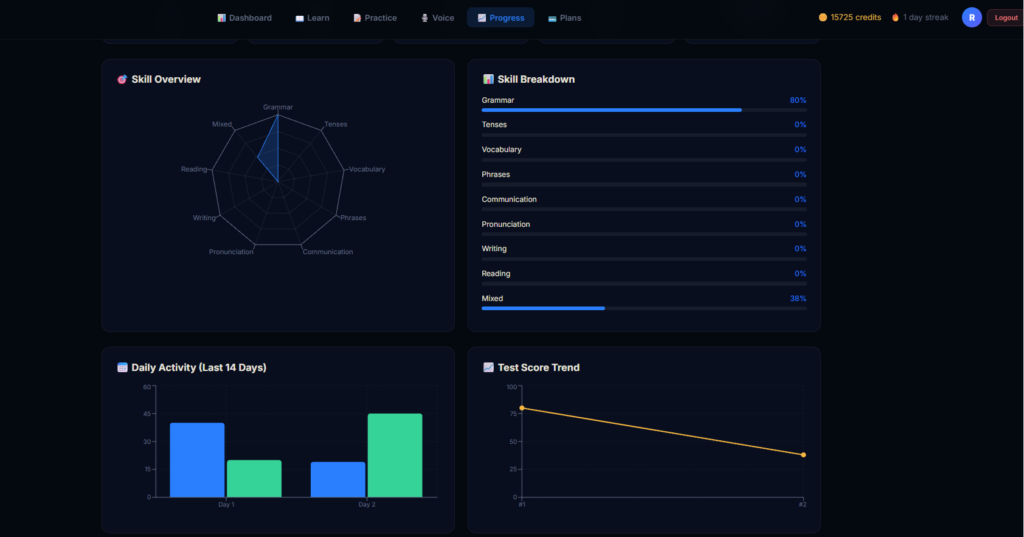
- Progress Dashboard: Weekly activity area chart, per-skill radar chart, 14-day bar chart, test score line chart, XP system, streak tracker, and a daily task checklist in one place.
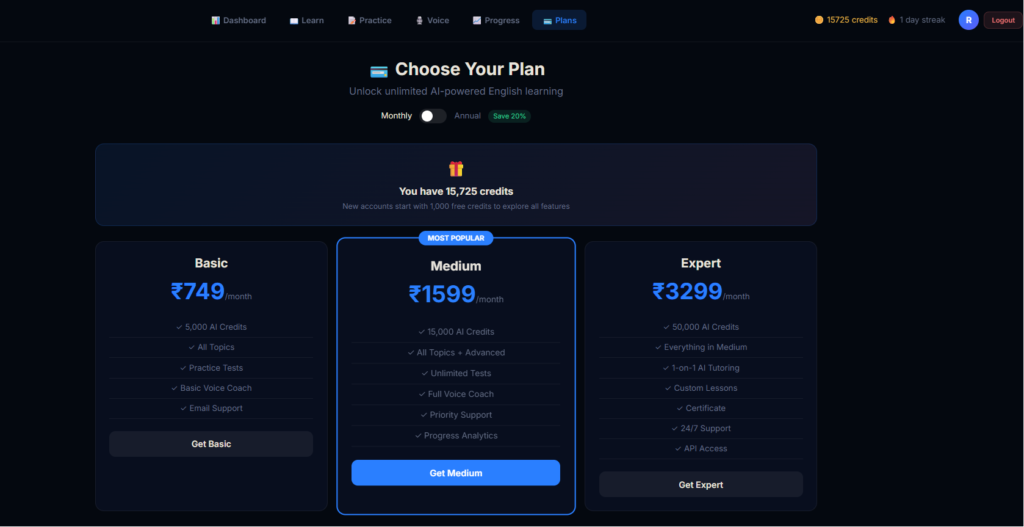
- Credit and Subscription System: Three Razorpay-powered plans – Basic (Rs 749), Medium (Rs 1,599), and Expert (Rs 3,299) – with monthly and annual billing and a 20 percent annual discount.
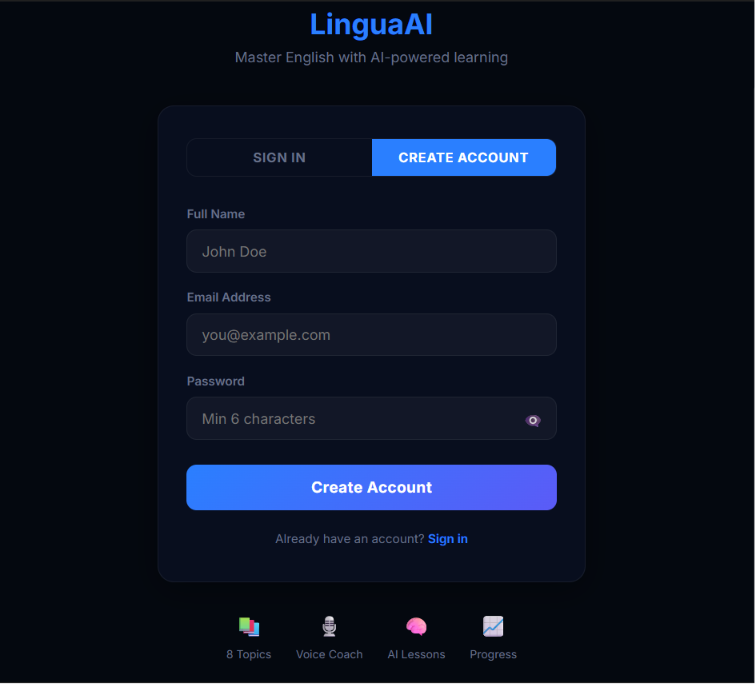
- User Authentication: Lightweight localStorage-based register, login, and session management with per-user profiles, test history, and credits.
- Modern Dark UI: Inter font, custom scrollbar, smooth animations, and a fully responsive dark theme layout.
Technology Used
| Layer | Technology | Purpose |
| UI Framework | React 19 | Component-based interactive single page application |
| Build Tool | Vite 7 | Fast dev server and optimised production builds |
| AI Engine | OpenAI GPT-4o-mini | Lesson generation, Q&A chat, test explanations, voice feedback |
| Voice | Web Speech API | Browser-based speech recognition and text-to-speech |
| Charts | Recharts 3 | Area, bar, line, and radar charts for progress analytics |
| Payments | Razorpay Checkout SDK | Subscription purchases with monthly and annual billing |
| Automation | n8n Webhooks | Event-driven automation for milestones, summaries, and CRM |
| Persistence | localStorage | User profiles, test history, credits, and session data |
| Styling | Inline styles + index.css | Dark theme, Inter font, custom scrollbar, responsive layout |
| Linting | ESLint 9 | Code quality with React hooks and refresh plugins |
Project Folder Structure
lingua-ai/
|-- index.html               # App shell - loads Inter font + Razorpay SDK
|-- vite.config.js           # Vite config with React plugin
|-- eslint.config.js         # ESLint flat config
|-- package.json
|-- .env                     # Local secrets - never commit
|-- public/                  # Static assets
|-- src/
    |-- main.jsx             # React entry point
    |-- App.jsx              # Root component + all page components
    |-- config.js            # Centralised env-var config + theme colours
    |-- index.css            # Global reset, typography, scrollbar, animations
    |-- assets/
    |-- hooks/
    |   |-- useVoice.js      # Web Speech API hook (listen, transcribe, speak)
    |-- services/
        |-- auth.js          # localStorage register / login / session
        |-- db.js            # localStorage user profile and activity store
        |-- openai.js        # OpenAI chat completions wrapper
        |-- n8n.js           # n8n webhook event helpers
        |-- razorpay.js      # Razorpay payment modal helper
How It Works
AI Lesson Generation
- The user selects one of the 8 topic cards: Grammar, Tenses, Vocabulary, Phrases, Idioms, Pronunciation, Writing, or Reading.
- A difficulty level is chosen – Beginner, Intermediate, or Advanced.
- The app deducts credits based on level and calls the OpenAI GPT-4o-mini API with an expert English teacher system prompt.
- A dynamic lesson is generated and displayed, and the user can ask follow-up questions in the in-lesson chat.
- Lesson completion is saved to the user profile and an n8n lesson_completed webhook is fired.
Practice Test Flow
- The user picks a topic filter or keeps it on All Topics.
- 8 questions are drawn randomly from a 22-question MCQ bank covering grammar, tenses, vocabulary, phrases, and communication.
- Answers are submitted and scored instantly on screen.
- A detailed review shows each question with the correct answer and an AI-generated explanation.
- Results are saved to skill scores, test history, and daily progress, and an n8n test_completed event fires.
Voice Coach Session
- A random speaking prompt is displayed from 10 real-world topics such as introductions, opinions, and storytelling.
- The user presses Start Session and the browser microphone activates via the useVoice hook using the Web Speech API.
- Speech is transcribed live on screen while the user speaks.
- When the user stops, the transcript is sent to GPT-4o-mini for pronunciation and grammar correction feedback.
- The AI response is read aloud via SpeechSynthesis at a natural rate, and session duration is saved to daily stats.
Subscription and Payment Flow
- The user opens the Pricing page and selects a plan – Basic (Rs 749), Medium (Rs 1,599), or Expert (Rs 3,299).
- Billing can be toggled between monthly and annual, with annual billing giving a 20 percent discount.
- Clicking Get Started opens the Razorpay Checkout modal.
- On successful payment, credits are added to the user profile and an n8n plan_purchased webhook fires.
Subscription Plans
| Plan | Monthly Price | Credits | Key Features |
| Basic | Rs 749 | 500 | All lessons, practice tests, voice sessions |
| Medium | Rs 1,599 | 1,500 | Everything in Basic + priority AI responses and progress reports |
| Expert | Rs 3,299 | 5,000 | Everything in Medium + 1-on-1 coaching and certificates |
How to Run This Project
Step 1: Install Dependencies
cd lingua-ai
npm install
Step 2: Create Your .env File
Create a .env file in the lingua-ai/ root folder and add your keys:
VITE_OPENAI_API_KEY=sk-proj-your-key-here
VITE_OPENAI_MODEL=gpt-4o-mini
VITE_N8N_WEBHOOK_URL=https://your-n8n-instance.example.com/webhook/lingua-ai
VITE_RAZORPAY_KEY=rzp_test_XXXXXXXXXXXXXXXX
Step 3: Start the Development Server
npm run dev
Open the local URL shown in your terminal, register an account, and start exploring all modules.
Step 4: Build for Production
npm run build
npm run preview
How to Download
The complete package is available so you can run, study, and submit it with confidence. It includes:
- Full Source Code
- Project Report
- Synopsis
- PPT Presentation
Demo Video
Watch the complete walkthrough of LinguaAI – AI-Powered English Learning App below, covering lesson generation, practice tests, voice coaching, and the Razorpay payment flow:
Screenshots
Why This Is a Great Final Year Project
- Real OpenAI GPT-4o-mini integration – not a fake demo; actual AI-generated content powers every lesson and test explanation.
- Live payment gateway with Razorpay – very few student projects include a working payment system, and this one impresses every examiner.
- Voice recognition and text-to-speech using the Web Speech API – a feature most students have never built before.
- Four real-time charts using Recharts – radar, bar, area, and line charts showing genuine user data.
- n8n webhook automation – an enterprise-level feature that shows you understand modern software workflows beyond just building UIs.
- Credit and subscription system – demonstrates business logic, monetisation, and user access control.
- Zero backend required – runs entirely in the browser, making it easy to demo from any laptop during viva.
How to Download This Project
The complete LinguaAI – AI-Powered English Learning App package includes:
For instant support, message us on WhatsApp: (check at the bottom)
Frequently Asked Questions (FAQ)
Is LinguaAI suitable for BCA, MCA, and B.Tech final year submission?
Yes. LinguaAI is an advanced-level project ideal for BCA, MCA, and B.Tech CS/IT final year students. It covers AI integration, payments, voice technology, and data visualisation – more than enough depth for a strong viva.
Do I need a backend server to run this project?
No. LinguaAI runs entirely in the browser and uses localStorage for user profiles, test history, credits, and session data. You only need Node.js installed to run the Vite development server.
Is the OpenAI API key included with the project?
No. You need to create your own OpenAI API key and add it to the .env file. The setup guide included with the project explains every step.
Does the Razorpay payment system actually work?
Yes. The project uses the official Razorpay Checkout SDK. You can run it in test mode with a Razorpay test key for your demo, and switch to a live key for production use.
Which browsers support the Voice Coach feature?
The Voice Coach uses the Web Speech API, which works best in Google Chrome and Microsoft Edge. Speech recognition support may vary in other browsers.
Can I customise the lessons, tests, and pricing plans?
Yes. The MCQ question bank, topic cards, speaking prompts, credit costs, and subscription plans are all defined in the source code and can be easily modified.
- Ai Powered english learning app free,english learning app free download
- english learning app speaking
- english learning app for adults
- english learning app for beginners
- english learning app in india
- best english learning app
- english learning app for android
- english learning app for college students
- best english learning app for competitive exams
- best english learning app for conversation
- best english learning app for communication
- best english learning app for college students
- english learning app codecanyon
- english learning app with conversation
- english learning app source code
- english learning app free of cost