Node.js Assert Module
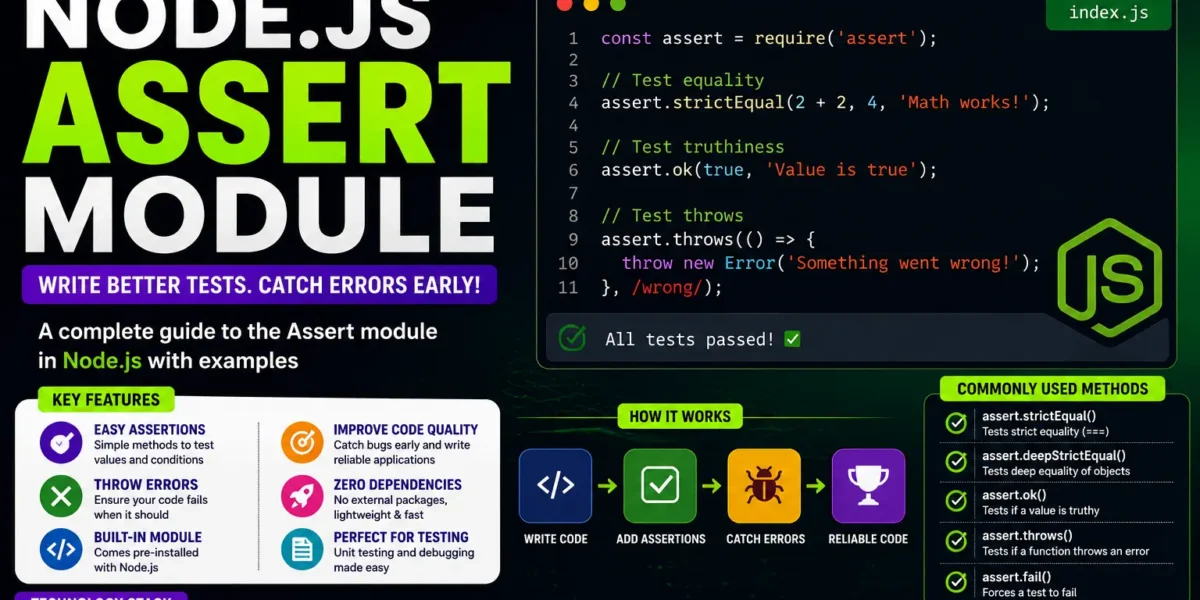
The Node.js Assert Module is a built-in utility module that provides assertion functions for writing and validating unit tests. Assertions are useful for checking whether specific conditions are true during program execution.
By using assertions effectively, developers can identify problems early, verify expected behavior, and improve the reliability and quality of their Node.js applications.
What is the Node.js Assert Module?
The Assert module is included by default with Node.js, so developers do not need to install a separate package to use it. It provides different assertion methods that can be used for basic comparisons, error validation, type checking, asynchronous testing, and debugging.
The module can be imported using:
const assert = require('assert');Once imported, its assertion methods can be used to verify expected conditions in JavaScript programs and test cases.
Basic Assertions
Basic assertions are used to verify simple conditions and compare values. The Node.js Assert module provides several methods for performing these validations.
const assert = require('assert');

// Check if value is truthy
assert.ok(true, 'This will pass');
assert.ok(1, 'This will also pass');

// Compare values using loose equality (==)
assert.equal(5, 5, 'Numbers are equal');
assert.equal('hello', 'hello', 'Strings are equal');

// Strict equality (===)
assert.strictEqual(5, '5', 'Not strictly equal');

// Deep comparison
assert.deepEqual({ a: 1 }, { a: 1 }, 'Objects are deeply equal');
Explanation
assert.ok()checks whether a value is truthy.assert.equal()verifies equality using==.assert.strictEqual()performs strict comparison using===.assert.deepEqual()checks whether objects are deeply equal.
These assertion methods provide the foundation for creating effective and accurate unit tests.
Error Assertions
Error assertions are useful when you need to verify whether a function throws an error under specific conditions. They are particularly helpful when testing error-handling paths.
const assert = require('assert');

assert.throws(() => {
  throw new Error('Intentional error');
}, Error);

assert.doesNotThrow(() => {
  // Some safe operation
});
The two important methods used in this example are:
assert.throws()verifies that a function throws the expected error.assert.doesNotThrow()confirms that a function does not produce an error.
Error assertions help developers test whether their applications behave correctly when errors occur.
Type Assertions
Type validation can be used to verify whether returned values contain errors. The Assert module provides assert.ifError() for this purpose.
const assert = require('assert');

assert.ifError(null);

// assert.ifError(new Error('Failure')); // Throws error
assert.ifError() throws an assertion error when the supplied value is truthy. It is commonly used with error-first callback patterns.
Custom Assertions
Developers can create custom assertion functions when the same validation logic needs to be used repeatedly. This helps encapsulate repetitive checks and makes tests easier to read.
const assert = require('assert');

function assertIsPositiveNumber(value) {
  assert(
    typeof value === 'number' && value > 0,
    'Value must be a positive number'
  );
}

assertIsPositiveNumber(5);

// assertIsPositiveNumber(-1); // Fails
Custom assertions make validation logic reusable and can improve the readability of test cases.
Using Assert with Testing Frameworks
The Node.js Assert module can be used together with testing frameworks such as Mocha, Jest, and Jasmine. Testing frameworks provide the structure for organizing tests, while the Assert module is used to verify the expected results.
const assert = require('assert');
const { add } = require('./math');

describe('add function', () => {
  it('should return sum of two numbers', () => {
    assert.equal(add(2, 3), 5);
  });
});
In this example, the testing framework structures the test while assert.equal() checks whether the result of the add() function is correct.
Asynchronous Testing
Testing asynchronous operations accurately is important when working with modern Node.js applications. Assertions can be used after asynchronous operations have completed to verify the expected results.
Using Promises
const assert = require('assert');

describe('asyncFunction', () => {
  it('should resolve to true', () => {
    return asyncFunction().then(result => {
      assert.ok(result);
    });
  });
});
Using Async/Await
describe('asyncFunction', () => {
  it('should resolve to true', async () => {
    const result = await asyncFunction();
    assert.ok(result);
  });
});
Assertions allow developers to verify that the expected output is produced after an asynchronous operation has completed.
Reporting Failures
When an assertion fails, the Assert module provides an error message that can help developers understand what went wrong. Meaningful error messages are useful during debugging and testing.
const assert = require('assert');

assert.strictEqual(5, '5', 'Not strictly equal');
This assertion fails because the values are not strictly equal. The resulting AssertionError contains the specified message:
AssertionError: Not strictly equalClear error messages make it easier to locate and understand problems within an application.
CI Integration
Assert-based test suites can be integrated into CI/CD pipelines such as GitHub Actions. Automated testing allows tests to run whenever changes are pushed to the project.
name: CI

on:
  push:
    branches:
      - main

jobs:
  test:
    runs-on: ubuntu-latest

    steps:
      - uses: actions/checkout@v2
      - run: npm install
      - run: npm test
Automated test execution helps identify regressions and maintain consistency in the codebase.
Debugging with Assertions
Assertions can also be useful during development for identifying invalid conditions and runtime problems.
const assert = require('assert');

function divide(a, b) {
  assert(b !== 0, 'Cannot divide by zero');
  return a / b;
}

console.log(divide(10, 2)); // Output: 5

// console.log(divide(10, 0)); // Throws AssertionError
In this example, the assertion checks whether the divisor is not zero. If the value of b is zero, the assertion fails and an AssertionError is generated.
Checking conditions inside functions in this way can help prevent unintended behavior during development.
YT:- DecodeIT
Best Practices for Node.js Assertions
When using the Assert module, following simple testing practices can make assertions more useful and maintainable.
- Use clear and descriptive error messages.
- Cover edge cases and potential failure scenarios.
- Run tests regularly.
- Keep assertions simple and meaningful.
For example:
const assert = require('assert');

assert.equal(5, 5, 'Numbers should be equal');

describe('divide function', () => {
  it('should divide two numbers', () => {
    assert.equal(divide(10, 5), 2);
  });

  it('should throw error when dividing by zero', () => {
    assert.throws(
      () => divide(10, 0),
      /Cannot divide by zero/
    );
  });
});
Simple and meaningful assertions make test cases easier to understand and maintain.
Advantages of Node.js Assert Module
1. Built-in Module
The Assert module is available by default in Node.js, so no additional installation is required.
2. Simple API
The API is straightforward and easy to understand, making it suitable for basic testing and validation.
3. Good Coverage
The module supports basic assertions, error assertions, type validation, and asynchronous testing.
4. Helpful Debugging
Assertions can provide meaningful error messages when expected conditions are not satisfied, helping developers identify problems during development.
Disadvantages of Node.js Assert Module
1. Limited Features
The built-in Assert module may not provide some of the advanced assertion features available in third-party testing libraries.
2. Verbose for Complex Logic
When tests become large and complex, managing assertions directly can become more difficult.
3. Basic Error Handling
The error-handling functionality may not be as comprehensive as that offered by dedicated testing tools.
4. Less Intuitive for Async Scenarios
Asynchronous testing can be less intuitive when compared with the features provided by testing frameworks such as Jest.
More:-UPDATEGADH
Conclusion
The Node.js Assert Module is a useful built-in utility for validating conditions, testing functions, checking errors, and debugging Node.js applications. It provides simple assertion methods such as ok(), equal(), strictEqual(), deepEqual(), throws(), doesNotThrow(), and ifError().
The module can also be used with testing frameworks and asynchronous code, making it useful for a wide range of testing scenarios. Its built-in nature and simple API make it a convenient option for basic assertions and unit testing in Node.js.
However, for more complex testing requirements, developers may prefer dedicated third-party testing tools that provide additional assertion and testing features.
Meta Description: Learn Node.js Assert Module with examples. Understand basic assertions, error assertions, custom assertions, async testing, debugging and CI integration.
Keywords: node js assert module, nodejs assert module, node js assertion, nodejs assertion tutorial, node js assert example, nodejs assertion example, node js testing, nodejs testing tutorial, node js unit testing, nodejs assert tutorial, assert module in node js, node js error handling, nodejs async testing, node js debugging, javascript assertion