Node.js Semantic Versioning
Node.js Semantic Versioning, commonly known as SemVer, is an important concept for managing package and dependency versions in Node.js applications. Proper version management helps keep a Node.js environment secure, stable, and predictable.
Semantic Versioning provides a structured way to track changes made to an application or package. It helps developers understand whether an update contains bug fixes, new backward-compatible features, or changes that may break existing implementations.
In Node.js projects, semantic versioning is commonly used with package.json to define dependency versions and control which updates can be installed.
What is Semantic Versioning?
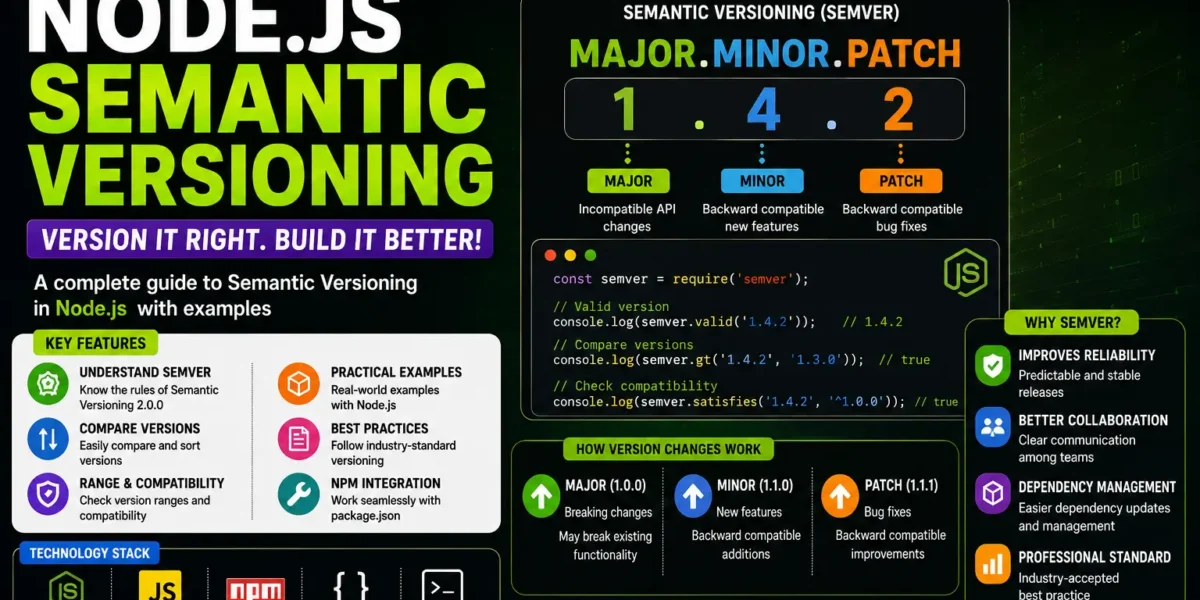
Semantic Versioning follows a simple numerical version structure:
major.minor.patchFor example:
1.0.1This version contains three different components:
- 1 – Major version
- 0 – Minor version
- 1 – Patch version
Each component represents a different type of change made to a package or application.
Patch Version
A patch release is used when existing bugs are fixed without introducing breaking changes. Patch updates remain backward compatible, which means the existing implementation should continue working after the update.
For example:
1.0.0 → 1.0.1Here, the patch number increases from 0 to 1 because the update represents a bug fix rather than a new breaking feature.
Minor Version
A minor release introduces new features or enhancements while maintaining backward compatibility.
For example:
1.0.1 → 1.1.0When the minor version increases, the patch version is reset to zero. Minor updates are considered safe to upgrade because they should not break existing implementations.
Major Version
A major version is increased when changes are not backward compatible. Major updates may modify, restructure, or redefine package functionality in a way that can break earlier implementations.
For example:
1.1.0 → 2.0.0Here, the major version changes from 1 to 2, while the minor and patch versions are reset.
Semantic Versioning Rules
The general version progression can be summarized as follows:
- Bug fixes: Increase the patch version.
- Backward-compatible features: Increase the minor version and reset the patch.
- Breaking changes: Increase the major version and reset the minor and patch versions.
For a new package, the recommended starting version is:
1.0.0Node.js Semantic Versioning and NPM Version Rules
NPM uses different operators and prefixes to define dependency version ranges. These operators determine how flexible or strict the required package versions are.
Understanding these version rules is important when working with dependencies in a Node.js application.
1. Caret (^)
The caret (^) is a commonly used NPM version prefix. It allows updates to minor and patch versions while keeping the same major version.
For example:
^1.10.1This allows compatible updates within the same major release. For example, a package can potentially update to:
1.11.2The major version remains 1, while the minor and patch versions can change according to the version range.
2. Tilde (~)
The tilde (~) operator provides a more restricted version range. It allows updates to the patch version while keeping the same major and minor versions.
For example:
~1.5.12A possible update is:
1.5.13The minor version remains 5, while the patch version can be updated.
3. Comparison Operators
NPM also supports comparison operators for defining version ranges. Common comparison operators include:
><>=<=
For example:
>2.5This specifies a version greater than 2.5.
Version ranges can also be defined using a hyphen:
2.0.0 - 2.5.0When using a hyphen range, both sides of the hyphen must have spaces around them.
4. Prerelease Versions
Prerelease versions such as alpha and beta can be represented using tags.
For example:
2.0.0-alpha.1Version ranges can also include prerelease versions.
>=2.0.0-alpha.0 <2.0.5Prerelease identifiers allow developers to distinguish development or testing releases from regular stable versions.
5. Multiple Version Sets
The || operator can be used to combine multiple version ranges.
YT:- DecodeIT
For example:
<1.1.0 || >1.1.4This expression allows versions that satisfy either of the specified ranges.
6. Using the x Symbol
The x wildcard can be used when any number is acceptable in a particular version position.
For example:
1.xThis refers to versions where the major version is 1. Examples include:
1.0.01.3.51.9.20
The wildcard provides flexibility when specifying compatible version ranges.
Semantic Versioning Inside the Lock File
Node.js projects commonly contain a file named package-lock.json. This file is used to lock dependency versions and helps prevent unexpected differences between development environments.
Without a lock file, two developers working on the same project may install different versions of a dependency. Such differences can result in bugs that appear only in certain environments.
By using and committing package-lock.json, team members can work with the same dependency versions, helping maintain consistency across the development environment.
Updating NPM Packages
NPM provides the following command for updating packages:
npm updateThe npm update command upgrades dependencies to the latest versions permitted by the version ranges defined in package.json.
The update process follows the semantic versioning rules specified for the dependencies and also updates the lock file accordingly.
This allows developers to keep dependencies updated while maintaining the version constraints defined by the project.
Dependency Pinning
When strict dependency consistency is required, developers can specify an exact package version instead of using prefixes such as ^ or ~.
For example:
1.2.3Using an exact version prevents the dependency from automatically moving to another version. This can help eliminate inconsistencies between different environments.
Semantic Versioning Example
Consider a Node.js package currently using version:
1.0.0If the developer fixes a bug without changing existing functionality, the version becomes:
1.0.1If a new backward-compatible feature is introduced, the version becomes:
1.1.0If a change is introduced that is not backward compatible, the version becomes:
2.0.0This simple versioning structure helps developers understand the type of change introduced by a new release.
More:- UPDATEGADH
Why Semantic Versioning is Important
Semantic Versioning provides a predictable way to manage package updates in Node.js projects. Developers can understand the significance of a version number without examining every change in the package.
Patch versions indicate bug fixes, minor versions indicate backward-compatible improvements, and major versions indicate potentially breaking changes.
Combined with package.json and package-lock.json, semantic versioning helps maintain stable and consistent Node.js development environments.
Conclusion
Node.js Semantic Versioning provides a structured approach to managing package and dependency versions. The standard major.minor.patch format makes it easier to identify whether a release contains bug fixes, new backward-compatible features, or breaking changes.
NPM provides several operators such as caret (^), tilde (~), comparison operators, hyphen ranges, prerelease tags, the OR operator, and x wildcards to define dependency version ranges.
The package-lock.json file further helps maintain consistent dependency versions across development environments, while npm update can be used to update packages according to the defined version ranges.
Understanding Semantic Versioning is therefore an important part of working with Node.js and NPM projects, especially when managing multiple dependencies and maintaining consistent application environments.
Keywords: node js semantic versioning, nodejs semantic versioning, semantic versioning in node js, semver node js, node js semver, npm semantic versioning, npm versioning, package json versioning, package lock json, node js npm version rules, npm caret tilde, npm version range, semantic versioning tutorial, node js version management npm semantic versioning