Node.js Callbacks
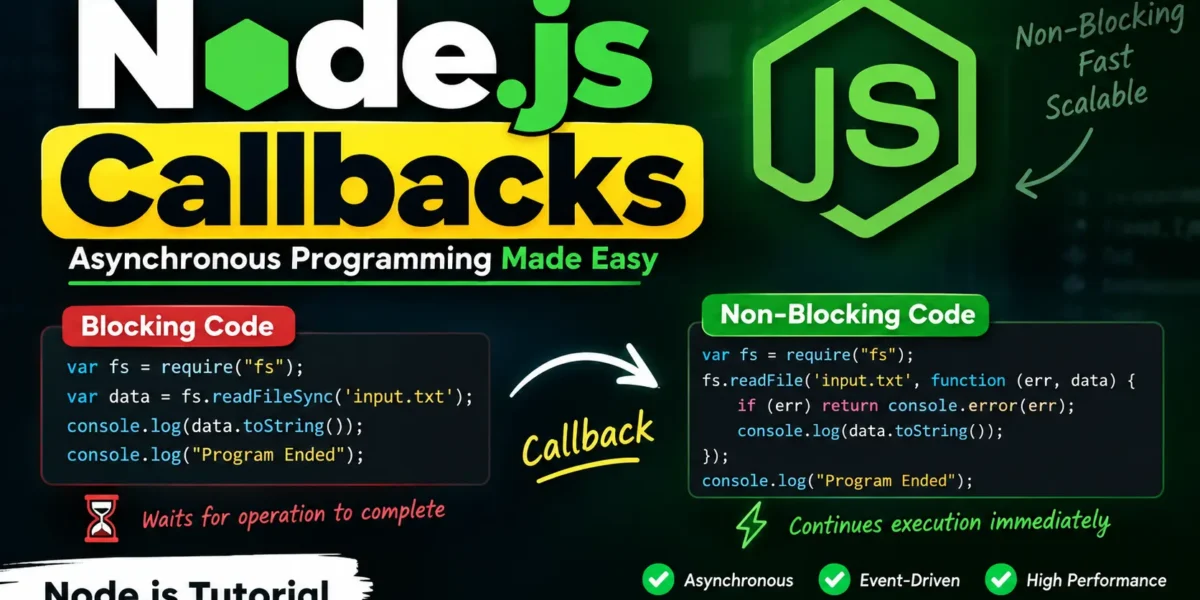
In Node.js, callbacks are an important part of asynchronous programming. A callback is a function passed as an argument to another function and executed after a specific operation is completed. Callbacks allow Node.js to handle asynchronous tasks efficiently without blocking the execution of other code.
Callbacks allow Node.js to perform tasks efficiently without making the entire application wait for one operation to finish before continuing with other tasks.
What Are Callbacks in Node.js?
Node.js uses an asynchronous, non-blocking programming model. When an operation such as reading a file starts, Node.js can continue executing other instructions instead of waiting for the file operation to finish.
After the operation is completed, the callback function is executed with the result. This approach helps Node.js applications handle multiple operations efficiently.
For example, while Node.js is reading a file, other code can continue running. Once the file has been successfully read, the callback receives the file data and processes it.
Blocking Code Example
First, create a text file named input.txt and add the following content:
Updategadh is an online platform providing self-learning tutorials on different technologies, in a very simple language.Next, create a JavaScript file named main.js with the following code:
var fs = require("fs");

var data = fs.readFileSync('input.txt');

console.log(data.toString());
console.log("Program Ended");
Open the Node.js command prompt and run:
Complete Advance AI Topics: Click Here
SQL Tutorial: Click Here
node main.jsHere, fs.readFileSync() reads the file synchronously. The program waits until the file-reading operation is finished before executing the next statement.
This type of execution is called blocking code because the execution of subsequent code is blocked until the current operation completes.
Non-Blocking Code Example
Now, use the same input.txt file and create a main.js file with the following code:
var fs = require("fs");

fs.readFile('input.txt', function (err, data) {
    if (err) return console.error(err);

    console.log(data.toString());
});

console.log("Program Ended");
Run the program using:
node main.jsIn this example, fs.readFile() performs the file-reading operation asynchronously. Node.js does not wait for the file operation to finish and immediately executes:
console.log("Program Ended");After the file has been successfully read, Node.js executes the callback function and displays the file content.
Understanding Blocking and Non-Blocking Code
| Blocking Code | Non-Blocking Code |
|---|---|
| Execution waits for the current operation to complete. | Execution continues while the operation is being processed. |
| Usually uses synchronous APIs. | Commonly uses asynchronous APIs and callbacks. |
| Can reduce performance when handling many I/O operations. | Helps applications handle multiple operations efficiently. |
| Simple and sequential execution. | Asynchronous execution requires careful handling of results. |
Blocking Code
In blocking code, tasks are performed sequentially. If an operation takes time to complete, the program waits before moving to the next instruction.
This approach can be easier to understand, but it may not be suitable for applications that need to handle many simultaneous operations.
Non-Blocking Code
Non-blocking code allows Node.js to continue executing other instructions while an asynchronous operation is in progress. When the operation completes, the callback function is executed to process the result.
This programming model is particularly useful for applications that perform frequent file, network, database, or other I/O operations.
Why Are Callbacks Important in Node.js?
Callbacks are a fundamental part of asynchronous programming in Node.js. They allow developers to define what should happen after an asynchronous operation finishes.
By using non-blocking operations, Node.js can efficiently handle multiple requests and I/O tasks without unnecessarily stopping the execution of the application.
YT:- DecodeIT
Conclusion
Node.js callbacks are functions executed after an operation has completed. They play an important role in Node.js’s asynchronous and non-blocking programming model.
Understanding the difference between blocking and non-blocking code is essential for developing efficient Node.js applications. By using callbacks with asynchronous APIs, developers can build applications that remain responsive and can handle multiple operations efficiently.
Keywords
Node.js Callbacks, Node.js Callback Function, Node.js Callbacks Tutorial, Node.js Asynchronous Programming, Node.js Blocking Code, Node.js Non-Blocking Code, Node.js File System, Node.js fs.readFile, Node.js fs.readFileSync, Node.js Event Driven Programming, Node.js Tutorial