Invoice Management System Using Python and SQLite
Handling invoices and billing information manually can become difficult for small businesses. Maintaining paper records, calculating totals, tracking products, and finding previous invoices can take considerable time and may also lead to errors. A digital solution such as the Invoice Management System helps organize these everyday billing activities in a more systematic way.
This desktop-based application is developed using Python, with Tkinter providing the graphical user interface and SQLite handling database operations. This technology combination keeps the application lightweight and practical while providing the essential functionality required for invoice and billing management.
From a student’s perspective, this project provides useful practical experience with Python GUI development, database management, employee handling, product management, invoice generation, and desktop application development. It also demonstrates how programming concepts can be applied to a common business requirement.
Complete Advance AI Topics: Click Here
Real Time Projects on YouTube:- DecodeIT
Project Overview
| Attribute | Details |
|---|---|
| Project Name | Invoice Management System |
| Language/s Used | Python (Tkinter) |
| Database | SQLite |
| Type | Desktop Application |
Available Features
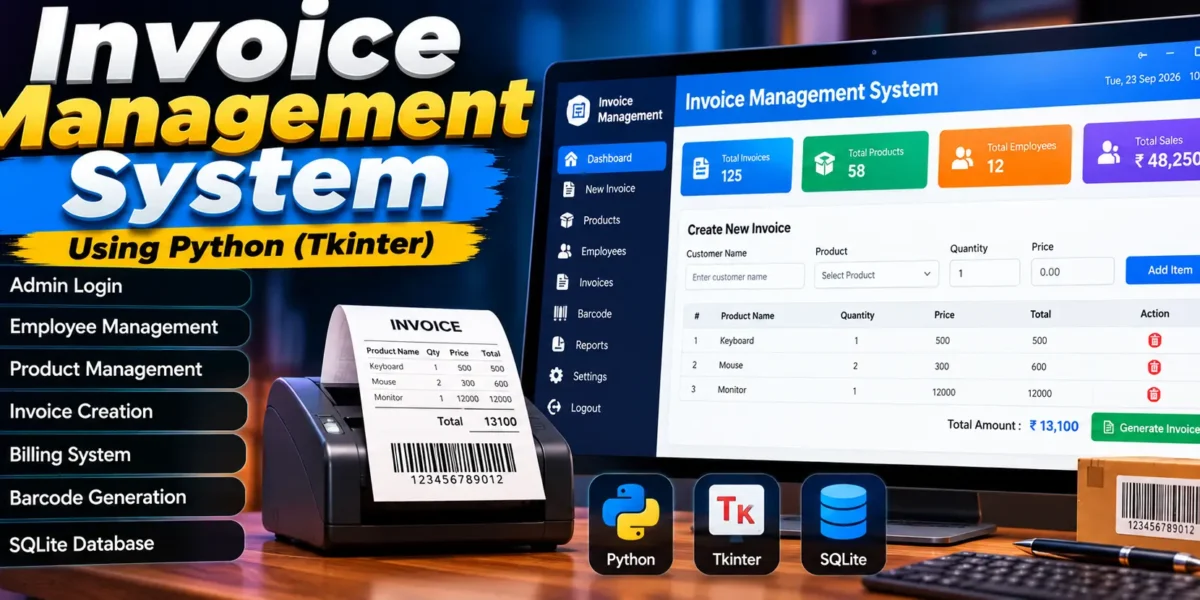
The Invoice Management System includes several features designed around employee management, product handling, billing, invoice creation, and database storage.
Admin Login
The application provides an admin login mechanism that restricts management functionality to authorized users. The administrator can access the management sections required for maintaining employees, products, billing activities, and invoice records.
Employee Management
The employee management section allows the administrator to add and update employee information. Employees created through the management section can use their credentials to access the billing-related functionality assigned to them.
Product Management
The system provides product management functionality for maintaining inventory information. Products can be added and existing product details can be updated. This helps keep the product records organized and available during billing operations.
Invoice Creation
The invoice creation feature allows users to prepare invoices using product information, quantities, prices, and calculated total amounts. This makes the billing process more organized than maintaining invoices manually.
Billing Screen
A dedicated billing interface is provided for handling customer transactions. Employees can use the billing screen to work with product information and prepare invoices during regular billing activities.
Barcode Generation
The application includes barcode generation for products. Barcodes can be generated and printed for products, providing a more structured approach to product identification during billing.
SQLite Database Storage
The application uses SQLite to store important records. Employee information, product details, and invoice records are maintained in the database so that the information can be accessed when required.
Download complete source code now
Installation Guide for VS Code
The project can be configured and executed through Visual Studio Code by following a few basic steps.
Step 1: Install Python
Make sure Python 3.x is installed on the computer. To verify the installed version, open the terminal and execute:
python --versionStep 2: Open the Project in VS Code
First, extract the project folder. Open Visual Studio Code and select File > Open Folder. Choose the extracted project directory named BilledIn-main.
Step 3: Create a Virtual Environment
Open the integrated terminal in VS Code and create a virtual environment with the following command:
python -m venv venvOn Windows, activate the environment using:
venv\Scripts\activateFor macOS or Linux, use:
source venv/bin/activateStep 4: Install Dependencies
The project contains a requirements.txt file containing the required Python packages. After activating the virtual environment, install the dependencies using:
pip install -r requirements.txtStep 5: Run the Application
After completing the installation, start the main Python application with:
python app.pyIf the setup has been completed correctly, the Invoice Management System graphical interface will open on the computer.
Usage
The system is organized around different roles and billing-related functions. Each role has a specific purpose within the application.
Admin Role
- The administrator logs into the application using the admin credentials.
- The admin can add and update employee information.
- The admin can manage products maintained in the inventory.
- The admin can access billing and invoice records.
Employee Role
- Employees log in using credentials created by the administrator.
- Employees handle regular billing activities.
- Employees can create invoices for customer transactions.
- Employees use the billing screen while processing transactions.
System Functions
The system automatically stores employee records, product information, and invoices in the SQLite database. Product barcodes can also be generated and printed, helping organize product identification during billing operations.
Contributing
The project can be modified and improved by developers who want to extend its existing functionality. Possible development work can focus on improving the user interface, enhancing database queries, adding customer-related functionality, or introducing reporting features such as sales summaries.
To contribute, create a fork of the project and then create a separate branch for your changes. After making the required modifications, test the updated functionality and share the changes with the community.
- Fork the project.
- Create a new branch for your changes.
- Make the required modifications.
- Share the updated work with the community.
License
The project includes an open-source license within the project folder. Users should review the provided license terms before reusing, modifying, or distributing the project.
Final Thoughts
From a student’s point of view, the Invoice Management System is a practical project for understanding how Python can be used to create a functional desktop application. By combining a Tkinter-based interface with SQLite database storage, the project demonstrates important concepts of graphical application development and data management.
The project also represents a common business requirement where invoices, products, employees, and billing activities need to be maintained in an organized manner. Instead of depending entirely on manual records, the application provides a digital approach for storing and managing important billing information.
For students, the project provides hands-on experience in several areas, including:
- Python Programming: Applying Python concepts while developing a complete desktop application.
- Tkinter GUI Development: Creating graphical screens and interfaces for interacting with the system.
- SQLite Database Management: Storing and managing employee, product, and invoice records.
- Business Automation: Understanding how software can organize common billing and invoice-related activities.
Overall, the Invoice Management System provides a practical way for students to understand the connection between Python programming, desktop GUI development, database operations, and real-world billing requirements. It can also serve as a foundation for students who want to explore larger management applications in the future.
Project Keywords
bill management system project in Python with MySQL, billing system project in Python PDF, billing system project in Python with database, simple billing program in Python code, billing system project in Python class 12, invoice-generator Python GitHub, Python invoice generator, telephone billing system project in Python, invoice management system using Python with source code, invoice management system using Python PDF, invoice management system using Python GitHub, invoice management system using Python example, billing system project in Python with source code, billing system project in Python GitHub, billing system project in Python example, billing system project in Python GeeksforGeeks.,Invoice Management System