Pharmacy Management System Using Python
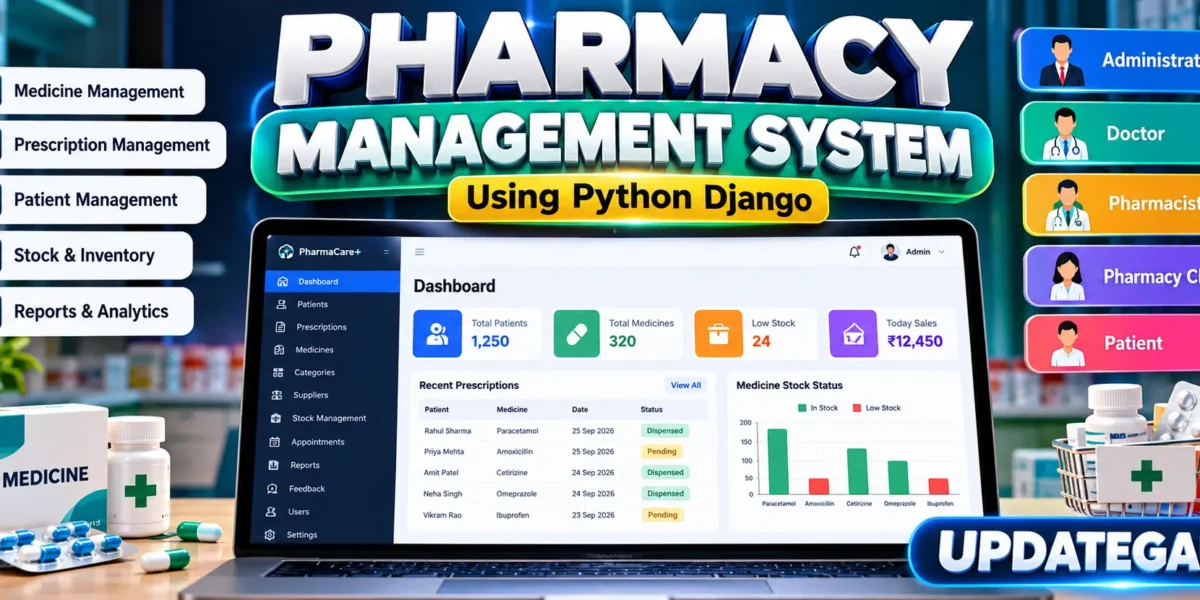
The Pharmacy Management System is an advanced web application designed to organize the daily workflow of a modern pharmacy. Built with Python and Django, the system brings patient registration, appointments, prescriptions, medicine inventory, suppliers, purchases, dispensing, feedback, notifications, reports, and user access into one connected workspace. The original project requirements identify Administrator, Doctor, Pharmacist, Pharmacy Clerk, and Patient roles; the completed design keeps those roles while expanding the workflow around the real pharmacy domain.
Complete Advance AI Topics: Click Here
Real Time Projects on YouTube:- DecodeIT
Project Overview
| Attribute | Details |
|---|---|
| Project Name | Pharmacy Management System |
| Framework | Python Django |
| Frontend | HTML, CSS, JavaScript |
| Database | SQLite3 |
User Roles
The system uses role-based access so that every user sees the functions appropriate to their responsibility. The Administrator manages the overall platform, users, catalog, records, reports, and operational settings. Doctors create prescriptions and manage their clinical workflow. Pharmacists control medicine inventory, suppliers, purchases, and dispensing. The Pharmacy Clerk focuses on patient registration and appointment coordination. Patients can view their own records, prescriptions, appointments, and submit service feedback.
Core Project Modules
Patient Management
Patient records contain identification, contact information, date of birth, gender, blood group, allergies, emergency contact, and account status. Search tools make it easier to locate records by name, patient code, or phone number. The patient profile brings related prescriptions and appointments into a single view.
Medicine Inventory
The inventory module maintains medicine names, generic names, categories, suppliers, batch numbers, expiry dates, dosage forms, strengths, prices, current quantities, storage information, and reorder levels. Stock status is automatically represented as In Stock, Low Stock, or Out of Stock. Search and stock filters help pharmacy staff identify items that need attention.
Prescription Management
Doctors can create prescriptions for registered patients and add medicines with dosage, frequency, duration, quantity, and instructions. Prescription status moves through a practical workflow instead of remaining an isolated record. Pharmacists can open an active prescription, verify available quantities, dispense the prescribed medicines, and update stock automatically.
Dispensing Workflow
Dispensing connects the clinical and inventory sides of the system. Before dispensing, the application checks whether the required medicine quantity is available. When the transaction is completed, stock is reduced and a dispensing record stores the responsible pharmacist, timestamp, total value, payment status, and remarks. This gives the project a connected end-to-end workflow rather than separate CRUD pages.
Supplier and Purchase Management
Suppliers can be maintained with contact information, address, status, and responsible contact person. Purchase records capture supplier invoices, purchase dates, status, totals, and notes. These modules establish the foundation for managing incoming stock and maintaining a traceable supply process.
Appointments and Admissions
The appointment module connects patients with doctors using date, time, reason, notes, and status. The Pharmacy Clerk can coordinate visits while doctors can view appointments relevant to them. The structure can also support patient admission workflows without turning the application into an unrelated hospital management system.
Feedback and Notifications
Patients can report dispensing or service concerns through the feedback module. Pharmacy users receive notifications for important feedback events. This provides a simple service-quality workflow and gives the application a communication layer that is directly relevant to pharmacy operations.
Professional Dashboard UI
The interface is designed specifically around a pharmacy operations identity rather than a generic framework admin page. It uses a dark clinical-teal sidebar, a clean light workspace, compact status badges, responsive tables, modern forms, KPI cards, a global search field, notification access, user profile information, quick actions, and domain-focused charts. The dashboard highlights patient count, medicine count, prescription count, low-stock items, appointments, and recent activity. The layout adapts for desktop, tablet, and mobile screens.
Reports and Analytics
The reporting area provides operational indicators for patients, prescriptions, dispensing records, inventory categories, and dispensed value. Charts are tied to project data rather than decorative values. Category breakdowns help users understand the medicine catalog, while dashboard indicators make important stock and workflow conditions visible at a glance.
How to Download
The complete package is available so you can run, study, and submit it with confidence. It includes:
- Full Source Code
- Project Report
- Synopsis
- PPT Presentation
Screenshot
Database Design
The SQLite database is organized around related entities such as users, profiles, patients, medicine categories, medicines, suppliers, prescriptions, prescription items, dispensing records, purchases, purchase items, appointments, feedback, notifications, and audit logs. Foreign-key relationships connect these entities so that a prescription belongs to a patient and doctor, prescription items reference medicines, and dispensing references the prescription and pharmacist. Created timestamps and status fields support traceability throughout the workflow.
Security and Access Control
Django authentication is used for sign-in and protected application pages. Role checks restrict sensitive actions such as prescription creation, medicine changes, dispensing, patient registration, and supplier management. Passwords are handled by Django’s authentication system rather than being stored directly in application code. Form validation, protected routes, database relationships, and server-side checks provide a realistic security foundation. Demo credentials are included only for local project evaluation and should be changed before any real deployment.
Installation and Setup
Open the project folder in Visual Studio Code and create a virtual environment with python -m venv env. Activate it using env\Scripts\activate on Windows or source env/bin/activate on macOS/Linux. Install dependencies with pip install -r requirements.txt. Then create the application tables using python manage.py makemigrations core followed by python manage.py migrate. Run python manage.py seed_demo to add demonstration accounts and sample pharmacy records. Finally start the application with python manage.py runserver and open the local Django address shown in the terminal.
Usage
After login, the dashboard changes according to the user’s role. An administrator can supervise the entire operation. A doctor can create prescriptions and review relevant appointments. A pharmacist can manage medicines, suppliers, purchases, and dispensing. A Pharmacy Clerk can register patients and schedule visits. A patient can review personal pharmacy information and send feedback. The connected workflow allows information entered in one module to become useful in another module.
Frequently Asked Questions
What is the purpose of this project?
It provides a centralized Django-based system for organizing pharmacy records, prescriptions, stock, dispensing, appointments, and related operational activities.
Which user roles are included?
The project includes Administrator, Doctor, Pharmacist, Pharmacy Clerk, and Patient roles with different access responsibilities.
Which database is used?
SQLite3 is used as the default database, making the project convenient for local college-project development and demonstration.
Can pharmacists update medicine stock?
Yes. Authorized pharmacy users can manage medicine quantities and the dispensing workflow automatically reduces stock when a prescription is dispensed.
Does the project include reports?
Yes. The application contains a reports and analytics area with project-related counts, category information, and dispensing value indicators.
Is the UI responsive?
Yes. The custom interface includes responsive layouts for dashboards, cards, forms, tables, navigation, and smaller screens.
Future Scope
- Add barcode-based medicine scanning for faster inventory operations.
- Add printable prescription and dispensing documents.
- Introduce stronger configurable permission management for larger organizations.
- Add scheduled expiry notifications and automated reorder reminders.
- Provide richer date-range and exportable operational reports.
- Support deployment with PostgreSQL and production-grade infrastructure.
Conclusion
The Pharmacy Management System is structured as a complete domain-focused software project rather than a simple login and CRUD demonstration. Its main strength is the connection between patients, doctors, prescriptions, pharmacists, inventory, purchases, dispensing, feedback, and reporting. For BCA, MCA, and Computer Science students, it provides practical exposure to Django models, authentication, role-based access, database relationships, responsive frontend design, validation, workflow logic, and real-world application structure.Pharmacy Management System Pharmacy Management System pharmacy management system project pharmacy management system project with source code pharmacy management system project in python pharmacy management system github pharmacy management system er diagram pharmacy management system project github pharmacy management system ui design pharmacy management system images pharmacy management system use case diagram