College Q&A Chatbot Using Python, LLMs, RAG, and Streamlit
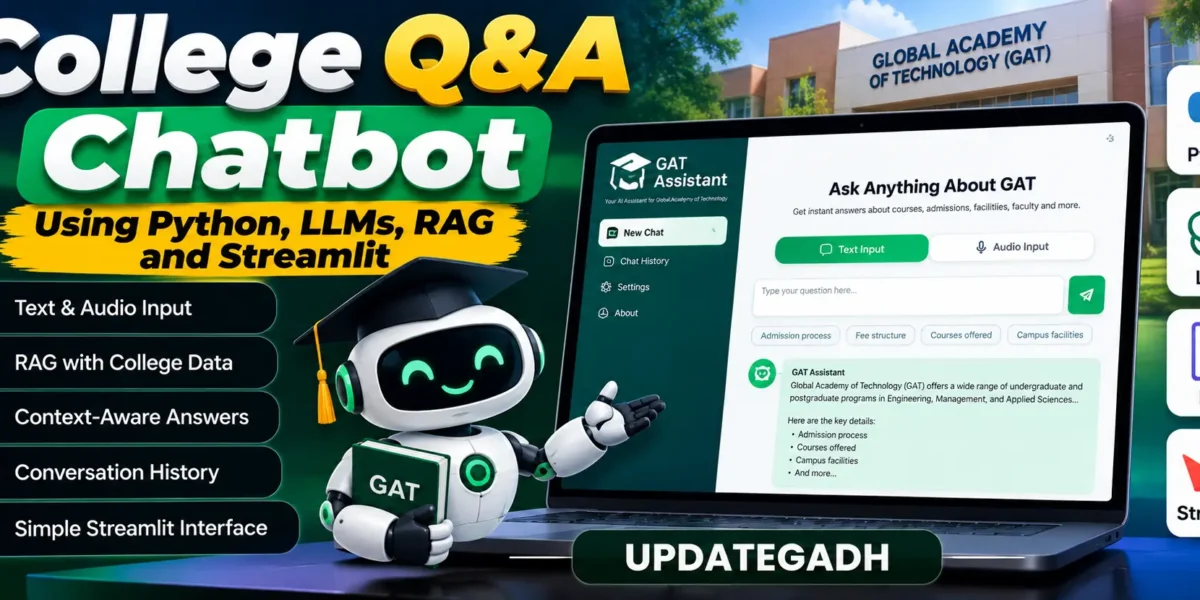
Managing college-related questions can be difficult for students, faculty members, and people who are new to an institution. The College Q&A Chatbot was developed as a smart and context-aware assistant for the Global Academy of Technology (GAT). It combines Large Language Models (LLMs), text embeddings, and Retrieval-Augmented Generation (RAG) to provide answers based on prepared institutional information. The chatbot supports both text and audio input, making interaction more convenient and accessible.
From a student’s perspective, this project is a useful example of how modern Artificial Intelligence can be applied to an academic environment. It also provides practical exposure to Natural Language Processing, embeddings, retrieval systems, and Streamlit application development.
Complete Advance AI Topics: Click Here
Real Time Projects on YouTube:- DecodeIT
Project Overview
| Attribute | Details |
|---|---|
| Project Name | College Q&A Chatbot |
| Language/s Used | Python |
| Database | Preloaded Text Files with Embeddings (Pickle Storage) |
| Type | Desktop/Web Application (Streamlit-based) |
Available Features
The chatbot includes several features focused on making college information easier to access and improving the quality of responses.
Text and Audio Input
Users can enter questions through text or provide audio input. This gives students and other users more than one way to interact with the chatbot.
Retrieval-Augmented Generation (RAG)
The chatbot uses Retrieval-Augmented Generation to retrieve relevant information from preloaded documents related to the Global Academy of Technology. The retrieved information helps the system provide answers based on the available institutional content.
Context-Aware Responses
The application maintains conversation history so that related follow-up questions can be understood in context. This allows users to continue a conversation instead of entering every question as a completely separate request.
Streamlit Interface
The chatbot is provided through a Streamlit interface. It includes interaction options such as follow-up mode and search depth control, allowing users to adjust how the application works with the prepared information.
Installation Guide for VS Code
To run the College Q&A Chatbot in Visual Studio Code, first extract the project files and open the project folder in VS Code.
Create a Virtual Environment
Open the VS Code terminal and create an isolated Python environment.
python -m venv venvActivate the environment on Windows:
venv\Scripts\activateFor Linux or macOS:
source venv/bin/activateInstall Dependencies
After activating the environment, install the packages listed in the requirements file.
pip install -r requirements.txtConfigure API Key
Create a config.json file in the root directory and add the Google API key in the following format:
{
  "google_api_key": "YOUR_GOOGLE_API_KEY"
}
Run the Application
Start the Streamlit application using:
streamlit run st_app.pyDownload complete source code
Usage
The chatbot is designed to provide information related to the Global Academy of Technology. Different types of users can use it according to their information needs.
Students
Students can ask questions about courses, facilities, faculty, events, and general academic information. They can use either text or voice input when interacting with the chatbot.
Faculty
Faculty members can use the chatbot to quickly access information about departments, academic schedules, and available resources without manually searching through lengthy documents.
Newcomers and Parents
Newcomers and parents can use the system to look for admission information, fee structures, and campus-related details available in the prepared institutional data.
Follow-Up Mode
Follow-up mode keeps conversation history available so that the chatbot can respond to related questions with the previous discussion in mind.
Search Depth Control
Search depth control allows users to adjust how deeply the chatbot searches through the preloaded documents when preparing an answer.
Project Structure
The project contains separate files and resources for the application, data preparation, embeddings, and configuration.
- st_app.py: The main Streamlit application used to run the chatbot.
- embeddings_generator.py: Responsible for generating embeddings from the prepared text data.
- data_generation/gat_raw.txt: Contains raw scraped content collected from GAT-related sources.
- data_generation/gat_refined.txt: Contains the manually refined dataset prepared for better response accuracy.
- gat_embeddings.pkl: Stores the precomputed embeddings and allows the chatbot to use the prepared vector information without generating it again for every query.
- config.json: Contains the API key configuration.
- requirements.txt: Contains the Python dependencies required by the project.
Generating Data and Embeddings
The chatbot depends on properly prepared institutional data and its corresponding embeddings.
Data Preparation
The web_scrapper.ipynb notebook is used to scrape text data from websites. The collected information is saved in gat_raw.txt. The content can then be manually reviewed and refined before being stored in gat_refined.txt. This refined file provides the prepared information used by the chatbot.
Generating Embeddings
After the refined dataset is ready, embeddings can be generated with the following command:
python embeddings_generator.py --data_file data_generation/gat_refined.txtThis process creates gat_embeddings.pkl. The chatbot uses this precomputed embedding file when processing questions, allowing the prepared institutional information to be retrieved during interaction.
Contributing
Developers who want to improve the project can create a separate branch for their changes and keep the implementation clean and properly tested. Contributions should follow Python PEP 8 coding standards. Any modification should be clearly explained when submitted for review, and the code should remain consistent with the project’s existing structure.
Final Thoughts
From a student’s perspective, the College Q&A Chatbot demonstrates how modern AI techniques can be connected with institutional information to create a practical question-answering application. Instead of requiring users to search through lengthy prepared documents manually, the chatbot provides an interactive way to ask questions and receive responses based on the available GAT-related content.
Working with this project provides practical understanding of LLMs, text embeddings, Retrieval-Augmented Generation, data preparation, and Streamlit development. It also shows how raw institutional information can be processed into a form that is easier for users to access through a conversational interface in daily college interactions.
Frequently Asked Questions
What is the College Q&A Chatbot?
The College Q&A Chatbot is a Streamlit-based application designed to answer questions related to the Global Academy of Technology using prepared institutional information.
Which technologies are used in the project?
The project uses Python, Large Language Models, text embeddings, Retrieval-Augmented Generation, and Streamlit.
Does the chatbot support audio input?
Yes. The provided project supports both text and audio input for interacting with the chatbot.
What is RAG used for?
Retrieval-Augmented Generation is used to retrieve relevant information from the preloaded GAT documents so that the chatbot can use that information when generating responses.
Where is the prepared data stored?
Raw scraped content is stored in gat_raw.txt, while the refined dataset is stored in gat_refined.txt. Generated embeddings are stored in gat_embeddings.pkl.
How are embeddings generated?
Embeddings are generated by running embeddings_generator.py with the refined GAT data file as the input.
Can users ask follow-up questions?
Yes. The follow-up mode maintains conversation history so related questions can be handled in context.
What is search depth control?
Search depth control provides an option for adjusting how deeply the chatbot searches the preloaded documents while preparing a response.
How is the application started?
After installing the dependencies and configuring the API key, the chatbot can be started with the command streamlit run st_app.py.