Recruitment Management System Using Django
The Recruitment Management System is a medium-level Django web application designed to organize the hiring workflow in one structured platform. Instead of depending on scattered spreadsheets, messages, and manual registers, the system gives administrators, hiring managers, and applicants a clear place to manage job openings, applications, statuses, and interviews.
This project is suitable for a college-level web development project because it demonstrates a practical business workflow without moving into enterprise-level complexity. Django authentication, role-based access, database relationships, form validation, searchable records, and a responsive dashboard are combined to create a complete recruitment experience.
Complete Advance AI Topics: Click Here
Real Time Projects on YouTube:- DecodeIT
Project Overview
| Parameter | Details |
|---|---|
| Project Name | Recruitment Management System |
| Language/s Used | Python, Django, HTML, CSS, JavaScript |
| Database | SQLite |
| Type | Web Application |
Key Features
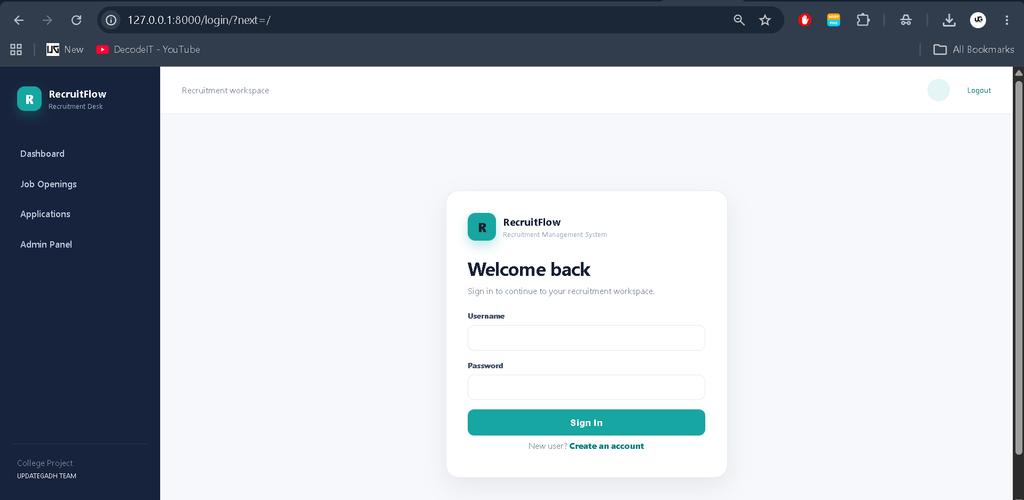
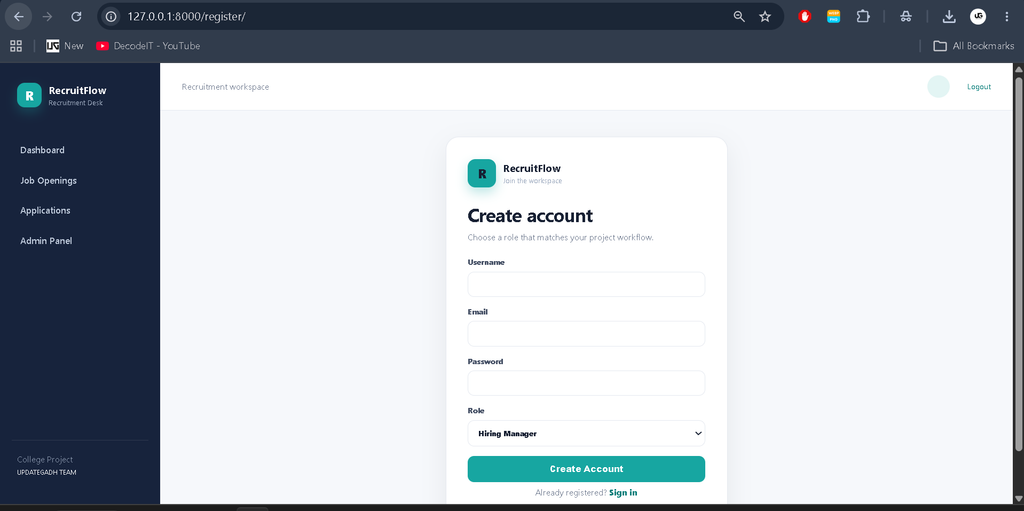
- User Authentication: Users can register and sign in through Django authentication, while protected pages require an authenticated session.
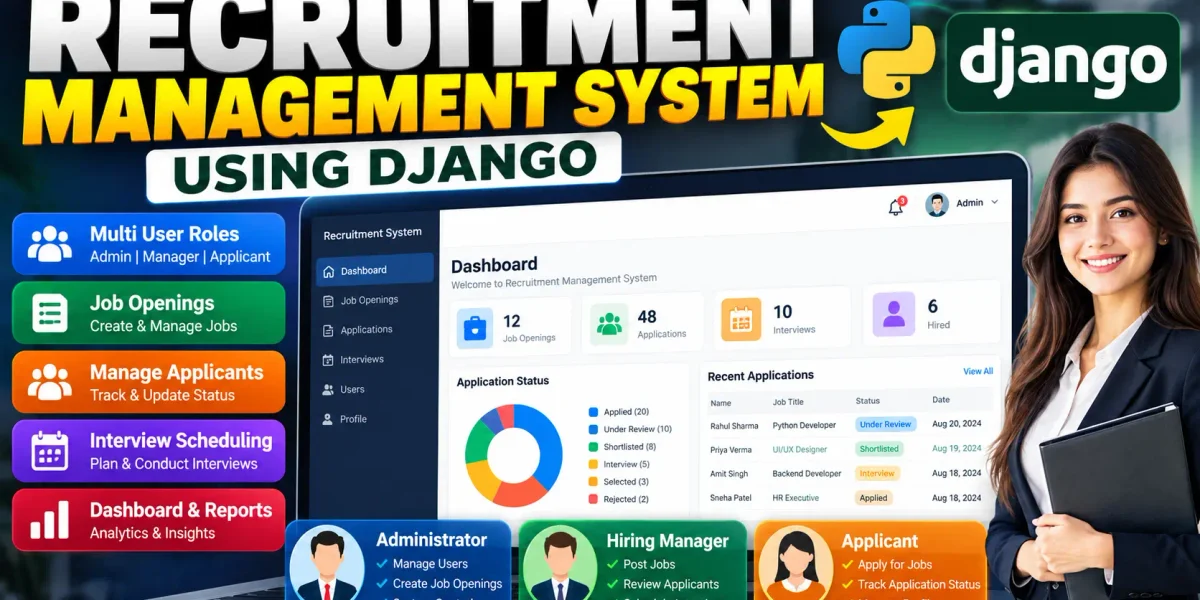
- Role-Based Workflow: The system supports Administrator, Hiring Manager, and Applicant roles with different responsibilities.
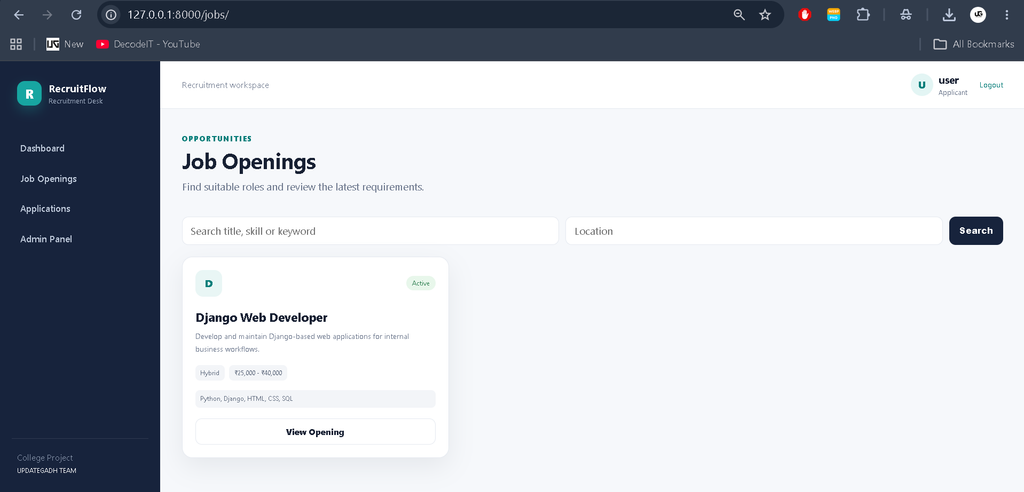
- Job Openings: Authorized recruitment staff can create openings with a title, description, salary information, required skills, location, and active status.
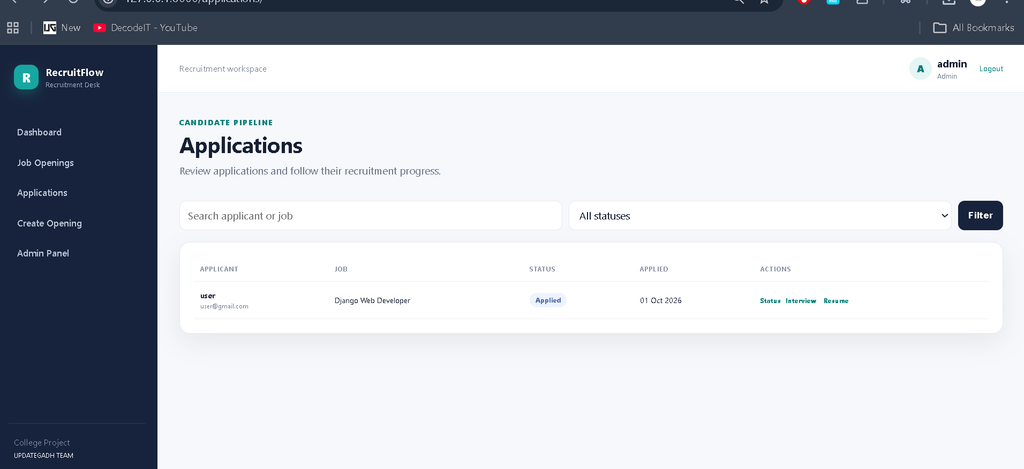
- Application Management: Applicants can submit an application with an optional resume and cover note. Staff can review applications and update their status.
- Interview Scheduling: Authorized staff can schedule an interview with a date and time, mode, and notes.
- Search and Filtering: Job and application pages provide practical search or status filtering for larger sets of records.
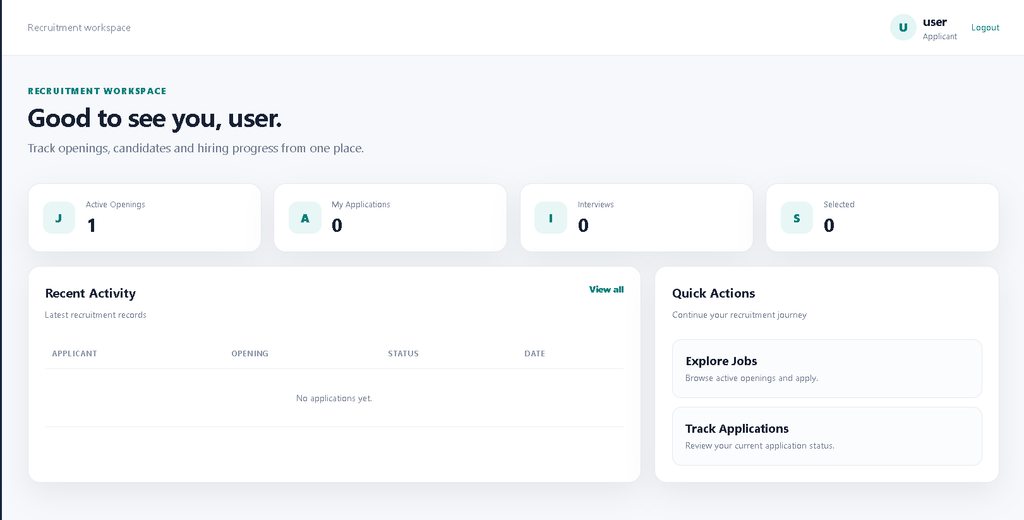
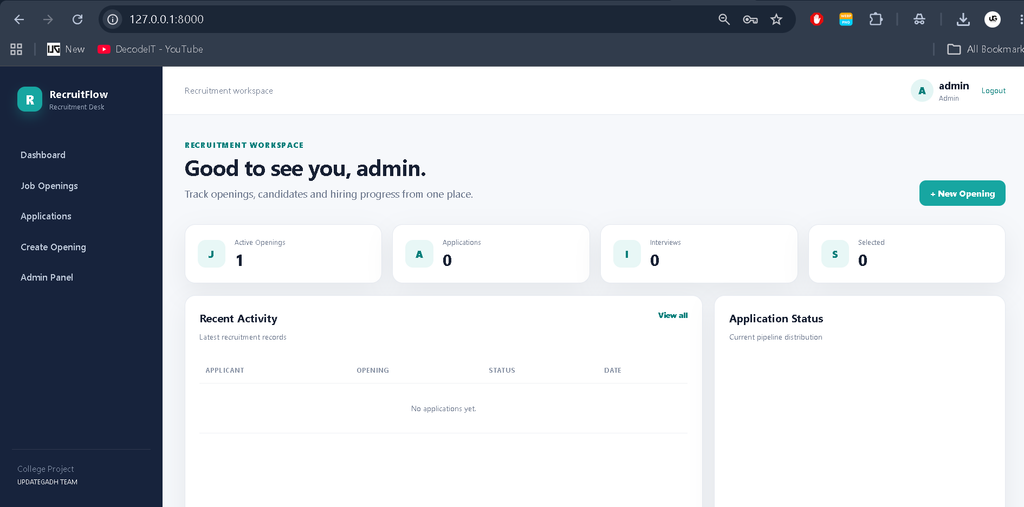
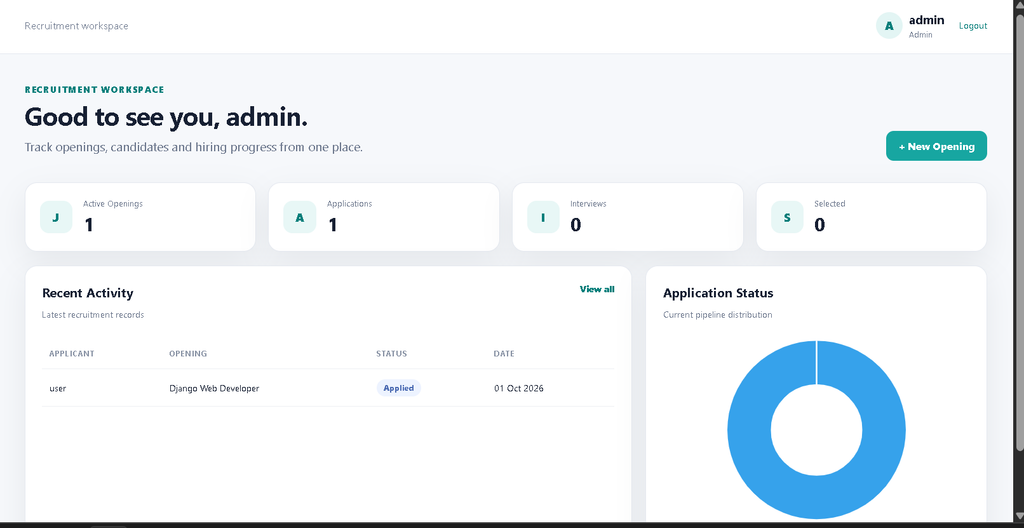
- Dashboard: The dashboard presents relevant recruitment KPIs, recent activity, and an application-status chart for staff users.
User Roles
Administrator
The administrator has the broadest project access. The role can manage recruitment data through the application and Django admin panel, review applications, manage openings, and maintain user accounts through the standard administration interface.
Hiring Manager
A hiring manager can create job openings, review applications connected with their openings, update application statuses, and schedule interviews. This keeps the day-to-day hiring workflow focused on the openings assigned to the manager.
Applicant
An applicant can browse active job openings, view complete job information, submit an application, optionally attach a resume, and monitor the progress of submitted applications from the application section.
Technologies Used
Python is used as the main programming language, while Django provides routing, authentication, forms, models, templates, and administration. SQLite is used as the default database because it is simple to configure for a college project. HTML and CSS create the interface, while lightweight JavaScript and Chart.js support the dashboard visualization.
Project Modules
- Authentication Module: Registration, login, logout, password-based authentication, and protected pages.
- Dashboard Module: Role-aware statistics, recent applications, quick actions, and recruitment pipeline visualization.
- Job Opening Module: Job creation, searchable listings, job details, skills, salary, location, and active status.
- Application Module: Application submission, resume upload, cover note, status tracking, and staff review.
- Interview Module: Interview date, mode, notes, and automatic movement of the related application into the interview stage.
- Administration Module: Django admin support for managing profiles, jobs, applications, and interviews.
Professional Dashboard and UI
The interface is designed specifically around recruitment rather than using a generic student dashboard. The layout uses a dark recruitment-oriented sidebar, a clean top navigation bar, profile information, KPI cards, searchable tables, status badges, job cards, and responsive forms. Staff users see application pipeline information and a compact doughnut chart, while applicants receive job discovery and application-focused actions.
The responsive layout adapts the sidebar, cards, tables, forms, and content areas for desktop, laptop, tablet, and mobile screens. The design keeps the visual structure modern while remaining understandable enough for a student to study and modify.
How the System Works
The workflow starts when a user registers and selects the appropriate project role. After login, the dashboard displays information according to that role. Recruitment staff can create a job opening and publish it as active. Applicants can search the opening directory, inspect a job, and submit an application.
After an application is submitted, it enters the recruitment pipeline with an initial Applied status. Staff can move it through stages such as Under Review, Shortlisted, Interview, Selected, or Rejected. When an interview is scheduled, its date, mode, and notes are stored against the application. This creates a connected workflow from job creation to candidate progress.
Database Structure
The database contains focused models for Profile, Job, Application, and Interview. A profile extends the standard Django user with a project role and phone information. A job can be connected with a hiring manager. Each application connects one applicant to one job, while a unique constraint prevents the same applicant from submitting duplicate applications for the same opening. An interview is connected to an application using a one-to-one relationship.
Installation and Setup
To run the project in Visual Studio Code, first install Python and open the project folder. Create and activate a virtual environment, then install the dependencies:
python -m venv venv
venv\Scripts\activate
pip install -r requirements.txt
Copy .env.example to .env and set a suitable secret key. Next, prepare the database and create an administrator account:
python manage.py migrate
python manage.py createsuperuser
python manage.py runserver
Open the local development address shown by Django in a browser. The application can then be tested by creating accounts for different roles and following the recruitment workflow.
Download complete source code
Screenshot
Usage
Administrators and hiring managers should first create or review job openings. Applicants can use the Job Openings page to search available roles and submit applications. Staff can open Applications to search candidates, filter by status, update progress, and schedule interviews. The dashboard provides a quick overview of current activity, while the admin panel provides additional database administration.
Learning Value for Students
From a college-project perspective, the system gives students practice with a complete request-to-database workflow. They can study how Django models represent relationships, how forms validate user input, how views enforce role-based actions, and how templates present database records. The project is also structured so individual modules can be extended without rebuilding the entire application.
Frequently Asked Questions
What is the purpose of this project?
It provides a structured web-based workflow for managing job openings, applicants, application statuses, and interviews.
Which framework is used?
The project uses the Django framework with Python for the server-side application.
Which database is included?
SQLite is configured as the default database, making local installation straightforward for a college project.
Can different users have different access?
Yes. The project defines Administrator, Hiring Manager, and Applicant roles, and the views restrict important actions according to those roles.
Can an applicant upload a resume?
Yes. The application form supports an optional resume upload along with a cover note.
Can staff schedule interviews?
Yes. Authorized staff can create or update an interview schedule linked to an application.
Future Scope
- Add a dedicated resume-parsing module for extracting structured candidate information.
- Add email notifications for application status and interview updates.
- Introduce richer reporting with date-wise recruitment summaries.
- Add applicant profile pages with reusable career information.
- Connect the project with a production-ready relational database when deployed at larger scale.
Conclusion
The Recruitment Management System demonstrates how Django can be used to turn a real-world hiring workflow into a connected college project. It combines authentication, role management, database relationships, job posting, application tracking, interview scheduling, search, filtering, and dashboard reporting without unnecessary enterprise complexity.
Keywords:
Recruitment Management System
Recruitment Management System – Google Search
recruitment management system project
recruitment management system bro
recruitment management system github
recruitment management system login
recruitment management system rms
recruitment management system open source
recruitment management system project pdf
recruitment management system er diagram
recruitment management system uml diagrams