Password Generator In Python
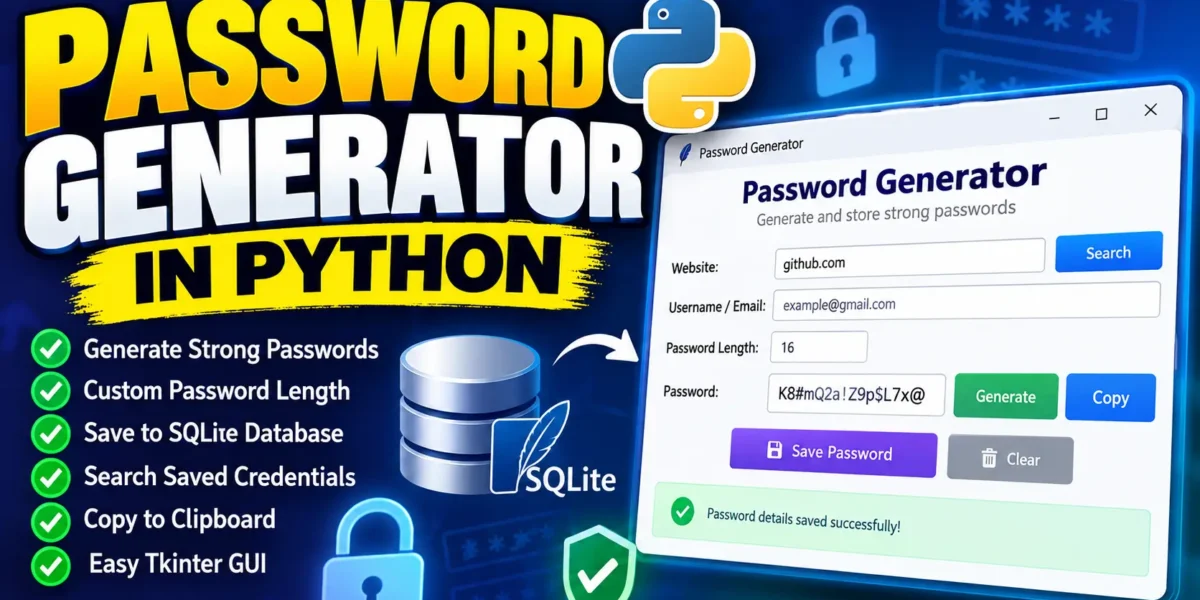
Password Generator In Python is a beginner-friendly GUI-based application developed using Python and Tkinter. The project allows users to generate strong and random passwords using a combination of uppercase letters, lowercase letters, numbers, and special characters. The generated password can also be saved along with the website and username details in a local SQLite database.
The main purpose of this project is to provide a simple password management interface while helping students understand important Python concepts such as Tkinter GUI development, random password generation, SQLite database connectivity, functions, input validation, and CRUD-style database operations.
Complete Advance AI Topics: Click Here
Real Time Projects on YouTube:- DecodeIT
About Password Generator In Python
When creating an account on a new website, users are usually required to create a username and password. Creating a different strong password for every account can be difficult, especially when users try to remember all of them manually. A password generator can solve this problem by automatically creating random passwords containing different types of characters.
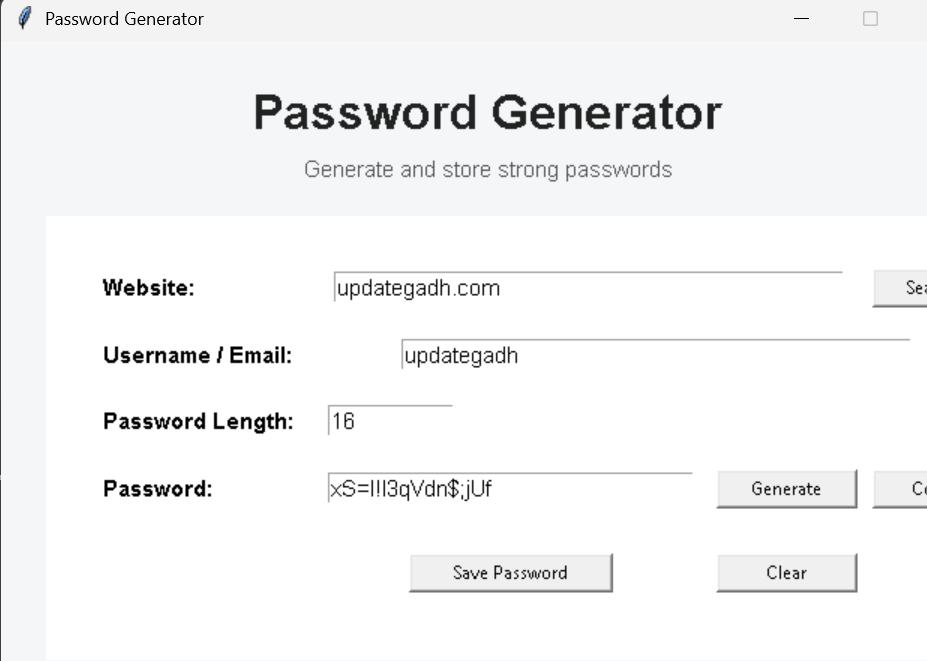
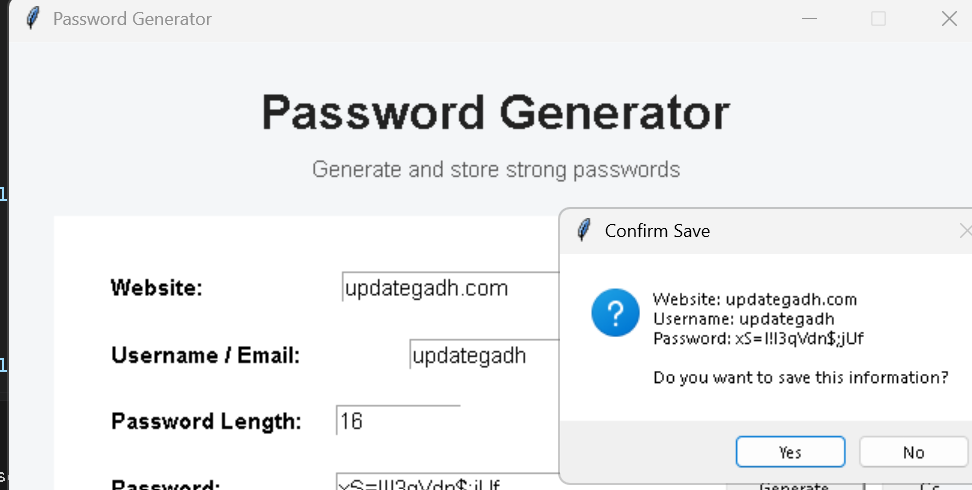
This Python project provides a graphical interface where users can enter a website name and username or email address. By clicking the Generate Password button, the application creates a random password. Users can then save the website, username, and generated password in an SQLite database.
Password Generator In Python is suitable for students who want to learn how Python can be used to build practical desktop applications. The project does not require an external database server because SQLite is included with Python.
Objective Of Password Generator In Python
The main objective of this project is to create a simple and easy-to-use password generation system with a graphical user interface. The application automatically creates unpredictable passwords instead of requiring users to manually select characters.
The project also demonstrates how a Python application can store information locally using SQLite. Users can save generated credentials and search for saved information through the application.
Some important objectives of the project are:
- Generate random and strong passwords.
- Allow users to customize the password length.
- Use uppercase and lowercase letters, numbers, and special characters.
- Provide a simple Tkinter-based graphical interface.
- Store website, username, and password information in SQLite.
- Allow users to retrieve saved credentials.
- Validate required input fields before saving information.
Features Of Password Generator In Python
1. Random Password Generation
The application generates passwords automatically using a combination of letters, numbers, and special characters. This reduces the possibility of users creating simple and predictable passwords.
2. Custom Password Length
Users can specify the required password length. The application checks the entered length before generating the password.
3. Strong Character Combination
Generated passwords can contain uppercase letters, lowercase letters, digits, and special characters. Using different character categories makes passwords more difficult to guess.
4. SQLite Database
The application uses SQLite to store website names, usernames, and generated passwords. The database is automatically created when the application starts.
5. Search Saved Credentials
Users can enter a website name and retrieve the corresponding saved username and password from the local database.
6. Copy Password
A generated password can be copied to the clipboard using a single button, making it easier to use the password on another website or application.
7. Input Validation
The system checks whether required fields are filled before saving data. It also validates the password length entered by the user.
8. Simple GUI
The entire application is developed using Tkinter, Python’s standard GUI library. No additional GUI framework is required.
Technology Used
| Component | Technology |
|---|---|
| Programming Language | Python |
| GUI | Tkinter |
| Database | SQLite3 |
| Password Generation | Python secrets module |
| Database Management | SQLite3 Library |
Screenshot
How To Run The Project?
Python must be installed on your computer before running the project. The application uses Python’s built-in Tkinter and SQLite libraries, so no third-party package is required for the basic version.
Step 1: Extract the Project
Download or copy the project files and extract them into a suitable folder.
Step 2: Open the Project Folder
Open the project folder in Visual Studio Code. You can also open Command Prompt or PowerShell inside the project directory.
Step 3: Check Python
python --versionIf Python is installed correctly, its version will be displayed.
Step 4: Create the Python File
Create a file named password_generator.py and add the complete source code provided below.
Step 5: Run the Application
python password_generator.pyThe Password Generator GUI will open automatically. The SQLite database file will also be created automatically when the application starts.
Complete Code
The following is the complete working source code for the Password Generator application. It includes password generation, SQLite database creation, saving credentials, searching credentials, clipboard functionality, input validation, and the graphical interface.
import tkinter as tk
from tkinter import messagebox
import sqlite3
import secrets
import string


# ---------------- DATABASE ---------------- #

DATABASE_NAME = "passwords.db"


def create_database():
    connection = sqlite3.connect(DATABASE_NAME)
    cursor = connection.cursor()

    cursor.execute("""
        CREATE TABLE IF NOT EXISTS passwords (
            id INTEGER PRIMARY KEY AUTOINCREMENT,
            website TEXT NOT NULL,
            username TEXT NOT NULL,
            password TEXT NOT NULL
        )
    """)

    connection.commit()
    connection.close()


# ---------------- PASSWORD GENERATOR ---------------- #

def generate_password():
    try:
        length = int(length_entry.get())
    except ValueError:
        messagebox.showerror(
            "Invalid Length",
            "Please enter a valid password length."
        )
        return

    if length < 8:
        messagebox.showwarning(
            "Weak Password",
            "Password length should be at least 8 characters."
        )
        return

    characters = (
        string.ascii_letters +
        string.digits +
        "!@#$%^&*()_+-=[]{}|;:,.?/!"
    )

    password = ''.join(
        secrets.choice(characters)
        for _ in range(length)
    )

    password_entry.delete(0, tk.END)
    password_entry.insert(0, password)


# ---------------- SAVE PASSWORD ---------------- #

def save_password():
    website = website_entry.get().strip()
    username = username_entry.get().strip()
    password = password_entry.get().strip()

    if not website:
        messagebox.showwarning(
            "Missing Information",
            "Please enter the website name."
        )
        return

    if not username:
        messagebox.showwarning(
            "Missing Information",
            "Please enter the username or email."
        )
        return

    if not password:
        messagebox.showwarning(
            "Missing Information",
            "Please generate or enter a password."
        )
        return

    confirmation = messagebox.askyesno(
        "Confirm Save",
        f"Website: {website}\n"
        f"Username: {username}\n"
        f"Password: {password}\n\n"
        "Do you want to save this information?"
    )

    if not confirmation:
        return

    connection = sqlite3.connect(DATABASE_NAME)
    cursor = connection.cursor()

    cursor.execute(
        """
        INSERT INTO passwords (website, username, password)
        VALUES (?, ?, ?)
        """,
        (website, username, password)
    )

    connection.commit()
    connection.close()

    messagebox.showinfo(
        "Success",
        "Password details saved successfully."
    )

    website_entry.delete(0, tk.END)
    username_entry.delete(0, tk.END)
    password_entry.delete(0, tk.END)


# ---------------- SEARCH PASSWORD ---------------- #

def search_password():
    website = website_entry.get().strip()

    if not website:
        messagebox.showwarning(
            "Search",
            "Please enter a website name."
        )
        return

    connection = sqlite3.connect(DATABASE_NAME)
    cursor = connection.cursor()

    cursor.execute(
        """
        SELECT username, password
        FROM passwords
        WHERE website = ?
        ORDER BY id DESC
        LIMIT 1
        """,
        (website,)
    )

    result = cursor.fetchone()

    connection.close()

    if result:
        username, password = result

        username_entry.delete(0, tk.END)
        username_entry.insert(0, username)

        password_entry.delete(0, tk.END)
        password_entry.insert(0, password)

        messagebox.showinfo(
            "Details Found",
            f"Username: {username}\nPassword: {password}"
        )
    else:
        messagebox.showinfo(
            "Not Found",
            "No saved password was found for this website."
        )


# ---------------- COPY PASSWORD ---------------- #

def copy_password():
    password = password_entry.get().strip()

    if not password:
        messagebox.showwarning(
            "Copy Password",
            "There is no password to copy."
        )
        return

    window.clipboard_clear()
    window.clipboard_append(password)
    window.update()

    messagebox.showinfo(
        "Copied",
        "Password copied to clipboard."
    )


# ---------------- CLEAR FIELDS ---------------- #

def clear_fields():
    website_entry.delete(0, tk.END)
    username_entry.delete(0, tk.END)
    password_entry.delete(0, tk.END)
    length_entry.delete(0, tk.END)
    length_entry.insert(0, "16")


# ---------------- GUI SETUP ---------------- #

create_database()

window = tk.Tk()
window.title("Password Generator")
window.geometry("650x500")
window.resizable(False, False)
window.configure(bg="#f4f6f8")


title_label = tk.Label(
    window,
    text="Password Generator",
    font=("Arial", 24, "bold"),
    bg="#f4f6f8",
    fg="#222222"
)
title_label.pack(pady=(25, 5))


subtitle_label = tk.Label(
    window,
    text="Generate and store strong passwords",
    font=("Arial", 11),
    bg="#f4f6f8",
    fg="#555555"
)
subtitle_label.pack(pady=(0, 20))


form_frame = tk.Frame(
    window,
    bg="#ffffff",
    padx=25,
    pady=25
)
form_frame.pack(padx=30, fill="both")


website_label = tk.Label(
    form_frame,
    text="Website:",
    font=("Arial", 11, "bold"),
    bg="#ffffff"
)
website_label.grid(
    row=0,
    column=0,
    padx=10,
    pady=10,
    sticky="w"
)


website_entry = tk.Entry(
    form_frame,
    width=42,
    font=("Arial", 11)
)
website_entry.grid(
    row=0,
    column=1,
    columnspan=2,
    padx=10,
    pady=10
)


search_button = tk.Button(
    form_frame,
    text="Search",
    width=10,
    command=search_password
)
search_button.grid(
    row=0,
    column=3,
    padx=5,
    pady=10
)


username_label = tk.Label(
    form_frame,
    text="Username / Email:",
    font=("Arial", 11, "bold"),
    bg="#ffffff"
)
username_label.grid(
    row=1,
    column=0,
    padx=10,
    pady=10,
    sticky="w"
)


username_entry = tk.Entry(
    form_frame,
    width=42,
    font=("Arial", 11)
)
username_entry.grid(
    row=1,
    column=1,
    columnspan=3,
    padx=10,
    pady=10
)


length_label = tk.Label(
    form_frame,
    text="Password Length:",
    font=("Arial", 11, "bold"),
    bg="#ffffff"
)
length_label.grid(
    row=2,
    column=0,
    padx=10,
    pady=10,
    sticky="w"
)


length_entry = tk.Entry(
    form_frame,
    width=10,
    font=("Arial", 11)
)
length_entry.grid(
    row=2,
    column=1,
    padx=10,
    pady=10,
    sticky="w"
)

length_entry.insert(0, "16")


password_label = tk.Label(
    form_frame,
    text="Password:",
    font=("Arial", 11, "bold"),
    bg="#ffffff"
)
password_label.grid(
    row=3,
    column=0,
    padx=10,
    pady=10,
    sticky="w"
)


password_entry = tk.Entry(
    form_frame,
    width=30,
    font=("Arial", 11)
)
password_entry.grid(
    row=3,
    column=1,
    padx=10,
    pady=10
)


generate_button = tk.Button(
    form_frame,
    text="Generate",
    width=12,
    command=generate_password
)
generate_button.grid(
    row=3,
    column=2,
    padx=5,
    pady=10
)


copy_button = tk.Button(
    form_frame,
    text="Copy",
    width=10,
    command=copy_password
)
copy_button.grid(
    row=3,
    column=3,
    padx=5,
    pady=10
)


save_button = tk.Button(
    form_frame,
    text="Save Password",
    width=18,
    command=save_password
)
save_button.grid(
    row=4,
    column=1,
    padx=5,
    pady=20
)


clear_button = tk.Button(
    form_frame,
    text="Clear",
    width=12,
    command=clear_fields
)
clear_button.grid(
    row=4,
    column=2,
    padx=5,
    pady=20
)


website_entry.focus()

window.mainloop()
How The Application Works
When the program starts, it first creates the SQLite database and the required table if they do not already exist. The user can then enter a website name, username or email address, and desired password length.
When the Generate button is clicked, Python’s secrets module selects random characters from letters, numbers, and special characters. The generated password is displayed inside the password field.
After generating a password, the user can click Copy to copy it to the clipboard or click Save Password to store the details in the SQLite database.
The Search button allows users to enter a previously saved website name and retrieve the latest saved username and password.
Project Output
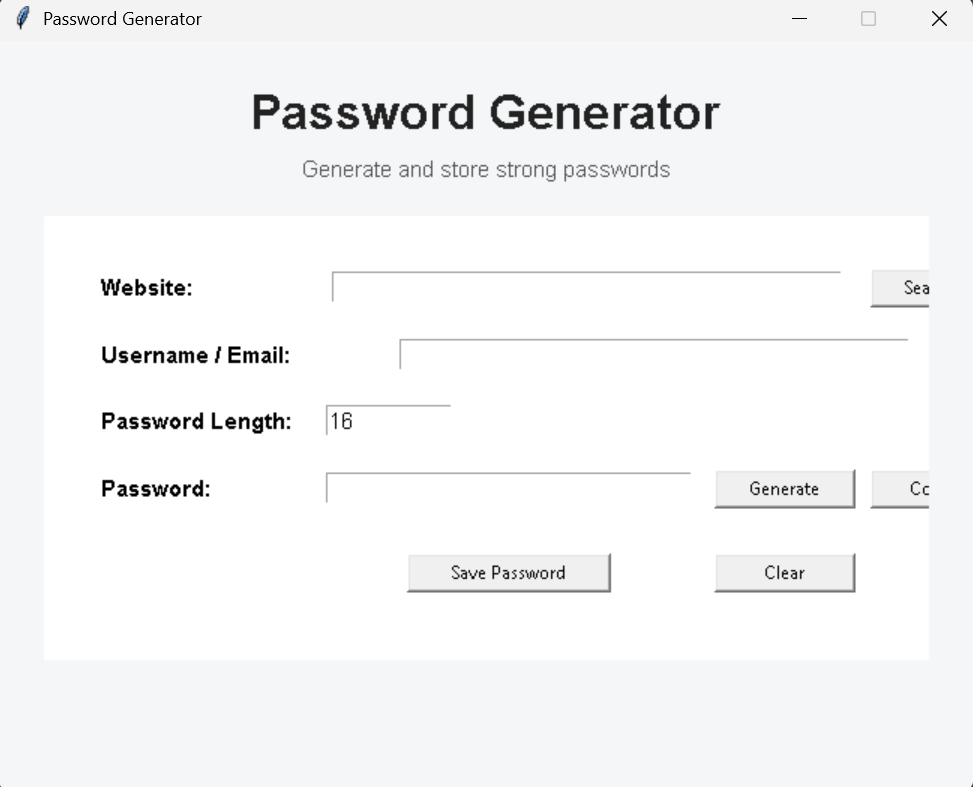
The final application provides a simple desktop interface containing fields for the website, username or email, password length, and generated password. It also provides buttons for generating, copying, saving, searching, and clearing password information.
The project database is stored locally as passwords.db. This file is automatically created in the same directory as the Python program.
Project Structure
Password-Generator/
│
├── password_generator.py
└── passwords.db
The passwords.db file does not need to be created manually. The application creates it automatically on the first run.
Important Note
This project is designed primarily for learning Python, Tkinter, random password generation, and SQLite database operations. Although the application demonstrates password generation and local storage, a production password manager should use proper encryption, secure key management, access controls, and protected credential storage rather than storing passwords as plain text in a local SQLite database.
Conclusion
Password Generator In Python is a useful beginner-level project for students who want to understand how Python can be used to create a practical desktop application. The project combines Tkinter for the graphical interface, the Python secrets module for random password generation, and SQLite for local data storage.
Tags
password generator in python, random password generator in python, how to make a password generator in python, random password generator in python project, random password generator in python using tkinter, automatic password generator in python, strong password generator in python, password generator algorithm python, password generator example, password generator GUI application in python, password generator using sqlite, python password generator project, tkinter password generator, sqlite password manager python, password manager project in python