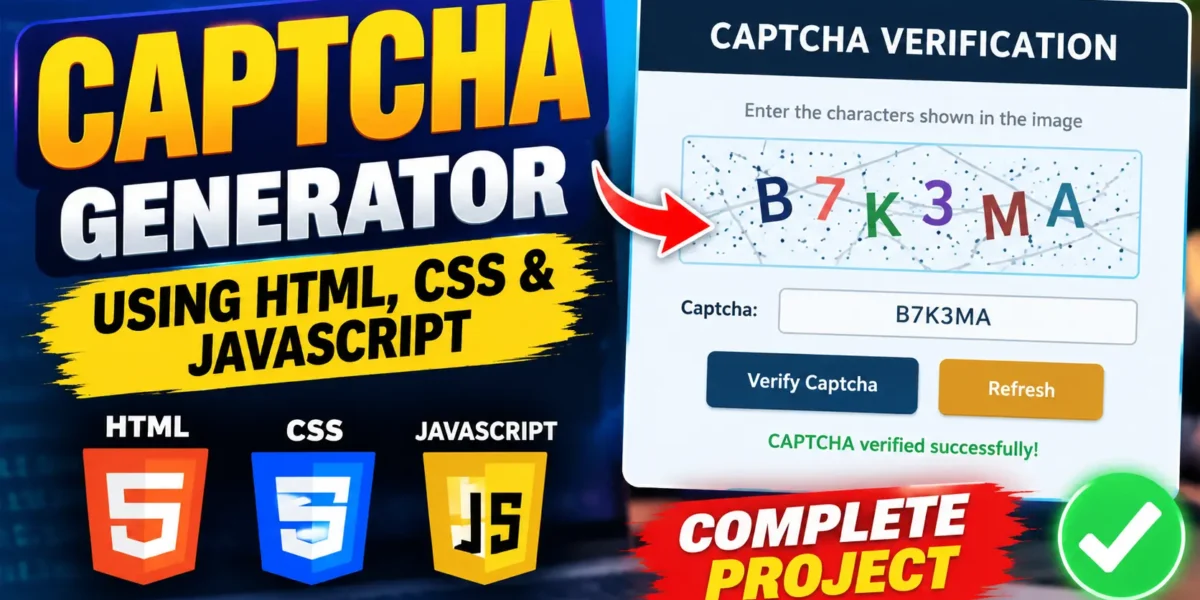
In this tutorial, we will learn how to create a Captcha Generator using HTML, CSS, and JavaScript. CAPTCHA is commonly used on websites to help verify that a user is a real person rather than an automated program.
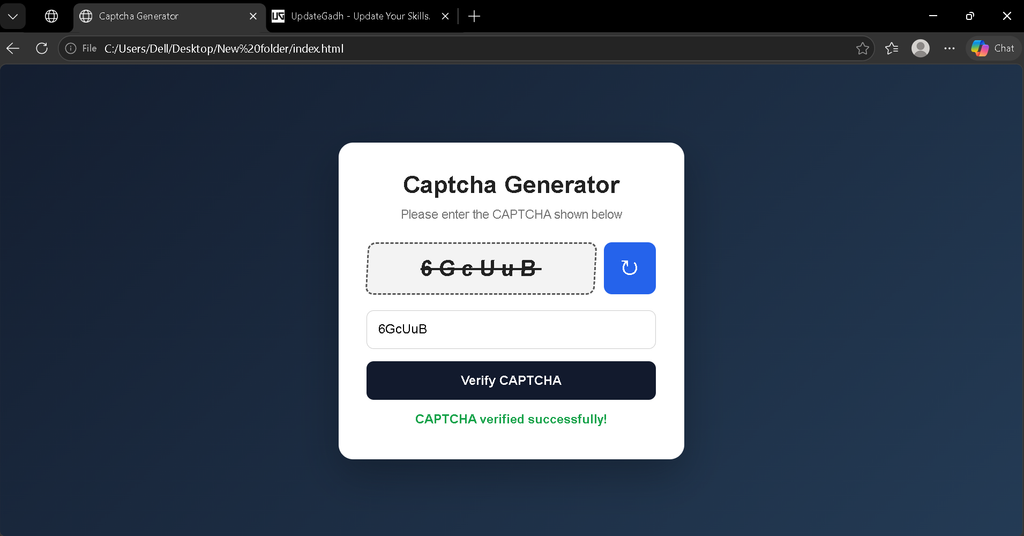
This project generates a random CAPTCHA containing letters and numbers. Users need to enter the displayed CAPTCHA into the input field and submit it for verification. The project also includes a refresh option that generates a new CAPTCHA whenever required.
Complete Advance AI Topics: Click Here
Real Time Projects on YouTube:- DecodeIT
Project Overview
| Project Name | Captcha Generator |
| Technologies | HTML, CSS, JavaScript |
| Database | Not Required |
| Type | Frontend Web Project |
Features
- Random CAPTCHA generation
- Letters and numbers based CAPTCHA
- Refresh CAPTCHA option
- CAPTCHA input field
- CAPTCHA validation
- Success and error messages
- Responsive user interface
- Clean and modern design
- No database required
- Pure HTML, CSS and JavaScript implementation
How the Captcha Generator Works
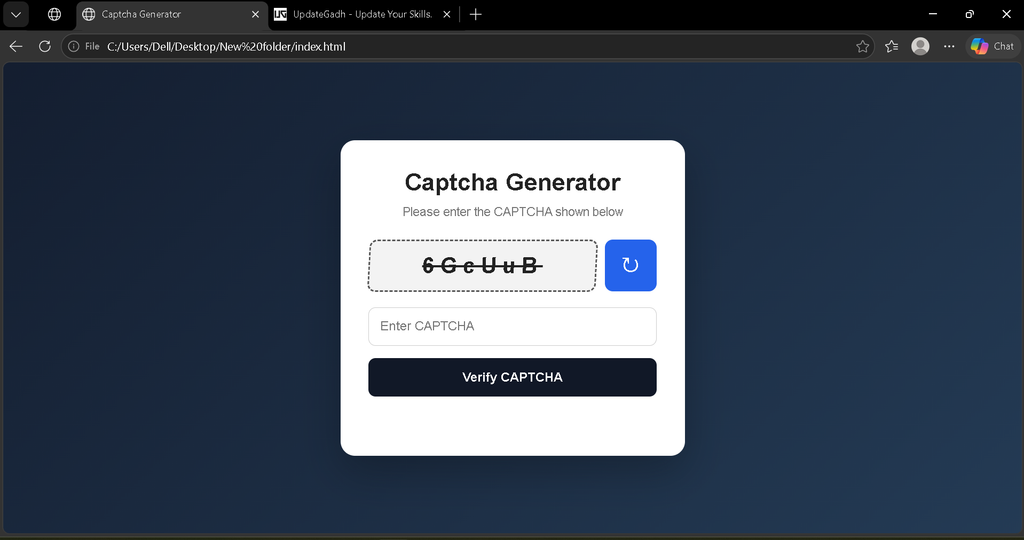
The project generates a random combination of letters and numbers using JavaScript. This generated value is displayed inside the CAPTCHA box.
When the user enters the CAPTCHA and clicks the Submit button, JavaScript compares the entered value with the generated CAPTCHA. If both values match, a success message is displayed. Otherwise, an error message is shown.
The Refresh Captcha button generates a completely new CAPTCHA so the user can try again.
Prerequisites
Before starting this project, you only need basic knowledge of:
- HTML
- CSS
- JavaScript
- Basic DOM manipulation
No database, backend server, or external library is required.
Screenshot
Project Structure
Create a new folder named captcha-generator and add these three files:
captcha-generator/
├── index.html
├── style.css
└── script.js
HTML Structure
Create an index.html file and add the following complete code:
<!-- ***** FOR MORE REAL TIME PROJECTS VISIT :- https://updategadh.com/ ***** -->

<!DOCTYPE html>
<html lang="en">
<head>
    <meta charset="UTF-8">
    <meta name="viewport" content="width=device-width, initial-scale=1.0">
    <title>Captcha Generator</title>
    <link rel="stylesheet" href="style.css">
</head>

<body>

    <div class="captcha-container">

        <h1>Captcha Generator</h1>

        <p class="subtitle">
            Please enter the CAPTCHA shown below
        </p>

        <div class="captcha-wrapper">
            <div id="captcha"></div>

            <button id="refresh" type="button" title="Refresh CAPTCHA">
                ↻
            </button>
        </div>

        <input
            type="text"
            id="captcha-input"
            placeholder="Enter CAPTCHA"
            autocomplete="off"
        >

        <button id="submit" type="button">
            Verify CAPTCHA
        </button>

        <p id="message"></p>

    </div>

    <script src="script.js"></script>

</body>
</html>
CSS Styling
Now create style.css and add the following code to design the CAPTCHA generator interface.
/* ***** FOR MORE REAL TIME PROJECTS VISIT :- https://updategadh.com/ ***** */

* {
    margin: 0;
    padding: 0;
    box-sizing: border-box;
}

body {
    min-height: 100vh;
    display: flex;
    justify-content: center;
    align-items: center;
    padding: 20px;
    font-family: Arial, sans-serif;
    background: linear-gradient(135deg, #141e30, #243b55);
}

.captcha-container {
    width: 100%;
    max-width: 430px;
    padding: 35px;
    text-align: center;
    background: #ffffff;
    border-radius: 18px;
    box-shadow: 0 20px 50px rgba(0, 0, 0, 0.25);
}

.captcha-container h1 {
    margin-bottom: 10px;
    color: #222;
    font-size: 30px;
}

.subtitle {
    margin-bottom: 25px;
    color: #777;
    font-size: 15px;
}

.captcha-wrapper {
    display: flex;
    gap: 10px;
    margin-bottom: 20px;
}

#captcha {
    flex: 1;
    min-height: 65px;
    display: flex;
    justify-content: center;
    align-items: center;
    padding: 10px;
    border: 2px dashed #555;
    border-radius: 10px;
    background: #f3f3f3;
    color: #222;
    font-size: 27px;
    font-weight: bold;
    letter-spacing: 7px;
    user-select: none;
    text-decoration: line-through;
    transform: skew(-3deg);
}

#refresh {
    width: 65px;
    border: none;
    border-radius: 10px;
    background: #2563eb;
    color: #fff;
    font-size: 28px;
    cursor: pointer;
    transition: 0.3s;
}

#refresh:hover {
    background: #1d4ed8;
    transform: rotate(15deg);
}

#captcha-input {
    width: 100%;
    padding: 14px;
    margin-bottom: 15px;
    border: 1px solid #ccc;
    border-radius: 9px;
    outline: none;
    font-size: 16px;
}

#captcha-input:focus {
    border-color: #2563eb;
}

#submit {
    width: 100%;
    padding: 14px;
    border: none;
    border-radius: 9px;
    background: #111827;
    color: #fff;
    font-size: 16px;
    font-weight: bold;
    cursor: pointer;
    transition: 0.3s;
}

#submit:hover {
    background: #2563eb;
}

#message {
    min-height: 24px;
    margin-top: 15px;
    font-size: 15px;
    font-weight: bold;
}

.success {
    color: #16a34a;
}

.error {
    color: #dc2626;
}

@media (max-width: 500px) {

    .captcha-container {
        padding: 25px 20px;
    }

    .captcha-container h1 {
        font-size: 25px;
    }

    #captcha {
        font-size: 22px;
        letter-spacing: 4px;
    }

    #refresh {
        width: 55px;
    }
}
JavaScript Functionality
The JavaScript file generates random CAPTCHA values, refreshes the CAPTCHA, checks the user’s input, and displays the verification result.
Create a script.js file and add the following complete code:
// ***** FOR MORE REAL TIME PROJECTS VISIT :- https://updategadh.com/ *****

const captchaElement = document.getElementById("captcha");
const captchaInput = document.getElementById("captcha-input");
const refreshButton = document.getElementById("refresh");
const submitButton = document.getElementById("submit");
const message = document.getElementById("message");

let currentCaptcha = "";

function generateCaptcha() {

    const characters =
        "ABCDEFGHIJKLMNOPQRSTUVWXYZabcdefghijklmnopqrstuvwxyz0123456789";

    const captchaLength = 6;

    currentCaptcha = "";

    for (let i = 0; i < captchaLength; i++) {
        const randomIndex = Math.floor(
            Math.random() * characters.length
        );

        currentCaptcha += characters[randomIndex];
    }

    captchaElement.textContent = currentCaptcha;

    captchaInput.value = "";
    message.textContent = "";
    message.className = "";
}

function verifyCaptcha() {

    const userInput = captchaInput.value.trim();

    if (userInput === "") {
        message.textContent = "Please enter the CAPTCHA.";
        message.className = "error";
        return;
    }

    if (userInput.toLowerCase() === currentCaptcha.toLowerCase()) {

        message.textContent = "CAPTCHA verified successfully!";
        message.className = "success";

    } else {

        message.textContent = "Incorrect CAPTCHA. Please try again.";
        message.className = "error";

    }
}

refreshButton.addEventListener("click", generateCaptcha);

submitButton.addEventListener("click", verifyCaptcha);

captchaInput.addEventListener("keydown", function(event) {

    if (event.key === "Enter") {
        verifyCaptcha();
    }

});

generateCaptcha();
How to Run the Project
- Create a folder named captcha-generator.
- Create index.html, style.css, and script.js.
- Copy the provided code into the respective files.
- Save all three files.
- Open index.html in your web browser.
- Enter the CAPTCHA displayed on the screen.
- Click Verify CAPTCHA to check the entered value.
- Click the refresh button to generate a new CAPTCHA.
How to Customize the Project
You can customize the CAPTCHA generator by changing the background colors, font sizes, CAPTCHA length, button colors, border styles, and other CSS properties.
The CAPTCHA length can also be changed from the JavaScript file by modifying the captchaLength value. You can also change the character set according to your project requirements.
Project Benefits
- Easy to understand for beginners
- Useful for learning JavaScript DOM manipulation
- Demonstrates random value generation
- Includes form validation
- Responsive design
- Does not require a database
- Can be integrated into frontend forms
Final Thoughts
Building a CAPTCHA Generator using HTML, CSS, and JavaScript is a useful project for understanding random value generation, user input handling, DOM manipulation, and frontend validation. Students can further improve this project by adding advanced CAPTCHA graphics, stronger distortion techniques, timers, or backend-side verification.
Keywords: Captcha Generator Using HTML CSS and JavaScript, CAPTCHA Generator, HTML CSS JavaScript CAPTCHA, JavaScript CAPTCHA Project, CAPTCHA Source Code, HTML CSS Project, JavaScript Project