
BMI Calculator Using HTML CSS and JavaScript
A BMI Calculator is a web-based application that calculates Body Mass Index using a user’s height and weight. This project allows users to enter their basic details, calculate their BMI, view the BMI category, and navigate to a diet plan based on the calculated result.
The project is developed using HTML, CSS, and JavaScript. It contains a BMI Calculator page and a Diet Plan page, with JavaScript localStorage used to transfer the user’s name and BMI value between the two pages.
Complete Advance AI Topics: Click Here
Real Time Projects on YouTube:- DecodeIT
Project Overview
| Project Name | BMI Calculator and Diet Plan |
|---|---|
| Language/s Used | HTML, CSS, JavaScript |
| Type | Web Application |
Available Features
- User name input
- Age input
- Gender selection
- Weight input in kilograms
- Height input in centimeters
- Automatic BMI calculation
- BMI category classification
- Diet recommendation based on BMI
- Diet Plan page
- User information transfer using localStorage
- Navigation between BMI Calculator and Diet Plan
Project Structure
BMI-Calculator/
├── index.html
├── diet_plan.html
├── bmi_calculator.css
├── diet_plan.css
├── bmi_calculator.js
└── diet_plan.js
The original project uses separate HTML, CSS, and JavaScript files for the BMI Calculator and Diet Plan pages.
Installation Guide
- Create a folder named BMI-Calculator.
- Create the six files shown in the project structure.
- Add the corresponding HTML, CSS, and JavaScript code.
- Save all files in the same folder.
- Open index.html in a modern web browser.
- Enter the required information and calculate the BMI.
- Use the Diet Plan option to open the diet plan page.
How the Works
The user enters their name, age, gender, weight, and height. JavaScript validates the required fields and converts the height from centimeters to meters. The BMI is then calculated using the weight and height values. The result is displayed together with a recommendation based on the calculated BMI.
Screenshot
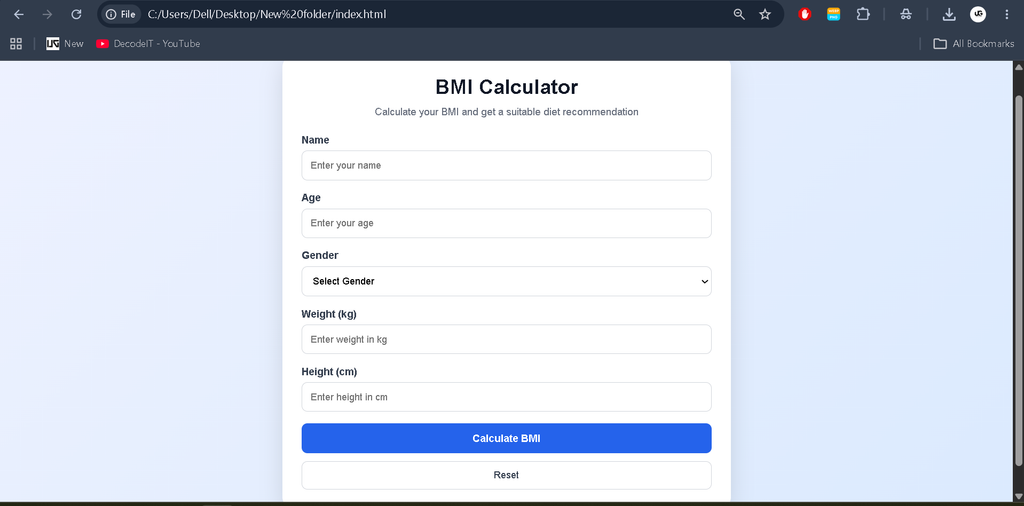
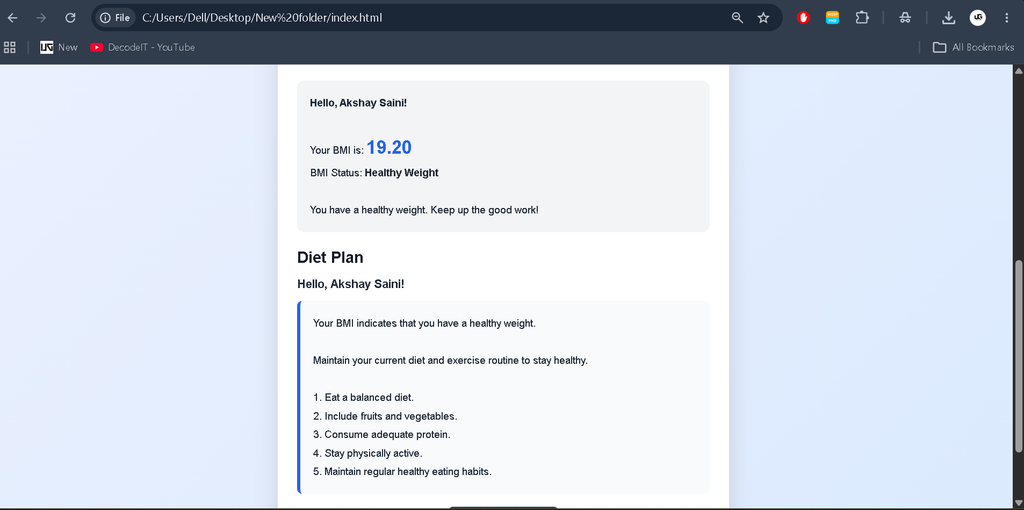
BMI Calculator Code
index.html
<!-- ***** FOR MORE REAL TIME PROJECTS VISIT :- https://updategadh.com/ ***** -->

<!DOCTYPE html>
<html lang="en">
<head>
    <meta charset="UTF-8">
    <meta name="viewport" content="width=device-width, initial-scale=1.0">
    <title>BMI Calculator</title>
    <link rel="stylesheet" href="bmi_calculator.css">
</head>
<body>

    <div class="container">
        <h1>BMI Calculator</h1>

        <form id="bmiForm">

            <div class="input-group">
                <label for="name">Name:</label>
                <input type="text" id="name" required>
            </div>

            <div class="input-group">
                <label for="age">Age:</label>
                <input type="number" id="age" required>
            </div>

            <div class="input-group">
                <label for="gender">Gender:</label>
                <select id="gender" required>
                    <option value="male">Male</option>
                    <option value="female">Female</option>
                </select>
            </div>

            <div class="input-group">
                <label for="weight">Weight (kg):</label>
                <input type="number" id="weight" required>
            </div>

            <div class="input-group">
                <label for="height">Height (cm):</label>
                <input type="number" id="height" required>
            </div>

            <button type="submit">Calculate BMI</button>

        </form>

        <a href="diet_plan.html">View Diet Plan</a>

        <div id="result"></div>
    </div>

    <script src="bmi_calculator.js"></script>

</body>
</html>
bmi_calculator.js
// ***** FOR MORE REAL TIME PROJECTS VISIT :- https://updategadh.com/ *****

document.getElementById("bmiForm").addEventListener("submit", function(e) {

    e.preventDefault();

    const name = document.getElementById("name").value.trim();
    const age = parseFloat(document.getElementById("age").value);
    const weight = parseFloat(document.getElementById("weight").value);
    const height = parseFloat(document.getElementById("height").value);

    if (!name || !age || !weight || !height) {
        alert("Please fill in all fields.");
        return;
    }

    const heightMeters = height / 100;
    const bmi = weight / (heightMeters * heightMeters);

    const resultElement = document.getElementById("result");

    let message = `Hello, ${name}!<br>`;
    message += `Your BMI is: ${bmi.toFixed(2)}<br>`;

    let dietRecommendation = "";

    if (bmi < 18.5) {
        dietRecommendation =
            "You are underweight. Consider a balanced diet with adequate calories.";
    } else if (bmi >= 18.5 && bmi < 24.9) {
        dietRecommendation =
            "You have a healthy weight. Keep up the good work!";
    } else if (bmi >= 25 && bmi < 29.9) {
        dietRecommendation =
            "You are overweight. Consider a calorie-controlled diet and exercise.";
    } else {
        dietRecommendation =
            "You are obese. Please consult a healthcare professional for guidance.";
    }

    message += `<br>${dietRecommendation}`;

    resultElement.innerHTML = message;

    localStorage.setItem("name", name);
    localStorage.setItem("bmi", bmi);
});
Diet Plan Page
The Diet Plan page retrieves the user’s name and BMI from localStorage. Based on the stored BMI value, JavaScript displays the corresponding diet recommendation. If the required information is unavailable, the user is redirected back to the BMI Calculator page.
diet_plan.html
<!-- ***** FOR MORE REAL TIME PROJECTS VISIT :- https://updategadh.com/ ***** -->

<!DOCTYPE html>
<html lang="en">
<head>
    <meta charset="UTF-8">
    <meta name="viewport" content="width=device-width, initial-scale=1.0">
    <title>Diet Plan</title>
    <link rel="stylesheet" href="diet_plan.css">
</head>
<body>

    <div class="container">

        <h1>Diet Plan</h1>

        <div id="userGreeting"></div>

        <div id="dietPlan"></div>

    </div>

    <script src="diet_plan.js"></script>

</body>
</html>
diet_plan.js
// ***** FOR MORE REAL TIME PROJECTS VISIT :- https://updategadh.com/ *****

document.addEventListener("DOMContentLoaded", function() {

    const name = localStorage.getItem("name");
    const bmi = parseFloat(localStorage.getItem("bmi"));

    if (!name || !bmi) {
        window.location.href = "index.html";
        return;
    }

    const userGreetingElement =
        document.getElementById("userGreeting");

    const dietPlanElement =
        document.getElementById("dietPlan");

    userGreetingElement.textContent =
        `Hello, ${name}!`;

    let dietPlan = "";

    if (bmi < 18.5) {

        dietPlan =
            "Your BMI indicates that you are underweight. " +
            "Consider balanced meals containing carbohydrates, " +
            "proteins, healthy fats, fruits, vegetables, and whole grains.";

    } else if (bmi >= 18.5 && bmi < 24.9) {

        dietPlan =
            "Your BMI indicates that you have a healthy weight. " +
            "Maintain a balanced diet and regular exercise routine.";

    } else if (bmi >= 25 && bmi < 29.9) {

        dietPlan =
            "Your BMI indicates that you are overweight. " +
            "Consider reducing sugary and high-fat foods, increasing " +
            "fiber-rich foods, and maintaining regular physical activity.";

    } else {

        dietPlan =
            "Your BMI indicates that you may need additional weight " +
            "management guidance. Please consult a qualified healthcare " +
            "professional or dietitian for personalized advice.";
    }

    dietPlanElement.textContent = dietPlan;
});
CSS Styling
The project uses separate CSS files for the BMI Calculator and Diet Plan pages. The original styling includes centered layouts, form controls, buttons, result sections, and responsive page elements.
bmi_calculator.css
/* ***** FOR MORE REAL TIME PROJECTS VISIT :- https://updategadh.com/ ***** */

body {
    font-family: Arial, sans-serif;
    background-color: #f0f0f0;
    margin: 0;
    padding: 0;
    display: flex;
    justify-content: center;
    align-items: center;
    min-height: 100vh;
}

.container {
    background-color: #fff;
    padding: 50px;
    border-radius: 10px;
    box-shadow: 0 0 10px rgba(0,0,0,0.2);
}

h1 {
    text-align: center;
}

.input-group {
    margin: 10px 0;
}

label {
    font-weight: bold;
}

input,
select {
    width: 100%;
    padding: 10px;
    border: 1px solid #ccc;
    border-radius: 5px;
}

button {
    background-color: #007bff;
    color: #fff;
    padding: 10px 20px;
    border: none;
    border-radius: 5px;
    cursor: pointer;
}

#result {
    margin-top: 20px;
    text-align: center;
    font-weight: bold;
}

a {
    display: block;
    text-align: center;
    margin-top: 20px;
    color: #007bff;
    text-decoration: none;
}
Usage
- Open index.html in a browser.
- Enter the user’s name, age, gender, weight, and height.
- Click Calculate BMI.
- The calculated BMI and recommendation will be displayed.
- The name and BMI are stored in browser localStorage.
- Open View Diet Plan to access the Diet Plan page.
Project Benefits
- Simple HTML, CSS, and JavaScript project for students.
- Demonstrates JavaScript calculations.
- Provides practical experience with forms and validation.
- Demonstrates browser localStorage.
- Shows navigation between multiple web pages.
- Can be customized with additional UI and functionality.