Captcha Generator
In today’s digital age, online security is of paramount importance. One essential tool to combat automated bots and ensure the security of online forms is the CAPTCHA (Completely Automated Public Turing test to tell Computers and Humans Apart). In this tutorial, we’ll show you how to build a CAPTCHA generator from scratch using HTML, CSS, and JavaScript.
Introduction
Web applications frequently employ CAPTCHAs to confirm that a user is human and not a bot. They entail posing a problem that is simple for people to answer but complex for automated programs. You will be able to create unique CAPTCHAs for your own web forms by the end of this course.
Video Tutorial:
If you would rather watch a tutorial video than read this blog article, you may view the video by clicking the link below. I frequently upload brand-new guides, tips, and techniques to my channel. To ensure that you don’t miss any of these, please subscribe to my channel.
Introduction
-
- Brief explanation of the project’s purpose.
-
- Mention the use of HTML, CSS, and JavaScript for implementation.
-
- Highlight the importance of Captcha Generator in online security and form submissions.
Prerequisites
-
- List any prerequisites for the project (e.g., basic knowledge of HTML, CSS, and JavaScript).
Project Structure
Let’s begin by setting up the project directory structure. Create a folder named “Captcha Generator ” and organize the following files within it:
-
- index.html
-
- style.css
- script.js
HTML Structure
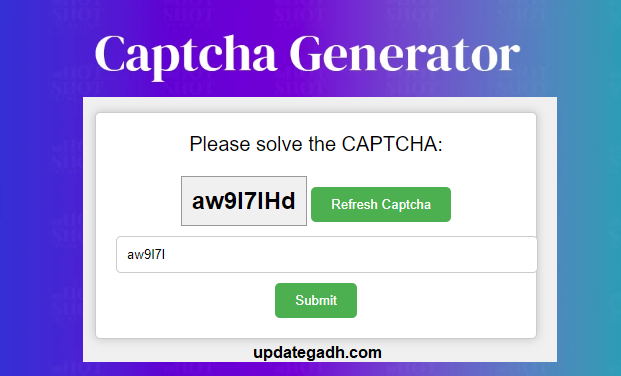
Open the index.html file and set up the basic structure. Create placeholders for displaying the Captcha Generator, including a title, input field, and buttons for refreshing and submitting the Captcha Generator.
<!DOCTYPE html>
<html>
<head>
  <link rel="stylesheet" type="text/css" href="style.css">
</head>
<body>
  <div id="captcha-container">
    <div id="captcha-title">Please solve the CAPTCHA:</div>
    <div id="captcha"></div>
    <button id="refresh">Refresh Captcha</button>
    <input id="captcha-input" type="text" placeholder="Enter the CAPTCHA">
    <button id="submit">Submit</button>
  </div>
  <script src="script.js"></script>
</body>
</html>
CSS Styling
In the style.css file, apply styles to enhance the appearance and user experience. Utilize CSS to ensure the CAPTCHA display is professional and visually appealing.
body {
  font-family: Arial, sans-serif;
  background-color: #f0f0f0;
}
#captcha-container {
  text-align: center;
  margin: 50px auto;
  max-width: 400px;
  background-color: #fff;
  border: 1px solid #ccc;
  border-radius: 5px;
  padding: 20px;
  box-shadow: 0px 0px 10px rgba(0, 0, 0, 0.2);
}
#captcha {
  font-size: 24px;
  font-weight: bold;
  margin: 10px 0;
  background-color: #f0f0f0; /* Background color for added noise */
  border: 1px solid #999;
  padding: 10px;
  display: inline-block;
}
#refresh {
  cursor: pointer;
  padding: 10px 20px;
  background-color: #4CAF50;
  color: white;
  border: none;
  border-radius: 5px;
  margin-top: 10px;
}
#captcha-title {
  font-size: 20px;
  margin-bottom: 10px;
}
#captcha-input {
  padding: 10px;
  border: 1px solid #ccc;
  border-radius: 5px;
  width: 100%;
  margin-bottom: 10px;
}
#submit {
  cursor: pointer;
  padding: 10px 20px;
  background-color: #4CAF50;
  color: white;
  border: none;
  border-radius: 5px;
}
JavaScript Functionality
Implement JavaScript functions in the script.js file to handle CAPTCHA generation, add distortion and noise, and validate user input. Utilize these functions to create a robust CAPTCHA system that effectively distinguishes between human users and bots.
-
- Create JavaScript functions to:
-
- Generate a random CAPTCHA.
-
- Add distortion and noise to the CAPTCHA.
-
- Check if the user’s input matches the generated CAPTCHA.
-
- Display appropriate messages for success or failure.
-
- Create JavaScript functions to:
function generateCaptcha() {
  var length = 8;
  var charset = "abcdefghijklmnopqrstuvwxyzABCDEFGHIJKLMNOPQRSTUVWXYZ0123456789";
  var captcha = "";
  for (var i = 0, n = charset.length; i < length; ++i) {
    captcha += charset.charAt(Math.floor(Math.random() * n));
  }
  document.getElementById('captcha').innerText = addNoise(captcha);
}
function addNoise(captcha) {
  var noisyCaptcha = '';
  for (var i = 0; i < captcha.length; i++) {
    if (Math.random() > 0.5) {
      noisyCaptcha += captcha.charAt(i).toUpperCase();
    } else {
      noisyCaptcha += captcha.charAt(i).toLowerCase();
    }
  }
  return noisyCaptcha;
}
function checkCaptcha() {
  var input = document.getElementById('captcha-input').value;
  var captchaText = document.getElementById('captcha').innerText;
  if (input.toLowerCase() === captchaText.toLowerCase()) {
    alert("Captcha is correct!");
  } else {
    alert("Captcha is incorrect!");
  }
}
window.onload = function() {
  generateCaptcha();
  var refreshButton = document.getElementById('refresh');
  refreshButton.onclick = generateCaptcha;
  var submitButton = document.getElementById('submit');
  submitButton.onclick = checkCaptcha;
}