Skip to content
  • SiteMap
  • Our Services
  • Frequently Asked Questions (FAQ)
  • Support
  • About Us

UpdateGadh

Update Your Skills.

  • Home
  • Projects
    •  Blockchain projects
    • Python Project
    • Data Science
    •  Ai projects
    • Machine Learning
    • PHP Project
    • React Projects
    • Java Project
    • SpringBoot
    • JSP Projects
    • Java Script Projects
    • Code Snippet
    • Free Projects
  • Tutorials
    • Ai
    • Machine Learning
    • Advance Python
    • Advance SQL
    • DBMS Tutorial
    • Data Analyst
    • Deep Learning Tutorial
    • Data Science
    • Nodejs Tutorial
  • Blog
  • Contact us
  • Toggle search form
Learning Management System using Django

Best Learning Management System (LMS) using Django — Course, Quiz, Results & Payments

Posted on August 24, 2025January 14, 2026 By Rishabh saini No Comments on Best Learning Management System (LMS) using Django — Course, Quiz, Results & Payments

Learning Management System

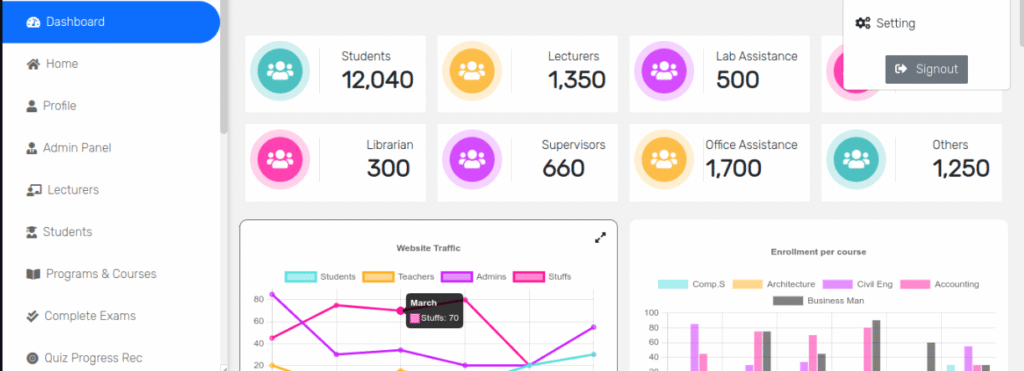
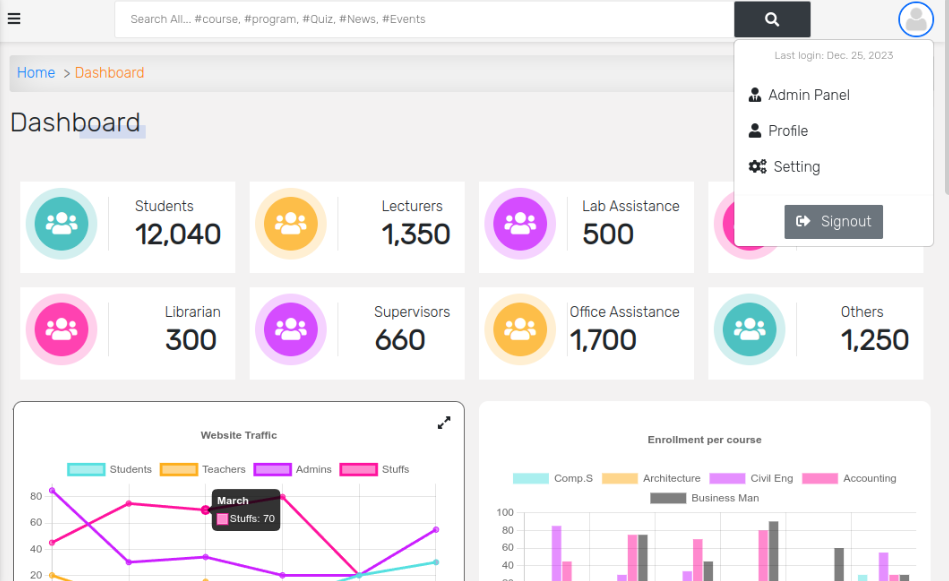
The Learning Management System (LMS) is a complete school and college management application built with the Django framework. It includes separate apps for managing accounts, courses, results, quizzes, search, and payments. The project follows a clean Django structure with organized folders for apps, templates, and settings. By default, it uses an SQLite database, but it also supports optional integrations like email services and multiple payment gateways such as Stripe, PayPal, GoPay, Coinbase, and Paylike.Additional features include PDF report generation for student lists and results using ReportLab, as well as crispy-bootstrap-5 for responsive forms and WhiteNoise for handling static files. Developed with Django 4.x, this project offers a professional foundation that can be extended for real educational institutes or showcased as a strong portfolio project.

Project Overview

Project NameLearning Management System using Django
Language/s UsedPython (Django 4), HTML/CSS with Bootstrap 5
DatabaseSQLite
TypeWeb Application

Download New Real Time Projects :-Click here

Available Features

  • User Accounts & Roles
    Custom user model and related profiles for students and staff. Includes admin utilities, profile pages, password change, and filters for user lists.
  • Programs & Courses
    Models for Program and Course, plus CourseAllocation to assign lecturers. Each course supports documentation and video uploads (separate models for files and videos), a detailed page per course, and edit/delete flows.
  • Course Registration
    Endpoints for course registration/drop and a My Courses view so learners can manage their enrollments.
  • Quizzes & Assessment
    Full quiz module with MCQ and essay questions, sittings/attempts, progress tracking, marking list, and quiz creation/update routes.
  • Results & PDF Reports
    Result tracking with TakenCourse and Result models. ReportLab is used to generate PDFs (e.g., student and lecturer lists), and there are result views/templates.
  • Search Across Modules
    A search view aggregates results from News/Events, Programs, Courses, and Quizzes to help users quickly find content.
  • News, Events, Session & Semester
    Core app includes NewsAndEvents, plus Session and Semester structures and an ActivityLog for key actions.
  • Payments & Invoicing
    Payments app with routes for Stripe, PayPal, Coinbase, Paylike, and GoPay. There’s an Invoice model, invoice list/detail templates, and a payment success flow.
  • REST API (Accounts)
    Basic DRF endpoint is present at accounts/api/ for user listing/detail, useful for integrations.

Complete Run

  1. Extract & Open
    Unzip the project and open the root folder (the one containing manage.py) in VS Code.
  2. Create Virtual Environment
    Open VS Code Terminal and run:
    python -m venv venv
  3. Activate Virtual Environment
    • Windows: venv\Scripts\activate
    • macOS/Linux: source venv/bin/activate
  4. Install Requirements
    The top-level requirements.txt points to local/dev dependencies. Install with:
    pip install -r requirements/local.txt
    (If you prefer a leaner install: pip install -r requirements/base.txt.)
  5. Environment Variables
    Copy .env.example to .env in the project root. Ensure at least:
    • DEBUG=True (for local development)
    • SECRET_KEY= any random string (a default exists, but you can set your own)
      Email and payment keys (Stripe, etc.) are optional for local runs; leave them blank if not using those features.
  6. Database Setup (SQLite by default)
    The project is preconfigured for SQLite in config/settings.py. No changes needed.
  7. Make Migrations
    python manage.py makemigrations
  8. Apply Migrations
    python manage.py migrate
  9. Create Superuser
    python manage.py createsuperuser
    Set admin username, email (optional), and password. You’ll use this for /admin.
  10. Run the Server
    python manage.py runserver
    Open the shown URL in your browser. Use /admin for the Django admin. App routes include:
    • accounts/ (auth, profiles, lists, PDFs)
    • programs/ (programs, courses, allocation, uploads, registration)
    • quiz/ (create, take, mark quizzes, progress)
    • result/ (student results, PDF outputs)
    • search/ (site-wide search)
    • payments/ (gateways and invoices)

We have projects Available in all languages:–Click Here
    BUY THIS PROJECT
    Learning Management System
    Learning Management System


    learning management system django github
    django e learning website github
    build a learning management system with django and react free download
    learning management system using python
    django management system github
    college management system django github
    learning management system github
    learning management system github php
    learning management system using django github
    learning management system using django with source code
    learning management system using django pdf
    learning management system using django in python
    learning management system using django example
     

    Post Views: 562
    Python Projects Tags:attendance management system using django, create a learning management system, django leanrning management system, django school management system, e learning management system, Learning Management System, learning management system in django, learning management system website, lms learning management system, python django college management system, student management system in django, what is a learning management system, what is learning management system

    Post navigation

    Previous Post: How Time Series Cross Correlation Works
    Next Post: Best NGO Management System in PHP with MySQL — Donor, Volunteer & Admin Panels

    More Related Articles

    Weather Forecast Application Weather Forecast Application in Python with Real-Time Python Projects
    Blood Bank Management System using Python Django Best Blood Bank Management System using Python Django Python Projects
    Face Recognition Based Secure Attendance Face Recognition Based Secure Attendance Python Projects

    Leave a Reply Cancel reply

    Your email address will not be published. Required fields are marked *

    You may also like

    1. Food Management System in Python [Django Framework ]
    2. Online Grocery Shop Using Python with Source code setup
    3. File Sharing Website Using Python in Django
    4. Library Management System in Python (Flask)
    5. Best Currency Converter Web Application Using Python – Complete Professional Project
    6. Pharmacy Management System Project using Python Django

    Most Viewed Posts

    1. Top Large Language Models in 2025
    2. Online Shopping System using PHP, MySQL with Free Source Code
    3. login form in php and mysql , Step-by-Step with Free Source Code
    4. Flipkart Clone using PHP And MYSQL Free Source Code
    5. News Portal Project in PHP and MySql Free Source Code
    6. User Login & Registration System Using PHP and MySQL Free Code
    7. Top 10 Final Year Project Ideas in Python
    8. Online Bike Rental Management System Using PHP and MySQL
    9. E learning Website in php with Free source code
    10. E-Commerce Website Project in Java Servlets (JSP)
    • AI
    • ASP.NET
    • Blockchain
    • ChatCPT
    • code Snippets
    • Collage Projects
    • Data Science Project
    • Data Science Tutorial
    • DBMS Tutorial
    • Deep Learning Tutorial
    • Final Year Projects
    • Free Projects
    • How to
    • html
    • Interview Question
    • Java Notes
    • Java Project
    • Java Script Notes
    • JAVASCRIPT
    • Javascript Project
    • JSP JAVA(J2EE)
    • Machine Learning Project
    • Machine Learning Tutorial
    • MySQL Tutorial
    • Node.js Tutorial
    • PHP Project
    • Portfolio
    • Python
    • Python Interview Question
    • Python Projects
    • PythonFreeProject
    • React Free Project
    • React Projects
    • Spring boot
    • SQL Tutorial
    • TOP 10
    • Uncategorized
    • Online Examination System in PHP with Source Code
    • AI Chatbot for College and Hospital
    • Job Portal Web Application in PHP MySQL
    • Online Tutorial Portal Site in PHP MySQL — Full Project with Source Code
    • Online Job Portal System in JSP Servlet MySQL

    Most Viewed Posts

    • Top Large Language Models in 2025 (8,613)
    • Online Shopping System using PHP, MySQL with Free Source Code (5,211)
    • login form in php and mysql , Step-by-Step with Free Source Code (4,866)

    Copyright © 2026 UpdateGadh.

    Powered by PressBook Green WordPress theme