Looking for a Real-Time Online Voting System Using Python with Flask and WebSockets? VoteLive is one of the most impressive final year projects for BCA, MCA, and B.Tech CS/IT students in 2026. It is a fully real-time web-based voting platform built with Flask, SQLite, and Flask-SocketIO – votes are tallied live and pushed to every open browser instantly, with no page refresh needed. The project includes voter self-registration, role-based access for admin and voter accounts, candidate management with photo uploads, live session control, animated live result bars, and CSV export. In this post, you get the complete project explanation, feature list, tech stack, folder structure, and step-by-step setup guide.
Complete Advance AI Topics: Click Here
Real Time Projects on YouTube:- DecodeIT
Project Overview
| Project Name | VoteLive – Online Voting System Using Python |
| Language Used | Python 3.x |
| Web Framework | Flask (application-factory + blueprints) |
| Real-Time Engine | Flask-SocketIO (threading mode) |
| ORM | Flask-SQLAlchemy |
| Authentication | Flask-Login + Werkzeug password hashing |
| Frontend | Jinja2, custom CSS, Socket.IO client |
| Database | SQLite |
| Project Type | Real-Time Web Application |
| Difficulty | Advanced |
| Best For | BCA, MCA, B.Tech CS/IT Final Year Students |
About the Project
The Online Voting System Using Python is a full-stack Flask web application that demonstrates one of the most in-demand skills in modern web development – real-time bidirectional communication using WebSockets. Built using Flask, Flask-SocketIO, SQLite, and Flask-Login, the system supports voter self-registration, secure password-hashed login, role-based access for admin and voter accounts, candidate management with photo uploads, election session control, and live result broadcasting.
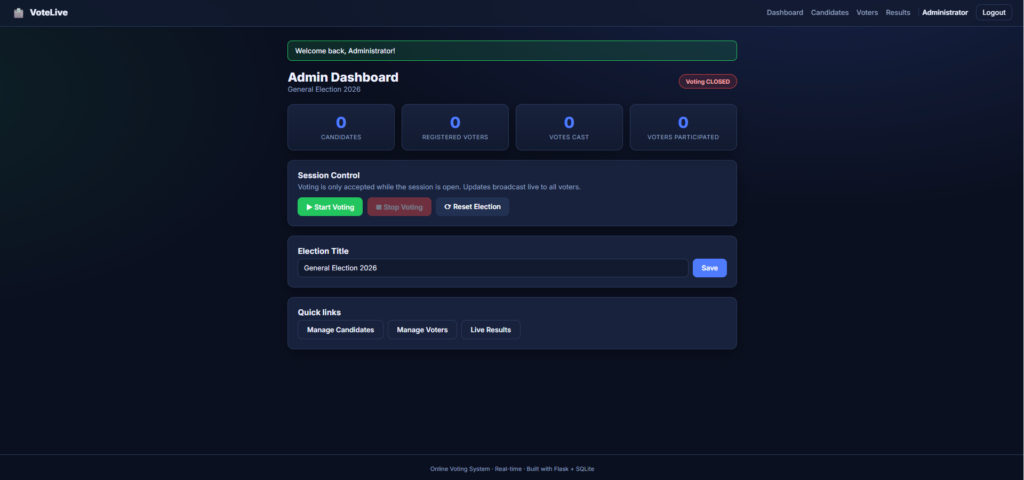
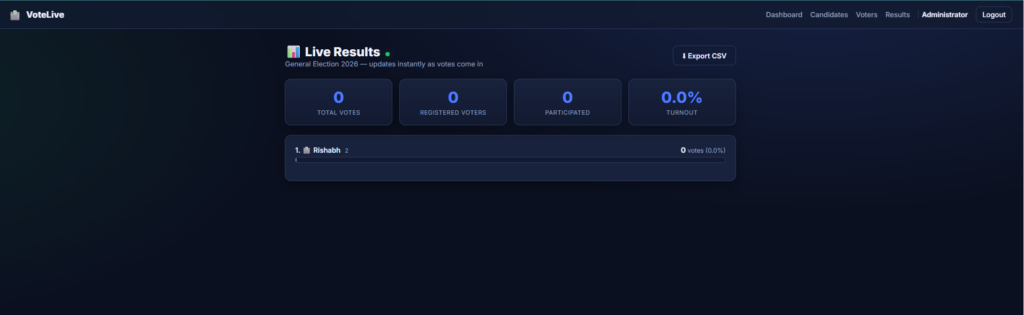
The standout feature is the live tally engine. When any voter casts a vote, the result update is broadcast through Socket.IO to every connected browser instantly – admins see the bar chart move in real time and voters see the ballot disabled the moment the admin stops the session. This combination of real-time websockets, role-based authentication, and one-vote-per-voter integrity makes VoteLive an extremely strong final year project for BCA, MCA, and B.Tech students.
Key Features
Real-Time Features
- Live vote counts and turnout are broadcast to all connected clients via Flask-SocketIO.
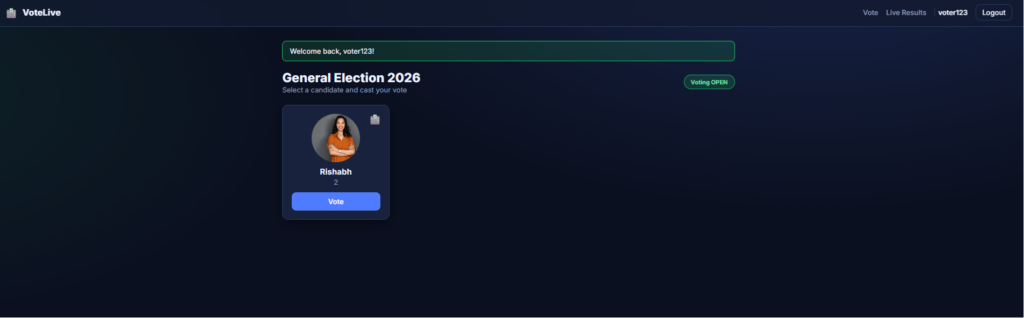
- Voters see the ballot enabled or disable instantly when the admin starts or stops voting.
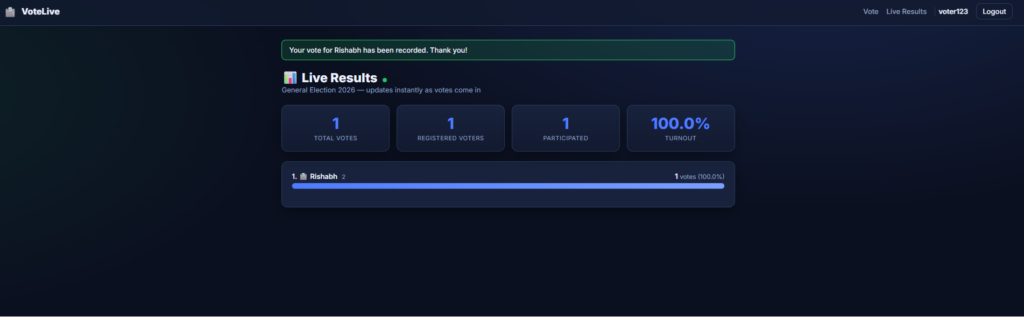
- Animated progress bars update in real time on the results page.
Voter Features
- Self-registration and secure login with hashed passwords.
- Photo and symbol-based ballot for an authentic voting experience.
- Strict one-vote-per-voter enforcement at the database and route level.
- Live results page with animated progress bars and percentage shares.
Admin Features
- Dashboard with live statistics and full session control (Start / Stop / Reset election).
- Candidate management – add, edit, delete, photo upload, and emoji symbol support.
- Voter management – enable, disable, delete, and view the voting status of every voter.
- Editable election title that updates live everywhere.
- CSV export of the final results for record-keeping or further analysis.
Technologies Used
| Layer | Technology |
| Backend | Python 3.x, Flask (app-factory + blueprints) |
| Real-Time | Flask-SocketIO (threading mode) |
| Database / ORM | SQLite, Flask-SQLAlchemy |
| Authentication | Flask-Login, Werkzeug password hashing |
| Frontend | Jinja2 templates, custom CSS, Socket.IO client |
| File Uploads | Werkzeug secure_filename for candidate photos |
Database Model (SQLite)
| Table | Fields |
| users | voter_id, name, email, password_hash, role (admin/voter), is_active_flag, has_voted |
| candidates | name, post, symbol, photo |
| votes | user_id, candidate_id, timestamp |
| settings | key/value store (session_active, election_title) |
How to Run This Project
Step 1: Create and Activate a Virtual Environment
# Windows PowerShell
python -m venv venv
.\venv\Scripts\Activate.ps1

# macOS / Linux
python -m venv venv
source venv/bin/activate
Step 2: Install Dependencies
pip install -r requirements.txtStep 3: Run the Application
# Default port 5000
python run.py

# Or pass a custom port if 5000 is busy
python run.py 5001
Open http://127.0.0.1:5000 in your browser. The SQLite database (voting.db) and the default admin account is created automatically on first run.
Default Login Credentials
| Role | Username | Password |
| Admin | admin123 | admin123 |
Voters create their own accounts via the Register page – no demo voters are pre-seeded. Register at least one voter to test the voting flow. For production use, change the admin password immediately after the first login.
How to Test the Real-Time Flow
- Log in as admin, add a few candidates, and click Start Voting.
- In another browser (or an incognito window), register a voter and log in.
- Open the Live Results page in the admin window.
- Cast a vote as the voter and watch the admin’s results bar update instantly – with no refresh.
- Stop the session as admin and notice the voter’s ballot is disabled in real time.
Security Features
- Hashed Passwords: All user passwords stored using Werkzeug PBKDF2/scrypt hashing.
- Role-Based Access Control: Admin-only and voter-only route decorators prevent unauthorised access.
- One-Time Vote Enforcement: Strictly checked at both the route layer and the database layer.
- Session Gating: Voting is only accepted while the election session is active.
- Soft-Disable Accounts: Admins can disable voter accounts without deleting them, preserving the audit trail.
- Secure File Uploads: Candidate photos sanitised with Werkzeug secure_filename.
How to Download
The complete package is available so you can run, study, and submit it with confidence. It includes:
- Full Source Code
- Project Report
- Synopsis
- PPT Presentation
Demo Video
Watch the complete walkthrough of the Real-Time Online Voting System below, covering voter registration, admin session control, live vote broadcasting, and CSV export:
Screenshots

Why This Is a Great Final Year Project
- Real WebSocket integration – one of the most in-demand modern web skills, demonstrated end-to-end.
- Application factory + Blueprints architecture – shows you understand production-grade Flask design.
- Role-based authentication – separate admin and voter flows with Flask-Login decorators.
- Real-world use case – online voting is a topic examiners instantly connect with.
- One-vote-per-voter integrity – shows you can think about data correctness, not just features.
- Live admin dashboard – animated bar charts updating in real time impress every Viva panel.
- Easy to extend – add OTP-based voting, biometric login, or blockchain vote storage.
- Lightweight setup – SQLite means zero database configuration during demo.
Frequently Asked Questions (FAQ)
Which technologies are used in this Online Voting System?
The project uses Python 3, Flask with application-factory and blueprints, Flask-SocketIO for real-time WebSocket communication, Flask-SQLAlchemy with SQLite as the database, Flask-Login for authentication, and Werkzeug for password hashing.
Is this Real-Time Voting System suitable for BCA, MCA, and B.Tech final year projects?
Yes. It is an advanced-level project that combines real-time WebSocket communication, authentication, role-based access, and database design – making it an excellent fit for BCA, MCA, B.Tech CS/IT, and M.Tech final year submissions.
How does the real-time vote update work without page refresh?
The application uses Flask-SocketIO to maintain a persistent WebSocket connection between the server and every connected browser. When a vote is cast, the server pushes the updated tally to every client instantly, and the JavaScript on the page redraws the progress bars without a refresh.
How is duplicate voting prevented?
One-time vote enforcement is implemented at two layers – a
has_votedflag on the user model that the route checks before accepting a vote, and a database-level constraint that prevents inserting a second vote row for the same user.Can the database be changed from SQLite to MySQL or PostgreSQL?
Yes. Because the project uses Flask-SQLAlchemy, you only need to change the
DATABASE_URLinconfig.pyto a MySQL or PostgreSQL connection string. The schema is created automatically on first run.Does this project include a project report, synopsis, and PPT?
Yes. The download package includes the complete source code along with the project report, synopsis, and PPT ready for academic submission.
Can multiple voters cast votes at the same time?
Yes. Flask-SocketIO is used in threading mode, which allows the server to handle multiple concurrent voters and broadcast live updates to every connected client in real time.
online voting system project with source code
online voting system project in python with source code github
online voting system using python pdf
Online Voting System Using Python
online voting system project with source code pdf
online voting system using python in ppt presentation
how to make online voting system project
online voting system project pdf
online-voting-system github
Online Voting System Using Python