AI-Based Traffic Management System
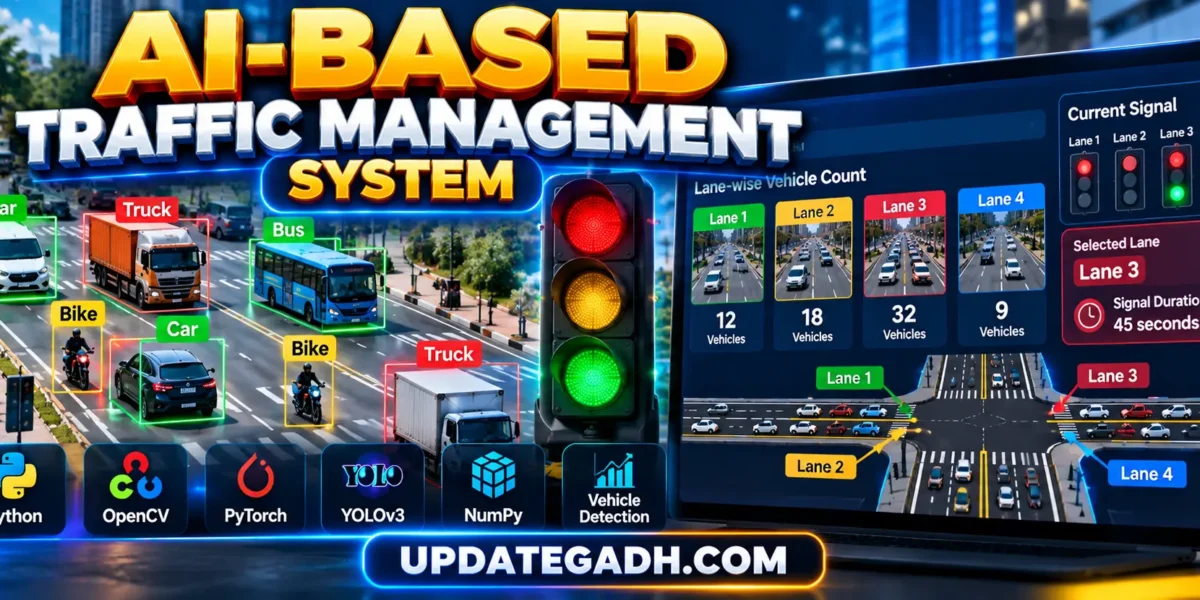
AI-Based Traffic Management System is a computer-vision project developed using Python, YOLOv3, PyTorch, and OpenCV to analyze traffic conditions and make traffic signal decisions based on vehicle density.
Traditional traffic signals generally work with predefined timings, which may not always be suitable for changing traffic conditions. One road may have a large number of vehicles while another lane has very little traffic, yet both may receive fixed signal timings. This project demonstrates a smarter approach by detecting vehicles from traffic images, counting vehicles for different lanes, identifying the lane with the highest traffic density, and calculating an appropriate signal duration.
The project uses a Darknet-based YOLOv3 implementation with pre-trained weights. It detects different vehicle categories such as cars, motorbikes, trucks, bicycles, and autorickshaws. After detection, the system calculates lane-wise vehicle counts and dynamically selects the lane with denser traffic.
For students, this project is a useful example of combining Artificial Intelligence, Deep Learning, Object Detection, Computer Vision, and traffic-management logic into a practical application.
Complete Advance AI Topics: Click Here
Real Time Projects on YouTube:- DecodeIT
Project Overview
| Project Name | AI-Based Traffic Management System |
|---|---|
| Language/s Used | Python |
| Object Detection | YOLOv3 |
| Deep Learning Framework | PyTorch |
| Computer Vision | OpenCV |
| Model Architecture | Darknet / YOLOv3 |
| Input | Traffic Images |
| Database | Not Required |
| Type | AI-Based Traffic and Computer Vision Project |
What Does the AI Traffic Management System Do?
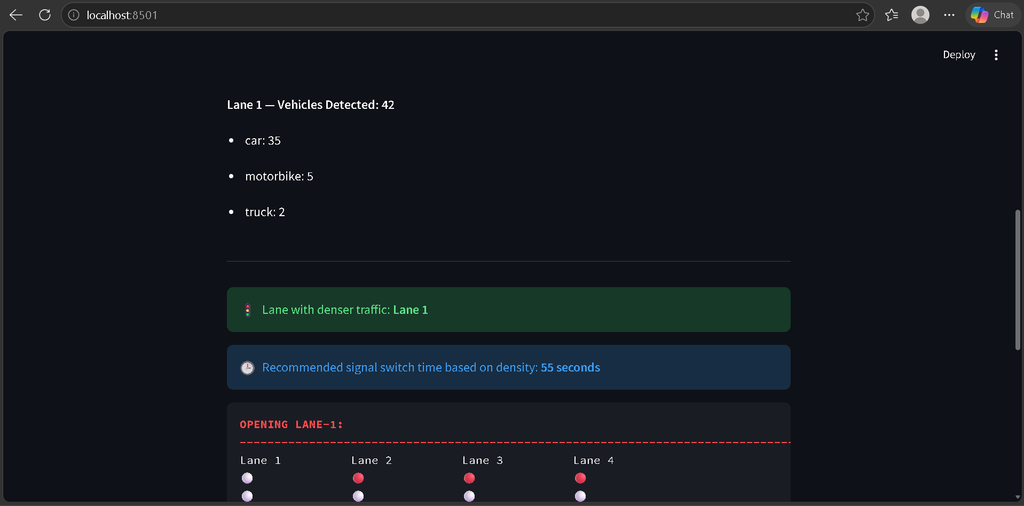
The system receives traffic images representing different lanes and passes them through a YOLOv3 object-detection model. The detected objects are classified and the application counts supported vehicle types.
After processing the input images, the system compares the number of detected vehicles for each lane. The lane with the highest vehicle count is considered the denser traffic lane.
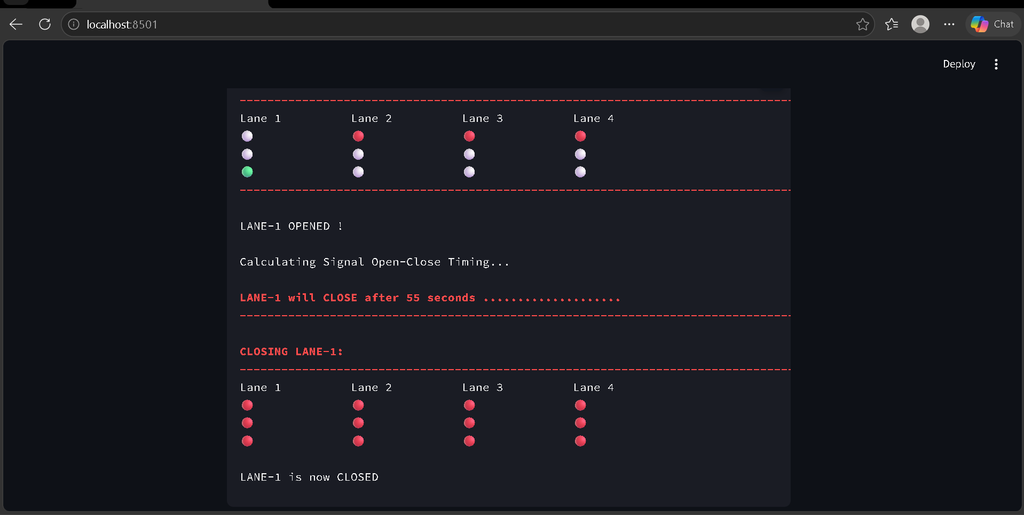
The project then uses a signal-timing function to calculate how long the selected lane should remain open. Finally, the system displays the corresponding traffic-signal switching sequence in the terminal.
Available Features
1. YOLOv3 Vehicle Detection
The system uses a Darknet-based YOLOv3 model to detect objects from traffic images. The model configuration is provided through the YOLO configuration file and the trained weights are loaded before detection begins.
2. Multiple Vehicle Detection
The project identifies several vehicle categories, including:
- Cars
- Motorbikes
- Trucks
- Bicycles
- Autorickshaws
3. Lane-Wise Vehicle Counting
Each input image is treated as a lane input. The system counts the detected vehicles and displays the number of vehicles detected for each lane.
4. Traffic Density Analysis
After counting vehicles, the application compares the lane counts and determines which lane has the highest number of vehicles.
5. Dense Lane Identification
The lane with the highest vehicle count is selected as the lane with denser traffic. This lane becomes the priority lane for the signal-switching process.
6. Dynamic Signal Timing
The system calculates signal timing based on the detected vehicle counts. Different traffic-density conditions result in different signal durations.
7. Four-Lane Signal Simulation
The project includes a four-lane signal simulation. It displays the status of Lane 1, Lane 2, Lane 3, and Lane 4 using colored signal indicators in the terminal output.
8. GPU Support
The application checks whether CUDA is available. If a compatible GPU is detected, the YOLO model and tensors can be moved to the GPU for processing.
9. Adjustable Detection Settings
The project provides configurable parameters for confidence score, non-maximum suppression threshold, YOLO configuration file, weights file, image resolution, and batch size.
10. Batch Image Processing
The detection pipeline prepares input images and processes them through the YOLO model. The project can work with an image directory or a specified image input.
How the System Works
Step 1: Load Traffic Images
The application reads traffic images from the configured input directory. These images represent different traffic lanes that need to be analyzed.
Step 2: Prepare the Images
Before sending images to YOLOv3, the project resizes them while maintaining their aspect ratio. Padding is applied to prepare the image for the network’s expected input size.
image = letterbox_image(
    image,
    (input_dimension, input_dimension)
)
Step 3: Convert Images for YOLO
The prepared image is converted into the required tensor format and normalized before being passed to the neural network.
image = image[:, :, ::-1].transpose((2, 0, 1)).copy()
image = torch.from_numpy(image).float().div(255.0).unsqueeze(0)
Step 4: Run YOLOv3 Detection
The YOLOv3 model processes the image and generates object-detection predictions.
with torch.no_grad():
    prediction = model(Variable(batch))
Step 5: Apply Non-Maximum Suppression
Non-Maximum Suppression is used to filter overlapping detections and retain the relevant vehicle predictions.
prediction = non_max_suppression(
    prediction,
    confidence,
    num_classes,
    nms_conf=nms_thesh
)
Step 6: Count Vehicles
The detected object classes are examined and supported vehicle categories are counted for each lane.
if i == "car" or i == "motorbike" or \
   i == "truck" or i == "bicycle" or \
   i == "autorickshaw":
    vehicle_count += 1
Step 7: Find the Densest Lane
The application compares vehicle counts and stores the lane containing the highest number of detected vehicles.
Step 8: Calculate Signal Timing
The detected lane counts are passed to the signal-timing function. The project calculates a switching duration based on the traffic density.
switching_time = avg_signal_oc_time(lane_count_list)Step 9: Switch the Signal
The selected lane is opened in the traffic-signal simulation, while the other lanes remain closed. After the calculated duration, the selected lane is closed again.
Intelligent Signal Decision-Making
The main intelligence of this project comes from connecting vehicle detection with signal-control logic. Instead of selecting a lane randomly, the application first analyzes the traffic images and identifies the lane containing the highest number of vehicles.
The signal duration is then calculated using the detected vehicle counts. The implementation contains different timing conditions for different traffic-density levels, allowing the simulated signal duration to change according to the observed traffic.
This approach demonstrates the basic concept behind adaptive traffic signal control: traffic information is analyzed first, and the signal decision is made based on that information.
Technology Stack
- Python: Main programming language.
- YOLOv3: Object-detection model used to identify vehicles.
- PyTorch: Deep-learning framework used to load and execute the YOLO model.
- OpenCV: Used for image reading and computer-vision processing.
- NumPy: Used for numerical and image-array operations.
- Darknet: YOLOv3 model architecture and configuration.
- Emoji: Used for terminal-based traffic and status indicators.
Software and Tools Required
- Windows, Linux, or macOS
- Python 3.x
- Visual Studio Code
- PyTorch
- OpenCV
- NumPy
- YOLOv3 configuration and weights
- CUDA-compatible GPU, if GPU acceleration is required
How to Download
The complete package is available so you can run, study, and submit it with confidence. It includes:
- Full Source Code
- Project Report
- Synopsis
- PPT Presentation
Demo Video
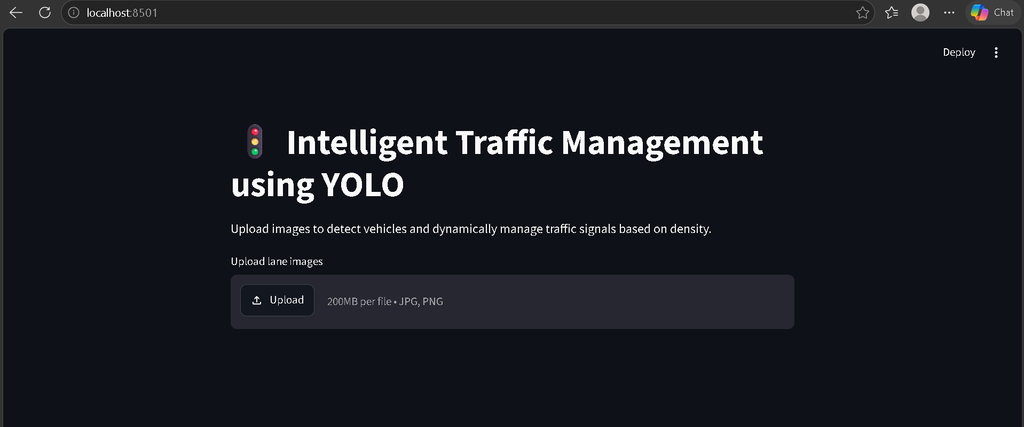
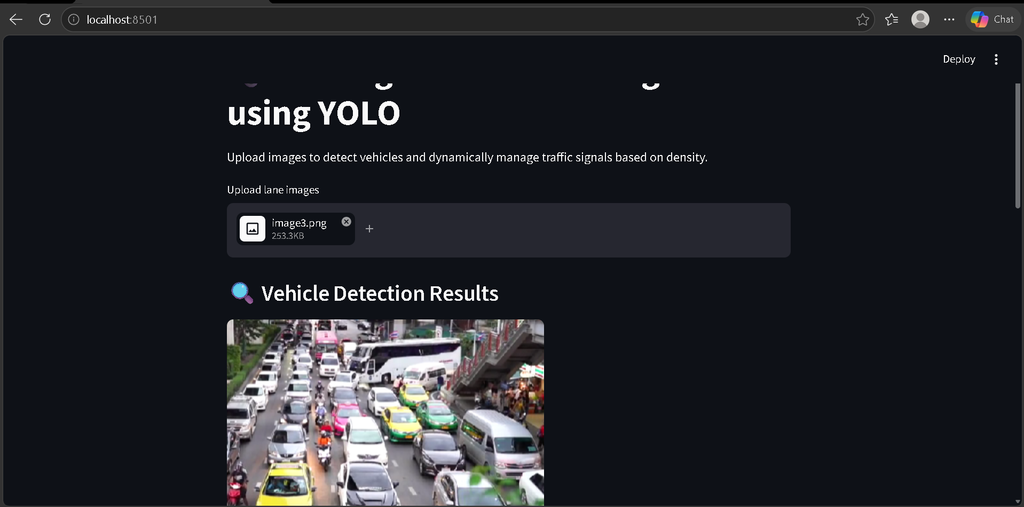
Screenshot
Installation Guide
Step 1: Extract the Project
Extract the project ZIP file and open the extracted folder in Visual Studio Code.
Step 2: Create a Virtual Environment
python -m venv venvStep 3: Activate the Environment
For Windows:
venv\Scripts\activateStep 4: Install Dependencies
pip install -r requirements.txtThe project requirements include packages such as PyTorch, OpenCV, NumPy, and Emoji.
Step 5: Verify YOLO Files
Make sure the YOLO configuration file and corresponding weights are available in the expected project location.
The project uses the configuration file:
config/yolov3.cfgThe application is configured to load the YOLO weights from:
weights/yolov3.weightsStep 6: Run the Project
The main detection script can be executed using Python after the required model files and dependencies are correctly configured.
python app.pyYou can also use the project’s configured scripts according to the input and model configuration you want to run.
How to Use the Project
- Open the project in Visual Studio Code.
- Activate the Python virtual environment.
- Install the required packages.
- Configure the YOLOv3 model and weights.
- Place the traffic images inside the configured input directory.
- Run the detection script.
- Allow the YOLO model to analyze the input images.
- Review the vehicle count for each lane.
- Check which lane has the highest traffic density.
- View the calculated signal switching duration.
- Review the simulated traffic-signal opening and closing sequence.
Practical Applications
- Smart Traffic Research: Demonstrates adaptive traffic-signal concepts.
- Traffic Density Analysis: Helps analyze vehicle distribution across lanes.
- Computer Vision Projects: Useful for learning real-world object detection.
- Smart City Concepts: Can serve as a foundation for larger intelligent transportation systems.
- Academic Projects: Suitable for students studying AI, machine learning, deep learning, and computer vision.
Project Benefits
- Uses a real object-detection model.
- Automatically detects multiple vehicle categories.
- Counts vehicles for individual lane inputs.
- Identifies the lane with the highest traffic.
- Calculates signal timing according to traffic density.
- Includes a four-lane signal simulation.
- Supports GPU acceleration when CUDA is available.
- Provides adjustable YOLO detection parameters.
- Demonstrates practical integration of AI and traffic management.
Limitations
The current uploaded implementation primarily processes traffic images rather than providing a complete live CCTV/video traffic-control system. The signal switching is simulated through software output and does not directly control physical traffic lights. It also does not currently include GPS-based traffic tracking, live map integration, IoT hardware, or a web-based traffic-control dashboard.
These limitations also provide opportunities for future development.
Future Enhancements
- Live CCTV Integration: Process continuous traffic-camera feeds.
- Modern YOLO Models: Upgrade the detection pipeline to newer YOLO versions.
- Emergency Vehicle Priority: Detect ambulances and emergency vehicles and provide priority routing.
- Web Dashboard: Create a dashboard for traffic officers to monitor traffic density.
- Hardware Integration: Connect the software with Arduino, Raspberry Pi, or compatible traffic-light controllers.
- Traffic History: Store vehicle counts and analyze traffic patterns over time.
- Real-Time Analytics: Generate traffic-density charts and reports.
- Multi-Intersection Support: Extend the system to coordinate multiple intersections.
Final Thoughts
AI-Based Traffic Management System is a practical computer-vision project that demonstrates how vehicle detection can be connected with traffic-management logic. By using YOLOv3 to detect vehicles and comparing vehicle counts across lanes, the system identifies the lane with the highest traffic and calculates an appropriate signal duration.
Keywords: AI-based Traffic Management System,ai based traffic management system, AI-based Traffic Management System project source code, AI traffic management system, AI traffic signal control system, real-time traffic signal control system, YOLOv3 traffic management system, vehicle detection using YOLOv3, traffic density detection using Python, intelligent traffic management system, traffic signal automation project, Python traffic management project, computer vision traffic project,Al-Based Traffic Management System Al-Based Traffic Management System ai-based traffic management system project source code ai-based traffic management system project ai-based traffic management system research paper ai based traffic management system india ai based traffic management system github ai based traffic management system project report ai based traffic management system in which state ai based traffic management system project pdf ai based traffic management system project ppt,ai based traffic management system,ai based traffic management system