Fake Currency Detection Using AI
Fake Currency Detection Using AI and Streamlit is an AI-powered image analysis project developed using Python, Streamlit, and Google Gemini Generative AI. The application allows users to upload an image of an Indian currency note and analyze it for important visual security characteristics such as the Mahatma Gandhi portrait, serial number, security thread, and watermark.
Counterfeit currency can create financial problems for individuals, shops, businesses, and organizations. Manually checking every security feature of a note may also be difficult for people who are unfamiliar with currency security characteristics. This project demonstrates how Generative AI and image understanding can be used to build a simple currency-analysis application.
The application provides an easy-to-use Streamlit interface where users upload a JPG, JPEG, or PNG image of a currency note. The uploaded image is passed to Google Gemini along with a specialized analysis prompt. Gemini then generates a structured result containing a verdict, reasoning, denomination, and serial number. The application also provides the result in multiple Indian languages.
Complete Advance AI Topics: Click Here
Real Time Projects on YouTube:- DecodeIT
Project Overview
| Project Name | Fake Currency Detection Using AI and Streamlit |
|---|---|
| Language/s Used | Python |
| Framework | Streamlit |
| AI Technology | Google Gemini Generative AI |
| Text-to-Speech | Pyttsx3 |
| Database | Not Required |
| Image Formats | PNG, JPG, JPEG |
| Type | AI Image Analysis Web Application |
What Does the Fake Currency Detection System Do?
The application analyzes an uploaded currency-note image using Google Gemini’s image-understanding capabilities. Instead of using a traditional machine-learning dataset and a separately trained classification model, this project sends the image to a Generative AI model with a detailed forensic-style prompt.
The prompt instructs the AI to examine several visible characteristics of an Indian currency note and produce a structured response. This makes the project particularly useful for students who want to understand how modern Generative AI can be integrated into Python applications.
Available Features
1. Currency Image Upload
Users can upload a currency-note image directly through the Streamlit interface. The application supports PNG, JPG, and JPEG image formats.
2. AI-Based Currency Analysis
The uploaded image is analyzed by Google Gemini Generative AI. The application sends both the image data and a specially designed analysis prompt to the Gemini model.
3. Original or Fake Verdict
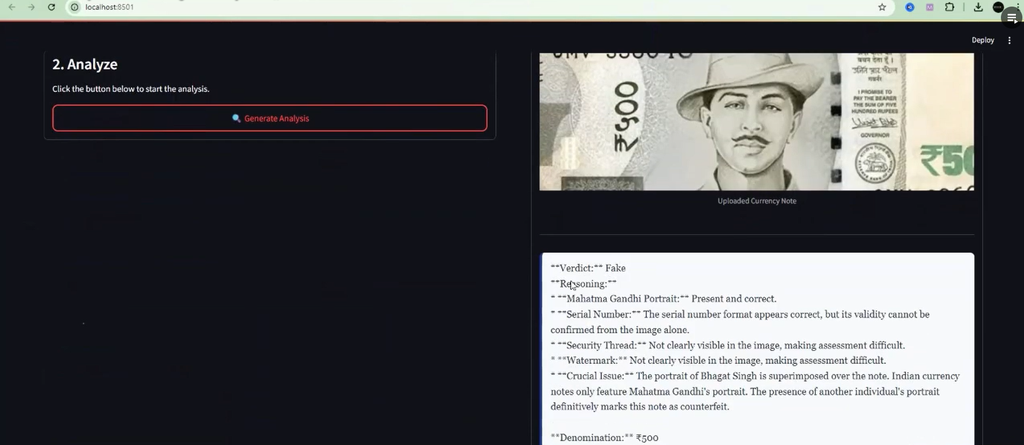
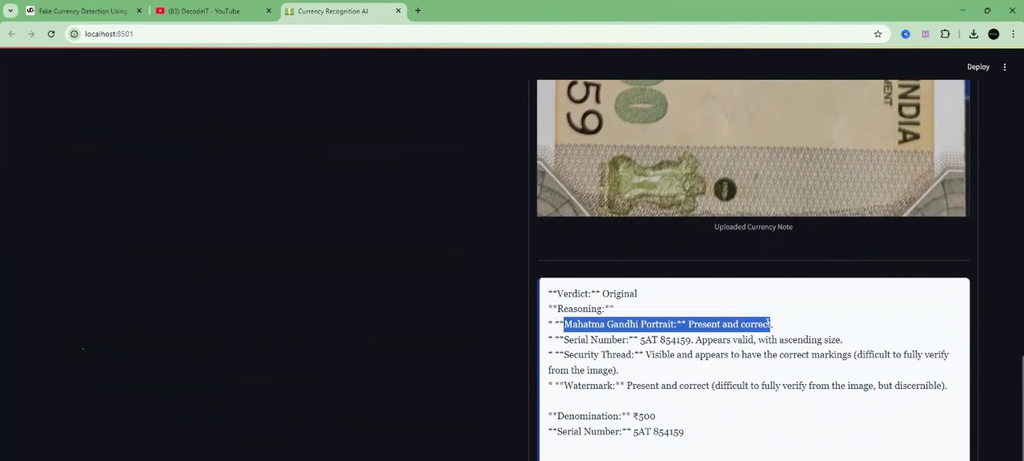
The AI is instructed to provide a final verdict as either Original or Fake. The decision is based on the visual characteristics identified from the uploaded image.
4. Mahatma Gandhi Portrait Verification
The analysis prompt asks Gemini to check whether the expected Mahatma Gandhi portrait appears in the appropriate location on the note.
5. Serial Number Analysis
The system attempts to read the currency note’s serial number and checks its visible format and characteristics. If the serial number cannot be identified, the application reports it as unreadable.
6. Security Thread Analysis
The AI is instructed to examine the visible security thread and consider characteristics such as its placement and printed text.
7. Watermark Analysis
The system also asks the AI to inspect the watermark area of the currency note. Image quality and lighting can affect this type of visual analysis.
8. Denomination Extraction
When the currency value can be identified from the uploaded image, the AI returns the denomination, such as ₹500. If it cannot identify the value, it reports the denomination as unidentifiable.
9. Multilingual Results
The current implementation provides translated verdict, denomination, and serial-number information in Marathi, Hindi, and Gujarati, in addition to the main English analysis.
10. Text-to-Speech Support
The project includes Pyttsx3 for text-to-speech functionality. This allows generated analysis to be converted into spoken output and demonstrates how AI applications can include accessibility-oriented features.
11. Safety Settings
The Gemini configuration includes safety settings for categories such as harassment, hate speech, sexually explicit content, and dangerous content.
12. Professional Streamlit Interface
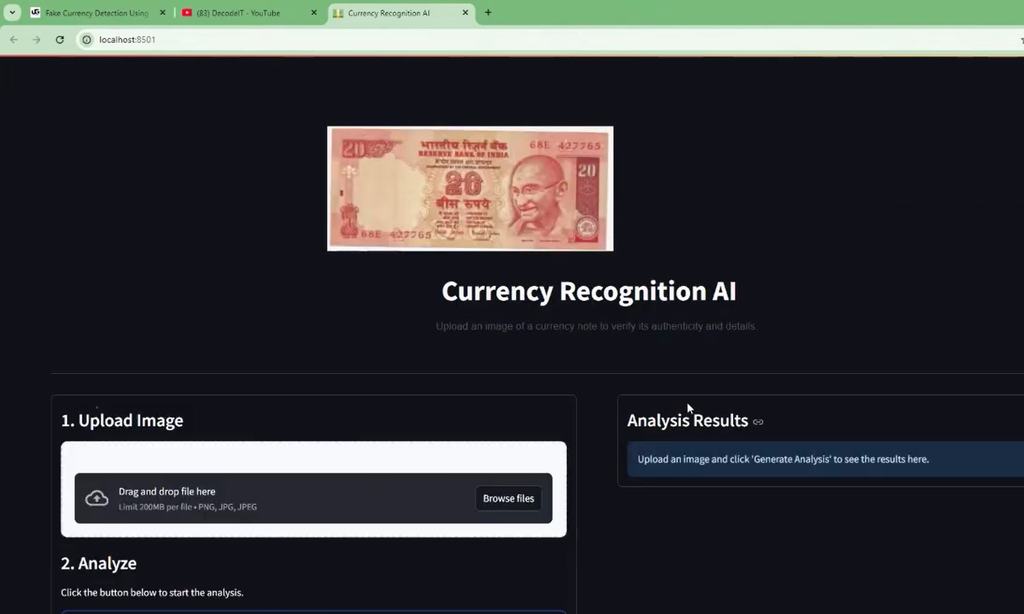
The interface includes a centered application header, currency image upload area, analysis button, uploaded-image preview, analysis result section, loading indicator, and error or warning messages.
How the System Works
The working process is simple and can be divided into several steps.
Step 1: Upload Currency Image
The user selects a currency-note image using the Streamlit file uploader. The supported formats are PNG, JPG, and JPEG.
Step 2: Prepare the Image
After the user clicks Generate Analysis, the application reads the uploaded image and prepares the image data for Gemini.
Step 3: Send Image to Gemini
The image is combined with a detailed system prompt. The prompt instructs Gemini to inspect the currency note and generate a structured analysis.
Step 4: Analyze Security Characteristics
The AI considers the visible portrait, serial number, security thread, watermark, denomination, and other visual information available in the uploaded image.
Step 5: Display the Result
The generated response is displayed inside the Analysis Results section. The uploaded currency image is also shown so the user can compare the image with the generated analysis.
Step 6: Provide Multilingual Information
The response contains the requested information in English followed by translations into Marathi, Hindi, and Gujarati.
Technology Stack
- Python: Main programming language used to develop the application.
- Streamlit: Used to build the interactive web interface.
- Google Generative AI: Used for image analysis and Generative AI integration.
- Gemini: Processes the uploaded currency image according to the configured prompt.
- Pyttsx3: Provides text-to-speech functionality.
- Pathlib: Used for file-path and image-file handling.
- Base64: Included in the application for image/data-related processing.
Software and Tools Required
- Windows, Linux, or macOS
- Python 3.x
- Visual Studio Code or another Python-compatible IDE
- Google Gemini API key
- Internet connection
- Required Python packages
How to Download
The complete package is available so you can run, study, and submit it with confidence. It includes:
- Full Source Code
- Project Report
- Synopsis
- PPT Presentation
Demo Video
Screenshot
Installation Guide
Follow these steps to run the project in Visual Studio Code.
Step 1: Extract the Project
Extract the project ZIP file and open the extracted folder in Visual Studio Code.
Step 2: Create a Virtual Environment
python -m venv venvStep 3: Activate the Virtual Environment
For Windows:
venv\Scripts\activateStep 4: Install Required Packages
pip install streamlit google-generativeai pyttsx3Step 5: Configure the Gemini API Key
Create or update the api_keys.py file and add your own Gemini API key.
api_key = "YOUR_GEMINI_API_KEY"For deployment, it is recommended to store API credentials using a secure secrets-management method instead of committing API keys directly into the project files.
Step 6: Run the Application
streamlit run main.pyStreamlit will start the application and provide a local web address that can be opened in the browser.
How to Use the Project
- Start the Streamlit application.
- Open the application in your browser.
- Upload a clear image of an Indian currency note.
- Click the Generate Analysis button.
- Wait while Gemini analyzes the uploaded image.
- Review the Original or Fake verdict.
- Check the denomination and serial number.
- Review the reasoning and multilingual information.
Project Benefits
- Demonstrates practical Generative AI image analysis.
- Provides a simple and user-friendly web interface.
- Does not require a traditional database.
- Supports multiple Indian languages.
- Includes text-to-speech functionality.
- Helps students understand AI API integration.
- Demonstrates how image data can be sent to a multimodal AI model.
- Can be extended with additional currency-analysis capabilities.
Important Limitation
This project is an educational AI image-analysis application and should not be treated as an official forensic currency-authentication system. A photograph may not clearly show features such as watermarks, security threads, microtext, ultraviolet characteristics, or other physical security elements. Therefore, the AI result should be considered an indication based on the uploaded image rather than a guaranteed determination of authenticity.
Future Enhancements
The project can be extended by adding a dedicated machine-learning classification model trained on a properly prepared currency dataset. Other possible improvements include better image preprocessing, automatic image-quality checking, support for additional denominations, detailed confidence scoring, database-based analysis history, improved multilingual support, and a more advanced accessibility interface.
Conclusion
Fake Currency Detection Using AI and Streamlit is a practical project that demonstrates how Python, Streamlit, and Generative AI can be combined to analyze currency-note images. The application provides a straightforward workflow: upload a note, send it to Gemini for visual analysis, and display the generated result.
Keywords: fake currency detection using AI and Streamlit, fake currency detection, fake currency detection using Python, fake currency detection project, AI currency detection, currency note detection using Gemini, currency recognition AI, fake note detection project, Indian currency detection, Gemini AI image analysis, Streamlit AI project ,Fake Currency Detection Fake Currency Detection fake currency detection machine fake currency detection using image processing fake currency detection using deep learning fake currency detection using machine learning fake currency detection dataset kaggle fake currency detection project fake currency detection dataset fake currency detection github fake currency detection using image processing project report