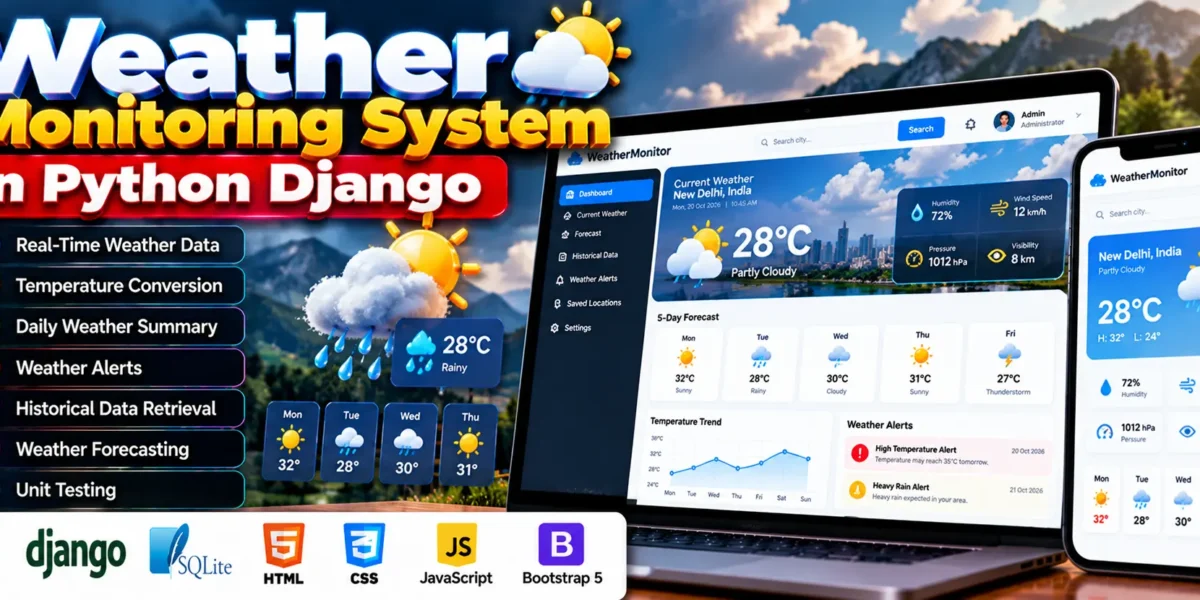
Weather Monitoring System Using Python
The Weather Monitoring System is a web application developed using Python and Django to help users monitor real-time and historical weather data for different locations. It integrates the OpenWeatherMap API to retrieve current weather conditions and display information through a clean and responsive interface.
The system provides weather updates, temperature conversion, daily summaries, weather alerts, historical data retrieval, and a basic forecasting module. It also includes unit tests for different components to support application reliability.
Complete Advance AI Topics: Click Here
Real Time Projects on YouTube:- DecodeIT
What Are the Project Details?
The Weather Monitoring System uses Django for web application development and SQLite for database storage. Python 3.8 or later is recommended for the project.
| Attribute | Details |
|---|---|
| Project Name | Weather Monitoring System |
| Programming Language | Python |
| Framework | Django |
| Recommended Python Version | 3.8+ |
| Database | SQLite |
| Weather API | OpenWeatherMap API |
| Project Type | Web Application |
What Are the Main Features of the Weather Monitoring System?
The system includes features for retrieving current weather information, reviewing historical records, receiving weather alerts, and accessing basic forecasts.
- Real-Time Weather Data: Retrieves current weather conditions for different locations using the OpenWeatherMap API, including temperature, humidity, wind speed, and general weather conditions.
- Temperature Conversion: Converts temperature values between Celsius and Fahrenheit.
- Daily Weather Summary: Presents daily weather readings in an easy-to-understand summary.
- Weather Alerts: Provides notifications when configured thresholds, such as high temperature, low temperature, or extreme humidity, are crossed.
- Historical Data Retrieval: Provides access to weather records for selected dates to examine past conditions and patterns.
- Basic Weather Forecasting: Offers forecasting functionality for upcoming days using API support.
- Unit Testing: Includes unit tests for different application components.
How Does the Weather Monitoring System Work?
The system uses the OpenWeatherMap API to retrieve weather information and displays the results through its Django web interface. Users can check current conditions, view historical weather records, and access the available forecasting functionality.
The application also processes weather readings to provide daily summaries and supports alerts based on configured temperature and humidity thresholds.
How Does the OpenWeatherMap API Integrate with Django?
The OpenWeatherMap API provides weather information that the Django application can retrieve and display. This integration allows the system to present current weather conditions without requiring users to collect weather readings manually.
The API supports the project’s real-time weather data functionality and basic forecasting module. The available information depends on the API endpoints and access configured for the application.
How Does the Weather Alert Feature Work?
The weather alert feature notifies users when configured weather thresholds are crossed. These thresholds include high temperature, low temperature, and extreme humidity.
This functionality helps users identify weather conditions that may require attention. The alerts depend on the thresholds configured in the application.
How Can Users View Historical Weather Data?
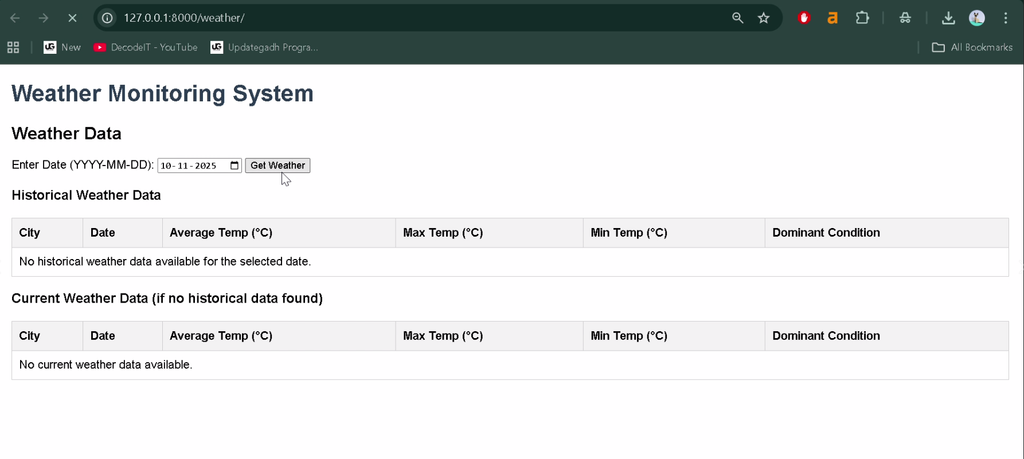
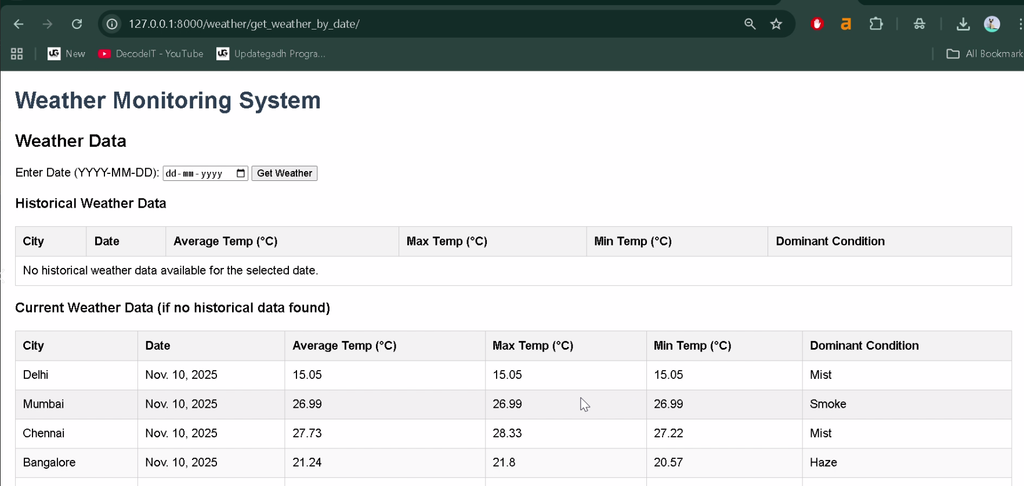
The historical data feature allows users to retrieve weather records for a selected date. It supports reviewing past conditions and examining weather patterns, trends, and anomalies.
The system presents historical weather information alongside its current weather monitoring functionality, making past records accessible through the application.
What Are the Main Components of the System?
The Weather Monitoring System combines a Django web application, an external weather API, weather data processing, and testing components.
- Django Application: Provides the web interface and backend functionality.
- OpenWeatherMap API: Supplies current weather information and supports the forecasting module.
- SQLite Database: Provides database storage for the application.
- Weather Summaries: Organizes weather readings into daily summaries.
- Alert Functionality: Checks configured weather thresholds and provides notifications.
- Unit Tests: Test different components of the application.
How to Download
The complete package is available so you can run, study, and submit it with confidence. It includes:
- Full Source Code
Screenshot
What Makes the Weather Monitoring System Responsive?
The application is designed with a clean, responsive interface for desktop computers, tablets, and mobile devices. Its layout allows users to navigate the application and access weather information across different screen sizes.
The interface brings together current weather conditions, historical records, summaries, alerts, and forecasting functionality.
What Software Is Required to Run the Project?
You need Python 3.8 or later, Django and the project’s required dependencies, Visual Studio Code, and a web browser to run the application locally.
- Python 3.8 or later
- Visual Studio Code
- pip for installing Python packages
- Project source code and its dependency files
- OpenWeatherMap API access and configuration
- A web browser
How to Install the Weather Monitoring System in VS Code?
To install the project, open its source folder in Visual Studio Code, create a Python virtual environment, and install the dependencies specified in the project files.
- Install Python 3.8 or later and Visual Studio Code.
- Extract the downloaded project folder.
- Open Visual Studio Code and select the project folder.
- Select Terminal > New Terminal.
- Create a virtual environment using the following command:
python -m venv venvActivate the virtual environment on Windows:
venv\Scripts\activateIf the project includes a requirements.txt file, install the dependencies:
pip install -r requirements.txtConfigure the OpenWeatherMap API credentials according to the project’s settings and configuration files.
How to Run the Weather Monitoring System?
After installing the dependencies and configuring the API, use Django’s management commands to prepare the database and start the local development server.
Step 1: Apply database migrations.
python manage.py migrateStep 2: Start the Django development server.
python manage.py runserverStep 3: Open the application.
Open the following address in your web browser:
http://127.0.0.1:8000/Important: These are standard Django commands. The exact setup may depend on the supplied source code, dependency file, database configuration, and API settings. If the project uses additional setup commands, follow its included instructions.
How Does the Weather Alert Feature Work?
The weather alert feature provides notifications when configured weather thresholds are crossed. These thresholds include high temperature, low temperature, and extreme humidity.
The alert functionality helps users identify weather conditions that may require attention. Its behavior depends on the thresholds configured in the application.
How Can Users Access Historical Weather Data?
The historical data feature allows users to retrieve weather records for selected dates. These records can be used to review past weather conditions, trends, and anomalies.
The system combines historical data retrieval with current weather monitoring and daily summaries.
Conclusion
The Weather Monitoring System is a Django-based web application that integrates the OpenWeatherMap API to provide real-time weather information and access to historical records. Its features include temperature conversion, daily summaries, threshold-based alerts, basic forecasting, and unit testing.
Frequently Asked Questions
1. Which framework is used in the Weather Monitoring System?
The project uses Python and the Django web framework.
2. Which API provides the weather information?
The system uses the OpenWeatherMap API to retrieve weather data.
3. Does the system support Celsius and Fahrenheit?
Yes, the temperature conversion feature supports both Celsius and Fahrenheit.
4. Can users access historical weather records?
Yes, the system provides access to weather records for selected dates.
5. Does the project include weather alerts?
Yes, the system provides alerts for configured thresholds such as high temperature, low temperature, and extreme humidity.
Keywords: Weather Monitoring System, Weather Monitoring System using Django, weather monitoring project in Python, Django weather application, OpenWeatherMap API project, real-time weather monitoring system, historical weather data application, weather forecasting project