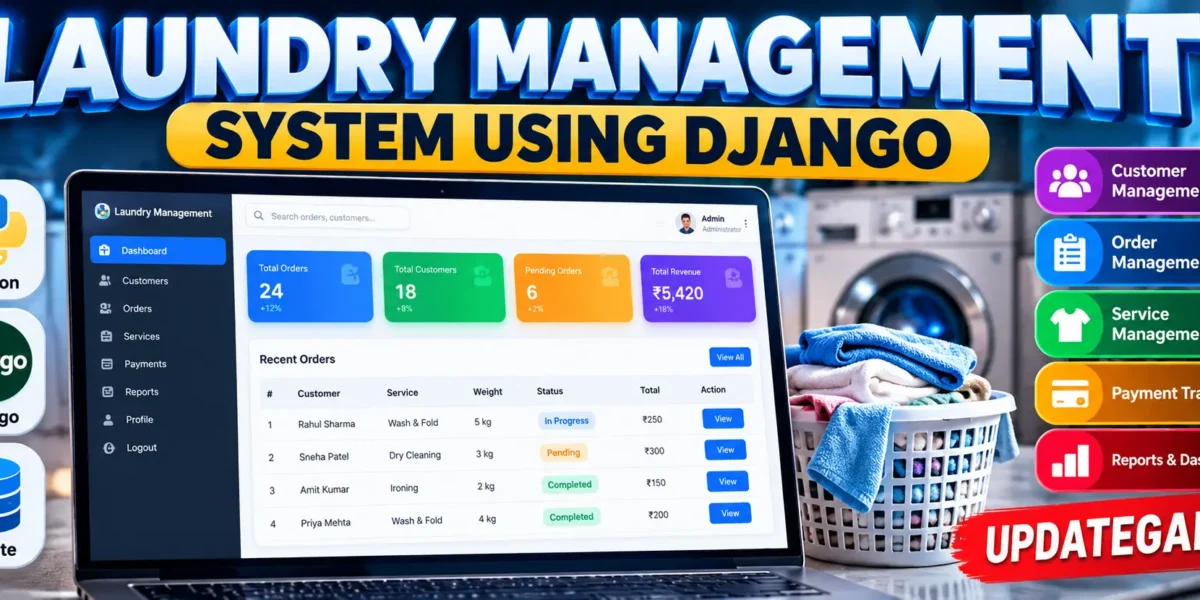
Laundry Management System Using Python Django
The Laundry Management System is a medium-level web application developed with Python and Django to organize the daily workflow of a laundry service. Instead of depending on scattered paper records, the system provides one structured workspace for customer information and laundry orders. It is designed as a practical college project, combining a responsive interface, Django views, forms, authentication, and an SQLite database.
Complete Advance AI Topics: Click Here
Real Time Projects on YouTube:- DecodeIT
Project Overview
| Project Detail | Information |
|---|---|
| Project Name | Laundry Management System |
| Language | Python, HTML, CSS, JavaScript |
| Framework | Django |
| Python Version | 3.8 or above recommended |
| Database | SQLite |
| Application Type | Web Application |
The application follows a simple but connected workflow. A staff member signs in, opens the dashboard, registers customers, creates laundry orders, updates their status, records payment status, and reviews recent activity. Search and filtering help locate records without making the project unnecessarily complex.
Key Features
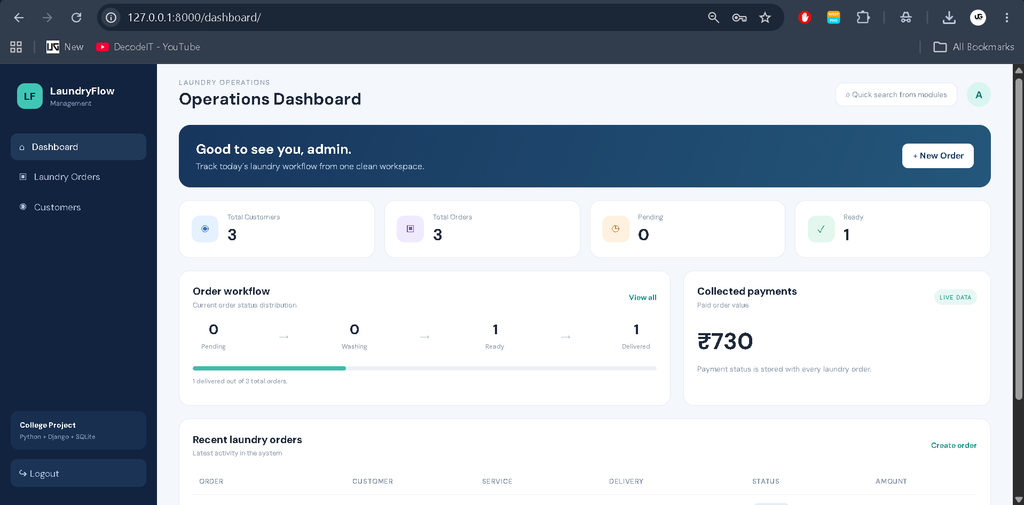
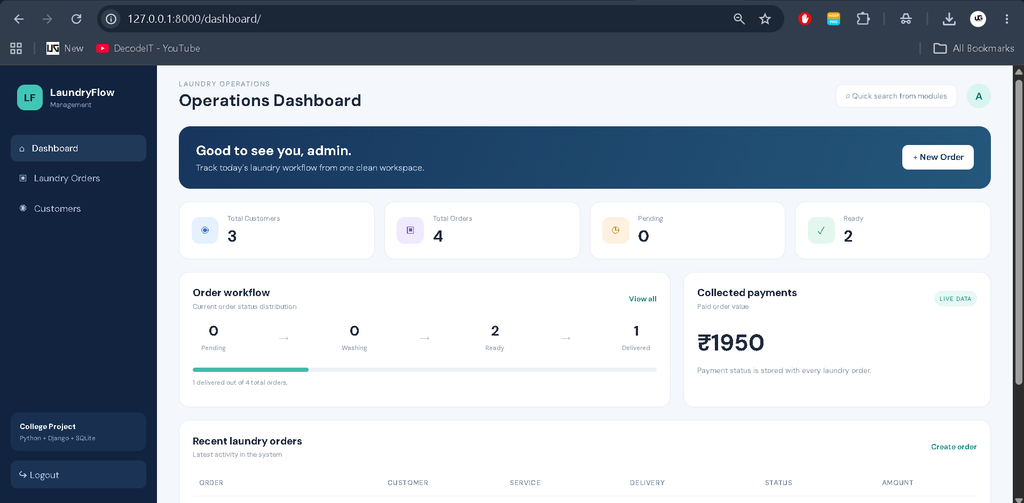
- Dashboard: Shows customer count, order count, pending work, ready orders, delivered orders, and collected payment value.
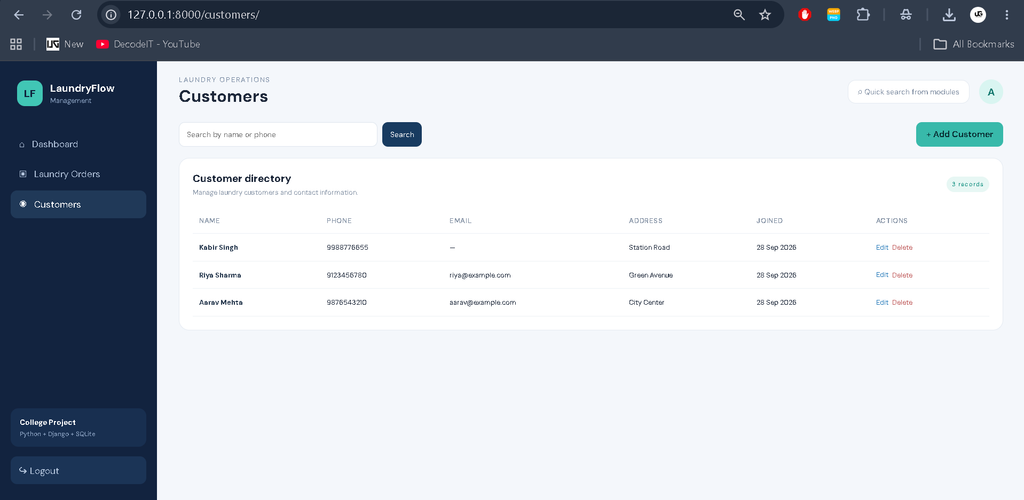
- Customer Management: Add, edit, search, and delete customer records containing contact and address information.
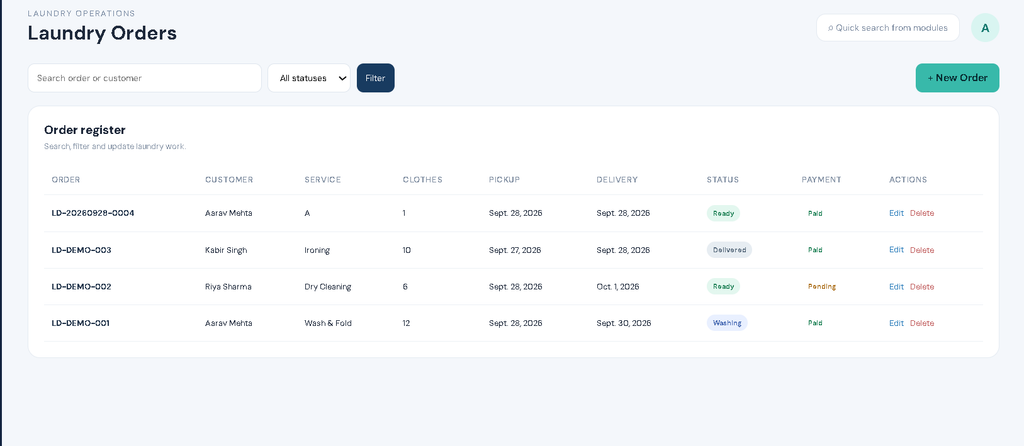
- Laundry Order Management: Create orders with service type, clothing count, pickup date, delivery date, amount, status, payment status, and notes.
- Status Tracking: Orders can move through Pending, Washing, Ready, and Delivered states.
- Payment Tracking: Each order records whether payment is Pending or Paid.
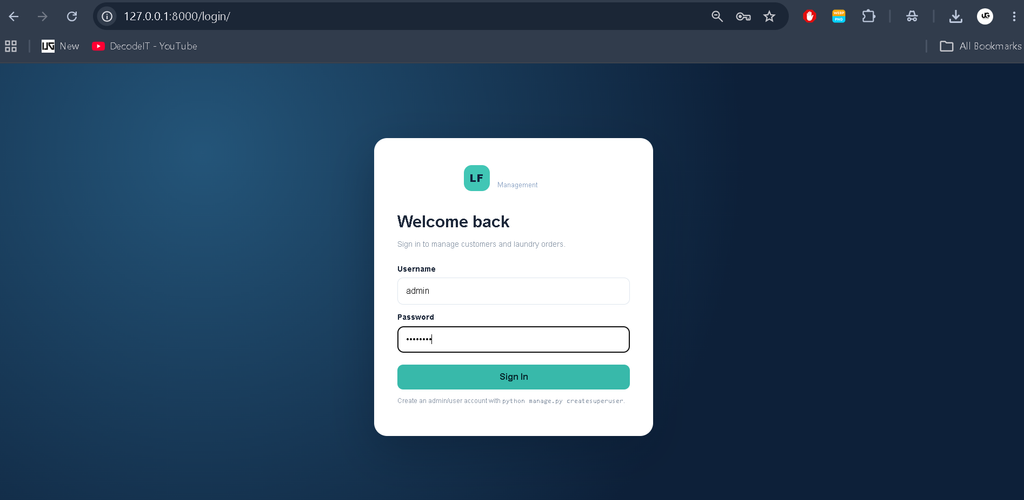
- Authentication: Django authentication protects operational pages from unauthenticated access.
- Search and Filtering: Customers can be searched by name or phone, while orders can be searched and filtered by status.
- Responsive UI: The dashboard, tables, forms, sidebar, and navigation adapt to smaller screens.
User Roles and Access
The supplied project concept does not require a complicated multi-role permission system. The implemented application uses Django authentication so an authenticated staff user can access the operational dashboard and management modules. The Django administration interface is also available for project administration. This keeps the access model understandable for a college student while still demonstrating secure login-based routing.
Professional Dashboard
The interface uses a laundry-focused management design rather than a plain beginner template. A dark blue sidebar contains Dashboard, Laundry Orders, and Customers navigation. The top area provides the current workspace title, quick-search styling, and a user avatar. The dashboard uses compact KPI cards and an order-workflow panel to make the current state of the laundry operation easy to understand.
The recent-orders table displays the order number, customer, service, delivery date, status, and amount. Status badges visually distinguish pending, washing, ready, and delivered work. A payment panel summarizes paid order value. This design gives the project the appearance of a practical management application while keeping the implementation within a medium college-project scope.
Project Modules
1. Authentication
Users can sign in through the Django authentication system. Protected pages use Django’s login decorator, and logout returns the user to the login screen.
2. Customer Management
The customer module stores name, phone, email, address, and creation time. Forms provide validation through Django ModelForm, while list pages support searching and standard edit and delete operations.
3. Laundry Orders
The order module connects every order to a customer through a foreign key. It stores the service selected, number of clothes, pickup and delivery dates, amount, operational status, payment status, notes, and timestamps. Order numbers are generated automatically when a new order is saved.
4. Dashboard
The dashboard reads live database values and presents operational summaries. It also displays recent orders so staff can quickly see the latest work without opening the complete order register.
Database Design
The project uses SQLite, which is included as the default Django database option. The main tables are represented by the Customer and LaundryOrder models. A laundry order has a foreign-key relationship with a customer, allowing one customer to have multiple orders. The order model also contains status and payment fields plus created and updated timestamps. This structure is sufficient for the current workflow without adding unnecessary tables.
How to Download
The complete package is available so you can run, study, and submit it with confidence. It includes:
- Full Source Code
Screenshots
How the System Works
After installation, an administrator creates a user account and signs in. The dashboard loads summary values directly from the database. A staff member can first create a customer record and then use that customer while creating a laundry order. The order receives a generated order number and starts with a selected workflow status. Staff can later edit the order to reflect washing, readiness, delivery, or payment changes. Customer and order list pages provide search and filtering for routine record management.
Installation and Setup
Install Python 3.8 or a newer compatible version, then open a terminal inside the project directory. Create and activate a virtual environment before installing the requirements.
python -m venv venv
venv\Scripts\activate
pip install -r requirements.txt
Next, create the database tables and an administrator account.
python manage.py makemigrations
python manage.py migrate
python manage.py createsuperuser
python manage.py runserver
Open the local Django server address shown in the terminal. The project can also be populated with demonstration records by running the included seed script after migrations.
python seed_demo.pyUsage
Use the sidebar to move between the dashboard, customer directory, and laundry orders. Select Add Customer to register a new customer. Use New Order to create a laundry record and choose its service, dates, amount, and statuses. The order register supports searching and status filtering, while edit and delete actions help maintain current records. The dashboard then reflects the updated database values.
Frequently Asked Questions
What is the purpose of this project?
It organizes customer and laundry-order information in a Django web application and demonstrates a practical management workflow.
Which database is used?
The project uses SQLite through Django’s standard database configuration.
Can orders be searched?
Yes. The order page can search by order number or customer name and can filter records by order status.
Can customer details be updated?
Yes. Customer records support creation, editing, searching, and deletion.
How are order statuses handled?
Each order can use Pending, Washing, Ready, or Delivered as its workflow status.
Is login required?
Yes. The dashboard and management pages are protected by Django authentication.
Can the project be customized?
Yes. Django models, forms, templates, and styles can be extended as the college project requirements grow.
Future Scope
- Introduce separate staff and manager permissions if the project later needs multiple operational roles.
- Add printable invoices or receipts for completed laundry orders.
- Add customer order-history pages for easier service tracking.
- Add email or SMS notifications for ready and delivered orders.
- Introduce simple date-based reporting for order volume and collected payments.
Learning Value
This project is useful for students because it brings several Django concepts together in one understandable application. Models demonstrate relational database design, ModelForm demonstrates structured form handling, views demonstrate request processing, templates demonstrate dynamic page rendering, and authentication demonstrates protected routes. The dashboard also shows how database queries can be converted into useful operational summaries. By working through the complete workflow, a student can practice creating a project that is more meaningful than isolated CRUD screens while still keeping the source code readable and suitable for academic presentation.
Conclusion
The Laundry Management System provides a practical example of how Django can be used to build a complete college-level management application. Its connected authentication, customer records, laundry orders, status tracking, payment tracking, search, filtering, database relationships, and responsive dashboard demonstrate important web-development concepts without moving into unnecessary enterprise complexity. The project is also structured so students can understand each major component and extend it according to their academic requirements.
Keywords:
Laundry Management System
Laundry Management System – Google Search
laundry management system github
laundry management system project
laundry management system codecanyon
laundry management system app
laundry management system project report pdf
laundry management system philippines
laundry management system website
laundry management system open source
laundry management system php