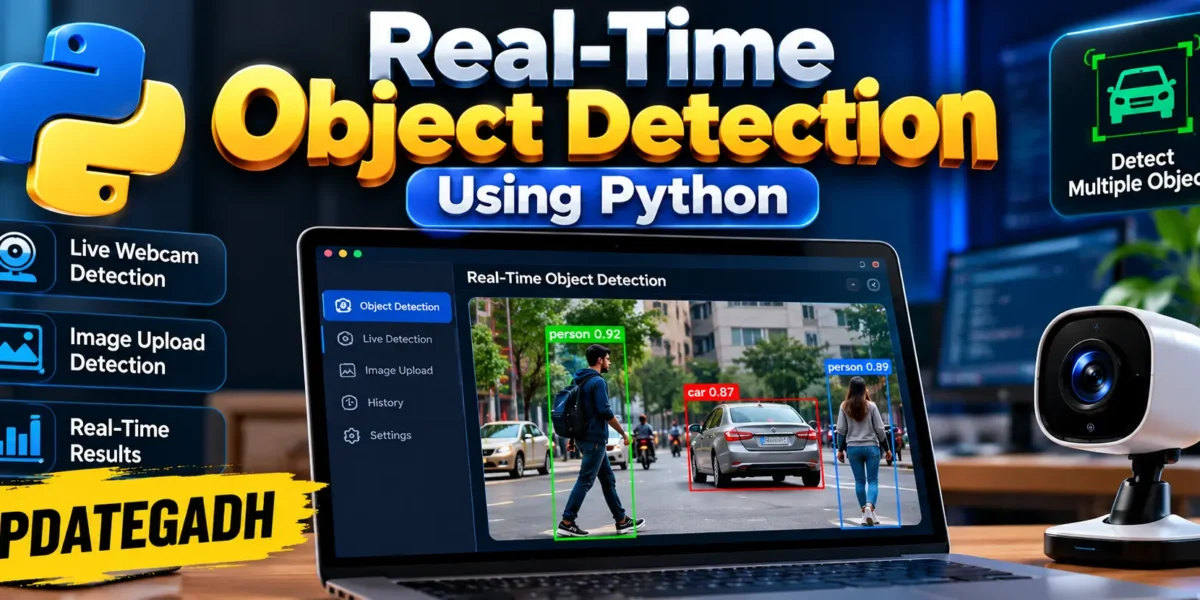
Real-Time Object Detection Using Python
Real-Time Object Detection Using Python is a practical computer vision project designed to identify objects from a live webcam feed and from uploaded images. The project combines Python, Flask, OpenCV and a pretrained YOLO detection model to create a responsive local web application. Instead of requiring users to train a model from scratch, the application loads a pretrained detector and focuses on the complete detection workflow, result presentation and user interaction.
The project is designed at a medium college-project level. It is more useful than a basic webcam demo while remaining understandable and maintainable for students. The interface provides live camera controls, confidence settings, detection statistics, class summaries, image analysis and a recent activity area in one professional workspace.
Complete Advance AI Topics: Click Here
Real Time Projects on YouTube:- DecodeIT
Project Overview
| Project Name | Real-Time Object Detection |
|---|---|
| Language | Python |
| Framework | Flask |
| Computer Vision | OpenCV |
| Detection Model | YOLO pretrained model |
Project Introduction
Object detection is a computer vision task in which a system identifies objects and locates them inside an image. A useful real-time detector must do more than classify an image: it must process frames quickly, draw bounding boxes, show confidence values and present the information in a form that users can understand. This project provides that complete flow through a browser-based interface.
The Flask backend receives webcam frames or uploaded images, sends them to the detection engine and returns structured detection information. OpenCV is used for image handling and annotation, while the YOLO model performs object detection. The browser interface then displays the annotated output and summary information without requiring a separate desktop GUI.
Key Features
- Real-Time Webcam Detection: Start a browser camera and send frames to the Python detection engine for continuous analysis.
- Confidence Control: Adjust the confidence threshold to control how selective the detector is.
- Detection Statistics: View the number of detected objects, unique classes and model processing time.
- Class Summary: Detected object categories are displayed as compact visual chips.
- Image Analysis: Upload JPG, JPEG, PNG or WEBP images and receive an annotated result.
- Downloadable Results: Uploaded-image results can be downloaded after detection.
- Recent Activity: The application keeps a lightweight in-memory history of recent detections.
- Responsive Interface: The dashboard adapts to desktop and smaller screens.
Project Modules
1. Flask Application
The application module connects the web interface with the detection engine. It provides routes for the dashboard, confidence settings, webcam frame processing, uploaded-image processing and annotated output files.
2. Detection Engine
The detection module loads the pretrained YOLO model and exposes a simple detection workflow. It converts model predictions into structured detection objects and uses OpenCV to draw bounding boxes and confidence labels on frames.
3. Data Models
The project uses lightweight Python data classes rather than a database. A detection stores its label, confidence and bounding-box coordinates. A detection result groups these objects with image dimensions, processing time and a timestamp.
4. Web Dashboard
The frontend provides the live camera workspace, image analysis section, detection summary, confidence control and activity log. JavaScript communicates with the Flask API and updates the page without full reloads.
Technology Stack
| Technology | Purpose |
|---|---|
| Python | Core application and detection logic |
| Flask | Web application and API routes |
| OpenCV | Image decoding, processing and annotation |
| YOLO | Pretrained object detection |
| HTML/CSS | Dashboard structure and responsive design |
| JavaScript | Camera control and asynchronous API communication |
Installation and Setup
First, create a virtual environment inside the project folder. Activate it and install the dependencies from requirements.txt. After installation, run python main.py. The Flask server will start on port 5000. Open the local address shown by the server in a modern browser. The first model initialization can take additional time because the pretrained model may need to be downloaded by the Ultralytics package.
For webcam detection, grant camera permission when the browser asks for it. Select Start Camera to begin processing. For image detection, use the Image Analysis area and select a supported image file.
Usage
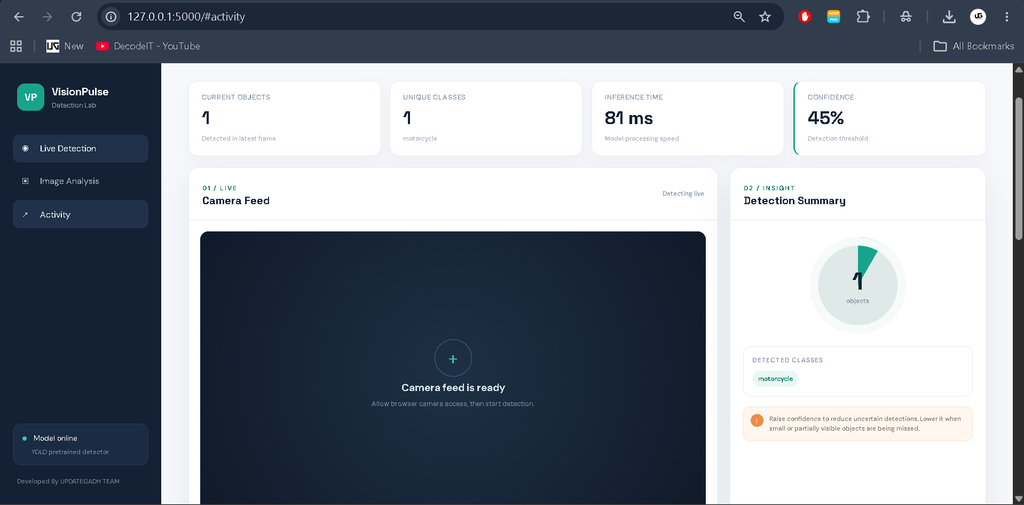
After opening the dashboard, the user can see the current detection status and model readiness. The live workspace is the primary module. Clicking Start Camera requests webcam access and begins sending compressed frames to the backend. The returned annotated image is displayed on the dashboard together with the number of objects, unique classes and processing time.
The confidence slider changes the threshold used by the detector. A higher value makes the system more selective, while a lower value allows more uncertain detections to be considered. The image analysis module provides a second workflow for users who do not want to use a webcam. After an upload is processed, the annotated result is shown and can be downloaded.
Download complete source code
Screenshot
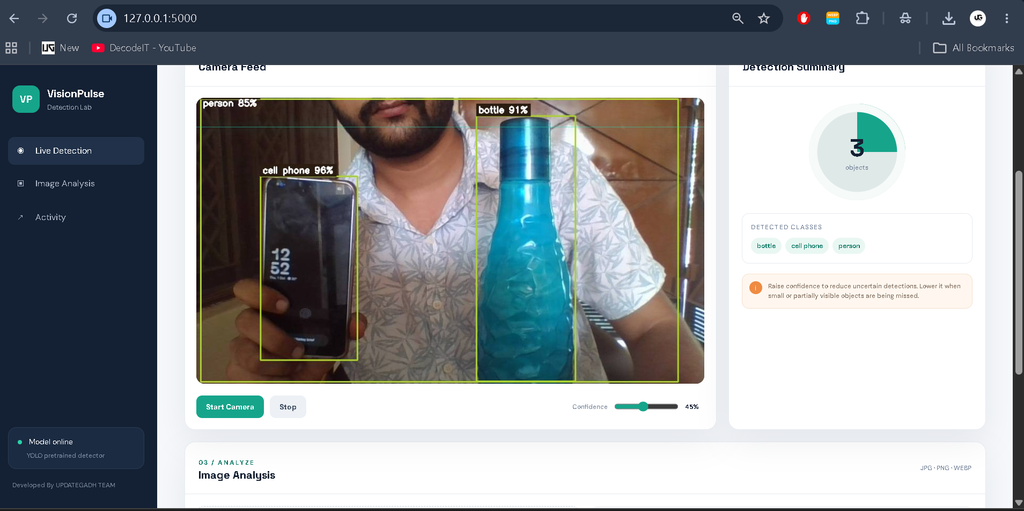
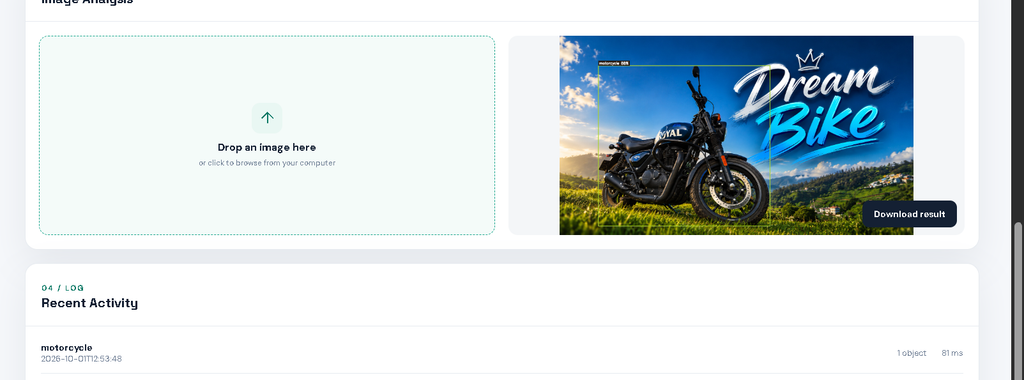
How the Detection Workflow Works
The detection workflow begins in the browser. When the camera starts, JavaScript reads the current video frame and places it on an internal canvas. The image is encoded and sent to the Flask API. The backend decodes it into an OpenCV frame and passes it to the detection engine. YOLO returns bounding boxes, class identifiers and confidence values, which are converted into structured detection data for the frontend.
OpenCV then draws the detected regions and labels on a copy of the frame. The annotated image is returned to the browser, where the dashboard updates the statistics and preview. Separating the camera interface, API layer and detection engine keeps each part focused and easier to maintain.
Validation and Practical Design
The application validates uploaded file types and limits the maximum upload size. It checks whether received image data can be decoded before sending it to the model. Invalid confidence values are rejected by the API. These checks demonstrate an actual application workflow rather than a single demonstration screen.
The interface also avoids unnecessary modules. The dashboard focuses on the operations that are directly connected with object detection: camera input, model confidence, results, image analysis and recent activity. This keeps the project medium-sized and gives students a clear path for understanding how the frontend communicates with Python-based computer vision logic.
Project Structure
The project keeps the main responsibilities separated. main.py starts the application, while app.py contains Flask routes and API handling. detection.py manages YOLO inference and OpenCV annotation. models.py defines the detection result structures, and config.py stores runtime configuration. Frontend files are kept inside the templates and static folders. This organization makes the project easier to understand, test and extend.
Frequently Asked Questions
Does the project require a database?
No. The provided implementation does not use a database. Recent activity is kept in memory for the running application session.
Can the project detect objects from a webcam?
Yes. The browser camera sends frames to the Flask backend, where the pretrained YOLO model processes them.
Can I analyze an existing image?
Yes. Supported image files can be uploaded through the Image Analysis section and the annotated output can be downloaded.
Does the project require model training?
No. It uses a pretrained YOLO model, so training a new model is not part of the supplied project workflow.
Future Scope
- Store detection history in a database for long-term reporting.
- Add user authentication and separate user workspaces.
- Add configurable model selection for different detection tasks.
- Add CSV or PDF reporting for detection sessions.
- Add optimized inference options for supported GPU hardware.
Conclusion
Real-Time Object Detection Using Python provides a complete and practical foundation for learning how computer vision, machine learning inference and web development can work together. The project keeps the architecture understandable while offering meaningful functionality through webcam detection, image analysis, confidence control, result visualization and activity tracking. For students, it also provides clear modules that can be studied independently and demonstrated as a working college project.
Keywords:
Object Detection
Object Detection
object detection using yolo
object detection using deep learning
object detection using esp32 cam
object detection using machine learning
object detection using opencv
object detection using yolo github
object detection using tensorflow
object detection using ultrasonic sensor
object detection using yolov8