CLI Wordle Game in Python
Introduction
Wordle is a simple but engaging word-guessing game where the player has a limited number of attempts to discover a hidden five-letter word. After every guess, the game gives clues that help the player understand which letters are correct, which letters exist in the secret word but are placed incorrectly, and which letters are not part of the answer.
In this Python project, we will create a CLI Wordle Game that runs directly inside the terminal or command prompt. The project is designed as a beginner-friendly Python application and does not require multiple source files. The complete game is contained inside one Python file, making it easier to understand, copy, run, and customize.
The application uses Python’s built-in features along with the colorama package to display colored feedback in the terminal. The player gets six chances to guess the hidden five-letter word.
Complete Advance AI Topics: Click Here
Real Time Projects on YouTube:- DecodeIT
Project Overview
| Project Name | CLI Wordle Game in Python |
|---|---|
| Language Used | Python |
| Library Used | Colorama |
| Database | Not Required |
| Application Type | Command Line Application |
Features of CLI Wordle Game
- Simple command-line interface.
- Five-letter word guessing system.
- Maximum of six attempts for each game.
- Green feedback for correctly positioned letters.
- Yellow feedback for letters present in another position.
- White or normal feedback for letters that are not present.
- Input validation for five-letter guesses.
- Built-in collection of words, so no separate text file is required.
- Random secret word selection for every new game.
- Option to play again after completing a game.
Prerequisites
Before running the project, make sure Python is installed on your computer. Python 3.6 or a newer version is suitable for this project.
You also need the colorama package. Open the VS Code terminal and execute:
pip install coloramaIf the pip command does not work on Windows, you can also try:
python -m pip install coloramaProject Structure
This version intentionally uses only one Python source file. You do not need app.py, wordle.py, main.py, or separate word-list files.
CLI-Wordle-Game/
│
└── wordle.py
The complete game logic, word collection, user interaction, validation, colored output, and replay functionality are implemented in wordle.py.
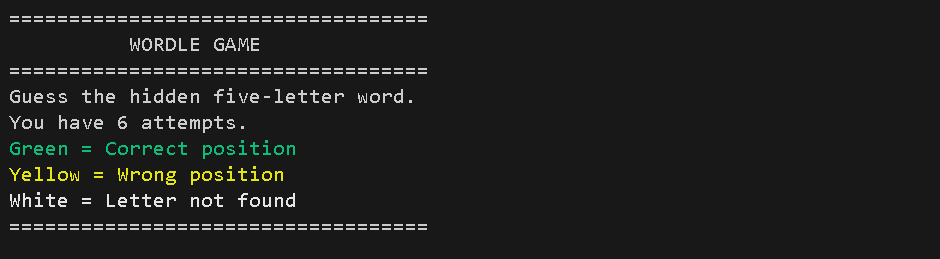
Screenshot
Complete Code
Create a file named wordle.py and add the following complete code:
import random
from colorama import init, Fore, Style

init(autoreset=True)

WORDS = [
    "APPLE", "BRAVE", "CHAIR", "CLOUD", "DREAM",
    "EARTH", "FLAME", "GRAPE", "HOUSE", "LIGHT",
    "MOUSE", "NIGHT", "OCEAN", "PAPER", "PLANT",
    "QUEEN", "RIVER", "SMILE", "STONE", "TABLE",
    "TIGER", "TRAIN", "WATER", "WORLD", "YOUTH"
]

MAX_ATTEMPTS = 6
WORD_LENGTH = 5


def get_feedback(secret, guess):
    feedback = [""] * WORD_LENGTH
    remaining = list(secret)

    # First check letters in the correct position
    for i in range(WORD_LENGTH):
        if guess[i] == secret[i]:
            feedback[i] = Fore.GREEN + guess[i] + Style.RESET_ALL
            remaining[i] = None

    # Then check letters in the wrong position
    for i in range(WORD_LENGTH):
        if feedback[i] != "":
            continue

        if guess[i] in remaining:
            feedback[i] = Fore.YELLOW + guess[i] + Style.RESET_ALL
            remaining[remaining.index(guess[i])] = None
        else:
            feedback[i] = Fore.WHITE + guess[i] + Style.RESET_ALL

    return feedback


def display_feedback(feedback):
    print(" ".join(feedback))


def play_game():
    secret = random.choice(WORDS)

    print("\n" + "=" * 35)
    print("          WORDLE GAME")
    print("=" * 35)
    print("Guess the hidden five-letter word.")
    print("You have 6 attempts.")
    print(Fore.GREEN + "Green = Correct position")
    print(Fore.YELLOW + "Yellow = Wrong position")
    print(Fore.WHITE + "White = Letter not found")
    print("=" * 35)

    for attempt in range(1, MAX_ATTEMPTS + 1):
        while True:
            guess = input(
                f"\nAttempt {attempt}/{MAX_ATTEMPTS} - Enter word: "
            ).strip().upper()

            if len(guess) != WORD_LENGTH:
                print("Please enter exactly five letters.")
                continue

            if not guess.isalpha():
                print("Please enter letters only.")
                continue

            if guess not in WORDS:
                print("This word is not available in the word list.")
                continue

            break

        feedback = get_feedback(secret, guess)
        display_feedback(feedback)

        if guess == secret:
            print(Fore.GREEN + "\nCongratulations! You guessed the word.")
            return

    print(Fore.YELLOW + f"\nGame Over! The correct word was: {secret}")


def main():
    while True:
        play_game()

        choice = input("\nDo you want to play again? (y/n): ").strip().lower()

        if choice != "y":
            print("\nThanks for playing Wordle!")
            break


if __name__ == "__main__":
    main()
How the Code Works
The program starts by importing Python’s random module and the required color components from colorama. The random module selects a different word from the available list whenever a new game starts.
The WORDS list contains the five-letter words that can be selected as the hidden answer or entered by the player. Since the word collection is directly inside the Python file, there is no requirement for an external .txt file.
The MAX_ATTEMPTS variable controls the number of guesses allowed, while WORD_LENGTH defines the required length of every word.
Feedback System
The get_feedback() function is responsible for comparing the player’s guess with the secret word. The program first checks whether each character is located at the correct position. If it is, the letter is displayed in green.
After checking exact matches, the program checks the remaining letters. If a guessed letter exists in the secret word but appears at another position, it is displayed in yellow. Letters that cannot be matched are displayed without a positive match color.
The matching process also keeps track of already-used letters. This helps the game handle repeated letters more accurately than simply checking whether a character exists somewhere in the secret word.
Step-by-Step Installation Guide
Step 1: Install Python
Install Python on your computer and verify that it is available from the terminal.
python --versionStep 2: Create the Project Folder
Create a folder named CLI-Wordle-Game. Open this folder in Visual Studio Code.
Step 3: Create the Python File
Create a new file named:
wordle.pyPaste the complete code provided above into this file and save it.
Step 4: Install Colorama
pip install coloramaStep 5: Run the Application
Open the VS Code terminal inside the project folder and execute:
python wordle.pyHow to Play
When the program starts, it displays the game title and instructions. The player must enter a five-letter word from the available word collection. The application checks the input before accepting it as a valid attempt.
For every guess, the terminal displays colored feedback. A green character means that the letter is in the correct position. A yellow character means that the letter belongs to the hidden word but is located somewhere else. A normal or white character means that the letter does not match the remaining characters of the secret word.
The player can make a maximum of six attempts. If the hidden word is identified within these attempts, the program displays a winning message. If all attempts are used, the secret word is revealed and the game ends.
Customizing the Game
The project can easily be modified by editing the WORDS list inside wordle.py. You can add more five-letter words to make the game more interesting.
You can also change the number of attempts by modifying:
MAX_ATTEMPTS = 6For example, changing the value to 8 will give the player eight attempts. However, the current feedback logic is designed for five-letter Wordle-style gameplay, so the word length should remain five unless the code is adjusted accordingly.
Conclusion
The CLI Wordle Game is a practical Python project for students who want to understand input handling, loops, conditional statements, lists, functions, random selection, string operations, and terminal-based user interfaces. By keeping the complete application inside a single Python file, the project is easier to study and execute.
From a student perspective, this project is also useful for learning how several basic Python concepts can be combined to create an interactive application. You can extend the same project later by adding a larger dictionary, score tracking, difficulty levels, a hint system, or a graphical interface.
Keywords:
CLI Wordle Game in Python, Wordle Game in Python, Python Wordle Game, Word Guessing Game in Python, Wordle Python Project, Wordle Game Python Code, Python CLI Game, Command Line Game in Python, Python Game Project, Python Mini Project, Word Guessing Game Python, Five Letter Word Game Python, Python Beginner Project, Python Console Game, Wordle Game Source Code, Python Project for Students, Interactive Python Game, Colorama Python Game, Python Terminal Game, Wordle Game for Beginners