Cold Mail Generator Using Python
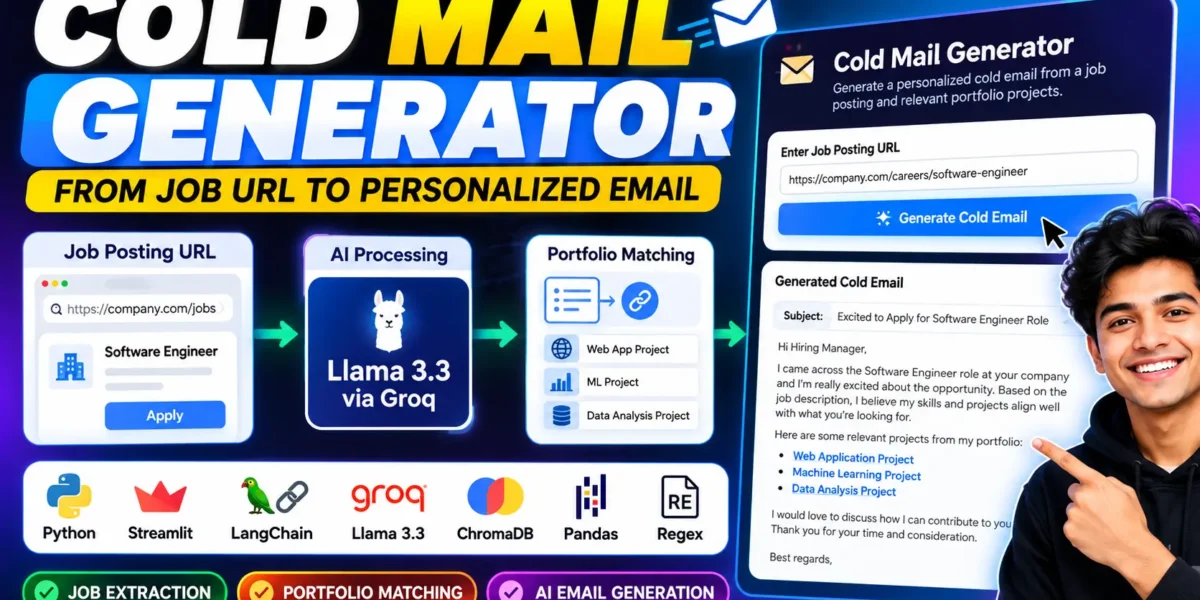
Cold Mail Generator is a professionally developed AI-based web application designed to simplify the process of job outreach. The application takes a job posting URL as input, extracts important job information, identifies relevant portfolio projects, and generates a personalized cold email according to the job requirements.
Instead of manually reading a complete job description and writing a separate email for every opportunity, this project automates the main parts of the process. It uses Python, Streamlit, LangChain, Groq with Llama 3.3, ChromaDB, Pandas, and Python’s Regex functionality.
The application is especially useful for job seekers, freelance professionals, and portfolio-based applicants who want to create relevant cold emails based on specific job opportunities.
Complete Advance AI Topics: Click Here
Real Time Projects on YouTube:- DecodeIT
Project Summary Table
| Project Name | Cold Mail Generator |
|---|---|
| Language/s Used | Python |
| Database | ChromaDB (Vector-based) |
| Framework | Streamlit |
| AI Technology | Llama 3.3 via Groq |
| AI Framework | LangChain |
Project Overview
The Cold Mail Generator works by connecting job information with relevant portfolio information. The user starts by entering the URL of a job posting or company career page. The application processes the page and extracts the available job-related content.
After the job information is extracted and cleaned, the application uses ChromaDB to search for portfolio projects that are related to the job description. This allows the generated email to include portfolio work that is relevant to the position instead of using unrelated projects.
The selected job information and portfolio details are then passed through the AI generation workflow. Llama 3.3 through Groq generates a professional cold email based on the available information.
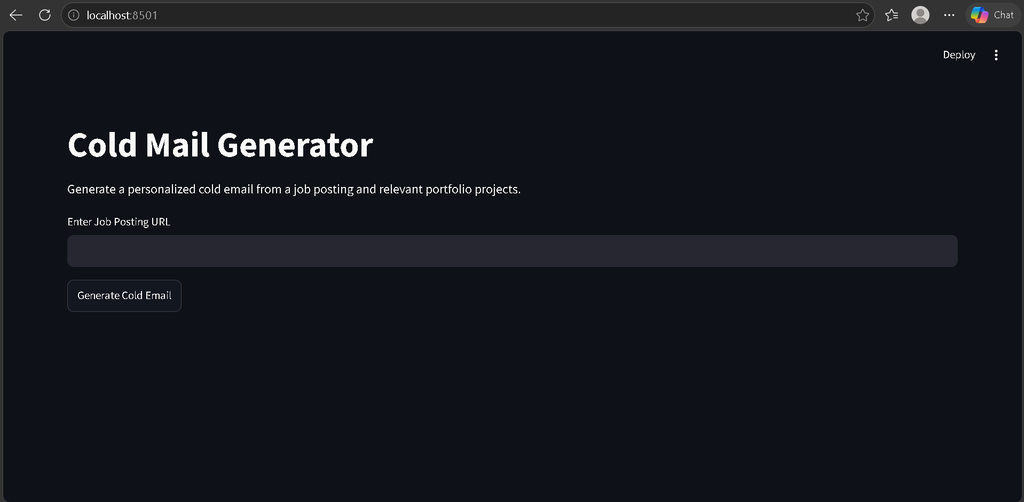
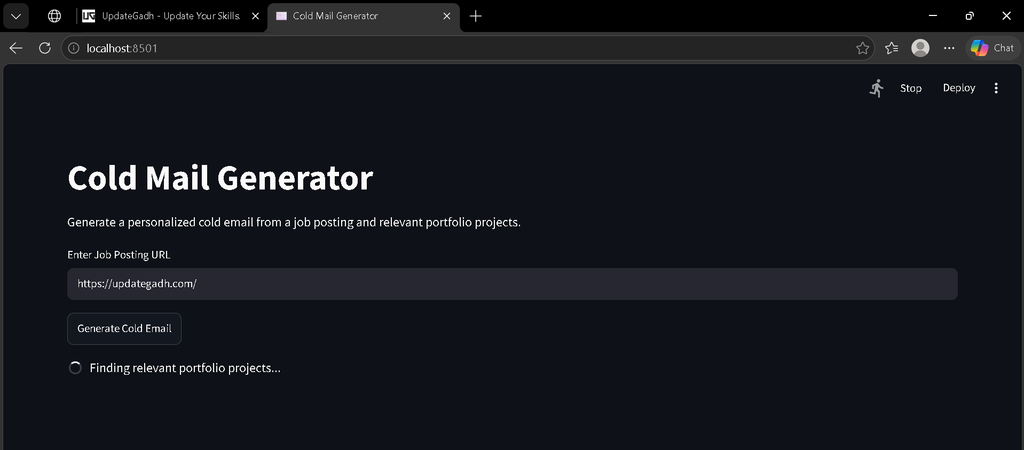
The user can interact with the complete system through a simple Streamlit interface without requiring a separate frontend application.
Architecture Diagram
Job Posting URL
       |
       v
Job Page Extraction
       |
       v
Text Cleaning and Processing
       |
       v
Job Description
       |
       v
ChromaDB Portfolio Matching
       |
       v
Relevant Portfolio Links
       |
       v
LangChain Prompt Processing
       |
       v
Llama 3.3 via Groq
       |
       v
Personalized Cold Email
       |
       v
Streamlit Interface
Technologies Used
- Python 3.8+: Main programming language used for the application.
- Streamlit: Used to create the interactive web interface.
- LangChain: Used to manage the LLM workflow and prompt processing.
- Groq: Used to access Llama 3.3 for cold email generation.
- ChromaDB: Used for vector-based portfolio matching.
- Pandas: Used for handling portfolio data.
- Regex: Used for text cleaning and processing.
Available Features
- Job Extraction: Automatically processes job information from an input career-page URL.
- Portfolio Matching: Uses ChromaDB to find portfolio projects related to the extracted job description.
- Personalized Cold Email Generation: Generates a professional email according to the job context.
- Interactive UI: Provides a simple Streamlit-based interface.
- Text Cleaning and Processing: Uses Python utilities and Regex to process extracted information.
- Portfolio Data Handling: Uses Pandas for portfolio data stored in CSV format.
- Single-File Project: The complete application logic is provided inside one Python file.
Installation Guide
Prerequisites
- Python 3.8 or higher
- VS Code
- pip package manager
- Groq API key
- Internet connection
Step 1: Create the Project Folder
Create a folder named Cold Mail Generator and open it in VS Code.
Step 2: Create a Virtual Environment
python -m venv venv
Activate the virtual environment on Windows:
venv\Scripts\activate
Step 3: Install Required Packages
pip install streamlit langchain langchain-groq chromadb pandas requests beautifulsoup4 python-dotenv
Step 4: Create the Environment File
Create a .env file in the project folder and add your Groq API key:
GROQ_API_KEY=your_api_key_here
Project Structure
Cold-Mail-Generator/
│
├── app.py
├── requirements.txt
└── .env
The complete application has been combined into app.py, so separate files such as chain.py, utils.py, and portfolio.py are not required.
Complete Code in a Single File
Create a file named app.py and add the following code:
import os
import re
import requests
import pandas as pd
import streamlit as st
import chromadb

from bs4 import BeautifulSoup
from dotenv import load_dotenv
from groq import Groq
from langchain_core.prompts import PromptTemplate

load_dotenv()

st.set_page_config(
    page_title="Cold Mail Generator",
    page_icon="✉️",
    layout="wide"
)

GROQ_API_KEY = os.getenv("GROQ_API_KEY")

if not GROQ_API_KEY:
    st.error("GROQ_API_KEY is not configured in the .env file.")
    st.stop()

client = Groq(api_key=GROQ_API_KEY)


def clean_text(text):
    text = re.sub(r"\s+", " ", text)
    text = re.sub(r"[^\x00-\x7F]+", " ", text)
    return text.strip()


def extract_job_description(url):
    headers = {
        "User-Agent": (
            "Mozilla/5.0 (Windows NT 10.0; Win64; x64) "
            "AppleWebKit/537.36 "
            "(KHTML, like Gecko) Chrome/130.0 Safari/537.36"
        )
    }

    response = requests.get(
        url,
        headers=headers,
        timeout=20
    )

    response.raise_for_status()

    soup = BeautifulSoup(response.text, "html.parser")

    for tag in soup(
        ["script", "style", "noscript", "svg"]
    ):
        tag.decompose()

    text = soup.get_text(separator=" ")

    return clean_text(text)[:20000]


def load_portfolio():
    file_path = "portfolio.csv"

    if os.path.exists(file_path):
        data = pd.read_csv(file_path)

        if "project" in data.columns:
            return data

    data = pd.DataFrame({
        "project": [
            "Python Django Web Application",
            "Machine Learning Project",
            "Data Analysis Project"
        ],
        "description": [
            "Python Django application with database integration.",
            "Machine learning project using Python and data processing.",
            "Data analysis project using Python and Pandas."
        ],
        "link": [
            "https://example.com/project1",
            "https://example.com/project2",
            "https://example.com/project3"
        ]
    })

    return data


def create_vector_store(portfolio):
    chroma_client = chromadb.Client()

    collection = chroma_client.get_or_create_collection(
        name="portfolio"
    )

    if collection.count() == 0:
        documents = []

        for _, row in portfolio.iterrows():
            project = str(row.get("project", ""))
            description = str(row.get("description", ""))

            documents.append(
                project + " " + description
            )

        collection.add(
            ids=[
                str(index)
                for index in range(len(documents))
            ],
            documents=documents,
            metadatas=[
                {
                    "link": str(row.get("link", ""))
                }
                for _, row in portfolio.iterrows()
            ]
        )

    return collection


def find_relevant_portfolio(job_description, collection):
    results = collection.query(
        query_texts=[job_description],
        n_results=3
    )

    documents = results.get("documents", [[]])[0]
    metadatas = results.get("metadatas", [[]])[0]

    portfolio_items = []

    for document, metadata in zip(
        documents,
        metadatas
    ):
        portfolio_items.append(
            "Project: "
            + document
            + "\nPortfolio Link: "
            + metadata.get("link", "")
        )

    return "\n\n".join(portfolio_items)


def generate_email(job_description, portfolio):
    prompt = PromptTemplate(
        input_variables=[
            "job_description",
            "portfolio"
        ],
        template="""
You are an AI assistant that writes professional cold emails.

Job Description:
{job_description}

Relevant Portfolio:
{portfolio}

Write a personalized cold email for the job opportunity.

Requirements:
- Create a professional subject line.
- Keep the email concise.
- Mention relevant skills from the job description.
- Include relevant portfolio links.
- Make the email professional and personalized.
- Do not invent information.
- Do not add unsupported experience or achievements.
- Return only the subject and email.

"""
    )

    formatted_prompt = prompt.format(
        job_description=job_description,
        portfolio=portfolio
    )

    response = client.chat.completions.create(
        model="llama-3.3-70b-versatile",
        messages=[
            {
                "role": "user",
                "content": formatted_prompt
            }
        ],
        temperature=0.5
    )

    return response.choices[0].message.content


st.title("Cold Mail Generator")

st.write(
    "Generate a personalized cold email from a job "
    "posting and relevant portfolio projects."
)

job_url = st.text_input(
    "Enter Job Posting URL"
)

if st.button("Generate Cold Email"):

    if not job_url:
        st.warning(
            "Please enter a job posting URL."
        )

    else:
        try:
            with st.spinner(
                "Extracting job information..."
            ):
                job_description = (
                    extract_job_description(job_url)
                )

            if not job_description:
                st.error(
                    "Unable to extract job information."
                )
                st.stop()

            portfolio = load_portfolio()

            with st.spinner(
                "Finding relevant portfolio projects..."
            ):
                vector_store = create_vector_store(
                    portfolio
                )

                relevant_portfolio = (
                    find_relevant_portfolio(
                        job_description,
                        vector_store
                    )
                )

            with st.spinner(
                "Generating personalized cold email..."
            ):
                email = generate_email(
                    job_description,
                    relevant_portfolio
                )

            st.success(
                "Cold email generated successfully."
            )

            st.subheader("Generated Cold Email")

            st.text_area(
                "Email",
                value=email,
                height=400
            )

            with st.expander(
                "View Extracted Job Information"
            ):
                st.write(job_description)

            with st.expander(
                "View Relevant Portfolio"
            ):
                st.write(relevant_portfolio)

        except Exception as error:
            st.error(
                "Error: " + str(error)
            )
Portfolio CSV File
The original project uses portfolio data in CSV format. Create a file named portfolio.csv in the same folder as app.py.
project,description,link
Python Django Project,Python Django web application,https://example.com/project1
Machine Learning Project,Machine learning project using Python,https://example.com/project2
Data Analysis Project,Python Pandas data analysis project,https://example.com/project3
You can replace the sample project information with your own portfolio details.
Screenshot
How to Run the Project
Open the VS Code terminal and activate the virtual environment:
venv\Scripts\activate
Install the required packages:
pip install -r requirements.txt
Then start the Streamlit application:
streamlit run app.py
After the application starts, open the Streamlit URL shown in the terminal.
How to Use
Step 1: Open the Cold Mail Generator in your browser.
Step 2: Enter the URL of a job posting or company career page.
Step 3: Click the Generate Cold Email button.
Step 4: The application extracts and cleans the available job information.
Step 5: ChromaDB searches the portfolio information and identifies relevant projects.
Step 6: LangChain prepares the AI prompt containing the job description and relevant portfolio information.
Step 7: Groq processes the prompt using the configured Llama model and generates a personalized cold email.
Step 8: The generated email is displayed in the Streamlit interface.
Final Thoughts
From a student’s perspective, the Cold Mail Generator is a useful Python project for understanding how AI, web data extraction, vector databases, and modern application interfaces can work together. The project demonstrates how a job description can be processed, relevant portfolio information can be identified, and a personalized cold email can be generated through an AI workflow.
Primary Keywords: Cold Mail Generator, AI Cold Email Generator, Python Cold Mail Generator, AI Cold Email Writer, Cold Email Generator Using Python ai cold email writer free, temporary email generator, cold email ai writer, copy ai email generator, email generator ai, best free cold email software, mailmeteor ai email generator, personalized cold email,Cold Mail Generator Using Python,Cold Mail Generator,Cold Mail Generator Using Python