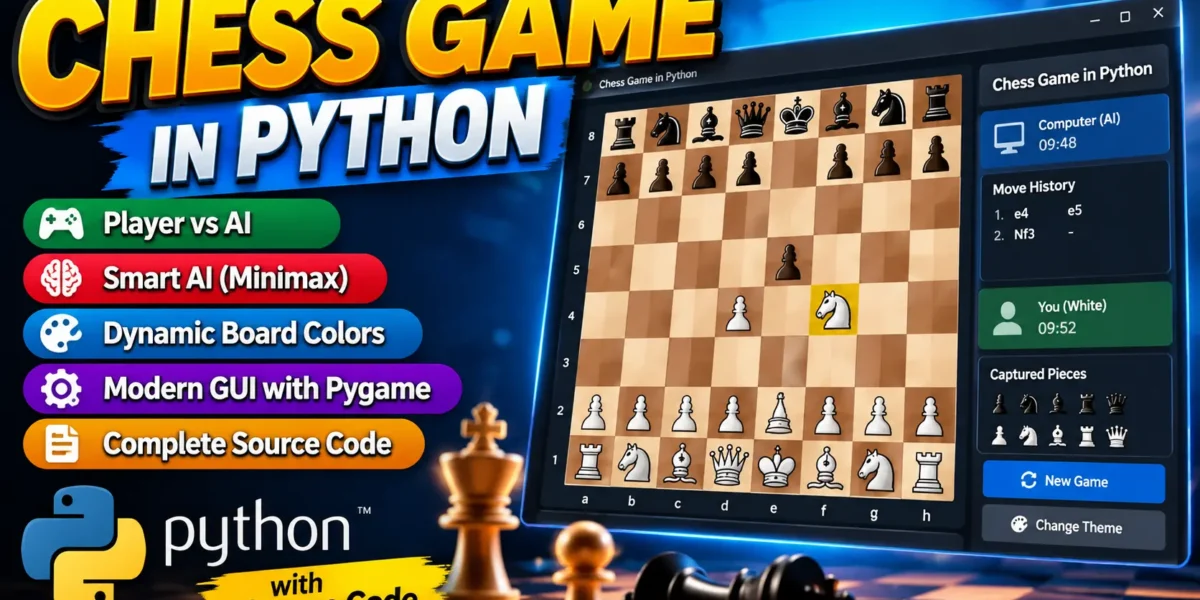
Chess Game in Python
The Chess Game in Python is a medium-level college project that combines graphical user interface development, game logic, move validation, and basic artificial intelligence. The application is built with Python and Pygame and provides a clean player-versus-AI chess experience. A player controls the White pieces while the computer controls Black and selects its moves using a minimax search with alpha-beta pruning.
The project is designed to be practical for students who want to understand how a strategy game can be organized into reusable functions and connected into one complete application. Instead of providing only a static chessboard, the system manages legal moves, captures, move history, game status, and AI responses inside one interface.
Complete Advance AI Topics: Click Here
Real Time Projects on YouTube:- DecodeIT
Project Overview
| Project Detail | Information |
|---|---|
| Project Name | Chess Game in Python |
| Programming Language | Python |
| GUI Library | Pygame |
| Chess Rules | python-chess |
| Application Type | Desktop Game |
| Game Mode | Player vs AI |
Key Features
- Player vs AI: The user plays as White and the computer responds as Black.
- Legal Move Validation: The chess engine checks whether a selected move is valid before it is applied.
- AI Move Selection: The computer evaluates possible positions with a modest minimax search and alpha-beta pruning.
- Dynamic Board Theme: A board color theme is selected when a new game starts, giving each session a slightly different appearance.
- Move History: Recent moves are displayed in the sidebar so players can follow the progress of the match.
- Captured Pieces: Captured pieces are recorded and displayed in the interface.
- Game Status: Checkmate, stalemate, and completed-game states are handled by the application.
- Professional Interface: The Pygame window contains a large chessboard, status area, history panel, action buttons, and clear visual feedback.
Project Modules
The project is organized around a small set of connected modules inside the main Python program. The board module logic draws the eight-by-eight playing area, coordinates, selected squares, and legal-move indicators. The game controller manages mouse interaction, turn handling, new games, and application events. The AI module evaluates positions and searches for a computer move. The interface module renders the sidebar, status information, move history, captured pieces, and buttons.
The project uses the python-chess library for the underlying chess position and rule validation. This keeps complicated rule handling understandable while allowing the student to concentrate on GUI programming and AI decision-making.
AI and Game Logic
The computer opponent uses a minimax approach with alpha-beta pruning. Minimax considers possible future positions and attempts to select a move that gives the computer a favorable evaluation while assuming the opponent will also make useful decisions. Alpha-beta pruning reduces unnecessary branches during the search, allowing the program to work with a practical search depth for a desktop college project.
The evaluation function primarily considers the material value of pieces, along with simple mobility and central-control information. Queens, rooks, bishops, knights, pawns, and the king receive different values. These values help the AI compare positions and select a move. The implementation intentionally avoids an advanced chess engine so that students can read, understand, and modify the logic.
Professional User Interface
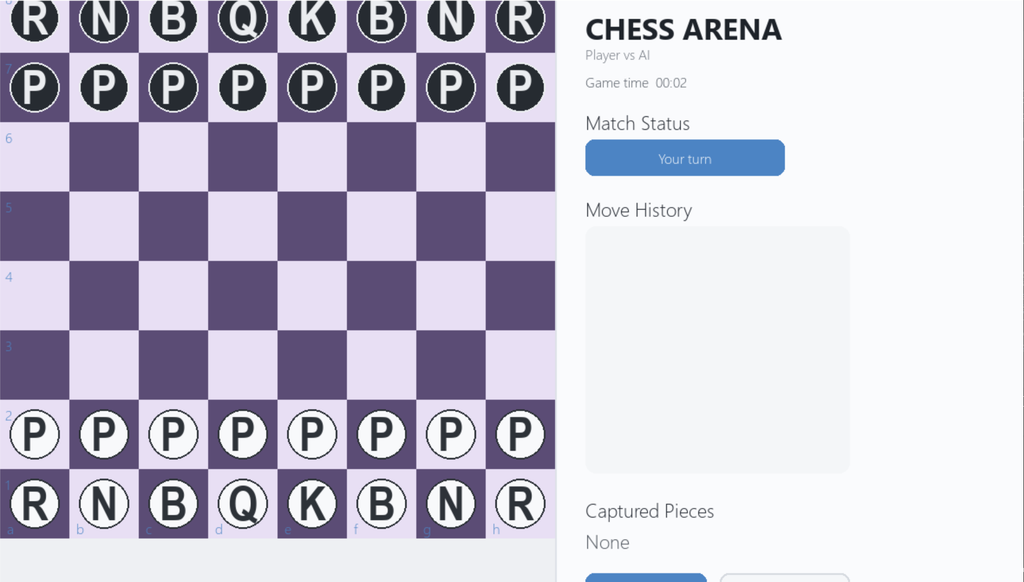
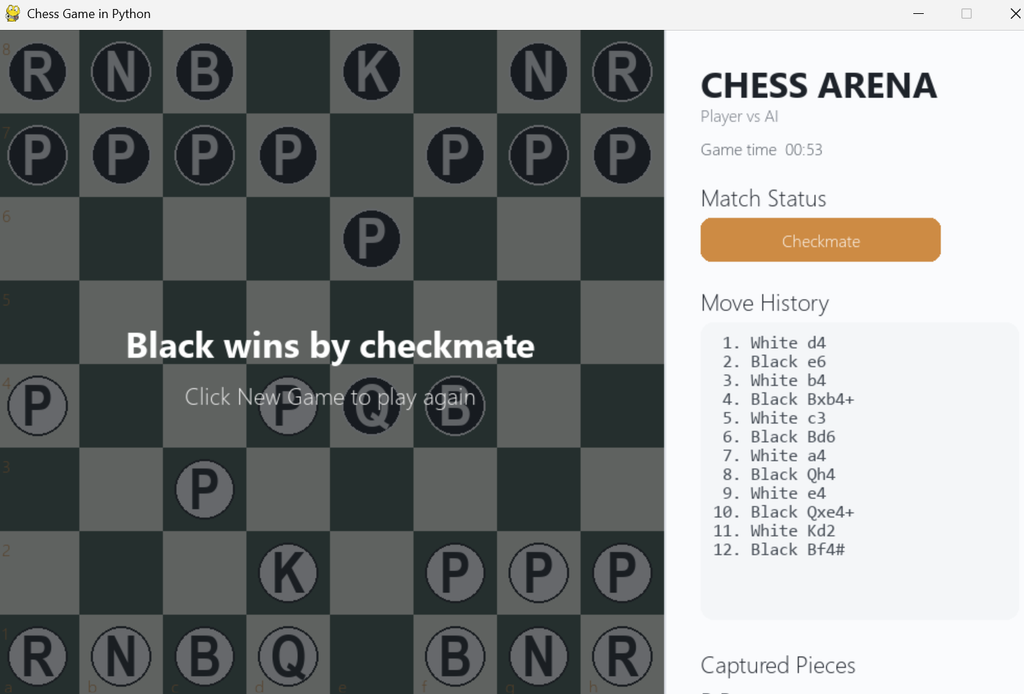
The interface uses a dedicated chess arena layout rather than a plain beginner-style window. The board occupies the main area while a separate information panel presents the match status, elapsed time, move history, captured pieces, and controls. Selected pieces are highlighted, and legal destination squares are shown with visual markers.
The visual design uses rounded controls, clear typography, subtle borders, and a changing board palette. The sidebar keeps important information visible without covering the game. The layout is also sized so that the board remains easy to use on a laptop or desktop display.
How the System Works
- The application starts with a standard chess position and selects a board theme.
- The player clicks a White piece to view its legal destinations.
- The player selects a highlighted destination to complete the move.
- The move is validated and added to the history.
- The AI evaluates available Black moves and selects one using minimax search.
- The computer move is applied and the interface updates.
- The cycle continues until checkmate, stalemate, or another completed-game condition occurs.
Screenshot
Complete Code
import random
import sys
import time
from pathlib import Path

import pygame
import chess

WIDTH, HEIGHT = 1000, 650
BOARD_SIZE = 640
SQ = BOARD_SIZE // 8
SIDEBAR_X = BOARD_SIZE + 35
FPS = 60

THEMES = [
    {"light": (238, 224, 194), "dark": (119, 86, 64), "accent": (73, 143, 121)},
    {"light": (230, 232, 220), "dark": (74, 96, 88), "accent": (205, 139, 68)},
    {"light": (239, 216, 182), "dark": (95, 119, 152), "accent": (196, 78, 88)},
    {"light": (232, 223, 244), "dark": (91, 76, 117), "accent": (76, 132, 196)},
]

PIECE_VALUE = {
    chess.PAWN: 100, chess.KNIGHT: 320, chess.BISHOP: 330,
    chess.ROOK: 500, chess.QUEEN: 900, chess.KING: 20000
}

FILES = "abcdefgh"
RANKS = "87654321"

pygame.init()
screen = pygame.display.set_mode((WIDTH, HEIGHT))
pygame.display.set_caption("Chess Game in Python")
clock = pygame.time.Clock()

FONT = pygame.font.SysFont("segoeui", 22)
SMALL = pygame.font.SysFont("segoeui", 16)
TITLE = pygame.font.SysFont("segoeui", 34, bold=True)
PIECE_FONT = pygame.font.SysFont("dejavusans", 54, bold=True)
MONO = pygame.font.SysFont("consolas", 17)

theme = random.choice(THEMES)
board = chess.Board()
selected = None
legal_targets = []
thinking = False
game_over_message = ""
move_history = []
captured_white = []
captured_black = []
start_time = time.time()
last_ai_move = ""


def square_to_xy(square):
    file_idx = chess.square_file(square)
    rank_idx = chess.square_rank(square)
    return file_idx * SQ, (7 - rank_idx) * SQ


def xy_to_square(pos):
    x, y = pos
    if not (0 <= x < BOARD_SIZE and 0 <= y < BOARD_SIZE):
        return None
    file_idx, row = x // SQ, y // SQ
    rank_idx = 7 - row
    return chess.square(file_idx, rank_idx)


def piece_label(piece):
    # Letter glyphs keep the project self-contained without external image assets.
    symbols = {
        chess.PAWN: "P", chess.KNIGHT: "N", chess.BISHOP: "B",
        chess.ROOK: "R", chess.QUEEN: "Q", chess.KING: "K"
    }
    return symbols[piece.piece_type]


def draw_text(text, pos, font=FONT, color=(35, 39, 45)):
    screen.blit(font.render(text, True, color), pos)


def draw_button(rect, label, active=False):
    bg = theme["accent"] if active else (245, 247, 249)
    border = theme["accent"] if active else (214, 218, 224)
    pygame.draw.rect(screen, bg, rect, border_radius=10)
    pygame.draw.rect(screen, border, rect, 2, border_radius=10)
    txt_color = (255, 255, 255) if active else (50, 56, 64)
    surf = SMALL.render(label, True, txt_color)
    screen.blit(surf, surf.get_rect(center=rect.center))


def draw_board():
    for row in range(8):
        for col in range(8):
            color = theme["light"] if (row + col) % 2 == 0 else theme["dark"]
            rect = pygame.Rect(col * SQ, row * SQ, SQ, SQ)
            pygame.draw.rect(screen, color, rect)

    if selected is not None:
        x, y = square_to_xy(selected)
        pygame.draw.rect(screen, theme["accent"], (x, y, SQ, SQ), 5)

    for sq in legal_targets:
        x, y = square_to_xy(sq)
        pygame.draw.circle(screen, theme["accent"], (x + SQ // 2, y + SQ // 2), 8)

    for sq, piece in board.piece_map().items():
        x, y = square_to_xy(sq)
        cx, cy = x + SQ // 2, y + SQ // 2
        is_white = piece.color == chess.WHITE
        fill = (248, 249, 251) if is_white else (38, 43, 49)
        outline = (45, 50, 56) if is_white else (235, 237, 240)
        pygame.draw.circle(screen, fill, (cx, cy), 29)
        pygame.draw.circle(screen, outline, (cx, cy), 29, 2)
        glyph = PIECE_FONT.render(piece_label(piece), True, outline)
        screen.blit(glyph, glyph.get_rect(center=(cx, cy - 1)))

    for col, file_name in enumerate(FILES):
        draw_text(file_name, (col * SQ + 8, BOARD_SIZE - 23), SMALL, theme["accent"])
    for row, rank_name in enumerate(RANKS):
        draw_text(rank_name, (6, row * SQ + 6), SMALL, theme["accent"])


def evaluate_position(b):
    if b.is_checkmate():
        return -999999 if b.turn == chess.WHITE else 999999
    if b.is_stalemate() or b.is_insufficient_material():
        return 0

    score = 0
    for piece_type, value in PIECE_VALUE.items():
        score += len(b.pieces(piece_type, chess.WHITE)) * value
        score -= len(b.pieces(piece_type, chess.BLACK)) * value

    # Small positional bonus for central control and mobility.
    score += 4 * (len(b.attackers(chess.WHITE, chess.E4)) + len(b.attackers(chess.WHITE, chess.D4)))
    score -= 4 * (len(b.attackers(chess.BLACK, chess.E5)) + len(b.attackers(chess.BLACK, chess.D5)))
    score += 2 * (b.legal_moves.count() if b.turn == chess.WHITE else -b.legal_moves.count())
    return score


def minimax(b, depth, alpha, beta, maximizing):
    if depth == 0 or b.is_game_over():
        return evaluate_position(b), None

    best_move = None
    moves = list(b.legal_moves)
    moves.sort(key=lambda m: b.is_capture(m), reverse=True)

    if maximizing:
        best_score = -float("inf")
        for move in moves:
            b.push(move)
            score, _ = minimax(b, depth - 1, alpha, beta, False)
            b.pop()
            if score > best_score:
                best_score, best_move = score, move
            alpha = max(alpha, best_score)
            if beta <= alpha:
                break
        return best_score, best_move

    best_score = float("inf")
    for move in moves:
        b.push(move)
        score, _ = minimax(b, depth - 1, alpha, beta, True)
        b.pop()
        if score < best_score:
            best_score, best_move = score, move
        beta = min(beta, best_score)
        if beta <= alpha:
            break
    return best_score, best_move


def ai_move():
    global thinking, last_ai_move
    thinking = True
    pygame.event.pump()
    # The AI controls Black and searches a modest depth suitable for a college project.
    _, move = minimax(board, 2, -float("inf"), float("inf"), False)
    if move is not None:
        san = board.san(move)
        capture = board.piece_at(move.to_square)
        if capture and capture.color == chess.WHITE:
            captured_black.append(capture)
        board.push(move)
        move_history.append(("Black", san))
        last_ai_move = san
    thinking = False


def new_game():
    global board, selected, legal_targets, theme, move_history
    global captured_white, captured_black, start_time, game_over_message, last_ai_move
    board = chess.Board()
    selected = None
    legal_targets = []
    theme = random.choice(THEMES)
    move_history = []
    captured_white = []
    captured_black = []
    start_time = time.time()
    game_over_message = ""
    last_ai_move = ""


def handle_click(pos):
    global selected, legal_targets
    if thinking or board.is_game_over():
        return
    sq = xy_to_square(pos)
    if sq is None:
        return

    piece = board.piece_at(sq)

    if selected is None:
        if piece and piece.color == chess.WHITE:
            selected = sq
            legal_targets = [m.to_square for m in board.legal_moves if m.from_square == sq]
        return

    if sq in legal_targets:
        move = chess.Move(selected, sq)
        # Promotion is handled automatically as a queen for this student project.
        if board.piece_at(selected).piece_type == chess.PAWN and chess.square_rank(sq) in (0, 7):
            move = chess.Move(selected, sq, promotion=chess.QUEEN)
        if move in board.legal_moves:
            san = board.san(move)
            captured = board.piece_at(sq)
            if captured:
                captured_white.append(captured)
            board.push(move)
            move_history.append(("White", san))
            selected = None
            legal_targets = []
            if not board.is_game_over():
                ai_move()
        else:
            selected = None
            legal_targets = []
    elif piece and piece.color == chess.WHITE:
        selected = sq
        legal_targets = [m.to_square for m in board.legal_moves if m.from_square == sq]
    else:
        selected = None
        legal_targets = []


def draw_sidebar():
    pygame.draw.rect(screen, (250, 251, 253), (BOARD_SIZE, 0, WIDTH - BOARD_SIZE, HEIGHT))
    pygame.draw.line(screen, (222, 226, 232), (BOARD_SIZE, 0), (BOARD_SIZE, HEIGHT), 2)

    draw_text("CHESS ARENA", (SIDEBAR_X, 28), TITLE, (30, 35, 42))
    draw_text("Player vs AI", (SIDEBAR_X, 70), SMALL, (105, 111, 120))

    elapsed = int(time.time() - start_time)
    mins, secs = divmod(elapsed, 60)
    draw_text(f"Game time  {mins:02d}:{secs:02d}", (SIDEBAR_X, 102), SMALL, (75, 82, 91))

    draw_text("Match Status", (SIDEBAR_X, 145), FONT, (35, 40, 48))
    status = "Your turn" if board.turn == chess.WHITE and not board.is_game_over() else "AI thinking..."
    if board.is_game_over():
        if board.is_checkmate():
            status = "Checkmate"
        elif board.is_stalemate():
            status = "Stalemate"
        else:
            status = "Game over"
    draw_button(pygame.Rect(SIDEBAR_X, 180, 230, 42), status, active=not thinking)

    draw_text("Move History", (SIDEBAR_X, 245), FONT, (35, 40, 48))
    panel = pygame.Rect(SIDEBAR_X, 280, 305, 285)
    pygame.draw.rect(screen, (244, 246, 248), panel, border_radius=12)

    recent = move_history[-14:]
    for i, (side, san) in enumerate(recent):
        y = panel.y + 12 + i * 18
        draw_text(f"{len(move_history)-len(recent)+i+1:>2}. {side:<5} {san}", (panel.x + 12, y), MONO, (70, 77, 86))

    draw_text("Captured Pieces", (SIDEBAR_X, 592), FONT, (35, 40, 48))
    captured = captured_white[-8:] + captured_black[-8:]
    draw_text(" ".join(piece_label(p) for p in captured) or "None", (SIDEBAR_X, 628), FONT, (80, 86, 94))

    draw_button(pygame.Rect(SIDEBAR_X, 680, 140, 45), "New Game", active=True)
    draw_button(pygame.Rect(SIDEBAR_X + 155, 680, 150, 45), "Quit")


def draw_overlay():
    if not board.is_game_over():
        return
    overlay = pygame.Surface((BOARD_SIZE, BOARD_SIZE), pygame.SRCALPHA)
    overlay.fill((15, 18, 22, 160))
    screen.blit(overlay, (0, 0))
    if board.is_checkmate():
        winner = "Black" if board.turn == chess.WHITE else "White"
        msg = f"{winner} wins by checkmate"
    elif board.is_stalemate():
        msg = "Draw by stalemate"
    else:
        msg = "Game over"
    surf = TITLE.render(msg, True, (255, 255, 255))
    screen.blit(surf, surf.get_rect(center=(BOARD_SIZE // 2, BOARD_SIZE // 2 - 20)))
    sub = FONT.render("Click New Game to play again", True, (235, 235, 235))
    screen.blit(sub, sub.get_rect(center=(BOARD_SIZE // 2, BOARD_SIZE // 2 + 30)))


def main():
    running = True
    while running:
        for event in pygame.event.get():
            if event.type == pygame.QUIT:
                running = False
            elif event.type == pygame.MOUSEBUTTONDOWN and event.button == 1:
                if event.pos[0] < BOARD_SIZE:
                    handle_click(event.pos)
                elif SIDEBAR_X <= event.pos[0] <= SIDEBAR_X + 140 and event.pos[1] >= 680:
                    new_game()
                elif SIDEBAR_X + 155 <= event.pos[0] <= SIDEBAR_X + 305 and event.pos[1] >= 680:
                    running = False

        screen.fill((238, 240, 243))
        draw_board()
        draw_sidebar()
        draw_overlay()
        pygame.display.flip()
        clock.tick(FPS)

    pygame.quit()
    sys.exit()


if __name__ == "__main__":
    main()
python chess.pyUsage
When the window opens, the player controls the White side. Click a White piece to select it. Available legal destinations are highlighted, making the interface easier to understand. Click one of those destinations to make the move. The computer then plays Black automatically. The right-side panel records recent moves and shows captured pieces. If the game finishes, a result message appears over the board. Selecting New Game resets the position and chooses another visual board theme, while Quit closes the program.
Frequently Asked Questions
What is the purpose of this project?
It demonstrates how Python can be used to build a graphical strategy game with real chess rules, user interaction, and a basic AI opponent.
Which libraries are required?
The project uses Pygame for the desktop interface and python-chess for chess position management and legal move validation.
Does the project include an AI opponent?
Yes. The computer plays Black and uses minimax search with alpha-beta pruning and a simple position evaluation function.
Can the player move illegal chess pieces?
No. The application checks the current board state and accepts only legal moves provided by the chess rules library.
Does the project require a database?
No. This desktop game does not require a database because the match state, move history, and captured pieces are maintained during the current session.
How can the project be started?
After installing the dependencies, open the project directory and run python chess.py from the terminal.
Future Scope
- Add selectable AI difficulty levels with different search depths.
- Add an optional player-versus-player mode on the same computer.
- Add persistent match saving and loading for completed games.
- Introduce graphical chess-piece assets for an alternative visual style.
- Add a move-timer system for more realistic chess sessions.
Why This Project Is Suitable for College Development
This project is suitable for a college submission because it demonstrates more than a single screen or isolated programming exercise. The application connects event handling, graphical rendering, rule validation, data structures, and algorithmic decision-making in one workflow. Students can study how mouse events are converted into chess moves, how a board position is represented, and how the AI compares alternative positions. The project is also easy to demonstrate during a practical presentation because the result is immediately visible. Its focused scope makes the code approachable while still providing enough technical depth for discussion of GUI programming and introductory game AI.
Conclusion
The Chess Game in Python is a practical medium-level college project for learning game development with Pygame and introductory AI techniques. It connects interface design, chess-rule management, user interaction, move tracking, and computer decision-making into one application. Students can use the project to understand how separate programming concepts work together in a complete desktop system. Because the code remains focused and readable, it can also serve as a strong base for future improvements without turning the project into an unnecessarily complex application.