
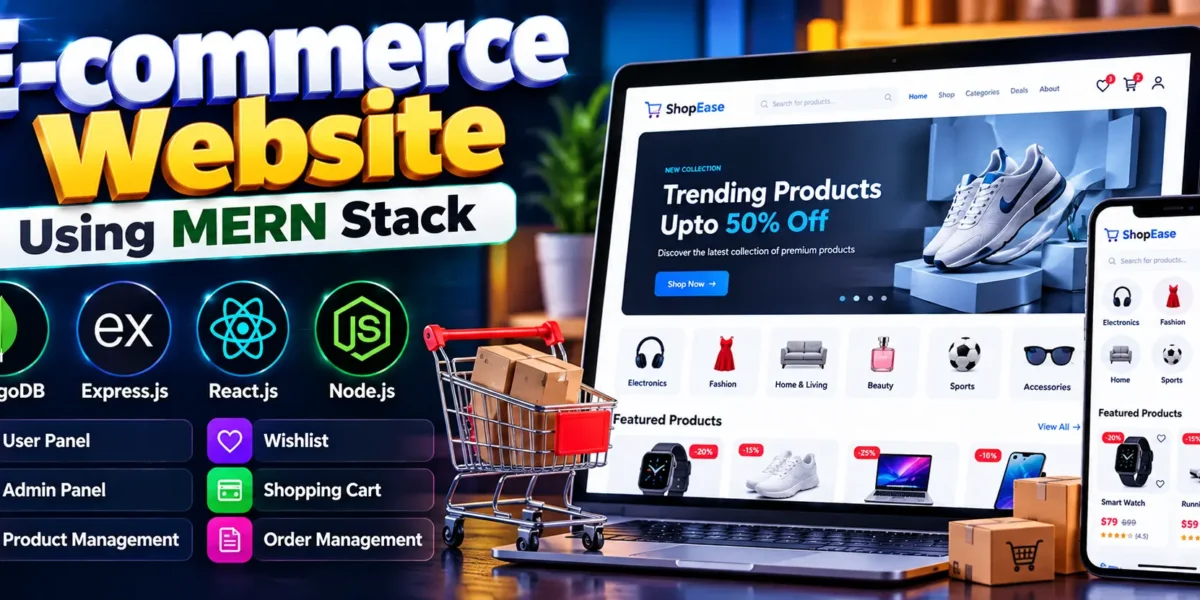
E-commerce Website Using MERN Stack
The E-commerce Website Using MERN Stack is a full-stack web application designed to deliver a modern and convenient online shopping experience. Built using MongoDB, Express.js, React.js, and Node.js, the project demonstrates how frontend and backend technologies work together to create a dynamic e-commerce platform.
The application includes product browsing, user authentication, wishlist management, product reviews, shopping cart functionality, order tracking, and profile management. It also provides an administrator interface for managing products, inventory, and customer orders.
Complete Advance AI Topics: Click Here
Real Time Projects on YouTube:- DecodeIT
Project Overview
| Parameter | Details |
|---|---|
| Project Name | MERN Ecommerce |
| Language/s Used | JavaScript, JSX, CSS |
| Frontend | React.js and Material UI |
| Backend | Node.js and Express.js |
| Database | MongoDB |
| State Management | Redux Toolkit |
| Type | Full-Stack Web Application |
Project Objectives
- Online Shopping: Provide an interface for browsing products and managing shopping carts.
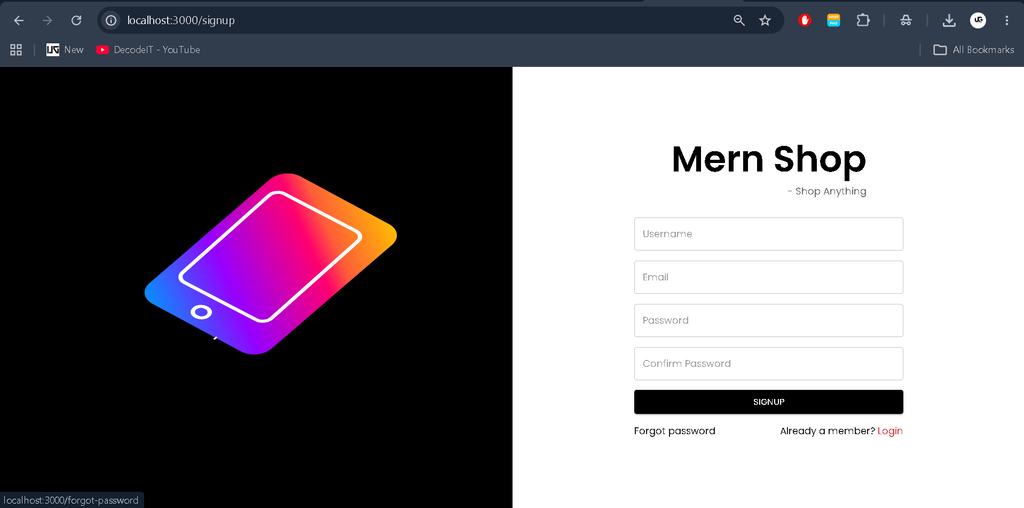
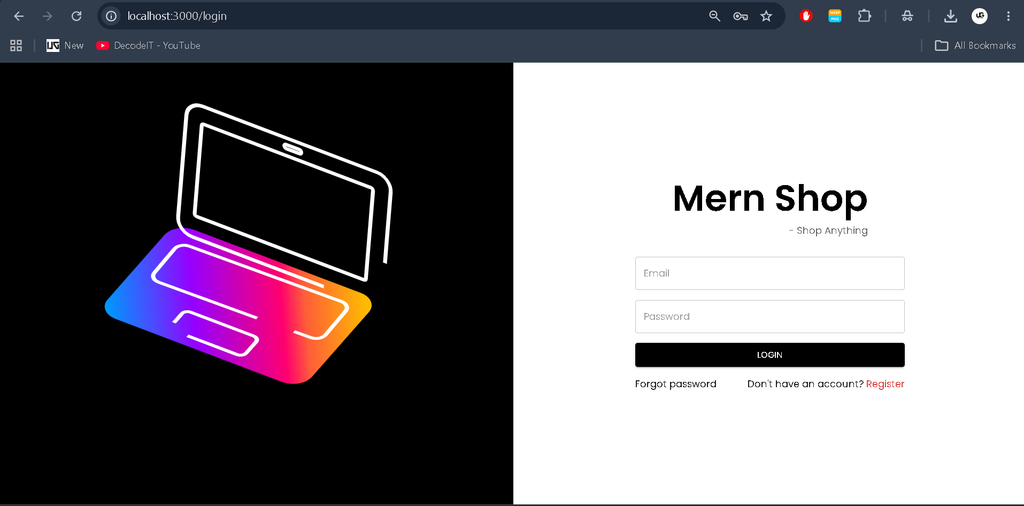
- User Account Management: Allow customers to register, log in, and maintain their profiles.
- Order Processing: Support order creation, order history, and status tracking.
- Product Administration: Enable administrators to manage product information and inventory.
- Customer Engagement: Support product reviews, ratings, and personalized wishlists.
- Secure Access: Implement authentication and account verification mechanisms.
- Maintainable Architecture: Separate frontend, backend, and database responsibilities.
Available Features
User Features
1. Product Reviews
Users can write, edit, and delete product reviews. Review information contributes to product ratings and rating statistics, helping customers evaluate products before purchasing.
2. Wishlist Management
Customers can add products to their wishlists and remove them when no longer needed. Wishlist entries can also support personalized notes where implemented.
3. Order Management
Users can create orders, view their order history, and monitor order progress through the available status information.
4. Profile Management
Users can update profile information, manage account details, and maintain multiple delivery addresses where supported.
5. Shopping Cart
The shopping cart allows users to add products, change quantities, remove items, and review subtotals before proceeding with checkout.
Admin Features
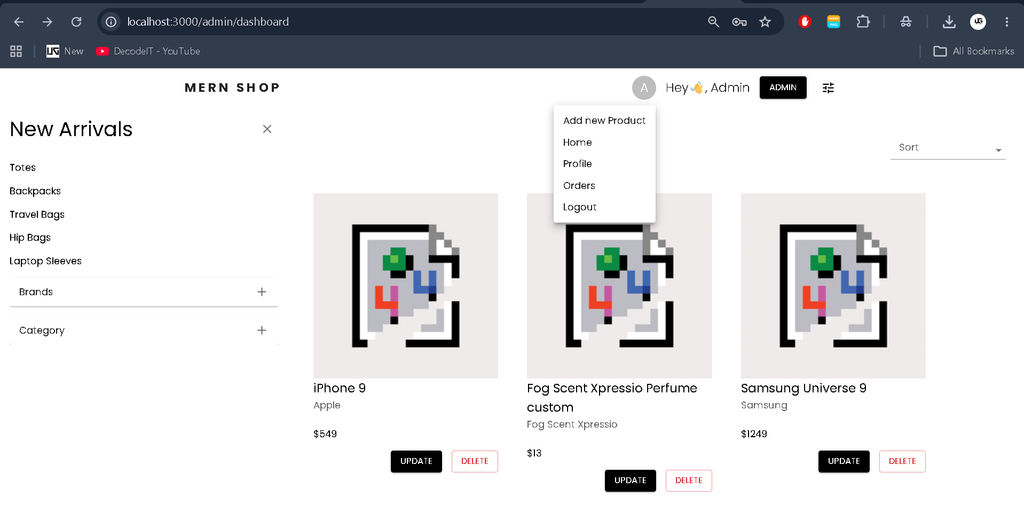
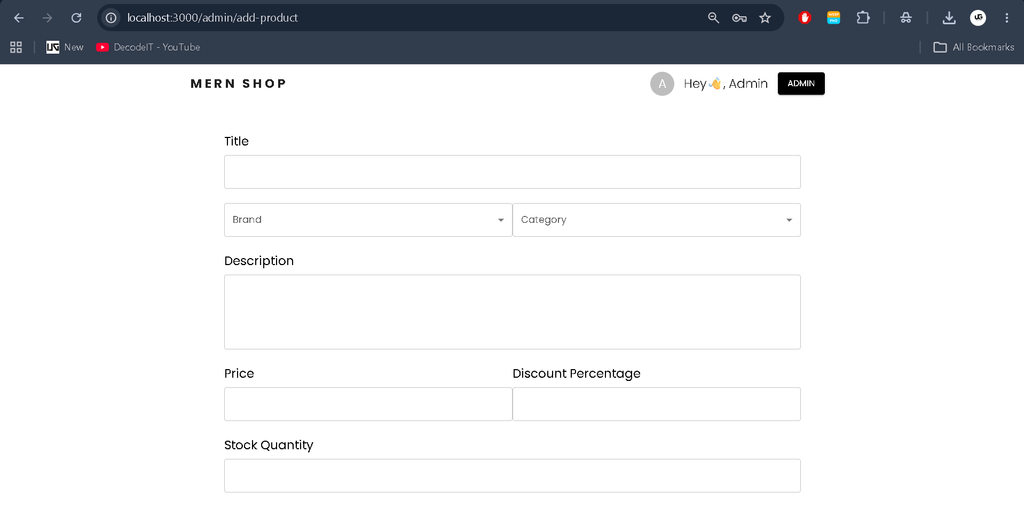
1. Product Management
Administrators can add, edit, and delete products. Product information may include names, descriptions, prices, and stock availability. Soft deletion can deactivate products without permanently removing their records.
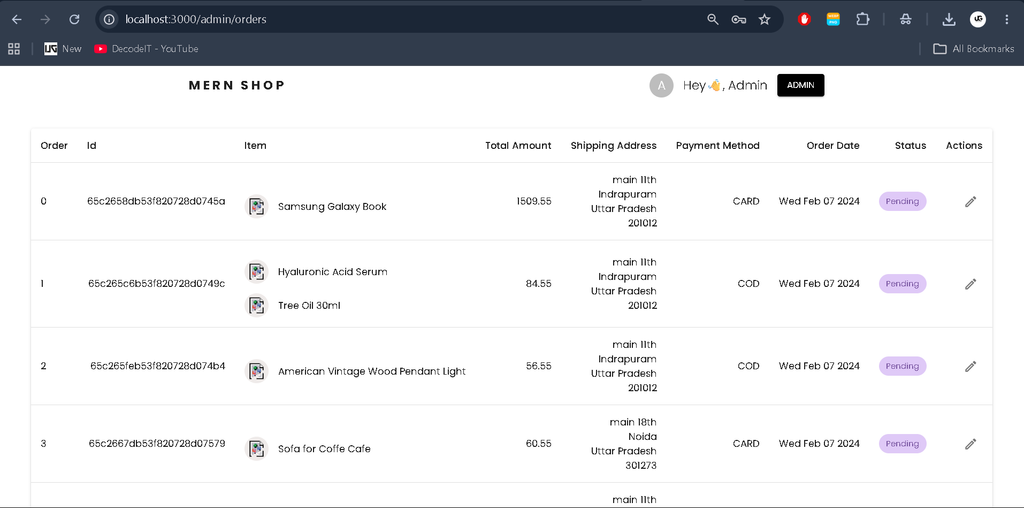
2. Order Management
Administrators can view customer orders and update their statuses, such as Pending, Shipped, and Delivered, according to the implemented workflow.
3. Inventory Management
Product stock information can be maintained through the administration interface to help organize inventory and product availability.
Security and User Experience
1. Authentication System
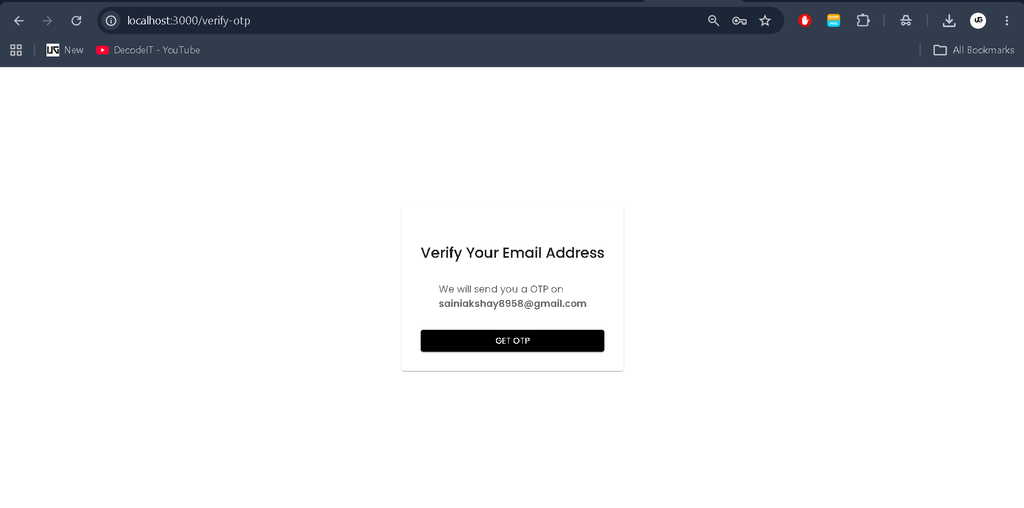
The application supports registration, login, OTP verification, password reset, and logout functionality as implemented. JWT and cookies are used for authentication and session-related operations.
2. Responsive User Interface
Material UI provides reusable interface components and styling options for a consistent shopping experience across different screen sizes.
How to Download
The complete package is available so you can run, study, and submit it with confidence.
- Full Source Code
Screenshot
Installation Guide (For VS Code)
Step 1: Install Required Software
Install Node.js, npm, MongoDB, and Visual Studio Code.
Verify the Node.js and npm installations:
node -v
npm -v
Step 2: Extract and Open the Project
Extract the project ZIP file and open the project directory in Visual Studio Code.
code mern-ecommerceUse the actual folder name if it differs.
Step 3: Install Backend Dependencies
Open the VS Code terminal and navigate to the backend directory:
cd backend
npm install
Step 4: Install Frontend Dependencies
Open another terminal and navigate to the frontend directory:
cd frontend
npm install
Step 5: Configure Environment Variables
Create a .env file in the backend directory and configure the variables required by the application.
Example backend configuration:
MONGO_URI=mongodb://127.0.0.1:27017/mern-ecommerce
ORIGIN=http://localhost:3000
EMAIL=your-email@example.com
PASSWORD=your-email-app-password
LOGIN_TOKEN_EXPIRATION=30d
OTP_EXPIRATION_TIME=120000
PASSWORD_RESET_TOKEN_EXPIRATION=2m
COOKIE_EXPIRATION_DAYS=30
SECRET_KEY=your-secure-secret-key
PRODUCTION=false
Replace placeholder values with the appropriate settings for your environment. Email credentials and secret keys must remain private.
If the frontend uses Create React App, configure its .env file with the backend URL:
REACT_APP_BASE_URL=http://localhost:8000Confirm the required environment variable names and URL format from the project’s source code before running the application.
Step 6: Seed the Database (Optional)
If the project includes a database seed script, run the following command from the backend directory:
npm run seedThis may populate the database with sample users, products, and orders, depending on the seed implementation.
Step 7: Start the Backend Server
Navigate to the backend directory and execute:
npm run devThe backend is expected to run on port 8000 if configured accordingly.
Step 8: Start the Frontend Application
Open another terminal, navigate to the frontend directory, and execute:
npm startThe frontend usually runs on port 3000 when configured as a Create React App project.
Step 9: Open the Application
Once both servers are running, open the frontend in your browser:
http://localhost:3000The backend API is expected to be available at:
http://localhost:8000These URLs depend on the actual project configuration.
Usage Guide
User Role
Account Creation and Login
Users can register with their account details and log in to access shopping features. OTP verification may be required depending on the authentication workflow.
Browse Products
Customers can explore available products, review descriptions, and use supported category filters to find items.
Wishlist and Shopping Cart
Users can save products to their wishlists, add items to the cart, adjust quantities, and review their selections before checkout.
Place and Track Orders
After placing an order, users can view their order history and check the status of their purchases.
Manage Profile
Customers can update personal information, manage delivery addresses, and change account credentials through the available profile features.
Admin Role
Dashboard Access
Administrators can sign in to access the management functionality assigned to their accounts.
Product and Inventory Management
Admins can add products, update product information, manage stock, and deactivate products when supported.
Order Management
Administrators can review customer orders and update their progress according to the available order workflow.
Technical Stack
- MongoDB: Stores product, user, review, and order information.
- Express.js: Handles backend routing, middleware, and API requests.
- React.js: Builds the interactive frontend interface.
- Node.js: Executes the server-side JavaScript application.
- Redux Toolkit: Manages shared application state.
- Material UI: Provides reusable interface components and styling.
- JWT and Cookies: Support the application’s authentication workflow where configured.
Why This Project Is Useful for Students
Frontend Development
Students learn to build interactive interfaces using React.js and Material UI.
Backend Development
Working with Node.js and Express.js provides practical experience with server-side logic, routing, and REST API development.
Database Management
MongoDB introduces students to document-based storage and database operations for products, users, reviews, and orders.
State Management
Redux Toolkit helps students understand centralized state management and how application data is shared between components.
Authentication and Security
The project introduces authentication workflows involving JWT, cookies, registration, login, and account verification.
Full-Stack Integration
Connecting the frontend, backend, and database helps students understand how a complete web application works.
This project can also be included in a student portfolio to demonstrate practical full-stack development skills.
Example Demo Credentials
If the database has been seeded with the provided demonstration account, the following credentials may be available:
- Email: demo@gmail.com
- Password: helloWorld@123
Note: These credentials work only if the corresponding demo account exists and the application accepts them. Password reset and OTP verification may be disabled or handled differently for demonstration accounts.
Real-Life Applications
- Online Retail Stores: Manage product catalogs, customer accounts, shopping carts, and orders.
- Small Businesses: Establish an online storefront for selling products.
- Inventory Management: Organize stock information and product availability.
- Customer Engagement: Collect product reviews and ratings.
- Order Administration: Maintain order records and monitor delivery progress.
Future Enhancements
The project can be extended with online payment gateway integration, shipment tracking, discount coupons, advanced analytics, automated email notifications, product recommendations, and inventory alerts.
Additional security testing, payment verification, and transaction handling would be necessary before deploying the application for real commercial transactions.
Final Thoughts
The E-commerce Website Using MERN Stack is a practical project for students who want to explore modern full-stack web development. It combines product management, customer accounts, shopping cart functionality, reviews, and order processing in a single application.
Keywords: E-commerce Website using MERN Stack, E-commerce Website Using MERN Stack GitHub, E-commerce Website Using MERN Stack Source Code, E-commerce Website Using MERN Stack Project Report, MERN Ecommerce Project With Source Code GitHub, Full-Stack E-commerce Website Source Code GitHub, E-commerce Website Using MERN Stack PPT, MERN Stack Ecommerce Project Report PDF, MERN Stack Ecommerce Template, MERN Stack Ecommerce Project GitHub, MERN Stack E-commerce Project, MERN Stack E-commerce Project Report PDF, Ecommerce Website Using Node.js and MongoDB GitHub, GreatStack E-commerce GitHub, E-commerce Full-Stack Project GitHub,E-commerce Website using, E-commerce Website using ecommerce website using html css and javascript, ecommerce website ,ecommerce website python
[…] E-commerce Website Using MERN Stack :- Click Here […]