Vehicle Management System Using MERN Stack
The Vehicle Management System Using MERN Stack is a web-based application designed to manage vehicle inventory, customers, suppliers, sales, imports, and vehicle maintenance from a centralized dashboard. It helps vehicle dealerships organize their daily operations, track vehicle availability, manage transactions, and monitor business performance.
This project is developed using MongoDB, Express.js, React.js, and Node.js. It includes JWT authentication, vehicle inventory management, sales and booking workflows, import tracking, service management, and reporting features. The project is suitable for students who want to learn practical full-stack web development.
Table of Contents
Project Overview
| Project Details | Description |
|---|---|
| Project Name | Vehicle Management System |
| Frontend | React.js |
| Backend | Node.js and Express.js |
| Database | MongoDB |
| Architecture | MERN Stack |
| Authentication | JWT |
| Project Type | Web-Based Management System |
Available Features
1. Dashboard Management
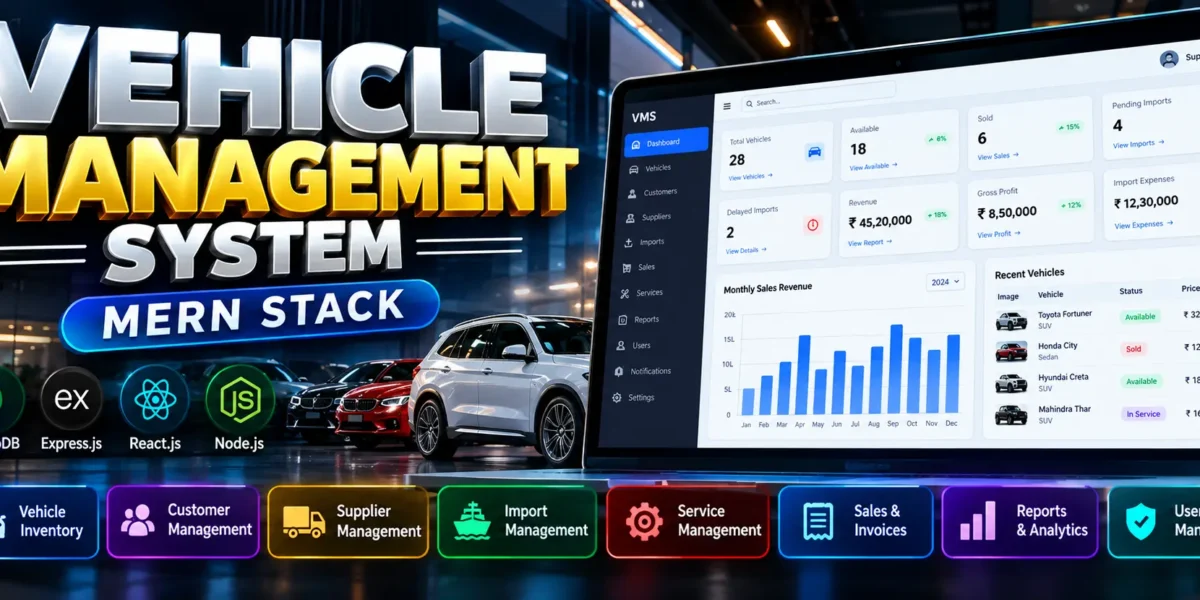
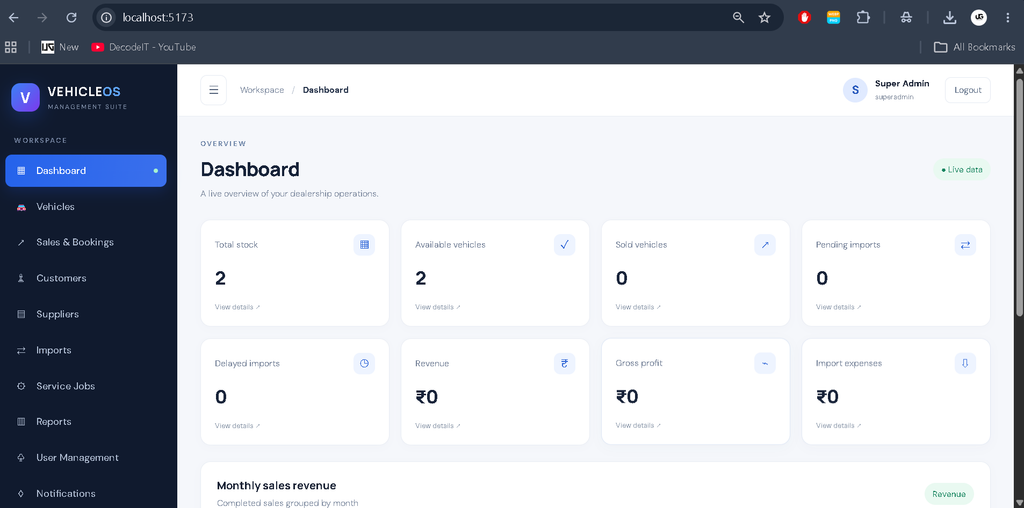
The dashboard displays vehicle inventory statistics, available and sold vehicles, pending imports, delayed imports, revenue, gross profit, and import expenses. Monthly sales revenue can be presented through charts using database records.
2. Vehicle Inventory Management
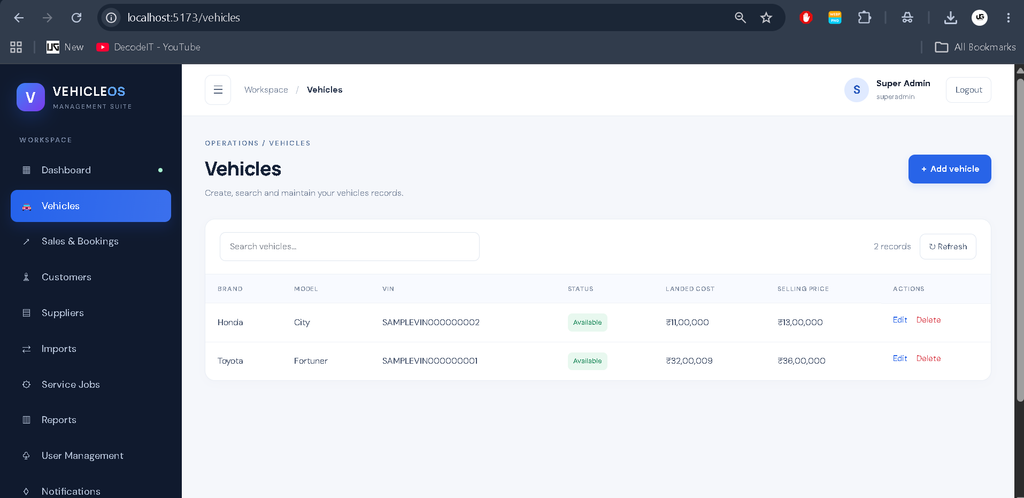
- Add, view, update, and delete vehicle records.
- Search vehicles and filter records by status.
- Manage brand, model, VIN, fuel type, transmission, and color.
- Maintain purchase price, selling price, and landed cost.
- Track available, reserved, sold, and maintenance statuses.
3. Customer Management
Maintain customer names, email addresses, phone numbers, and address details. Customer records can be associated with relevant sales and booking workflows.
4. Supplier Management
Store supplier contact information and connect suppliers with vehicle import orders to organize procurement records.
Complete Advance AI Topics: Click Here
Real Time Projects on YouTube:- DecodeIT
5. Import and Shipment Management
- Create and manage vehicle import orders.
- Track shipment references and expected delivery dates.
- Monitor shipping and customs clearance statuses.
- Record shipping charges, customs fees, taxes, and other expenses.
- Allocate import costs to calculate vehicle landed costs.
6. Vehicle Service and Maintenance
Manage service jobs, vehicle inspections, repair notes, assigned employees, spare parts, labour costs, service expenses, and maintenance statuses. Service scheduling helps organize vehicle maintenance activities.
7. Sales and Booking Management
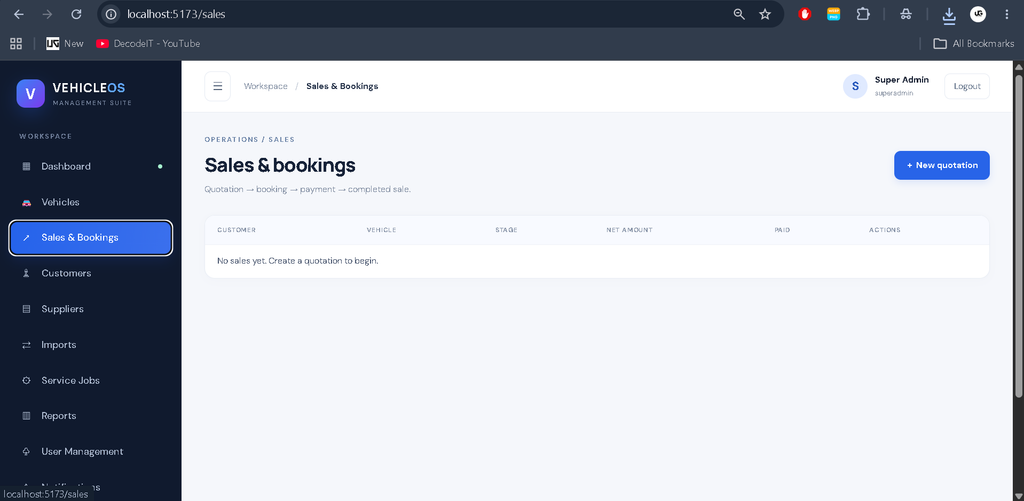
- Create sales quotations and vehicle bookings.
- Record booking amounts and payments.
- Manage discounts and refunds.
- Complete or cancel sales transactions.
- Generate PDF invoices where supported by the configured workflow.
8. Reports and Financial Tracking
Generate sales reports and export supported data to CSV. Financial summaries can include revenue, vehicle costs, import expenses, and gross profit, helping businesses review their performance.
9. Authentication and User Management
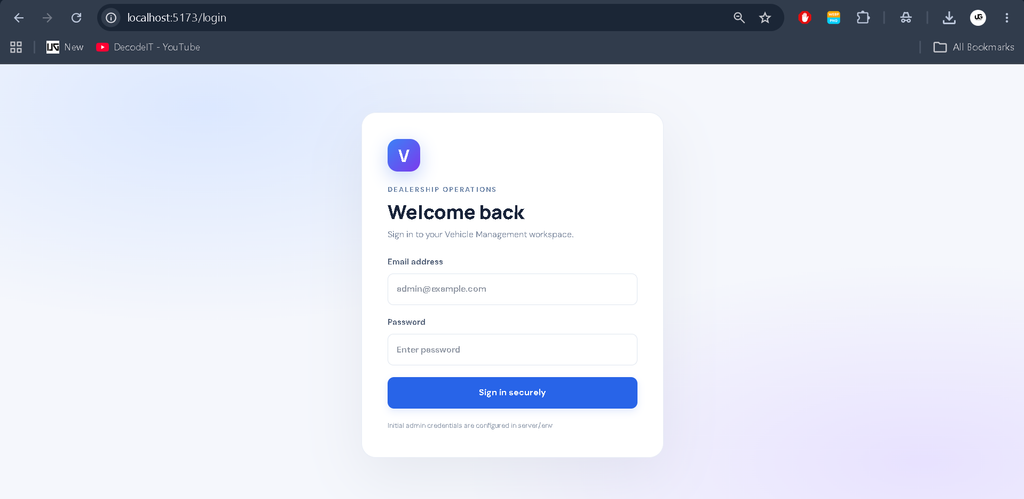
JWT-based authentication protects access to authorized application areas. The project also includes role-aware navigation, password change functionality, account profiles, and backend support for activity audit logs.
10. Notifications and Responsive Interface
The application includes backend notification support and a responsive layout designed for desktop and mobile devices.
Technology Stack
| Technology | Purpose |
|---|---|
| MongoDB | Database for business records |
| Express.js | Backend API development |
| React.js | Interactive frontend interface |
| Node.js | Backend runtime environment |
| Mongoose | MongoDB data modelling |
| JWT | User authentication |
| Tailwind CSS | Responsive interface styling |
| Recharts | Dashboard charts |
| PDFKit | PDF invoice generation |
Software and Tools Required
- Node.js 18 or later
- MongoDB Community Server or MongoDB Atlas
- Visual Studio Code
- npm package manager
- A web browser
How to Download
The complete package is available so you can run, study, and submit it with confidence. It includes:
- Full Source Code
Screenshot
Installation Guide in VS Code
Step 1: Extract the Project
Extract the project ZIP file and open the vms folder in Visual Studio Code.
Step 2: Configure the Backend
Open the VS Code terminal and navigate to the server folder:
cd serverCopy the environment configuration file:
copy .env.example .envOpen server/.env and configure MONGO_URI, JWT_SECRET, SUPERADMIN_EMAIL, and SUPERADMIN_PASSWORD. Use a strong password and secret key.
Install the backend dependencies:
npm installStart the backend server:
npm run devStep 3: Configure the Frontend
Open a second terminal and navigate to the client folder:
cd clientCopy the frontend environment file:
copy .env.example .envInstall frontend dependencies:
npm installStart the frontend application:
npm run devStep 4: Open the Application
Open http://localhost:5173 in your browser. Sign in using the Super Admin credentials configured in the backend environment file.
Usage of the System
- Administrator: Access authorized management features, monitor dashboard statistics, and manage business records according to permissions.
- Inventory Staff: Maintain vehicle records, update availability, and search inventory.
- Sales Staff: Manage customer records, quotations, bookings, and sales workflows where access is permitted.
- Service Staff: Track maintenance jobs, repair details, and service progress where access is permitted.
Available actions depend on the implemented role permissions and configured backend workflows.
Project Benefits
- Centralizes vehicle and customer information.
- Improves inventory tracking and record organization.
- Helps monitor sales and import expenses.
- Organizes service and maintenance activities.
- Provides practical experience with the MERN Stack.
- Demonstrates authentication, REST APIs, and database integration.
Frequently Asked Questions (FAQs)
1. What is a Vehicle Management System Using MERN Stack?
A Vehicle Management System is a web-based application developed using MongoDB, Express.js, React.js, and Node.js to manage vehicle inventory, customers, suppliers, sales, imports, and maintenance records.
2. Which technologies are used in this project?
The project uses React.js for the frontend, Node.js and Express.js for the backend, MongoDB for database management, and JWT for authentication.
3. What are the main features of the Vehicle Management System?
The main features include vehicle inventory management, customer and supplier records, import tracking, service management, sales bookings, payment tracking, PDF invoices, dashboard analytics, and reports.
4. Is MongoDB required to run this project?
Yes. The application requires a working MongoDB connection, either through a local MongoDB installation or MongoDB Atlas, to store and retrieve application data.
5. Can students use this project for learning and college submissions?
Yes. This project can help students understand full-stack web development, REST APIs, database integration, authentication, and business management workflows. Students should review the implementation and follow their institution’s project submission guidelines.
Final Thoughts
The Vehicle Management System Using MERN Stack is a practical project for learning how a full-stack management application works. Its inventory, sales, import, customer, supplier, and service modules provide a useful foundation for understanding real-world business workflows. Students can use it to strengthen their knowledge of React.js, Node.js, Express.js, MongoDB, authentication, and API integration.
Keywords: Vehicle Management System Using MERN Stack, Vehicle Management System Project, MERN Stack Project, React Node.js MongoDB Project, Vehicle Inventory Management System,Vehicle Management System Using MERN Stack,Vehicle Management System Using python