SQL FULL JOIN
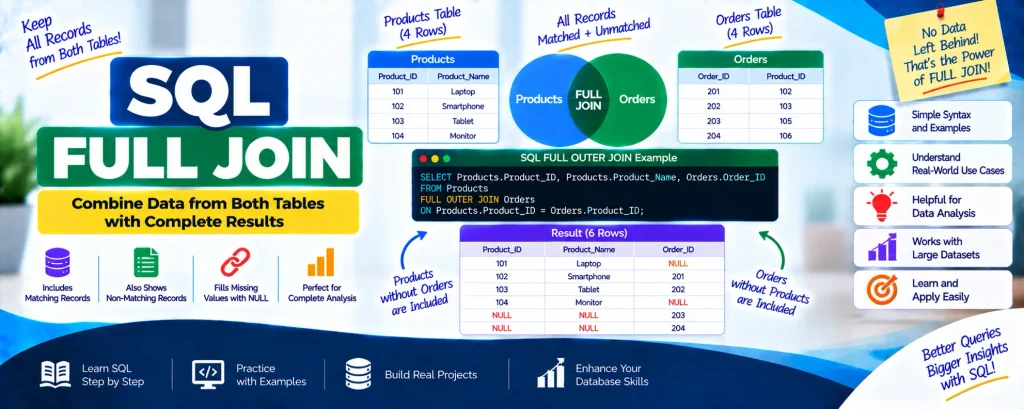
SQL FULL JOIN, also called FULL OUTER JOIN, combines the results of both a LEFT JOIN and a RIGHT JOIN. It returns every record from both tables, whether or not a matching record exists.
When matching records are found, their related values are combined in the result. If a record from either table has no match, the columns belonging to the other table contain NULL values. This makes FULL JOIN useful when you need a complete view of data from two tables without leaving unmatched records behind.
Complete Advance AI Topics: Click Here
SQL Tutorial: Click Here
SQL FULL OUTER JOIN Syntax
The general syntax for using a FULL OUTER JOIN is:
SELECT *
FROM table1
FULL OUTER JOIN table2
ON table1.column_name = table2.column_name;
Explanation:
table1andtable2represent the two tables that need to be joined.column_namespecifies the column used to establish the relationship between the tables.- The query returns all records from both tables.
- For records without a matching row, the corresponding columns contain NULL values.
Example of SQL FULL OUTER JOIN
Let’s understand FULL OUTER JOIN using two tables: Products and Orders.
Table: Products
| Product_ID | Product_Name |
|---|---|
| 101 | Laptop |
| 102 | Smartphone |
| 103 | Tablet |
| 104 | Monitor |
Table: Orders
| Order_ID | Product_ID |
|---|---|
| 201 | 102 |
| 202 | 103 |
| 203 | 105 |
| 204 | 106 |
Now, we can perform a FULL OUTER JOIN using the Product_ID column:
SELECT Products.Product_ID, Products.Product_Name, Orders.Order_ID
FROM Products
FULL OUTER JOIN Orders
ON Products.Product_ID = Orders.Product_ID;
Resulting Table:
| Product_ID | Product_Name | Order_ID |
|---|---|---|
| 101 | Laptop | NULL |
| 102 | Smartphone | 201 |
| 103 | Tablet | 202 |
| 104 | Monitor | NULL |
| NULL | NULL | 203 |
| NULL | NULL | 204 |
Understanding the Result:
- Rows having matching
Product_IDvalues in both tables are combined into a single result. - When a product does not have a corresponding order,
NULLappears in theOrder_IDcolumn. - When an order does not have a matching product,
NULLappears in theProduct_IDandProduct_Namecolumns.
Why Use FULL OUTER JOIN?
A FULL JOIN is particularly useful in situations where you need to preserve information from both sides of a relationship.
- When you want to retain every record from both tables.
- When you need to identify or analyze missing relationships between datasets.
- When reporting or analysis requires a complete view of the available data.
Pictorial Representation:
        +-------------+              +-------------+
        |  Products   |              |   Orders    |
        +-------------+              +-------------+
                |                          |
                |                          |
                |        FULL JOIN         |
                +--------------------------+
This approach ensures that records from both tables remain part of the final result, even when corresponding records cannot be found in the other table.
Download New Real Time Projects :- Click here
Conclusion
SQL FULL OUTER JOIN is useful when you need to combine two tables while keeping every record from both sides. Unlike joins that return only matching records, FULL JOIN also includes unmatched rows and represents missing values with NULL.
This makes FULL OUTER JOIN particularly valuable for comprehensive reporting, data comparison, and analysis. A clear understanding of SQL JOIN types helps developers and database administrators select the appropriate join for different querying requirements.
For more SQL tutorials and database concepts, keep visiting for the latest insights!
SEO Keywords
mysql full join
cross join in sql
self join in sql
sql joins
SQL FULL JOIN
sql full join vs full outer join
sql outer join
inner join in sql
sql join types
sql full form
sql full join full example
sql full join example
sql full join w3schools