Skip to content
  • SiteMap
  • Our Services
  • Frequently Asked Questions (FAQ)
  • Support
  • About Us

UpdateGadh

Update Your Skills.

  • Home
  • Projects
    •  Blockchain projects
    • Python Project
    • Data Science
    •  Ai projects
    • Machine Learning
    • PHP Project
    • React Projects
    • Java Project
    • SpringBoot
    • JSP Projects
    • Java Script Projects
    • Code Snippet
    • Free Projects
  • Tutorials
    • Ai
    • Machine Learning
    • Advance Python
    • Advance SQL
    • DBMS Tutorial
    • Data Analyst
    • Deep Learning Tutorial
    • Data Science
    • Nodejs Tutorial
  • Blog
  • Contact us
  • Toggle search form
SQL RIGHT JOIN

SQL RIGHT JOIN: A Comprehensive Guide

Posted on March 14, 2025March 14, 2025 By Rishabh saini No Comments on SQL RIGHT JOIN: A Comprehensive Guide

SQL RIGHT JOIN

Introduction

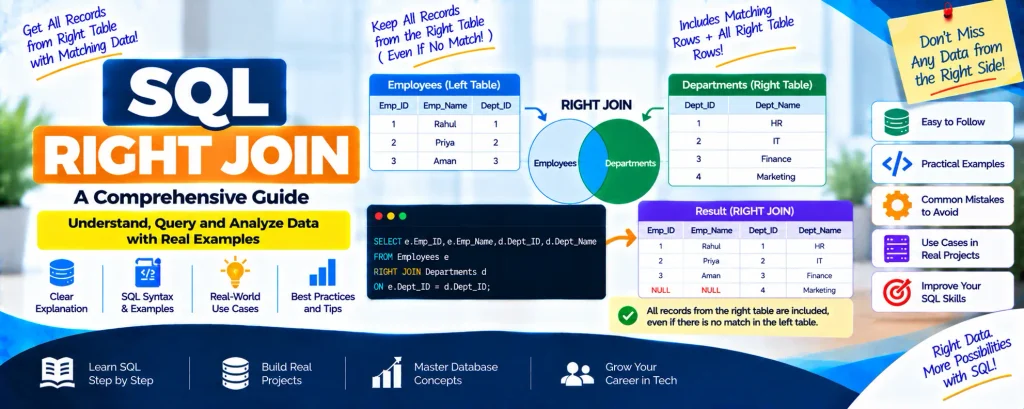
In SQL, records from two tables can be combined using the RIGHT JOIN procedure. All of the records from the right table are returned when a RIGHT JOIN is used, together with the matching entries from the left table. If there are no matching records in the left table, NULL values are displayed for the missing data.

With the help of MySQL, we will examine the RIGHT JOIN function in SQL in this tutorial. Let’s begin by comprehending the RIGHT JOIN syntax.

Complete Python Course with Advance topics:-Click Here
SQL Tutorial :-Click Here

Syntax

SELECT Table1.column1, Table2.column2
FROM Table1   
RIGHT JOIN Table2
ON Table1.common_column = Table2.common_column;  

In this case, the left table is denoted by Table 1 and the right table by Table 2. All of the records from Table 2 are guaranteed to be included in the result set by the RIGHT JOIN.

Understanding RIGHT JOIN with Examples

Let’s use the following tables to illustrate the RIGHT JOIN operation:

Table 1: Employees

EmpIDEmp_NameEmp_Salary
101Raj Malhotra75000
102Ankit Sharma62000
103Meena Patel48000
104Jatin Verma53000
105Priya Singh59000

Table 2: Departments

DeptIDDept_NameEmp_ID
1Finance101
2Marketing103
3Sales104
4HR105
5IT106

Example 1: RIGHT JOIN Employees and Departments

The following query is used to retrieve employee information along with their department:

SELECT e.EmpID, e.Emp_Name, e.Emp_Salary, d.DeptID, d.Dept_Name
FROM Employees e
RIGHT JOIN Departments d
ON e.EmpID = d.Emp_ID;  

Output:

EmpIDEmp_NameEmp_SalaryDeptIDDept_Name
101Raj Malhotra750001Finance
103Meena Patel480002Marketing
104Jatin Verma530003Sales
105Priya Singh590004HR
NULLNULLNULL5IT

Explanation:

  • Every record is obtained from the Departments table.
  • The only records shown are those from the Employees table that correspond to an Emp_ID in Departments.
  • NULL values are displayed because the IT department does not have a corresponding employee.

Table 3: Loans

LoanIDBranchAmount
501B120000
502B250000
503B312000
504B490000
505B515000

Table 4: Borrowers

CustIDCust_NameLoanID
1Riya Kapoor501
2Mohit Verma503
3Ishaan Gupta504
4Alisha Jain506

Example 2: RIGHT JOIN Loans and Borrowers

SELECT l.LoanID, l.Branch, l.Amount, b.CustID, b.Cust_Name
FROM Loans l
RIGHT JOIN Borrowers b
ON l.LoanID = b.LoanID;  

Output:

LoanIDBranchAmountCustIDCust_Name
501B1200001Riya Kapoor
503B3120002Mohit Verma
504B4900003Ishaan Gupta
NULLNULLNULL4Alisha Jain

Explanation:

  • All records from Borrowers are displayed.
  • Only matching LoanID values from the Loans table are shown.
  • Since LoanID 506 has no match in Loans, NULL values appear.

Table 5: Customers

CustIDCust_NameAgeSalary
201Aditi Rana2765000
202Rohit Mehta3050000
203Neha Singh2655000
204Kunal Shah2947000

Table 6: Orders

OrderIDOrder_DateCust_IDAmount
3012022-01-1020112000
3022022-03-1520215000
3032022-04-202058000

Example 3: RIGHT JOIN Customers and Orders

SELECT c.CustID, c.Cust_Name, c.Age, c.Salary, o.OrderID, o.Order_Date, o.Amount
FROM Customers c
RIGHT JOIN Orders o
ON c.CustID = o.Cust_ID;  

Output:

CustIDCust_NameAgeSalaryOrderIDOrder_DateAmount
201Aditi Rana27650003012022-01-1012000
202Rohit Mehta30500003022022-03-1515000
NULLNULLNULLNULL3032022-04-208000

Explanation:

  • Included are all Orders records.
  • Only customer records that match are displayed.

  • NULL values are displayed because OrderID 303 does not have a matching Cust_ID in Customers.

Download New Real Time Projects :-Click here
Complete Advance AI topics:- CLICK HERE

Conclusion

While the left table only offers matching records, the RIGHT JOIN procedure guarantees that every record from the right table is shown. It is frequently used in database administration to preserve all of the data from the primary reference table while extracting insightful information.


For more SQL tutorials, stay tuned to UpdateGadh!


SQL RIGHT JOIN
sql right join vs left join
sql right outer join
right join example
sql joins
left join in sql
full join in sql
inner join in sql
cross join in sql
sql
sql left join
sql right join example
sql right join w3schools

Post Views: 450
SQL Tutorial Tags:algorithms, computer science, Data Science, data structures, database, devops, joma, joma academia, joma class, jomaclass, learn sql, ms sql, mysql course, mysql tutorial for beginners, Programming, right join, software engineering, sql, sql course, sql interview question, sql join, sql join example, sql joins, sql joins with examples, sql left join, sql right join, sql tutorial, sql tutorial for beginners

Post navigation

Previous Post: Understanding SQL LEFT JOIN with Examples
Next Post: SQL FULL JOIN – A Complete Guide

More Related Articles

SQL SELECT TOP SQL SELECT TOP Clause: A Comprehensive Guide SQL Tutorial
SQL SELECT IN Operator SQL SELECT IN Operator SQL Tutorial
SQL DELETE DUPLICATE ROWS SQL DELETE DUPLICATE ROWS SQL Tutorial

Leave a Reply Cancel reply

Your email address will not be published. Required fields are marked *

You may also like

  1. Understanding the SQL DELETE Statement and Its Variants
  2. SQL Temporary Tables: A Handy Tool for Developers
  3. SQL SELECT TOP Clause: A Comprehensive Guide
  4. SQL ORDER BY LIMIT – Retrieve Specific Rows from a Database
  5. Understanding SQL CROSS JOIN with Examples
  6. IN vs EXISTS in SQL: A Complete Guide

Most Viewed Posts

  1. Top Large Language Models in 2025
  2. Online Shopping System using PHP, MySQL with Free Source Code
  3. login form in php and mysql , Step-by-Step with Free Source Code
  4. Flipkart Clone using PHP And MYSQL Free Source Code
  5. News Portal Project in PHP and MySql Free Source Code
  6. User Login & Registration System Using PHP and MySQL Free Code
  7. Top 10 Final Year Project Ideas in Python
  8. Online Bike Rental Management System Using PHP and MySQL
  9. E learning Website in php with Free source code
  10. E-Commerce Website Project in Java Servlets (JSP)
  • AI
  • ASP.NET
  • Blockchain
  • ChatCPT
  • code Snippets
  • Collage Projects
  • Data Science Project
  • Data Science Tutorial
  • DBMS Tutorial
  • Deep Learning Tutorial
  • Final Year Projects
  • Free Projects
  • How to
  • html
  • Interview Question
  • Java Notes
  • Java Project
  • Java Script Notes
  • JAVASCRIPT
  • Javascript Project
  • JSP JAVA(J2EE)
  • Machine Learning Project
  • Machine Learning Tutorial
  • MySQL Tutorial
  • Node.js Tutorial
  • PHP Project
  • Portfolio
  • Python
  • Python Interview Question
  • Python Projects
  • PythonFreeProject
  • React Free Project
  • React Projects
  • Spring boot
  • SQL Tutorial
  • TOP 10
  • Uncategorized
  • Online Examination System in PHP with Source Code
  • AI Chatbot for College and Hospital
  • Job Portal Web Application in PHP MySQL
  • Online Tutorial Portal Site in PHP MySQL — Full Project with Source Code
  • Online Job Portal System in JSP Servlet MySQL

Most Viewed Posts

  • Top Large Language Models in 2025 (8,612)
  • Online Shopping System using PHP, MySQL with Free Source Code (5,210)
  • login form in php and mysql , Step-by-Step with Free Source Code (4,862)

Copyright © 2026 UpdateGadh.

Powered by PressBook Green WordPress theme